
1. Introduction
This manual provides comprehensive instructions for the installation, operation, and maintenance of your Alpine INE-W970HD 6.5-inch Navigation Receiver. This unit combines advanced navigation, multimedia playback, and smartphone integration features, including Android Auto and Apple CarPlay, along with a backup camera for enhanced safety. Please read this manual thoroughly before using the product to ensure proper operation and to prevent damage.
2. Safety Information
Observe the following safety precautions to prevent personal injury or damage to the unit and vehicle:
- Professional Installation: Installation of this product requires technical expertise. It is highly recommended to have the unit installed by a qualified professional.
- Power Supply: Connect the unit only to a 12V DC power supply with a negative ground.
- Wiring: Ensure all wiring is correctly connected according to the wiring diagram. Incorrect wiring can cause malfunction or damage.
- Driving Safety: Do not operate the unit's complex functions, such as navigation input or video playback, while driving. Distraction can lead to accidents.
- Volume Control: Keep the volume at a level where you can still hear outside traffic sounds.
- Avoid Moisture: Do not expose the unit to rain or moisture to prevent fire or electric shock.
3. Package Contents
Verify that all items are present in the package:
- Alpine INE-W970HD Navigation Receiver
- Wiring Harnesses (Power, Speaker, etc.)
- GPS Antenna
- USB Extension Cable
- Microphone
- BULCAMC-1 Backup Bullet Camera
- Camera Mounting Hardware
- User Manual (this document)

Figure 3.1: Alpine INE-W970HD Navigation Receiver, BULCAMC-1 Backup Bullet Camera, and included accessories.
4. Product Overview
The Alpine INE-W970HD features a 6.5-inch resistive touchscreen display and a series of physical buttons for intuitive control. The unit integrates navigation, audio, and communication functionalities.

Figure 4.1: Front view of the Alpine INE-W970HD unit, showing the 6.5-inch touchscreen and control buttons.
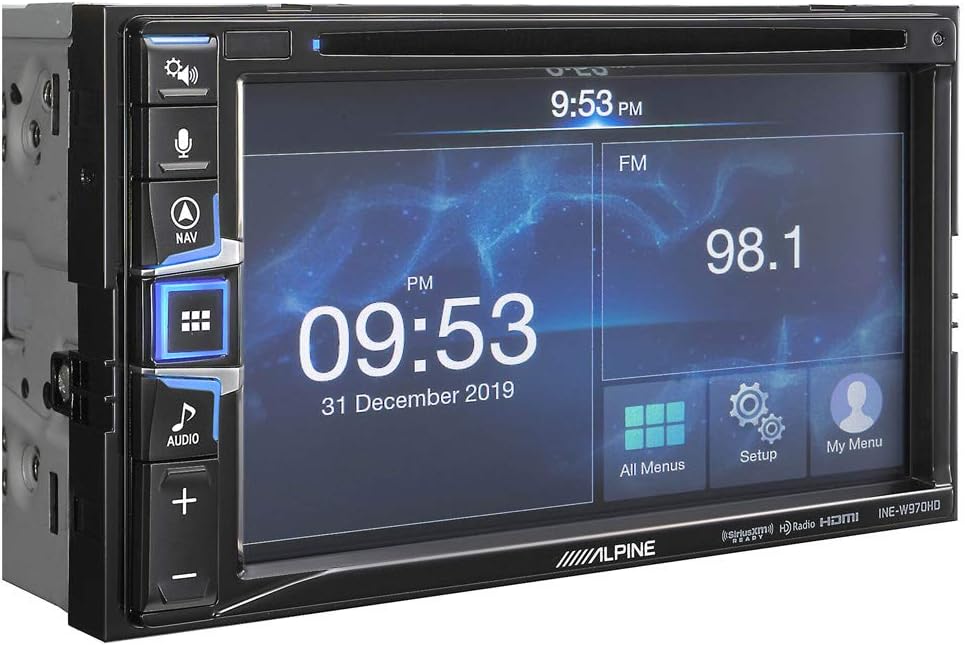
Figure 4.2: Angled view of the Alpine INE-W970HD, highlighting the side controls and chassis.
4.1 Front Panel Controls
- Power/Volume Knob: Press to power on/off, rotate to adjust volume.
- NAV Button: Access the built-in navigation system.
- AUDIO Button: Select audio sources.
- MENU Button: Access the main menu or settings.
- Microphone: For hands-free calling and voice commands.
4.2 Rear Connections
The rear panel includes various inputs and outputs for system integration:
- Power/Speaker Harness: Main power and speaker connections.
- GPS Antenna Input: Connect the supplied GPS antenna.
- USB Inputs (x2): For media playback and smartphone connectivity (Android Auto/Apple CarPlay).
- HDMI Input: For connecting external video sources.
- A/V Input: Rear auxiliary audio/video input.
- Camera Inputs (x2): For front and rear cameras.
- Preamp Outputs (6-channel): Front, Rear, Subwoofer outputs for external amplifiers.
5. Setup and Installation
Proper installation is crucial for optimal performance. It is strongly recommended that a qualified professional install this unit.
5.1 Wiring Connections
Refer to the detailed wiring diagram provided with your unit for specific connections. Key connections include:
- Power: Connect the yellow wire to constant 12V, red wire to accessory 12V, and black wire to vehicle ground.
- Speakers: Connect speaker wires to the corresponding vehicle speaker wires, observing polarity.
- Parking Brake: Connect the parking brake wire to the vehicle's parking brake circuit. This is a safety feature that prevents video playback while driving.
- Backup Camera: Connect the BULCAMC-1 camera's video output to the camera input on the receiver. Connect the camera's power to the vehicle's reverse light circuit and ground.

Figure 5.1: The BULCAMC-1 Backup Bullet Camera with its mounting bracket, designed for discreet installation.
5.2 Initial Setup
After installation, power on the unit. You may be prompted to set the language, time, and date. Follow the on-screen instructions.
6. Operating Instructions
6.1 Basic Operation
- Power On/Off: Press and hold the Power/Volume knob. A short press mutes/unmutes audio.
- Volume Adjustment: Rotate the Power/Volume knob.
- Main Menu: Press the MENU button to access the main source selection screen.
- Touchscreen: Navigate menus and control functions by touching the icons and options on the 6.5-inch resistive touchscreen.
6.2 Navigation System
Press the NAV button to launch the built-in navigation system. Follow the on-screen prompts to enter destinations, view maps, and receive turn-by-turn directions. Ensure the GPS antenna has a clear view of the sky for accurate positioning.
6.3 Smartphone Integration (Android Auto / Apple CarPlay)
Connect your compatible smartphone to one of the unit's USB inputs using a certified USB cable. The unit will automatically detect and launch Android Auto or Apple CarPlay, mirroring essential smartphone functions like navigation, music, and messaging onto the receiver's display.
- Android Auto: Requires Android 5.0 (Lollipop) or higher and the Android Auto app installed on your phone.
- Apple CarPlay: Requires iPhone 5 or later with iOS 7.1 or higher.
6.4 Bluetooth Operation
The INE-W970HD features built-in Bluetooth for hands-free calling and audio streaming.
- Pairing: Go to the Bluetooth settings menu on the receiver and your smartphone. Search for available devices on your phone and select "Alpine INE-W970HD". Confirm the pairing code if prompted.
- Hands-Free Calling: Once paired, you can make and receive calls directly through the receiver using the built-in microphone and vehicle speakers.
- Audio Streaming: Stream music from your smartphone to the receiver wirelessly.
6.5 Radio (AM/FM/HD Radio)
Select the Radio source from the main menu. You can scan for stations, save presets, and enjoy the enhanced sound quality of HD Radio broadcasts where available.
6.6 Media Playback (CD/DVD, USB, Pandora, Spotify)
- CD/DVD: Insert a disc into the disc slot. The unit will automatically begin playback.
- USB: Connect a USB storage device containing MP3, WMA, or AAC music files to a USB input. Select the USB source for playback.
- Pandora/Spotify: Control these streaming services directly from the receiver when your smartphone is connected via USB or Bluetooth (for Spotify).
6.7 Backup Camera Display
When the vehicle is shifted into reverse, the BULCAMC-1 backup camera image will automatically display on the screen, providing a clear view of the area behind your vehicle. This feature enhances safety during parking and reversing maneuvers.
7. Maintenance
- Screen Cleaning: Use a soft, dry cloth to wipe the touchscreen. For stubborn smudges, lightly dampen the cloth with water or a screen-safe cleaner. Do not use abrasive cleaners or solvents.
- General Care: Keep the unit free from dust and debris. Avoid extreme temperatures and direct sunlight for prolonged periods.
8. Troubleshooting
If you encounter issues with your Alpine INE-W970HD, refer to the following common problems and solutions:
| Problem | Possible Cause | Solution |
|---|---|---|
| No power | Incorrect wiring; Blown fuse; Vehicle ignition off. | Check power and ground connections. Inspect vehicle fuses. Ensure vehicle ignition is on. |
| No sound | Volume too low; Mute activated; Incorrect speaker wiring; Amplifier issue. | Increase volume. Check if mute is active. Verify speaker connections. Check external amplifier if used. |
| Navigation not working / GPS signal lost | GPS antenna obstructed or disconnected; Unit in an area with poor satellite reception. | Ensure GPS antenna is properly connected and has a clear view of the sky. Move to an open area. |
| Bluetooth pairing failure | Device not in pairing mode; Incorrect pairing code; Interference. | Ensure both devices are in pairing mode. Re-enter pairing code. Try pairing in a different location. |
| Backup camera not displaying | Camera power/video cable disconnected; Reverse trigger wire not connected. | Check camera connections. Verify reverse trigger wire is correctly connected to the vehicle's reverse light circuit. |
If the problem persists after attempting these solutions, please contact Alpine customer support or your authorized dealer.
9. Specifications
| Model Number | INE-W970BLCAMK (Includes BULCAMC-1 Camera) |
| Display | 6.5-inch Resistive Touchscreen |
| Navigation | Built-in Navigation System |
| Smartphone Integration | Android Auto, Apple CarPlay (Wired) |
| Bluetooth | Built-in for Hands-Free Calling & Audio Streaming |
| Tuner | AM/FM Tuner, Built-in HD Radio |
| Media Playback | DVD/CD, USB (MP3, WMA, AAC), Pandora, Spotify |
| Audio Features | 24-bit Digital-to-Analog Converter, Time Correction, High- & Low-Pass Crossovers |
| Inputs | Rear HDMI, 2 Rear USB, Rear A/V, 2 Camera Inputs |
| Outputs | Auxiliary Output (Rear), 6-channel Preamp Outputs (4-volt Front, Rear, Subwoofer) |
| Backup Camera (BULCAMC-1) | CMOS, 420 lines resolution, 0.5 lux, 155-degree view, IP67-68 waterproof |
| Product Dimensions | 12 x 12 x 12 inches |
| Item Weight | 8 pounds |
| Connectivity Technology | Auxiliary, Bluetooth, HDMI, USB |
| Compatible Devices | Smartphone, Speaker |
10. Warranty Information
Alpine products are manufactured to the highest quality standards. This product is covered by a limited warranty provided by Alpine. Please refer to the warranty card included in your product packaging or visit the official Alpine website for detailed warranty terms, conditions, and registration information. Keep your proof of purchase for warranty claims.
11. Customer Support
For technical assistance, troubleshooting beyond this manual, or warranty inquiries, please contact Alpine customer support:
- Website: Visit the official Alpine website for FAQs, support documents, and contact options.
- Phone: Refer to the contact information provided on the Alpine website or your product documentation.
When contacting support, please have your product model number (INE-W970HD or INE-W970BLCAMK) and proof of purchase readily available.


