
1. Introduction
Thank you for purchasing the FX-Audio DAC-SQ5J High-Resolution Digital Audio Converter. This device is designed to transform digital audio signals into high-fidelity analog sound, providing an enhanced listening experience. Please read this manual carefully before using the product to ensure proper operation and to maximize its performance.
2. Safety Information
- Read all instructions thoroughly before operating the device.
- Do not expose the unit to water, moisture, or extreme temperatures.
- Use only the recommended power adapter (12V DC, 1A or more) with the specified connector (outer diameter 5.5mm, inner diameter 2.1mm, center positive). An incompatible power supply may damage the unit.
- Do not open the casing. There are no user-serviceable parts inside. Refer all servicing to qualified personnel.
- Keep the device away from heat sources, direct sunlight, and strong magnetic fields.
- Ensure proper ventilation around the unit to prevent overheating.
3. Package Contents
Please check the package for the following items:
- FX-Audio DAC-SQ5J Unit
- Brief Instructions Manual
Note: The AC power adapter is sold separately and is not included in the package.
4. Product Overview
Familiarize yourself with the components and interfaces of your DAC-SQ5J.
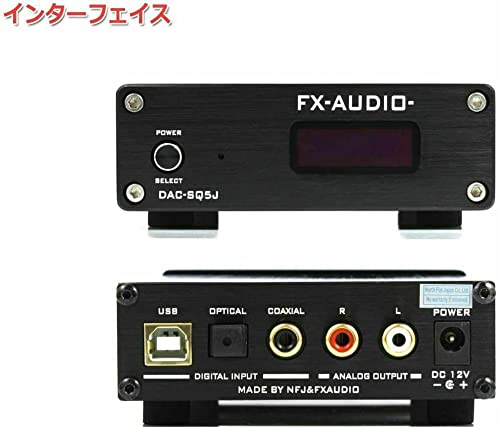
Figure 4.1: Front and Rear Panels of the FX-Audio DAC-SQ5J. This image shows the power button, select button, and display on the front, and the USB, Optical, Coaxial, RCA outputs, and DC 12V power input on the rear.
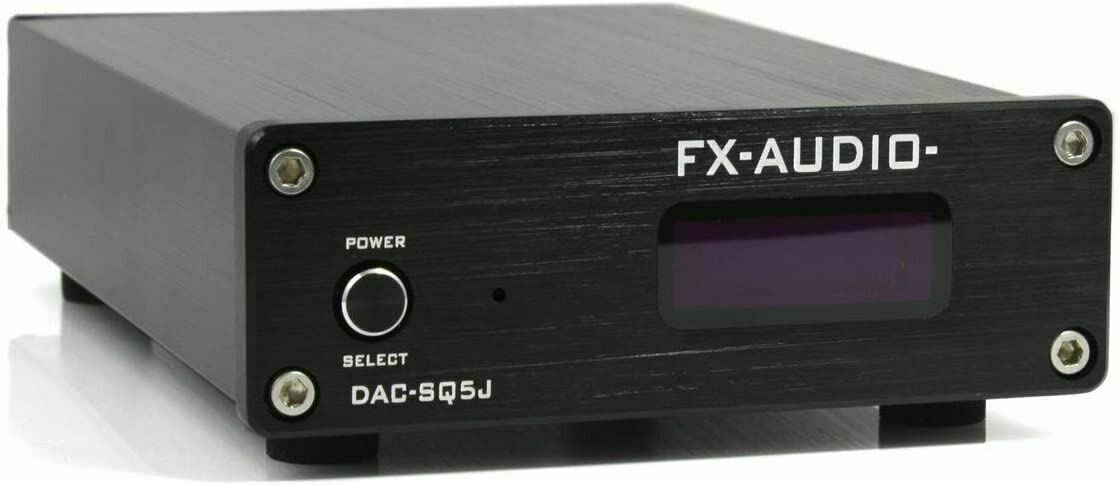
Figure 4.2: Detailed view of the FX-Audio DAC-SQ5J front panel, showing the 'POWER' button, 'SELECT' button, and the digital display indicating input and sample rate.

Figure 4.3: Internal view of the FX-Audio DAC-SQ5J, showcasing the circuit board and various electronic components responsible for digital-to-analog conversion.
4.1. Front Panel
- POWER Button: Press to turn the unit on or off.
- SELECT Button: Press to cycle through available digital input sources (USB, Optical, Coaxial).
- Display: Shows the currently selected input and the audio sample rate.
4.2. Rear Panel
- USB Input: Connect to a computer or other USB audio source.
- OPTICAL Input: Connect to devices with an optical (Toslink) digital audio output.
- COAXIAL Input: Connect to devices with a coaxial (RCA) digital audio output.
- ANALOG OUTPUT (RCA L/R): Connect these outputs to your amplifier, receiver, or active speakers.
- DC 12V Power Input: Connect the external 12V DC power adapter here.
5. Setup
Follow these steps to set up your DAC-SQ5J:
- Connect Digital Source: Choose your preferred digital audio input (USB, Optical, or Coaxial) and connect the corresponding cable from your source device (e.g., PC, CD player, TV) to the DAC-SQ5J.
- Connect Analog Output: Connect the RCA L/R analog outputs of the DAC-SQ5J to the analog input of your amplifier, receiver, or active speakers using RCA cables.
- Connect Power: Connect a compatible 12V DC, 1A (or higher) power adapter (sold separately) to the DC 12V power input on the rear panel of the DAC-SQ5J. Then, plug the power adapter into a wall outlet.
- Power On: Press the 'POWER' button on the front panel to turn on the DAC-SQ5J.
6. Operating Instructions
- Power On/Off: Press the 'POWER' button on the front panel to switch the unit on or off.
- Select Input: Repeatedly press the 'SELECT' button on the front panel to cycle through the available digital inputs: USB, Optical, and Coaxial. The selected input will be displayed on the screen.
- Audio Playback: Once the correct input is selected, begin playing audio from your source device. The DAC-SQ5J will automatically process the digital signal and output analog audio through the RCA outputs.
- Monitor Display: The display will show the active input and the current sample rate of the audio signal being processed.
7. Maintenance
- Cleaning: Use a soft, dry cloth to clean the exterior of the unit. Do not use liquid cleaners, aerosols, or solvents, as these may damage the finish or internal components.
- Ventilation: Ensure that the ventilation openings are not blocked to prevent overheating.
- Storage: When not in use for extended periods, store the unit in a cool, dry place, away from direct sunlight and extreme temperatures.
8. Troubleshooting
If you encounter any issues with your DAC-SQ5J, please refer to the following common problems and solutions:
- No Sound Output:
- Ensure the DAC-SQ5J is powered on.
- Verify that the correct input source (USB, Optical, Coaxial) is selected on the DAC-SQ5J.
- Check all audio cables (digital input and analog output) are securely connected.
- Confirm your amplifier/receiver/active speakers are powered on and set to the correct input and volume level.
- Check the audio output settings on your source device (e.g., computer, TV) to ensure it's sending audio to the correct digital output.
- Distorted or Poor Sound Quality:
- Check all cable connections for any damage or loose contacts.
- Ensure the source audio is not overdriven or clipping.
- Try a different audio source or cable to isolate the problem.
- Verify that the sample rate displayed on the DAC-SQ5J matches your source audio.
- Unit Not Powering On:
- Ensure the 12V DC power adapter is correctly connected to the unit and a working power outlet.
- Confirm the power adapter meets the specified requirements (12V DC, 1A or more, center positive).
- Try plugging another device into the same power outlet to confirm it is active.
If the problem persists after trying these solutions, please contact customer support.
9. Specifications
| Model | DAC-SQ5J |
| Weight | 350 grams |
| Dimensions (H x W x D) | 32 mm x 97 mm x 147 mm (excluding protrusions) |
| Power Input | DC 12V, 1A or more (AC adapter sold separately) |
| Power Connector | Outer diameter 5.5 mm, Inner diameter 2.1 mm (center positive) |
| Digital Inputs | USB, Optical (Toslink), Coaxial (RCA) |
| Analog Outputs | RCA L/R |
10. Warranty Information
This product is covered by a standard manufacturer's warranty. The warranty period and terms may vary depending on your region and the retailer from whom you purchased the product. Please retain your proof of purchase (receipt or invoice) as it will be required for any warranty claims.
For detailed warranty information, please refer to the documentation provided with your purchase or contact your retailer.
11. Support
Should you require technical assistance, have questions about the product, or need to report an issue, please contact the retailer where you purchased the FX-Audio DAC-SQ5J.
You may also visit the official FX-Audio website for additional resources, FAQs, and potential firmware updates.


