
KBS MBF 041
KBS 19-in-1 Compact Bread Machine User Manual
Model: MBF 041
Introduction
Thank you for choosing the KBS 19-in-1 Compact Bread Machine. This appliance is designed to simplify your bread-making process with its advanced features and versatile programs. With dual heaters for even baking, multiple loaf sizes, and crust color options, you can enjoy freshly baked bread, doughs, jams, and more right in your home. Please read this manual thoroughly before first use to ensure safe and optimal operation.
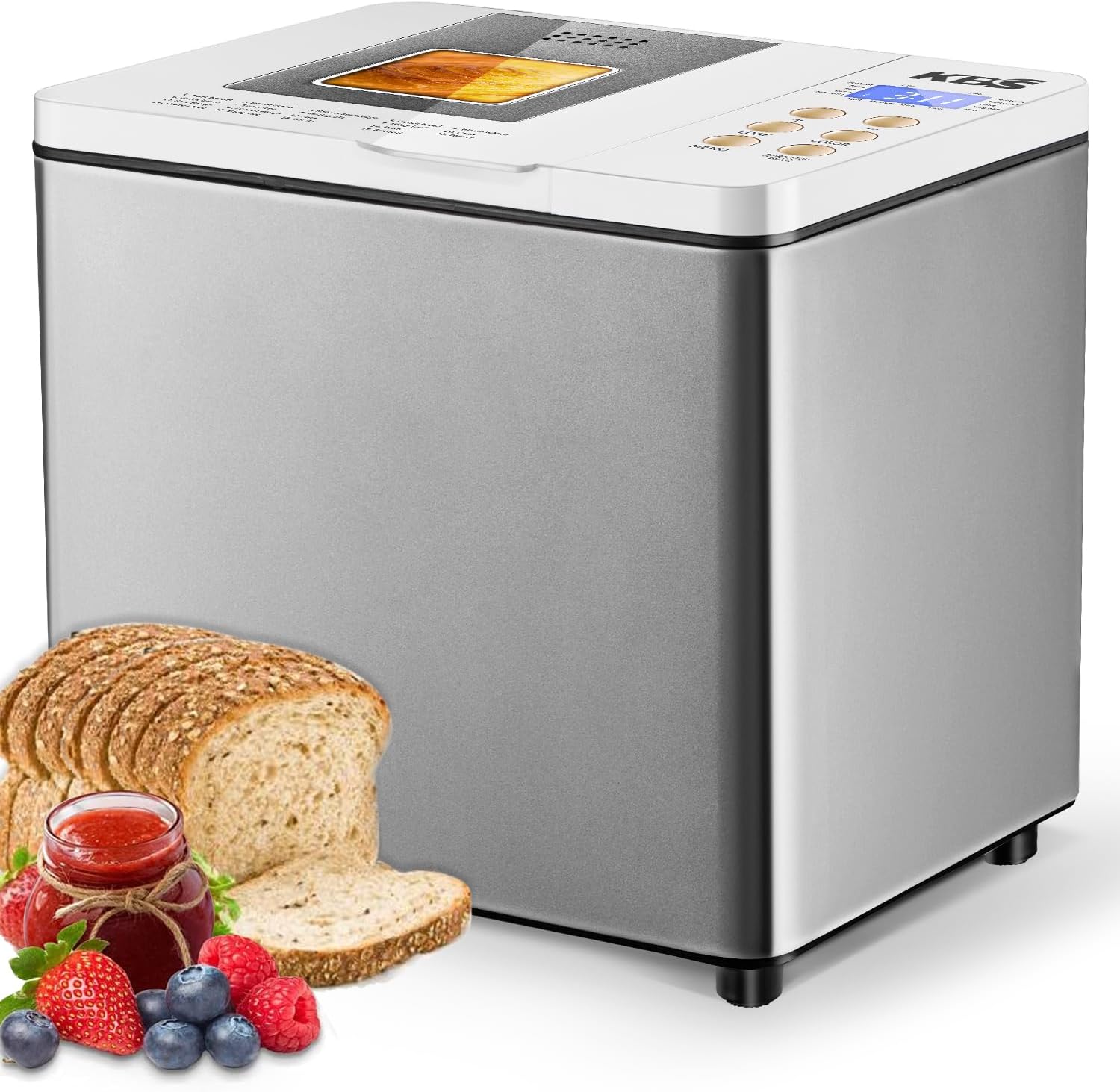
Image: The KBS 19-in-1 Compact Bread Machine, showcasing its sleek design alongside a freshly baked loaf of bread, a jar of jam, and fresh berries, illustrating its versatility.

Image: A banner highlighting the KBS 1.5 LB Auto Bread Maker's key features: 19 Nutrition Programs, Non-stick Pan, 1.5L Large Capacity, and Stainless Steel Body, with the machine and various baked goods.
Important Safety Information
- Always ensure the bread machine is unplugged before cleaning or when not in use.
- Do not immerse the appliance, cord, or plug in water or any other liquid.
- Keep hands and utensils away from the moving paddle during operation to prevent injury.
- Do not touch hot surfaces. Use oven mitts when removing the bread pan or hot bread.
- Ensure the appliance is placed on a stable, heat-resistant surface, away from flammable materials.
- This appliance is for household use only. Do not use outdoors.
- Supervise children closely when the appliance is in use.
- Do not operate the appliance with a damaged cord or plug. Contact customer service for repair.
Product Overview
Components and Controls
Familiarize yourself with the parts of your KBS Bread Machine:
- Control Panel: Features an HD LCD display and buttons for program selection, loaf size, crust color, and start/stop/pause.
- Viewing Window: Allows you to observe the baking process without opening the lid.
- Bread Pan: Non-stick pan for easy bread removal and cleaning.
- Kneading Paddle: Detachable paddle located inside the bread pan for mixing and kneading ingredients.
- Dual Heaters: 550W heating elements located at the top and bottom for even baking and browning.
- Stainless Steel Housing: Durable and easy-to-clean exterior.
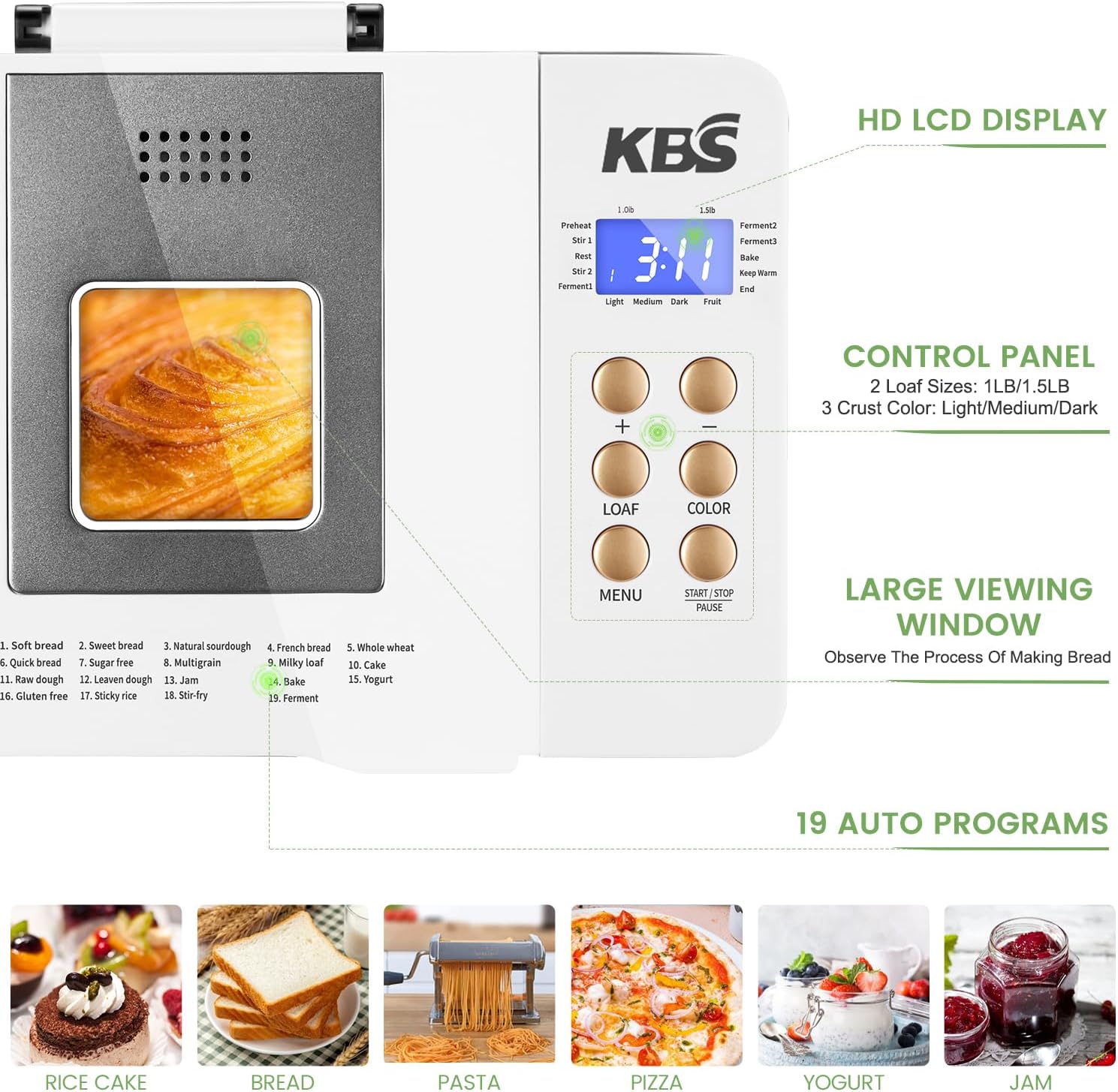
Image: Close-up view of the KBS Bread Machine's control panel, showing the HD LCD display, program list (19 auto programs), loaf size and crust color buttons, and a large viewing window.

Image: Diagram illustrating the 550W powerful upgraded dual heaters for uniform heat distribution, along with options for 3 crust shades (Light, Medium, Dark) and 2 loaf sizes (1 lb, 1.5 lb).

Image: A visual comparison showing the efficiency of double heating tubes versus a single heating tube in a bread machine, emphasizing more even baking and crispiness with dual heaters.

Image: An internal view of the bread machine's motor, highlighting its powerful yet low-noise operation, contributing to a quieter baking experience.

Image: Hands kneading dough on a floured surface, with text indicating "550W SUPER MOTOR WITH UNIQUE KNEADING" technology that makes dough more pliable.
Setup
- Unpack: Carefully remove the bread machine and all accessories from the packaging.
- Clean: Before first use, wash the bread pan and kneading paddle with warm, soapy water. Wipe the exterior of the machine with a damp cloth. Dry all parts thoroughly.
- Position: Place the bread machine on a stable, flat, and heat-resistant surface, ensuring adequate ventilation around the appliance.
- Insert Paddle: Insert the kneading paddle onto the shaft inside the bread pan.
- Place Pan: Place the bread pan into the baking chamber and turn it clockwise until it locks into place.
- Connect Power: Plug the power cord into a grounded electrical outlet. The display will light up, indicating it's ready for use.
Operating Instructions
Basic Operation Steps
- Add Ingredients: Add ingredients to the bread pan in the order specified by your recipe (typically liquids first, then dry ingredients, with yeast last).
- Select Program: Press the "MENU" button to cycle through the 19 available programs until you reach your desired setting.
- Choose Loaf Size: Press the "LOAF" button to select between 1 lb or 1.5 lb loaf sizes.
- Select Crust Color: Press the "COLOR" button to choose your preferred crust (Light, Medium, or Dark).
- Start Baking: Press the "START/STOP/PAUSE" button to begin the selected program.
- Pause/Restart: During operation, a single click of the "START/STOP/PAUSE" button will pause the program. Click again to restart.
- Cancel Program: To cancel a running program, long press the "START/STOP/PAUSE" button.

Image: A visual guide showing three simple steps to make fresh bread: 1. Put the ingredients, 2. Select Settings on the control panel, 3. Fresh bread done, with a family enjoying the result.

Image: A comprehensive image showing the KBS Bread Machine, detailing the "Easy to use" steps (Add ingredients, Select menu/color/size, Fresh bread finished) and listing the "USEFUL ACCESSORIES" included.
Program Functions (19 Automatic Programs)
The KBS Bread Machine offers a wide range of programs to cater to various baking needs:
- Bread Programs: Soft Bread, Sweet Bread, Natural Sourdough, French Bread, Whole Wheat, Quick Bread, Gluten-Free, etc.
- Dough Programs: Pizza Dough, Kneading, Ferment.
- Specialty Programs: Yogurt, Jam, Cake, Rice Cake, Stir-fry.

Image: A collage showcasing the variety of foods that can be made with the 19 customized programs, including Whole Wheat bread, Cake, Yogurt, Jam, Rice Cake, and Stir-fry.

Image: A close-up of sliced gluten-free bread, emphasizing the dedicated "GLUTEN FREE SETTING" that allows more people to enjoy homemade bread.

Image: A delicious-looking rice cake, highlighting the "MORE NEW FUNCTIONS" such as rice cake and stir-fry, offering more food choices.
Advanced Features
- 15-Hour Delay Timer: Set the machine to start baking at a later time, allowing you to wake up to fresh bread.
- 1-Hour Automatic Keep Warm: After baking, the machine will automatically keep the bread warm for up to an hour.
- 15-Minute Power Failure Backup: In case of a brief power interruption, the machine will resume operation from where it left off within 15 minutes.
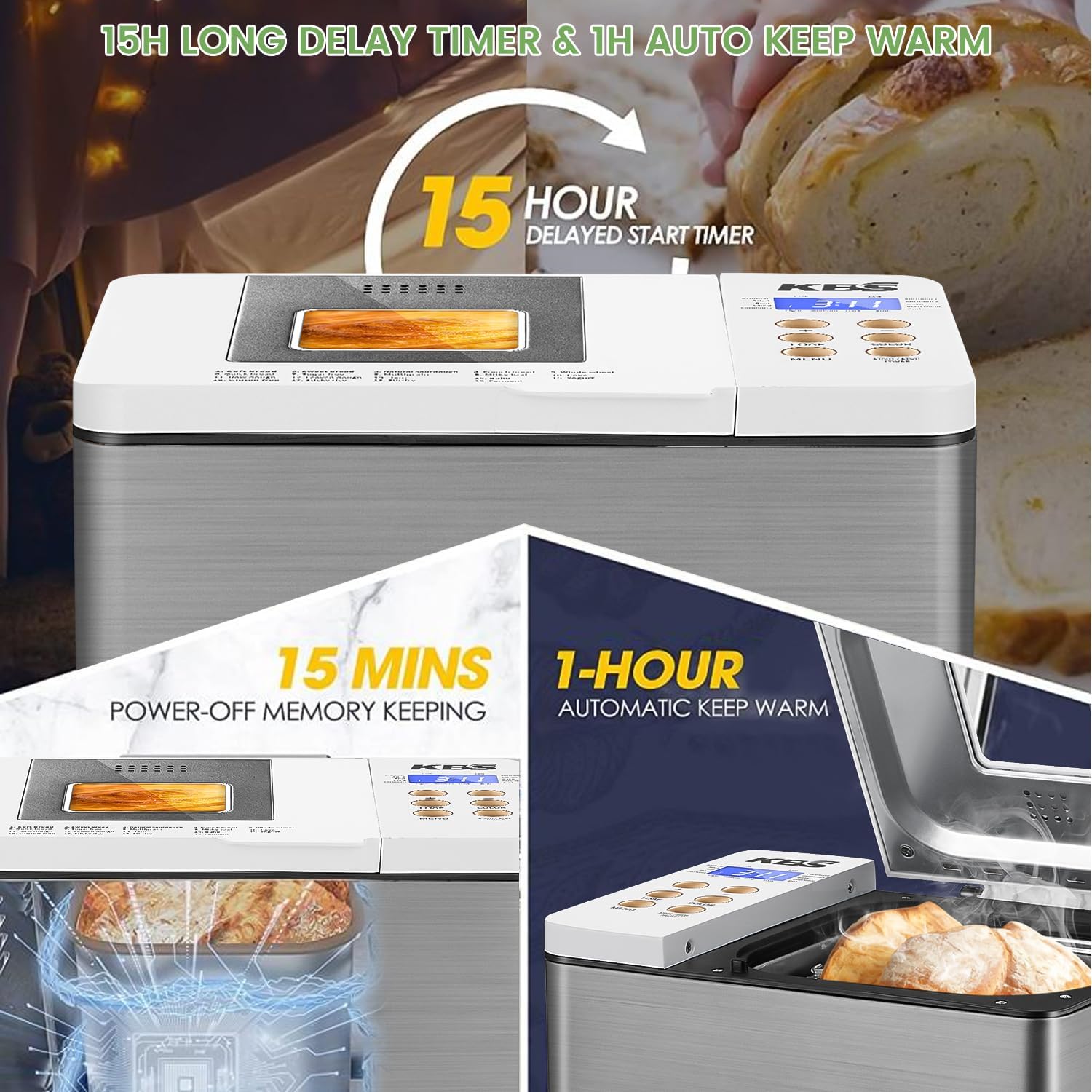
Image: Visual representation of the 15-hour delayed start timer, 1-hour automatic keep warm function, and 15-minute power-off memory keeping, ensuring convenience and fresh bread anytime.

Image: A serene image of a mother and baby sleeping, with icons for "15 H Delay Timer" and "1 H Keep Warm," symbolizing the convenience these features offer for fresh bread without early rising.
Maintenance and Cleaning
Regular cleaning ensures the longevity and optimal performance of your bread machine.
- Before Cleaning: Always unplug the appliance and allow it to cool completely before cleaning.
- Bread Pan and Paddle: Remove the bread pan and kneading paddle. Wash them with warm, soapy water. For stubborn residue, soak the pan in warm water for about 10 minutes. Do not use abrasive cleaners or metal scouring pads. All accessories are dishwasher safe.
- Exterior: Wipe the exterior of the bread machine with a soft, damp cloth. Do not use harsh chemicals or abrasive cleaners.
- Interior: Wipe the inside of the baking chamber with a damp cloth. Remove any crumbs or spills.
- Storage: Ensure all parts are completely dry before storing the appliance. Store in a cool, dry place.
Troubleshooting
| Problem | Possible Cause | Solution |
|---|---|---|
| Bread does not rise | Expired yeast, incorrect water temperature, too much salt/sugar. | Check yeast expiration, use lukewarm water (105-115°F), ensure correct ingredient measurements. |
| Bread is too dense | Too much flour, not enough liquid, old yeast. | Measure ingredients precisely, ensure proper liquid-to-flour ratio. |
| Bread sticks to pan | Pan not properly greased (if recipe requires), pan coating damaged. | Ensure pan is clean and non-stick coating is intact. Allow bread to cool slightly before removing. |
| Machine not starting | Not plugged in, program not selected, "START/STOP/PAUSE" not pressed. | Check power connection, select a program, press "START/STOP/PAUSE". |
Specifications
- Model: MBF 041
- Power: 550W
- Loaf Sizes: 1 lb, 1.5 lb
- Programs: 19 Automatic Programs
- Dimensions: 9 x 10.9 x 10.1 inches (D x W x H)
- Item Weight: 11.08 pounds
- Color: Grey
- Certifications: ETL/FCC Dual Certification

Image: A comparison showing the compact design of the KBS Bread Machine, illustrating how it can be easily stored inside a kitchen cabinet compared to a larger, less storage-friendly model.
Accessories
Your KBS Bread Machine comes with the following useful accessories:
- Non-Stick Pan (x1)
- Paddle (x2)
- Measuring Cup (x1)
- User Manual (x1)
- Hook (x1)
- Oven Mitt (x1)
- Quick Start Manual (x1)
- Measuring Spoon (x1)

Image: A display of the KBS Bread Machine and its included accessories: Non-Stick Pan, Paddles, Measuring Cup, User Manual, Hook, Oven Mitt, Quick Start Manual, and Measuring Spoon, all indicated as dishwasher safe.
Warranty and Support
KBS offers a 2-year worry-free warranty for your bread machine. Our friendly and responsible customer service team is available to provide professional technical support.
For warranty claims, technical assistance, or any questions regarding your KBS Bread Machine, please refer to the contact information provided in the Quick Start Manual or visit the official KBS website.
Please retain your proof of purchase for warranty purposes.
Related documentsMBF 041


Ask a question about this manual
Ask about setup, troubleshooting, compatibility, parts, safety, or missing instructions. Manuals+ will review the question and use this page’s manual context to help answer it.