
1. Introduction
Welcome to the world of high-performance remote control vehicles with your new DEERC H16E RC car. This 1:16 scale 4WD racing car is equipped with a powerful brushless motor, offering incredible torque, acceleration, and speed. Designed for durability and thrilling off-road experiences, it features an independent 2S/3S 45A IPX5 ESC and a 2.2kgf.cm 3-wire servo for precise control. With two included Li-Po batteries, you can enjoy extended playtime.

Figure 1: The DEERC H16E RC car and its main accessories.
This manual provides essential information for setting up, operating, maintaining, and troubleshooting your DEERC H16E to ensure a safe and enjoyable experience.
2. Setup
2.1 Package Contents
Before you begin, please verify that all items are present in your package:
- DEERC H16E RC Car (with one body installed)
- Remote Control Transmitter
- 2 x Li-Po Batteries (modular, flame-retardant shell)
- USB Charging Cable
- Spare Car Body
- Screwdriver
- Hex Wrench
- Body Clips
- User Manual

Figure 2: Detailed view of the DEERC H16E package contents.
2.2 Battery Installation and Charging
The DEERC H16E uses modular Li-Po batteries. Always ensure safe handling during charging and installation.
- Connect the Li-Po battery to the USB charging cable.
- Plug the USB charging cable into a suitable USB power adapter (e.g., 5V/2A).
- The indicator light on the charging cable will show charging status (refer to charger's specific instructions for light indications).
- Once fully charged, disconnect the battery from the charger.
- Open the battery compartment on the RC car.
- Insert the charged battery into the compartment, ensuring it is securely connected.
- Close the battery compartment.

Figure 3: The modular Li-Po battery with flame-retardant material shell.
2.3 Remote Control Setup
The remote control requires 3x AA batteries (not included).
- Open the battery compartment on the back of the remote control.
- Insert 3x AA batteries, observing the correct polarity (+/-).
- Close the battery compartment.
- Turn on the remote control.
- Turn on the RC car. The remote control and car should automatically pair. If not, refer to the troubleshooting section.

Figure 4: The 2.4GHz remote control for the DEERC H16E.
3. Operation
3.1 Basic Controls
Familiarize yourself with the remote control functions:
- Steering Wheel (CH1: ST): Rotate left or right to control the car's direction.
- Throttle Trigger (CH2: TH): Pull to accelerate forward, push to brake or reverse.
- ST. TRIM: Adjusts the steering neutral position if the car pulls to one side.
- Fn (CH3 Light control): Controls the car's lights.
- Power Switch (OFF-70% TH-100% TH): Controls the power and throttle limit.
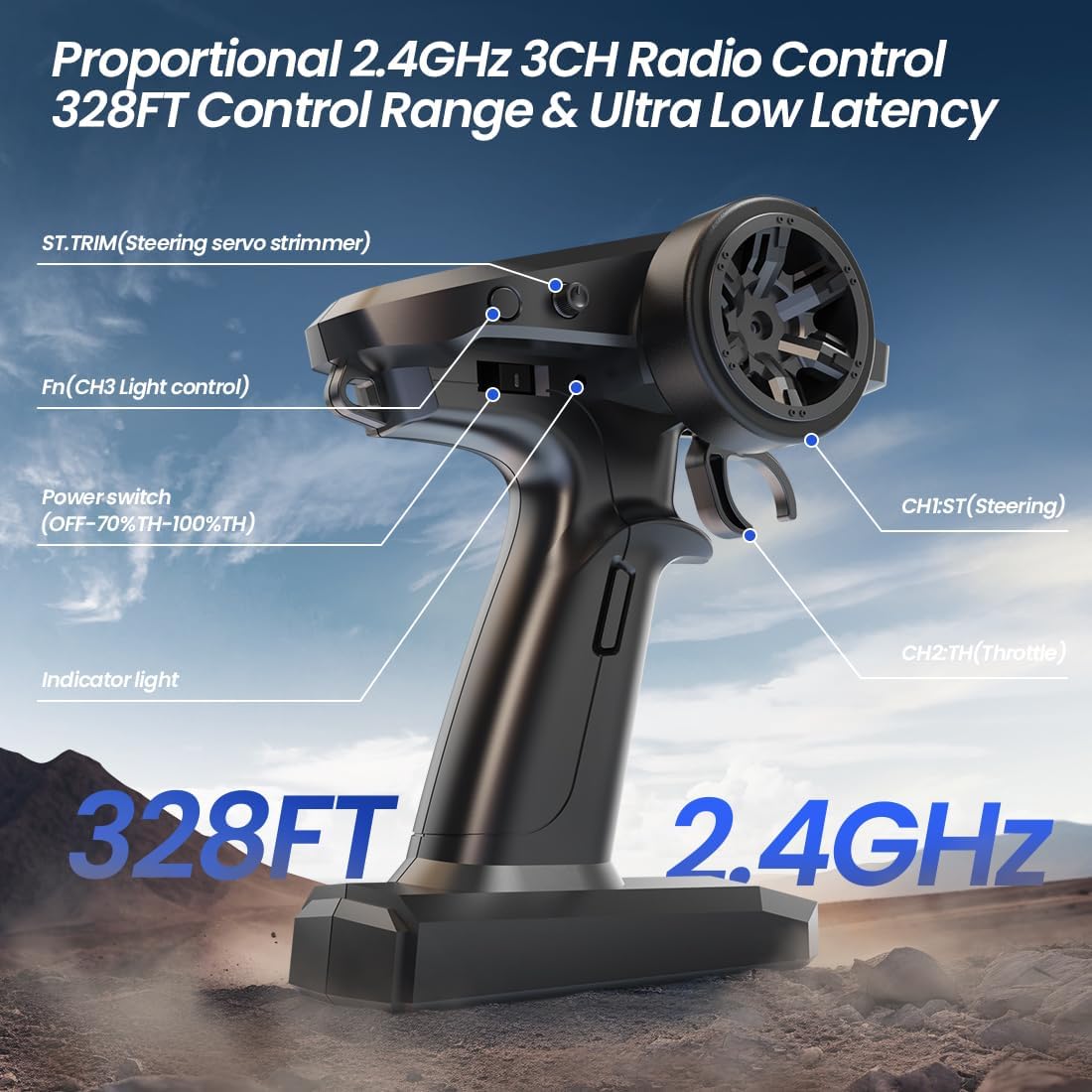
Figure 5: Remote control layout and functions.
3.2 Driving Tips
The DEERC H16E is a high-speed 4WD vehicle designed for various terrains. Start slowly to get a feel for the controls, especially the sensitive throttle and steering.
- Speed Control: The brushless motor provides significant power. Use the throttle trigger gently to avoid losing control, especially at high speeds.
- All-Terrain Capability: The 4WD system and robust suspension allow the car to handle dirt, grass, and light gravel. Avoid deep water or extremely rough terrain.
- Braking and Reversing: Push the throttle trigger forward from neutral to engage the brake. Push again to reverse.
- Battery Life: Each Li-Po battery provides approximately 20-25 minutes of playtime, extending to 40+ minutes with both batteries.

Figure 6: The DEERC H16E demonstrating its all-terrain capability.
4. Maintenance
Regular maintenance will extend the life and performance of your RC car.
4.1 Cleaning
- After each use, especially in dusty or dirty conditions, clean the car thoroughly.
- Use a soft brush or compressed air to remove dirt and debris from the chassis, wheels, and suspension components.
- Wipe down the body with a damp cloth. Avoid using harsh chemicals.
4.2 Battery Care
- Always charge batteries in a safe, supervised area, away from flammable materials.
- Do not overcharge or over-discharge Li-Po batteries.
- Store batteries in a cool, dry place, ideally at a storage voltage (around 3.8V per cell) if not used for extended periods.
- If a battery appears swollen or damaged, discontinue use immediately and dispose of it properly.
4.3 Component Inspection
- Regularly inspect the wheels, tires, and suspension for any damage or loose parts.
- Check the motor and ESC for excessive heat buildup during operation. The brushless motor has a metal heat sink and cooling fans.
- Ensure all screws and fasteners are tight.
- Inspect the drive shafts and gears for wear. The car features a full metal CVD and metal gears for durability.

Figure 7: Internal components and drivetrain of the DEERC H16E.
5. Troubleshooting
This section addresses common issues you might encounter with your DEERC H16E RC car.
| Problem | Possible Cause | Solution |
|---|---|---|
| Car does not respond to remote. | Car or remote not powered on; batteries low; not paired. | Ensure both are on. Charge/replace batteries. Re-pair by turning both off, then car on, then remote on. |
| Car pulls to one side. | Steering trim needs adjustment. | Adjust the ST. TRIM dial on the remote control until the car drives straight. |
| Short playtime. | Battery not fully charged; old battery; aggressive driving. | Ensure full charge. Consider battery replacement if old. Adjust driving style. |
| Loss of control/range. | Interference; out of range; low remote battery. | Move to an open area. Stay within 328ft (100m) range. Replace remote batteries. |
| Motor/ESC overheating. | Continuous high-speed use; driving in thick grass/sand; damaged components. | Allow cool-down periods. Avoid prolonged driving in high-resistance environments. Inspect for damage. |
6. Specifications
Key technical specifications for the DEERC H16E RC Car:
- Model Number: DEERC H16E
- Scale: 1:16
- Dimensions (L x W x H): 30.99 x 11 x 22.2 cm (approx. 12.2 x 4.33 x 8.74 inches)
- Weight: 1.83 kg
- Motor: Hobby 2845 4200KV Brushless Motor (4-pole, high torque)
- ESC: Independent 2S/3S 45A IPX5 Brushless ESC (waterproof)
- Servo: 2.2kgf.cm 3-wire servo
- Drive System: Full-time 4WD with Metal Driving System (Full Metal CVD & Metal Gears)
- Suspension: Full Aluminum Oil-Filled Shocks, 4-point suspension
- Control System: Proportional 2.4GHz 3CH Radio Control
- Control Range: Up to 328 feet (100 meters)
- Top Speed: 45-50 km/h (with 2S LiPo), 68-75 km/h (with 3S LiPo)
- Batteries: 2 x Li-Po Batteries (modular, flame-retardant material shell)
- Playtime: 40+ minutes (with 2 batteries)
- Main Material: Acrylonitrile Butadiene Styrene (ABS)

Figure 8: Comparison of DEERC H16E's components and dimensions.
7. Warranty and Support
DEERC products are manufactured to high-quality standards. For specific warranty information, please refer to the warranty card included in your product packaging or visit the official DEERC website. If you encounter any issues or require technical assistance, please contact DEERC customer support through the retailer where you purchased the product or via the contact information provided on the official DEERC website.
Please retain your proof of purchase for warranty claims.


