
1. Introduction
The PalliPartners Compound Microscope SWXWJ-1 is a precision optical instrument designed for detailed observation of microscopic specimens. It offers magnification levels from 100X to 2000X, making it suitable for students, adults, and various educational or laboratory settings. This manual provides essential instructions for proper setup, operation, and maintenance to ensure optimal performance and longevity of your microscope.
Key features include a WF25X eyepiece, 4X/10X/40X objective lenses, dual control coarse and fine focusing, and a dual LED illumination system with adjustable brightness. The comprehensive kit also includes prepared slides and a phone adapter for enhanced viewing and capture capabilities.
2. Package Contents
Please verify that all items listed below are included in your package:
- PalliPartners Compound Microscope (SWXWJ-1)
- WF25X Eyepiece
- Objective Lenses (4X, 10X, 40X)
- Power Adapter
- Mobile Phone Adapter
- Mobile Remote Control (Bluetooth)
- 15 Prepared Slides
- Blank Slides (for custom preparations)
- Experimental Accessories (e.g., tweezers, droppers, collection bottles)
- Carrying Case
- Instruction Manual

Figure 1: All components of the PalliPartners Compound Microscope kit.

Figure 2: Detailed view of the experimental accessories and prepared slides.
3. Product Overview
The PalliPartners Compound Microscope is engineered for clarity and ease of use, featuring robust construction and advanced optical components.
- Professional-Grade Magnification & Clarity: Equipped with a WF25X eyepiece and 4X, 10X, and 40X objective lenses, providing 6 magnification levels ranging from 100X to 2000X. Ideal for observing cell structures and microorganisms with lab-certified resolution.
- Dual Control Focus System: Features heavy-duty coarse and fine focusing knobs (0.1mm precision) for achieving razor-sharp images of specimens.
- Lab-Grade Illumination Technology: Dual LED lights (top and bottom) with a 6-level brightness control and a 0.65 NA condenser ensure optimal contrast for various specimens, including transparent plant cells and opaque insect wings.
- 360° Rotatable Monocular Head: Allows for comfortable viewing and easy sharing among multiple users.
- Portable Design: Weighs only 3.2 lbs and comes with a shockproof carrying case, making it convenient for transport and storage.

Figure 3: Functional description of the microscope's key components.

Figure 4: Dual LED lighting system for clear and bright illumination.
4. Setup
- Unpacking: Carefully remove the microscope and all components from the carrying case. Place the microscope on a stable, flat surface.
- Eyepiece Installation: Insert the WF25X eyepiece into the monocular head.
- Power Connection: Insert the small plug of the AC power adapter into the socket on the back of the microscope base.
- Battery Operation (Optional): For portable use, the microscope can be powered by 3 AA batteries (not included). Open the battery cover on the bottom of the base, insert the batteries according to the indicated polarities, and close the cover. Battery life is approximately 3 hours.
Video 1: Demonstrates the unboxing and initial setup of the microscope, including eyepiece insertion and power connection.
5. Operating Instructions
- Power On/Off: Locate the power switch on the base of the microscope. Flip the switch to turn the LED illumination on or off.
- Adjusting Illumination: Use the brightness control knob to adjust the intensity of the LED lights. The 5-color filter wheel below the stage can be rotated to change the color of the light passing through the specimen, enhancing contrast for different observations.
- Placing a Specimen: Place a prepared slide on the mechanical stage. Use the stage clips to secure the slide. Use the X-Y adjustment knobs to center the specimen directly under the objective lens.
- Changing Magnification: Rotate the revolving nosepiece to select the desired objective lens (4X, 10X, or 40X). Always start with the lowest magnification (4X objective) for initial viewing.
- Focusing: Use the coarse adjustment knob to bring the specimen into approximate focus. Then, use the fine adjustment knob for precise focusing to achieve a clear and sharp image.

Figure 5: The 5-color filter wheel enhances contrast for various specimens.
Video 2: Demonstrates basic microscope operation, including placing slides, adjusting focus, and using the color filter wheel.
6. Magnification Levels
The total magnification is calculated by multiplying the eyepiece magnification by the objective lens magnification. With the WF25X eyepiece, the available magnifications are:
- WF25X Eyepiece + 4X Objective = 100X Magnification
- WF25X Eyepiece + 10X Objective = 250X Magnification
- WF25X Eyepiece + 40X Objective = 1000X Magnification
- For 2000X magnification, an additional 2X lens adapter is used in conjunction with the WF25X eyepiece and 40X objective.
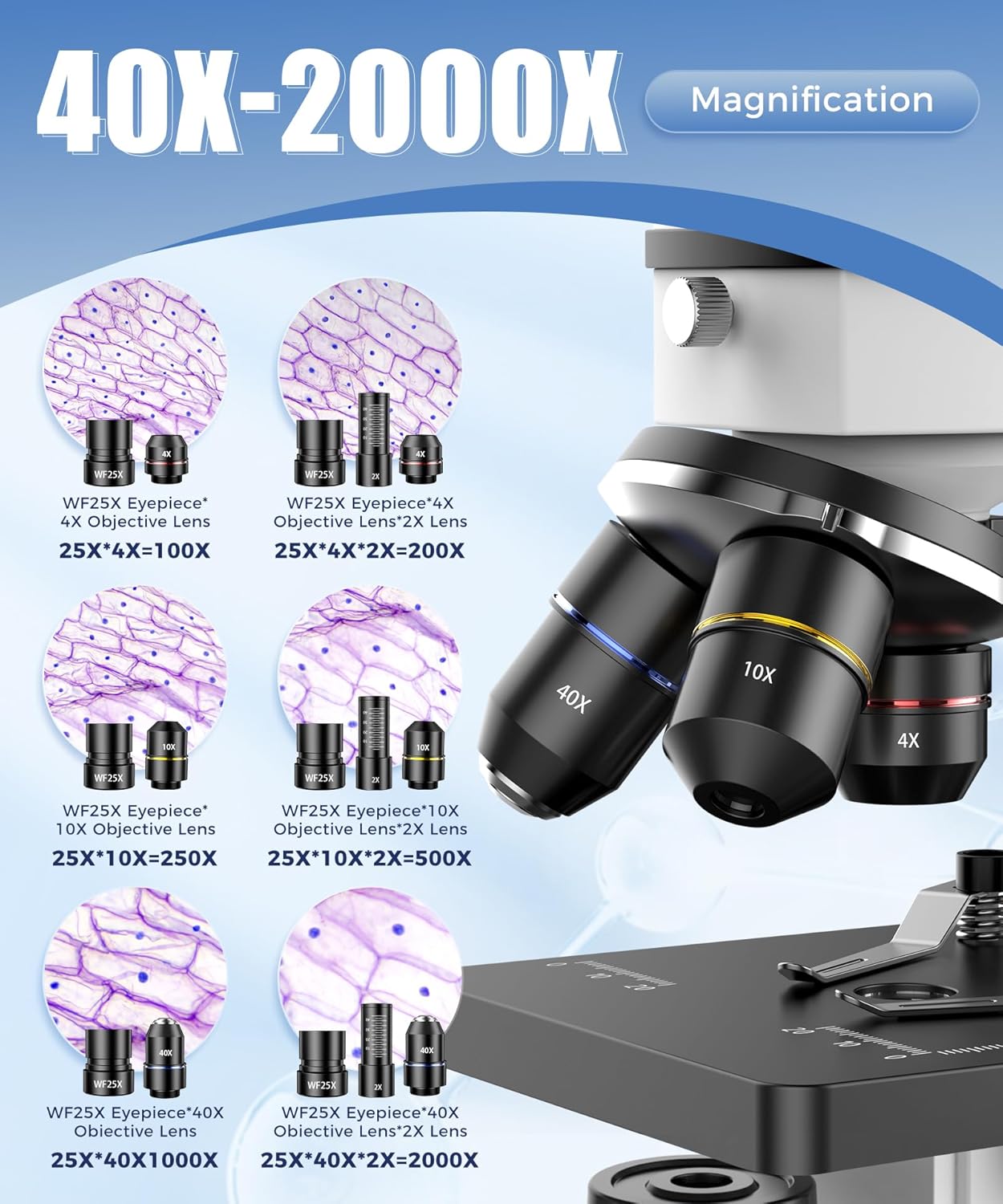
Figure 6: Visual representation of achievable magnification levels.
7. Using the Phone Adapter
The included phone adapter allows you to connect your smartphone to the microscope's eyepiece, enabling you to view, capture photos, and record videos of your observations. This is particularly useful for sharing discoveries or for group viewing.
- Attach Adapter: Securely attach your smartphone to the phone adapter.
- Mount to Eyepiece: Carefully slide the phone adapter (with your phone attached) over the microscope's eyepiece.
- Adjust Position: Adjust your phone's camera lens to align with the eyepiece for a clear view.
- Capture: Use your phone's camera app to take photos or record videos. The Bluetooth remote control can be used for hands-free capture.

Figure 7: Using the phone holder for convenient observation and media capture.

Figure 8: The Bluetooth remote control allows for hands-free photo and video capture.
8. Maintenance
- Cleaning: Use a soft, lint-free cloth to clean the microscope body. For lenses, use specialized lens cleaning tissue and fluid. Avoid using abrasive cleaners or solvents that could damage the optical components.
- Storage: Store the microscope in its carrying case in a dry, clean, and dust-free environment. Avoid direct sunlight, high temperatures, or excessive humidity.
- Handling: Always handle the microscope with care. Avoid sudden impacts or vibrations.
9. Troubleshooting
- No Illumination: Check if the power adapter is securely connected or if batteries are correctly installed. Ensure the power switch is in the 'On' position.
- Blurry Image: Adjust the coarse and fine focus knobs. Ensure the specimen is properly placed and centered on the stage. Clean the eyepiece and objective lenses if dust or smudges are present.
- Difficulty Changing Objectives: Gently rotate the revolving nosepiece until the desired objective clicks into place. Do not force it.
10. Specifications
| Feature | Detail |
|---|---|
| Product Dimensions | 5.71 x 3.94 x 9.84 inches |
| Item Weight | 3.61 pounds (1.64 Kilograms) |
| Item Model Number | SWXWJ-1 |
| Light Source Type | LED (Dual Top/Bottom) |
| Magnification Maximum | 2000 x |
| Eyepiece | WF25X |
| Objective Lenses | 4X, 10X, 40X |
| Material | Metal |
| Color | White (with black accents) |
| Voltage | 240 Volts (via adapter) |
| Batteries Required | 1 A batteries (for light, type likely AAA based on common microscope battery usage) |
11. Warranty and Support
For warranty information, technical support, or any inquiries regarding your PalliPartners Compound Microscope, please refer to the contact details provided at your point of purchase. Keep your purchase receipt as proof of purchase.