
Introduction
This manual provides comprehensive instructions for the ALLIMITY Replacement Remote Control, model QYSY-RC4870-TD-QYSY. This remote is designed to function as a direct replacement for original remote controls of various Silvercrest LCD TV models. It offers full functionality without the need for complex programming.
Setup: Battery Installation
The ALLIMITY Replacement Remote Control requires two AAA alkaline batteries (not included) for operation. No programming is required; the remote will function immediately upon battery insertion.
- Locate the battery compartment on the back of the remote control.
- Slide the battery compartment cover downwards or in the direction indicated by an arrow to open it.
- Insert two new AAA alkaline batteries, ensuring the positive (+) and negative (-) terminals align correctly with the markings inside the compartment.
- Replace the battery compartment cover by sliding it back into position until it clicks securely.

Image 1: Front view of the ALLIMITY Replacement Remote Control. This image displays the layout of all buttons, including number keys, volume and channel controls, menu navigation, and media playback buttons.
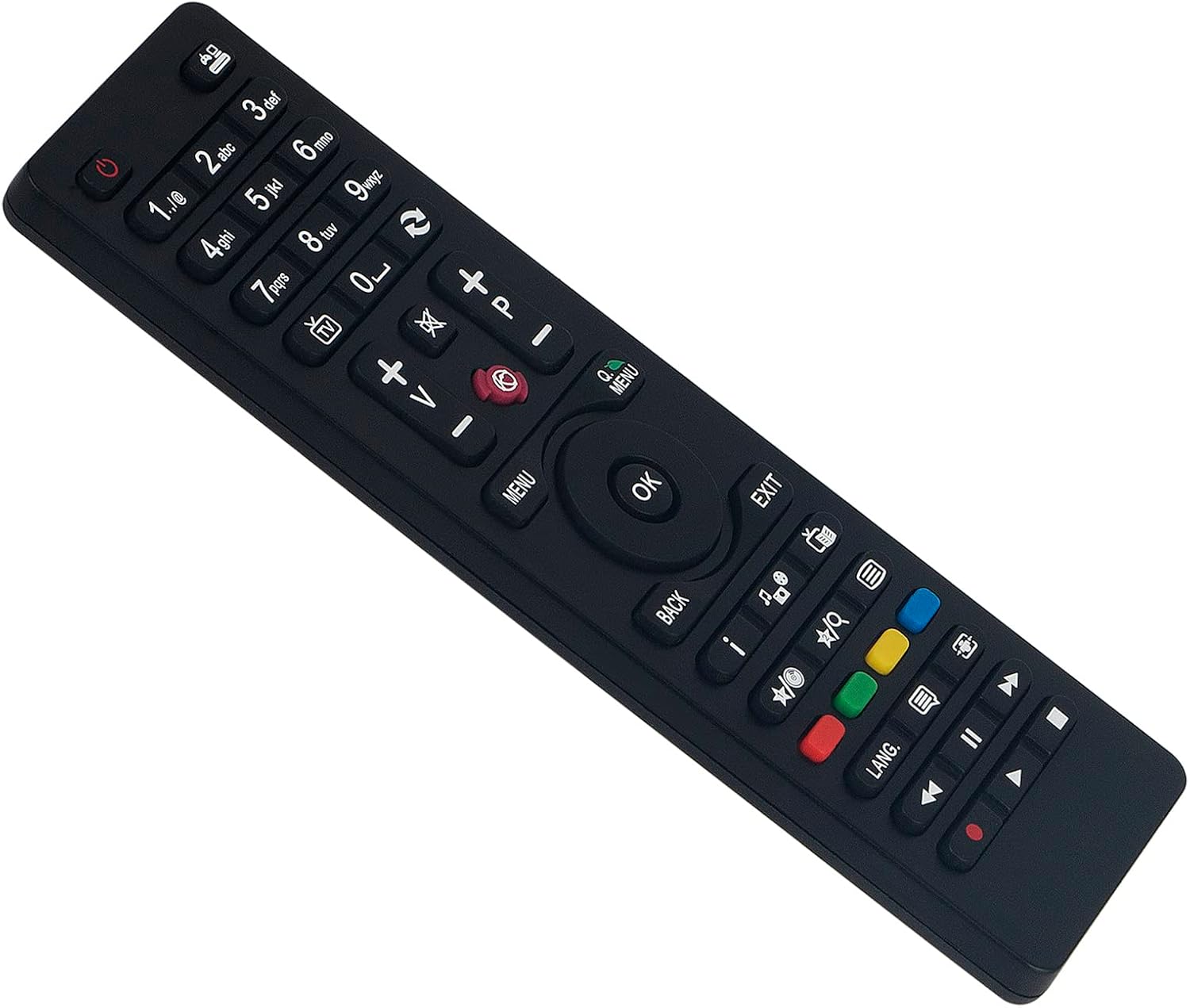
Image 2: Angled view of the ALLIMITY Replacement Remote Control. This perspective highlights the ergonomic design and button placement from a side angle.
Operating Instructions
This remote control is designed to replicate the functions of your original Silvercrest LCD TV remote. Point the remote directly at your television's infrared receiver for optimal performance.
Basic Functions
- Power Button (●): Turns the TV on or off.
- Number Buttons (0-9): Directly select TV channels.
- Volume Up/Down (V+/V-): Adjusts the audio volume.
- Channel Up/Down (P+/P-): Changes the TV channel sequentially.
- Mute Button (🔇): Mutes or unmutes the TV audio.
- Input/Source Button (□): Cycles through available input sources (HDMI, AV, etc.).
Menu Navigation and Advanced Functions
- MENU Button: Accesses the TV's main menu.
- Navigation Buttons (Up, Down, Left, Right): Used to move through menu options.
- OK Button: Confirms a selection within the menu.
- BACK/EXIT Button: Returns to the previous menu or exits the current menu.
- Colored Buttons (Red, Green, Yellow, Blue): These buttons typically correspond to specific functions displayed on the TV screen, often in teletext or smart TV applications.
- Media Playback Controls (Play, Pause, Stop, Rewind, Fast Forward): Used for controlling media playback on compatible devices or TV functions.
Compatible Silvercrest LCD TV Models
This ALLIMITY Replacement Remote Control is compatible with the following Silvercrest LCD TV models:
- LCDTV22104
- LCDTV19111DVBT
- K48DLV3F
- K22LV1F
- K24LV3H
- K32DLV3H
- K40DLV1F
- K40DLV2F
- K48DLV3F
- K20LV1H
- K50DLV1F
- K22LV3H

Image 3: Side view of the ALLIMITY Replacement Remote Control. This image shows the slim profile of the remote.
Troubleshooting
If you experience issues with your ALLIMITY Replacement Remote Control, please refer to the following common solutions:
- Remote not responding:
- Ensure the batteries are inserted correctly with the correct polarity (+/-).
- Replace old batteries with new AAA alkaline batteries.
- Check for any obstructions between the remote control and the TV's infrared receiver.
- Ensure you are within the effective operating range (up to 10 meters) and pointing the remote directly at the TV.
- Specific buttons not working:
- Clean the remote control buttons and surface with a soft, dry cloth to remove any dirt or residue.
- If only certain buttons are unresponsive, it might indicate a fault with the remote.
- TV not listed as compatible:
- This remote is specifically designed for the listed Silvercrest models. If your TV model is not listed, full compatibility cannot be guaranteed.
Maintenance
To ensure the longevity and proper functioning of your remote control, follow these maintenance guidelines:
- Avoid dropping the remote control or subjecting it to strong impacts.
- Keep the remote control away from liquids and excessive moisture.
- Do not expose the remote control to direct sunlight or extreme temperatures.
- Clean the remote control regularly with a soft, dry cloth. Do not use abrasive cleaners or solvents.
- If the remote will not be used for an extended period, remove the batteries to prevent leakage.
Specifications
| Brand | ALLIMITY |
| Model Number | QYSY-RC4870-TD-QYSY |
| Connectivity Technology | Infrared |
| Compatible Devices | Silvercrest LCDTV22104, LCDTV19111DVBT, K48DLV3F, K22LV1F, K24LV3H, K32DLV3H, K40DLV1F, K40DLV2F, K48DLV3F, K20LV1H, K50DLV1F, K22LV3H |
| Special Feature | No programming required |
| Battery Type | AAA Alkaline (not included) |
| Maximum Range | 10 Meters |
| Number of Buttons | 25 |
| Product Dimensions | 4 x 12 x 0.3 cm |
| Item Weight | 60 grams |

Image 4: Top-down view of the ALLIMITY Replacement Remote Control. This image provides a clear overhead perspective of the button layout.

Image 5: Back view of the ALLIMITY Replacement Remote Control. This image shows the battery compartment and model markings on the rear of the device.
Warranty and Support
For any questions or support regarding your ALLIMITY Replacement Remote Control, please refer to the retailer or manufacturer's customer service channels. Specific warranty details may vary by region and purchase point.