
Introduction
This manual provides comprehensive instructions for the assembly, operation, and maintenance of your Devoko Electric Sit-Stand Desk, Model 0077. Designed for ergonomic use, this adjustable height desk offers a versatile workspace for various activities.
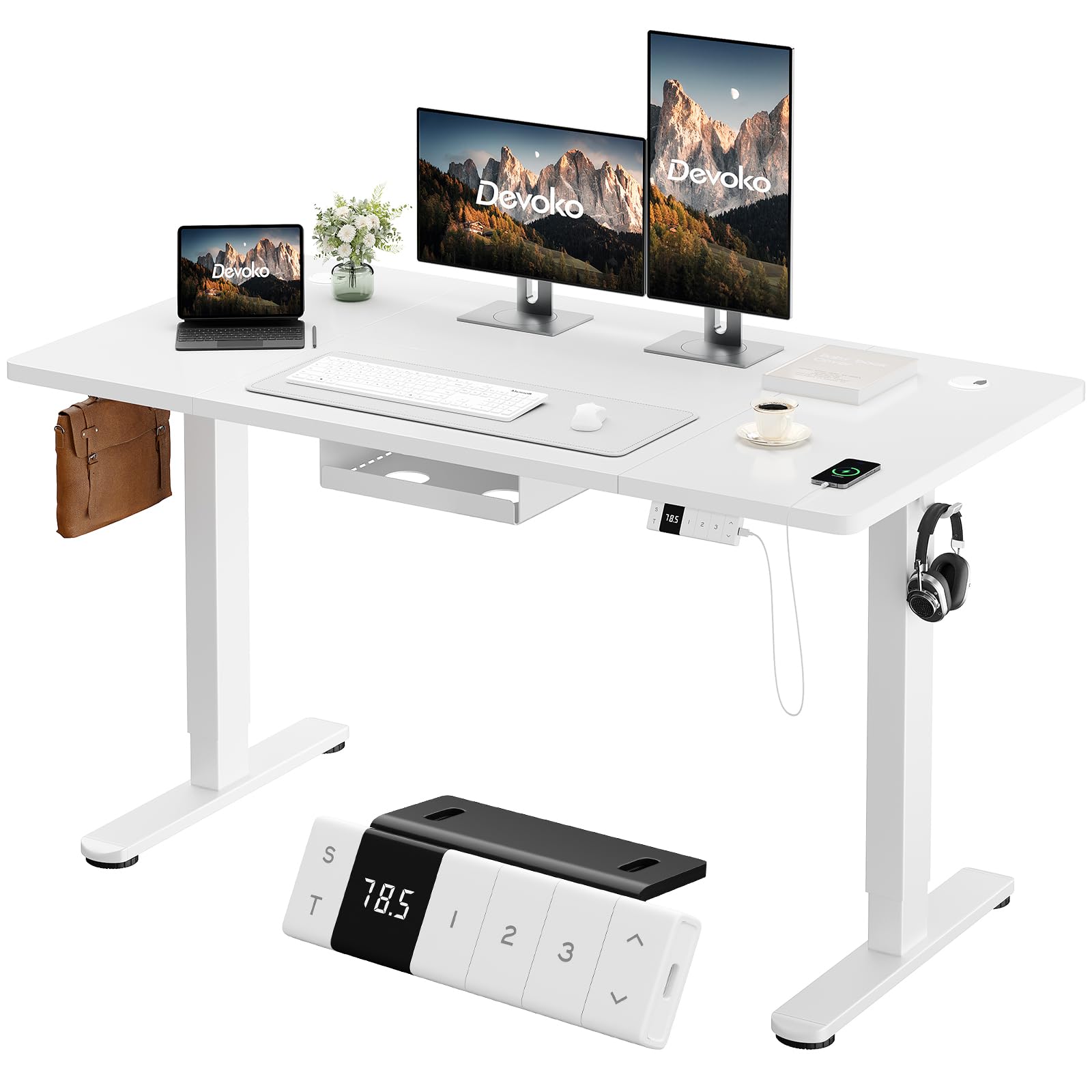
Image: Devoko Electric Sit-Stand Desk in white, 160x80cm.
Key Features
- Adjustable Height: Seamlessly switch between sitting and standing positions with a height range of 72 cm to 118 cm.
- Smart Control Panel: Features an LED display, 3 programmable memory presets for preferred heights, and up/down adjustment buttons.
- Integrated Type-C Charger: Conveniently charge your devices directly from the desk.
- Cable Management System: Includes a cable storage box and two hooks to keep your workspace tidy and organized.
- Robust Stability: T-shaped legs support up to 70 kg, ensuring a stable and durable work surface.
- Safety Features: Equipped with anti-collision technology and overheating protection for secure operation.
- Quiet Operation: Motor operates at less than 50dB, allowing for a focused work environment.
Safety Information
Please read and understand all safety instructions before operating the desk to prevent injury or damage.
- Use the desk responsibly and do not exceed the maximum load capacity of 70 kg.
- Ensure the desk is placed on a stable and level surface.
- Keep children and pets away from the desk during height adjustments.
- Do not place hands or objects in the path of moving parts during operation.
- In case of malfunction or unusual noise, immediately unplug the desk and contact customer support.
- The anti-collision feature is designed to prevent damage, but always exercise caution.
Package Contents
Verify that all components are present before beginning assembly. If any parts are missing or damaged, please contact Devoko customer support.

Image: Illustration of desk components for assembly.
Components List:
- Right Table Leg (x1)
- Left Table Leg (x1)
- Leg Base (x2)
- Control Panel (x1)
- Side Plate (x2)
- Left Crossbar (x1)
- Right Crossbar (x1)
- Transmission Rod (x1)
- Connector (x1)
- Tabletop Sections (x4)
- Cable Management Tray (x1)
- Headphone Hanger (x1)
- Cable Hole Covers (x2)
- Tabletop Connectors (J & M types)
- Wood Tips (for tabletop alignment)
- Various Screws (M6x11mm, M6x35mm, M8x12mm, M5x15mm)
Note: All mounting tools are not included. Please prepare a screwdriver for assembly.
Assembly Instructions
Follow these steps carefully to assemble your Devoko Electric Sit-Stand Desk. It is recommended to have a second person assist with certain steps.
Video: Step-by-step assembly guide for the Devoko Electric Sit-Stand Desk. (Note: This is a placeholder video URL as no specific M3U8 video was provided in the product data.)
Step-by-Step Guide:
- Attach Right Crossbar: Secure the Right Crossbar (9) to the Right Table Leg (1) using M6x11mm screws (A).
- Install Side Plate (Right): Attach one Side Plate (7) to the assembled right leg and crossbar using M8x12mm screws (C).
- Attach Left Crossbar: Secure the Left Crossbar (8) to the Left Table Leg (2) using M6x11mm screws (A).
- Install Side Plate (Left): Attach the second Side Plate (7) to the assembled left leg and crossbar using M8x12mm screws (C).
- Connect Legs: Use the Connector (10) to join the two leg assemblies, securing it with M6x11mm screws (A).
- Assemble Tabletop: Join the tabletop sections (11, 12, 13, 14) using the provided Wood Tips (F) for alignment.
- Secure Tabletop Connectors: Attach the J and M Tabletop Connectors to the underside of the assembled tabletop using M5x15mm screws (E).
- Attach Legs to Tabletop: Carefully place the assembled leg frame onto the underside of the tabletop. Secure the legs to the tabletop using M5x15mm screws (E). Ensure the motor and control panel wiring are accessible.
- Install Transmission Rod: Insert the Transmission Rod (4) to connect the motor mechanism between the two legs.
- Mount Cable Management Tray: Attach the Cable Management Tray (15) to the underside of the desk using M5x12mm screws (D).
- Attach Leg Bases: Secure the Leg Bases (3) to the bottom of each table leg using M6x35mm screws (B).
- Install Control Panel: Mount the Control Panel (5) to the front edge of the desk, typically on the right side, using M5x15mm screws (E). Connect the necessary cables from the motor and power supply.
- Attach Headphone Hanger: Install the Headphone Hanger (K) to the desired location on the underside of the desk using M5x15mm screws (E).

Image: Cable management tray, headphone hooks, and adjustable feet.
Operating Instructions
Your Devoko Electric Sit-Stand Desk is designed for intuitive operation. Familiarize yourself with the control panel functions.
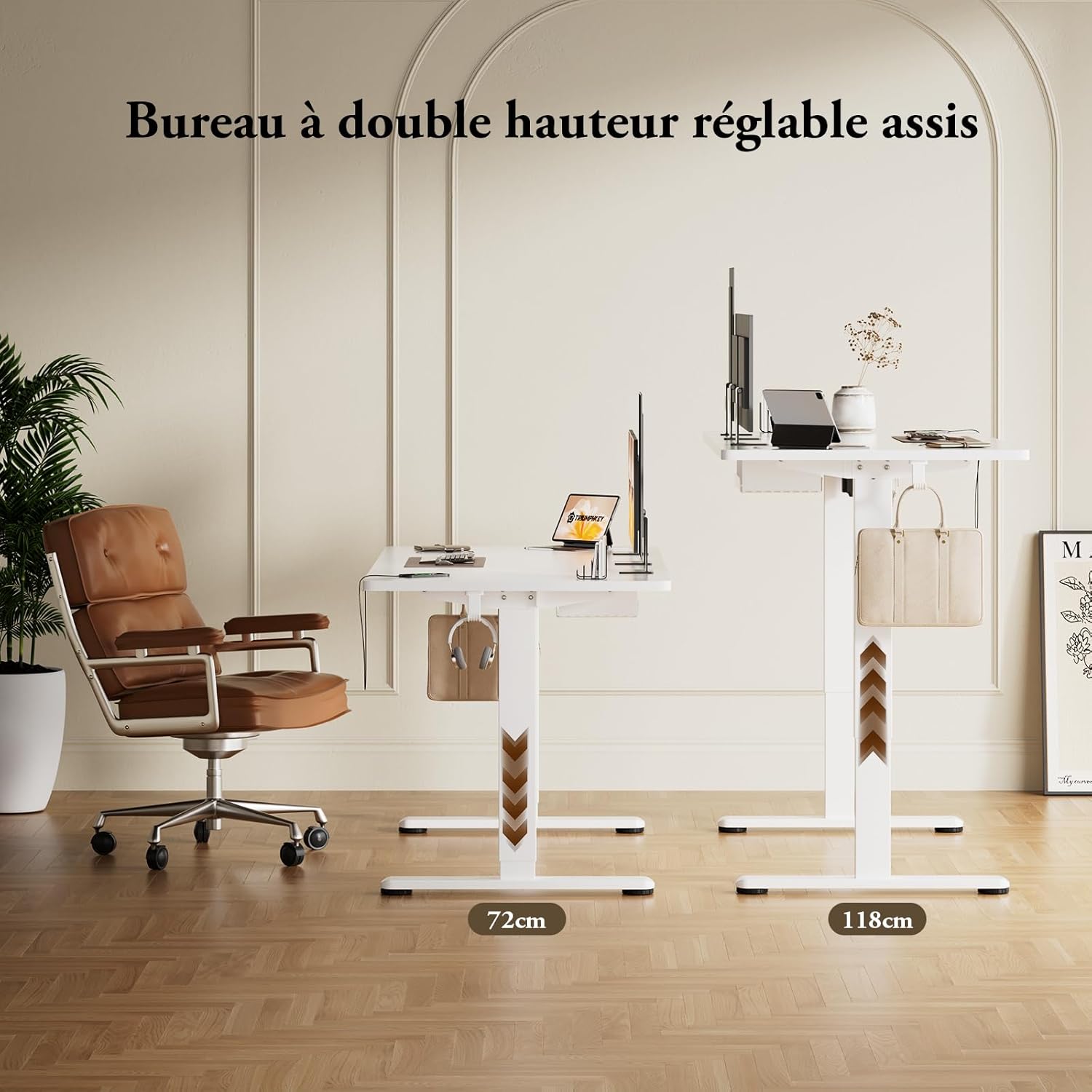
Image: Control panel with height display, memory buttons, and USB-C port.
Height Adjustment:
- Up/Down Buttons: Press and hold the up (▲) or down (▼) arrow buttons on the control panel to adjust the desk height. Release the button when the desired height is reached. The current height will be displayed on the LED screen.
Memory Presets:
- Setting a Memory Position: Adjust the desk to your desired height. Press the 'S' button, then press one of the numbered memory buttons (1, 2, or 3) within 3 seconds. The height is now saved to that preset.
- Recalling a Memory Position: Press the corresponding numbered memory button (1, 2, or 3) to automatically move the desk to the saved height.
USB-C Charging:
- Plug your compatible device into the Type-C port on the control panel to charge it.
Anti-Collision System:
- The desk is equipped with an anti-collision system. If the desk encounters an obstacle during adjustment, it will automatically stop and reverse slightly to prevent damage.
Maintenance
Regular maintenance ensures the longevity and optimal performance of your desk.
- Cleaning: Wipe the desk surface and frame with a soft, damp cloth. Avoid abrasive cleaners or harsh chemicals.
- Inspection: Periodically check all screws and connections to ensure they are tight. Retighten if necessary.
- Cable Management: Ensure cables are neatly organized within the cable management tray to prevent snagging or damage during height adjustments.
- Motor Care: The motor is designed for durability. Avoid overloading the desk beyond its 70 kg capacity.
Troubleshooting
If you encounter any issues with your Devoko Electric Sit-Stand Desk, refer to the following common problems and solutions.
| Problem | Possible Cause | Solution |
|---|---|---|
| Desk does not move | Power cable disconnected; Overload; Motor overheating. | Check power connection; Reduce weight on desk; Allow motor to cool down. |
| Uneven height adjustment | Obstruction; Unbalanced load. | Remove any obstructions; Redistribute weight evenly on the desk. |
| Anti-collision system frequently triggers | Sensitive setting; Obstacles nearby. | Ensure no objects are near the desk's path; Refer to the full manual for sensitivity adjustment if available. |
| Memory presets not working | Presets not saved correctly. | Re-save the memory positions following the operating instructions. |
If the problem persists after attempting these solutions, please contact Devoko customer support for further assistance.
Specifications
| Feature | Detail |
|---|---|
| Brand | Devoko |
| Model Number | 0077 |
| Desk Design | Standing Desk |
| Dimensions (D x W x H) | 80P x 160l x 72H cm (Min Height) |
| Adjustable Height Range | 72 cm to 118 cm |
| Color | White |
| Tabletop Material | Wood |
| Frame Material | Metal (Alloy Steel) |
| Special Features | Ergonomic, Height Adjustable, Integrated USB-C Port, Electric |
| Number of Height Positions | 3 (Memory Presets) |
| Item Weight | 29 Kilograms |
| Recommended Maximum Load | 70 Kilograms |
| Mounting Type | Freestanding |
| Included Components | Headphone hook, Cable management tray, Integrated USB port |
Warranty and Support
Your Devoko Electric Sit-Stand Desk comes with a lifetime warranty, ensuring peace of mind regarding its quality and durability. For any questions, technical support, or warranty claims, please contact Devoko customer service.
- Return Policy: 30-day returns.
- Warranty Type: Lifetime.
- Customer Support: Refer to your purchase documentation or the Devoko brand store on Amazon for contact information.


