
1. Introduction and Overview
Thank you for choosing the miisso 10000mAh Slim Portable Charger, Model K95. This compact and versatile power bank is designed to keep your devices charged wherever you are. Featuring built-in Type-C cables and multiple output options, it's an ideal companion for daily use, travel, and business trips. This manual provides essential information for safe and efficient operation of your new portable charger.

Figure 1: miisso 10000mAh Slim Portable Charger (Model K95)
2. Product Features
- Pocket Size Design: The K95 is an upgraded 2025 version, featuring a slim body (4.25*2.74*0.67 inches) for easy portability in handbags or pockets.
- Built-in Cables: Equipped with two built-in Type-C cables, eliminating the need to carry extra charging cords. These cables are compatible with devices such as iPhone 15, iPhone 16, iPhone 17, iPad, Samsung, and other USB-C port phones. Note: Not compatible with iPhones 14/13/12/11/8/7/6/5.
- High Capacity: Contains 10000mAh of power, sufficient to provide over two full charges for an iPhone 17 or Samsung Galaxy S25, meeting daily electricity demands.
- Simultaneous Charging: Features three output options, allowing you to charge up to three devices concurrently. It also includes a USB-C input for convenient recharging of the power bank itself.
- Universal Compatibility: Widely compatible with most cellphones and tablets, including iPhone 17, 16, 15, AirPods 4, Samsung S25, S24, S23, and other Android USB-C devices.
- 15-Layer SmartProtect System: Advanced safety features including charge low and high temperature protection, discharge low and high temperature protection, battery temperature protection, output overvoltage protection, charging undervoltage protection, overcurrent recovery protection, battery overdischarge protection, output overcurrent protection, charging overvoltage protection, USB-C overcharge protection, charging overcurrent protection, discharge overcurrent protection, short-circuit recovery protection, Type-C port overheat protection, and input overvoltage protection.

Figure 2: Compact and portable design of the miisso power bank.

Figure 3: Built-in Type-C cables for convenient charging.

Figure 4: Charging up to three devices at once.
3. Setup
3.1 Initial Charging of the Power Bank
- Locate the USB-C input port on the power bank.
- Connect the provided USB charging cable (USB-A to USB-C) to a compatible USB power adapter (not included).
- Plug the USB-C end of the cable into the power bank's USB-C input port.
- Plug the USB power adapter into a wall outlet.
- The LED indicator lights on the power bank will illuminate to show the charging progress. Allow the power bank to fully charge before first use.
3.2 Identifying Ports and Cables
The miisso K95 features:
- Built-in Type-C Cables (x2): Located on the sides, these are for direct device charging.
- USB-C In/Out Port: For recharging the power bank or charging a device with your own USB-C cable.
- Micro-USB In Port: For recharging the power bank using a Micro-USB cable (not included).
- USB-A Out Port: For charging devices using your own USB-A cable.
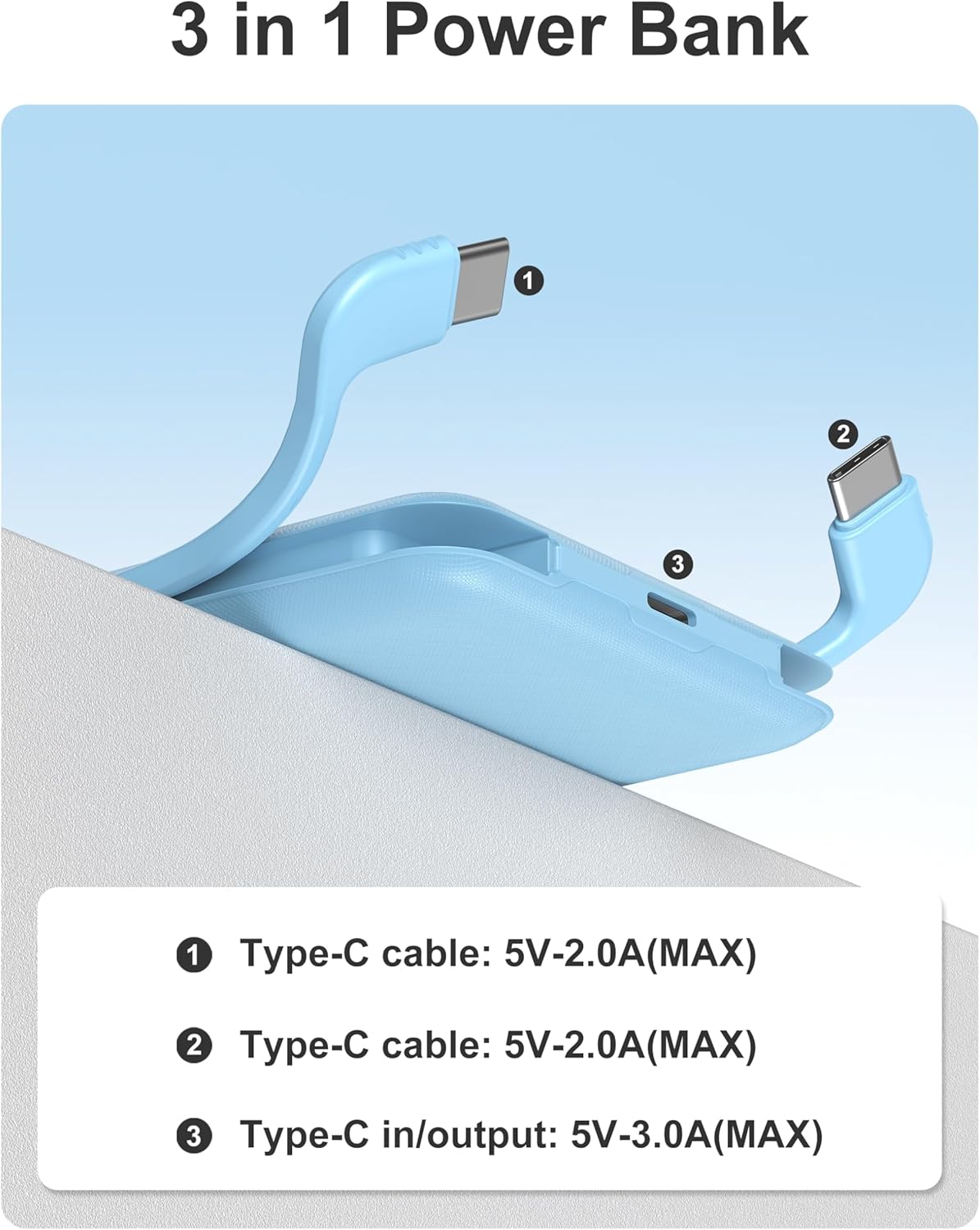
Figure 5: Overview of charging ports and built-in cables.
4. Operating Instructions
4.1 Charging Your Devices
- Using Built-in Type-C Cables: Gently pull out one of the built-in Type-C cables from its slot. Connect the cable directly to your compatible device's charging port. The power bank will automatically begin charging.
- Using External USB Ports: For devices requiring a USB-A or USB-C connection not provided by the built-in cables, use your device's original charging cable. Plug the USB-A end into the power bank's USB-A output port, or the USB-C end into the power bank's USB-C In/Out port. Connect the other end to your device.
4.2 Checking Battery Level
Press the power button on the power bank. The LED indicator lights will show the remaining battery capacity. A full circle indicates a full charge, and the illuminated segment will decrease as power is consumed.
Video 1: Demonstrating the compact size and built-in cables of the miisso power bank.
5. Maintenance
- Storage: Store the power bank in a cool, dry place away from direct sunlight and extreme temperatures.
- Cleaning: Use a soft, dry cloth to clean the exterior of the power bank. Avoid using harsh chemicals or abrasive materials.
- Battery Care: To prolong battery life, fully charge the power bank at least once every three months if not in regular use. Avoid completely draining the battery frequently. The power bank provides 300 full charging cycles.
- Environmental Responsibility: The product features degradable materials for its packaging and instruction manual. It uses a recyclable and recoverable Lithium-ion cell, copper wire, and gold-plated charger connector. It is lead-free, mercury-free, and cadmium-free, complying with global and local eco-certification standards.

Figure 6: miisso's commitment to sustainability.
6. Troubleshooting
| Issue | Possible Cause | Solution |
|---|---|---|
| Device not charging | Low power bank battery; incorrect cable/port; device incompatibility. | Recharge power bank; ensure correct cable/port for your device; check device compatibility (e.g., iPhone 14/13/12/11/8/7/6/5 are not compatible with built-in cables). |
| Slow charging | Cable quality; device input limit; multiple devices charging. | Use original or high-quality cables; ensure device supports fast charging; try charging one device at a time. |
| Power bank not recharging | Faulty charging cable/adapter; incorrect input port. | Try a different USB-C cable and power adapter; ensure cable is connected to the correct input port (USB-C In/Out or Micro-USB In). |
| LED indicator not working | Power bank completely drained or internal fault. | Attempt to charge the power bank for several hours; if issue persists, contact customer support. |
7. Specifications
- Model Number: K95
- Brand: miisso
- Battery Capacity: 10000 Milliamp Hours
- Battery Cell Type: Lithium Polymer
- Item Dimensions L x W x Thickness: 4.25"L x 2.74"W x 0.67"Th
- Item Weight: 6.08 ounces
- Number of Ports: 3 (1 USB-A Out, 1 USB-C In/Out, plus 2 built-in Type-C cables)
- Connector Type: USB Type C (built-in and port), USB Type A (port), Micro USB (input port)
- Voltage: 5 Volts
- Power Source: Battery-Powered
- Special Features: Built-in Cable, LED Indicator Lights, Pocket Size, Short Circuit Protection, Slim
- Compatible Devices: iPhone 17 Pro/iPhone 17/iPhone Air/iPhone 16 Pro/iPhone 16 Pro Max /iPhone 16 /iPhone 16 Plus/iPhone 15/iPhone 15 Plus/iPhone 15 Pro/iPhone 15 Pro Max /Samsung Galaxy Z Fold 7 /Samsung Galaxy Z Flip 6 /Samsung Galaxy Z Fold 5/ Samsung Galaxy Z Flip 5/Samsung Galaxy Z Fold 4/Samsung Galaxy Z Flip 4 /Samsung Galaxy S25/Samsung Galaxy S24/Samsung Galaxy S24 Ultra/Samsung Galaxy S24+/Samsung Galaxy S23/Samsung Galaxy S23 Ultra/Samsung Galaxy S23+/Samsung Galaxy S22/Samsung Galaxy S22 Ultra/Samsung Galaxy S22+ /Samsung Galaxy S21/Samsung Galaxy S21 Ultra/Samsung Galaxy S21+ /Samsung Galaxy C55/Samsung Galaxy A55 /Samsung Galaxy A54 /Samsung Galaxy A53 /Samsung Galaxy A52/motorola razr/LG G8/LG G7/LG X4/LG Q60/LG K40/LG Q7/Google Pixel/Google Pixel XL/Google Pixel 2/Google Pixel 2 XL/Google Pixel 3/Google Pixel 3 XL/Google Pixel 4/Google Pixel 4 XL
8. Warranty and Support
Your miisso 10000mAh Slim Portable Charger comes with a user guide (included in the package). For any product-related inquiries, technical support, or warranty claims, please refer to the contact information provided in your product packaging or visit the official miisso website. The product is Verified by Transparency, ensuring authenticity and quality.