
1. Introduction
This manual provides essential information for the safe and efficient use of your ONN 24-Inch Series 1 Class HD 720p Smart TV. Please read it thoroughly before operating the device and retain it for future reference. This television offers a 720p HD display, smart TV functionalities, and compatibility with Alexa and Google Assistant.
2. Safety Information
Always follow basic safety precautions when using this television to reduce the risk of fire, electric shock, and injury.
- Do not expose the TV to rain or moisture.
- Do not open the TV cabinet; refer all servicing to qualified personnel.
- Ensure proper ventilation around the TV.
- Use only the power cord supplied with the TV.
- Keep the TV away from heat sources and direct sunlight.
- When wall mounting, ensure the wall mount is securely installed and capable of supporting the TV's weight.
3. What's in the Box
Carefully unpack your television and check that all items are present and undamaged. The package includes:
- ONN 24-Inch Smart TV
- Wall Mount Bracket (Note: TV stands are not included with this renewed product)
- Remote Control (not explicitly listed but implied for TV operation)
- Power Cord

This image displays the ONN 24-Inch Smart TV alongside the wall mount bracket that comes with the product, illustrating the primary components.
4. Setup
4.1 Unpacking and Placement
Remove the TV and all accessories from the packaging. Due to the absence of TV stands, this model is designed for wall mounting. Choose a suitable location for your TV, ensuring it is on a stable surface if temporarily placed, or a strong wall if mounting.
4.2 Wall Mounting
Your ONN 24-Inch Smart TV comes with a wall mount for convenient installation. Follow the instructions provided with the wall mount for secure attachment. Ensure the wall can support the weight of the TV. The TV features VESA compatible mounting holes on its rear panel.

The back panel of the ONN 24-Inch Smart TV is shown, detailing the VESA compatible mounting holes for wall installation and ventilation slots.

This image illustrates the physical dimensions of the ONN 24-Inch Smart TV, with a width of 21.9 inches, a height of 13.1 inches, and a depth of 3 inches, crucial for wall mount planning.
4.3 Connecting Devices
The TV is equipped with HDMI and USB ports for connecting external devices such as Blu-ray players, gaming consoles, or USB storage devices.
- HDMI: Connect HDMI cables from your devices to the HDMI ports on the TV.
- USB: Insert USB drives into the USB port for media playback.

This image provides a side view of the ONN 24-Inch Smart TV, clearly showing the various input and output ports available for connecting external devices.
4.4 Initial Power On and Network Setup
After connecting the power cord, press the power button on the remote control or TV. Follow the on-screen instructions to complete the initial setup, including language selection, channel scanning, and connecting to your Wi-Fi network to enable smart TV features.
5. Operating the Smart TV
5.1 Smart TV Features
Your ONN Smart TV provides instant access to a wide selection of applications from popular streaming services. Navigate through the smart TV interface using your remote control to access apps like Netflix, Disney+, YouTube, and more.

A front view of the ONN 24-Inch Smart TV, showcasing its display with vibrant colors, suitable for general viewing and smart TV content.
5.2 Voice Assistant Compatibility
The TV is compatible with Alexa and Google Assistant. You can use voice commands through a compatible smart speaker or device to control your TV, such as turning it on, changing channels, or adjusting the volume.
6. Maintenance
6.1 Cleaning the TV
To clean the screen, gently wipe it with a soft, lint-free cloth. For the TV cabinet, use a soft, dry cloth. Do not use abrasive cleaners, waxes, or solvents as they can damage the finish.
6.2 Software Updates
Ensure your TV's software is up to date for optimal performance and security. The TV may automatically prompt you for updates when connected to the internet. You can also check for updates manually through the TV's settings menu.
7. Troubleshooting
If you encounter issues with your TV, refer to the following common solutions:
- No Power: Check if the power cord is securely plugged into both the TV and the wall outlet. Try a different outlet.
- No Picture/Sound: Ensure the correct input source is selected. Check all cable connections (HDMI, antenna).
- Remote Control Not Working: Replace the batteries in the remote. Ensure there are no obstructions between the remote and the TV's IR sensor.
- Network Connection Issues: Restart your Wi-Fi router. Re-enter your Wi-Fi password in the TV's network settings.
- Picture Quality Issues: Adjust picture settings (brightness, contrast, sharpness). Ensure the content source is of good quality.
8. Specifications
| Feature | Specification |
|---|---|
| Screen Size | 24 inches |
| Display Technology | LED |
| Resolution | 720p HD |
| Refresh Rate | 60 Hz |
| Aspect Ratio | 16:9 |
| Connectivity | HDMI, USB |
| Speaker Type | Built-In |
| Product Dimensions (D x W x H) | 3" x 21.9" x 13.1" |
| Item Weight | 4.83 pounds |
| Color | Black |
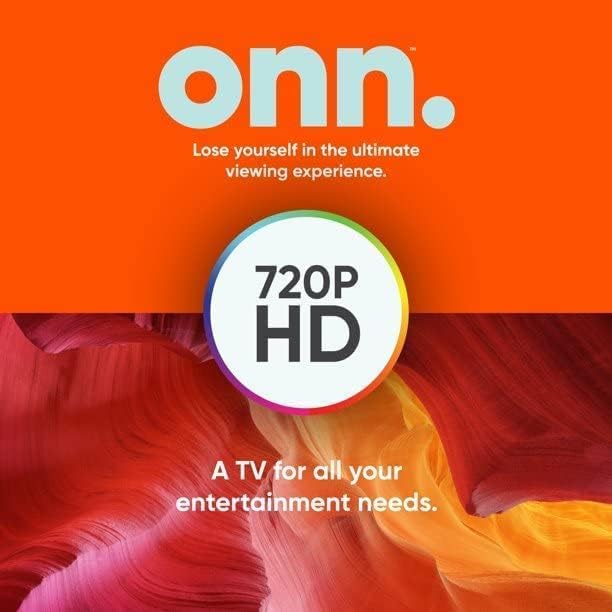
A graphic featuring the 'onn.' brand logo and emphasizing '720P HD' resolution, indicating a clear and detailed picture quality.
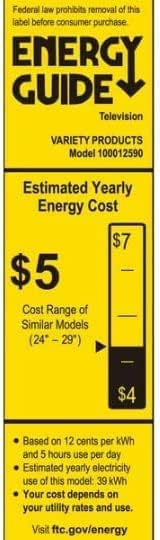
The Energy Guide label for the television, providing information on the estimated yearly energy cost, which is approximately $5 based on standard usage.
9. Warranty and Support
This product is sold as an Amazon Renewed item. Amazon Renewed products are backed by the Amazon Renewed Guarantee. This means your purchase is eligible for replacement or refund within 90 days of receipt if it does not work as expected. For specific warranty details or support, please refer to the Amazon Renewed program terms and conditions or contact Amazon customer service directly.


