
Introduction
This manual provides essential information for the proper setup, operation, and maintenance of your ONN 55-Inch Series 1 Class 4K Smart TV. Please read this manual thoroughly before using your television and retain it for future reference. This television offers a 4K (2160p) resolution display, smart TV functionalities with access to various streaming services, and compatibility with Alexa and Google Assistant.
Safety Information
Important Safety Instructions:
- Do not block any ventilation openings. Install in accordance with the manufacturer's instructions.
- Do not install near any heat sources such as radiators, heat registers, stoves, or other apparatus (including amplifiers) that produce heat.
- Protect the power cord from being walked on or pinched, particularly at plugs, convenience receptacles, and the point where they exit from the apparatus.
- Only use attachments/accessories specified by the manufacturer.
- Unplug this apparatus during lightning storms or when unused for long periods of time.
- Refer all servicing to qualified service personnel. Servicing is required when the apparatus has been damaged in any way, such as power-supply cord or plug is damaged, liquid has been spilled or objects have fallen into the apparatus, the apparatus has been exposed to rain or moisture, does not operate normally, or has been dropped.
What's in the Box
Upon unpacking, ensure all items are present:
- ONN 55-Inch Series 1 Class 4K Smart TV
- Remote Control (with batteries)
- TV Stands (2)
- Screws for TV Stands
- Power Cord
- Quick Start Guide
Note: Speakers are integrated into the television unit.
Setup
1. Attaching the TV Stands
Carefully place the TV screen-down on a soft, clean surface to prevent damage. Align each stand with the corresponding screw holes on the bottom of the TV. Secure the stands using the provided screws.

Image: Front view of the ONN 55-Inch 4K Smart TV with its stands properly attached, displaying a vibrant screen. This illustrates the TV's appearance after stand installation.
2. Wall Mounting (Optional)
If you choose to wall mount your TV, ensure you use a VESA-compatible wall mount kit (sold separately) that supports the TV's weight and size. Follow the instructions provided with your wall mount kit. Do not attempt to wall mount the TV with the stands attached.
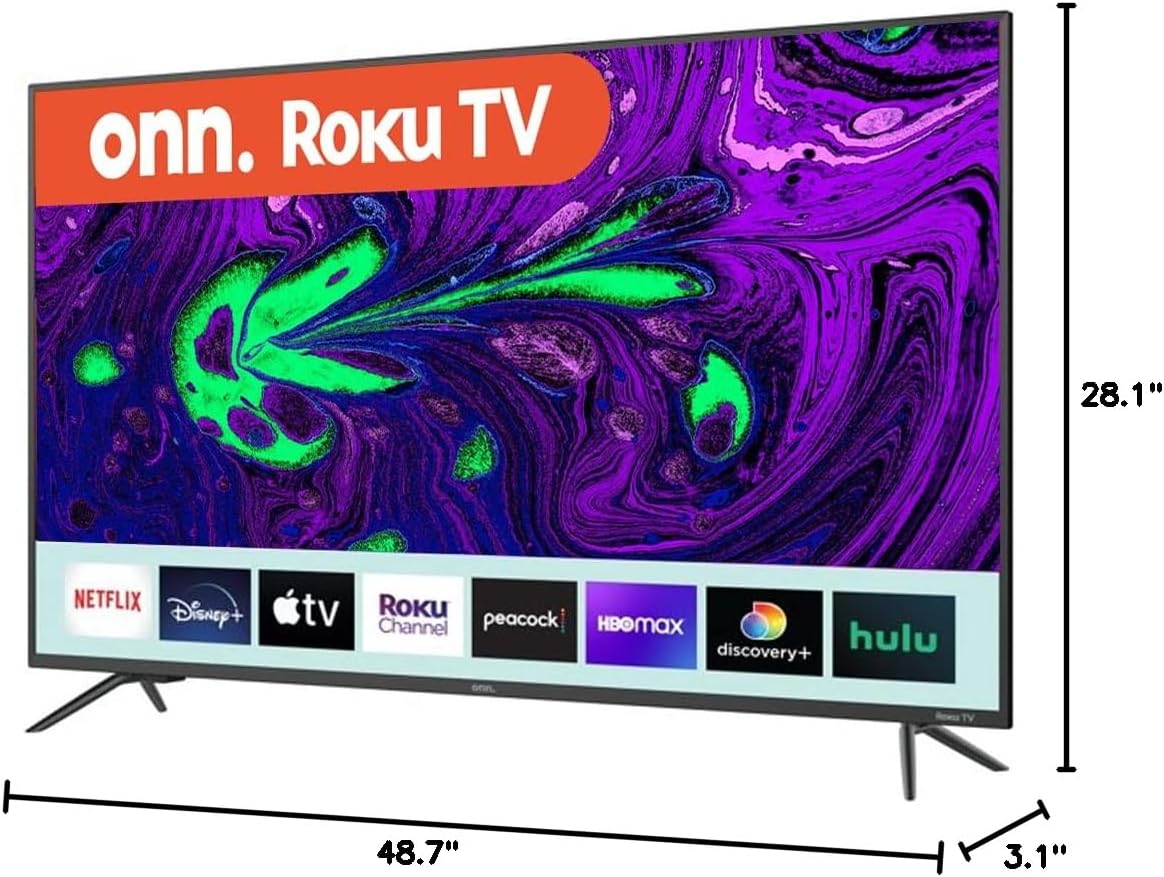
Image: Diagram showing the dimensions of the ONN 55-Inch 4K Smart TV, including width (48.7 inches), height (28.1 inches), and depth (3.1 inches). This is crucial for planning installation space or selecting a compatible wall mount.
3. Connecting Peripherals
Connect your external devices (e.g., cable box, Blu-ray player, gaming console) to the appropriate ports on the back or side of the TV. Refer to the 'Connections' section for port details.
4. Powering On and Initial Setup
- Plug the power cord into the TV and then into a wall outlet.
- Press the power button on the remote control or on the TV itself.
- Follow the on-screen instructions to select your language, connect to your Wi-Fi network, and complete the initial setup process. This includes channel scanning (if using an antenna) and linking your smart TV account.
Operating Your TV
Basic Controls
- Power: Press the power button on the remote or TV to turn the TV on or off.
- Volume: Use the 'Volume Up' and 'Volume Down' buttons on the remote.
- Channels: Use the 'Channel Up' and 'Channel Down' buttons for broadcast TV.
- Input: Press the 'Input' button to switch between connected devices (HDMI 1, HDMI 2, USB, etc.).
Smart TV Features
Your ONN Smart TV provides instant access to a selection of apps from top streaming services. Navigate through the smart TV interface using your remote control. You can customize your home screen by adding or removing apps.
Voice Assistant Compatibility
This TV is compatible with Alexa and Google Assistant. Once configured, you can use voice commands to control various TV functions such as power, volume, channel changes, and app launching. Refer to the respective voice assistant's setup guide for integration instructions.
Mobile App Control
A mobile app is available for controlling your ONN Smart TV. This app can be used as an alternative remote control, offering features like channel browsing and voice control directly from your smartphone.
Connections
The ONN 55-Inch Smart TV offers a variety of connection ports for your entertainment needs:

Image: Rear view of the ONN 55-Inch 4K Smart TV, highlighting the arrangement of various input and output ports. This image helps users identify where to connect their external devices.
| Port Type | Quantity | Description |
|---|---|---|
| HDMI | 3 | Connect high-definition devices like Blu-ray players, game consoles, or cable boxes. |
| USB | 1 | Connect USB storage devices for media playback. |
| Composite (AV) | 1 | Connect older devices using RCA cables (red, white, yellow). |
| Optical (Digital Audio Out) | 1 | Connect to a soundbar or home theater system for digital audio. |
| Coaxial/Cable (RF) | 1 | Connect an antenna or cable TV feed. |
| LAN (Ethernet) | 1 | Connect to a wired network for internet access. |
| Headphone | 1 | Connect headphones for private listening. |
Maintenance
Cleaning the TV
- Always unplug the TV before cleaning.
- Use a soft, dry cloth to wipe the screen and cabinet.
- For stubborn marks, lightly dampen the cloth with water or a mild, non-abrasive screen cleaner. Never spray cleaner directly onto the screen.
- Avoid using abrasive cleaners, waxes, or solvents as they can damage the TV's finish.
Software Updates
Your Smart TV may receive periodic software updates to improve performance and add new features. Ensure your TV is connected to the internet to receive these updates automatically. You can also manually check for updates through the TV's settings menu.
Troubleshooting
If you encounter issues with your TV, refer to the following common problems and solutions:
| Problem | Possible Solution |
|---|---|
| No power | Check if the power cord is securely plugged into both the TV and the wall outlet. Test the outlet with another device. |
| No picture, but sound is present | Ensure the correct input source is selected. Check all cable connections to external devices. |
| No sound, but picture is present | Check the volume level and mute settings. Verify audio cable connections if using external speakers. |
| Remote control not working | Replace the batteries in the remote. Ensure there are no obstructions between the remote and the TV's IR sensor. |
| Cannot connect to Wi-Fi | Verify your Wi-Fi password. Restart your router and the TV. Ensure the TV is within range of your Wi-Fi signal. |
| Smart features are slow or unresponsive | Check your internet connection speed. Try restarting the TV. Clear app caches if available in settings. |
Specifications
Key technical specifications for the ONN 55-Inch Series 1 Class 4K Smart TV:
| Feature | Specification |
|---|---|
| Model Number | ONN551E018 |
| Screen Size | 55 Inches (140 cm visible diagonal) |
| Display Technology | LED |
| Resolution | 4K (2160p) |
| Refresh Rate | 60 Hz |
| Aspect Ratio | 16:9 |
| Connectivity | 3 HDMI, 1 USB, 1 Composite, 1 Optical, 1 Coaxial/Cable, 1 LAN, 1 Headphone, Wi-Fi |
| Smart Features | Smart Home Ready - Works with Apple Home, Amazon Alexa, and Google Home |
| Product Dimensions (W x D x H) | 54 x 6 x 33 inches (approximate, with stands) |
| Item Weight | 33.2 pounds |
| Color | Black |
| Voltage | 1.1E+2 Volts (AC) |
Warranty Information
This ONN television is covered by a limited warranty. For specific details regarding warranty coverage, duration, and terms, please refer to the warranty card included with your product or visit the official ONN support website. Keep your proof of purchase for warranty claims.
Support
If you require further assistance or have questions not covered in this manual, please contact ONN customer support. Support contact information can typically be found on the manufacturer's website or on the product packaging.
For online resources, visit the official ONN support page.


