
EASYLONGER YN-056
EASYLONGER Car Adapter for CPAP Instruction Manual
Comprehensive guide for your EASYLONGER DC 12/24V Converter CPAP Power Cord.
1. Product Overview
The EASYLONGER Car Adapter for CPAP is a versatile DC 12/24V converter designed to provide reliable power to your CPAP machine and other devices while on the go. It features an 84W output and comes with multiple DC CPAP cables for wide compatibility.
Included Components:
- 1 × PD converter (Car adapter)
- 1 × DC Cable for ResMed S9
- 1 × DC Cable for AirSense 10 / AirCurve 10
- 1 × DC Cable for AirMini / AirSense 11
- 1 × DC Cable for Philips DreamStation / DreamStation 2
- 1 × User Manual

This image displays the main components of the EASYLONGER Car Adapter for CPAP, including the converter unit, the cigarette lighter plug, and the four different DC CPAP cables designed for various machine models.

This diagram illustrates which specific CPAP machine models (ResMed AirSense 11, AirMini, AirSense 10, AirCurve 10, DreamStation 2, DreamStation, ResMed S9) are compatible with each of the four included DC cables, indicating their respective voltage requirements.
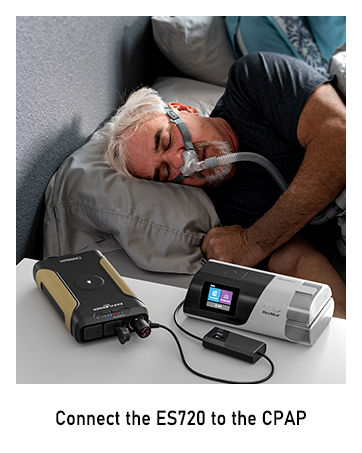
The adapter is designed to be compatible with various EASYLONGER CPAP battery packs, including models like ES960, ES720, and ES400 AIR, providing flexible power solutions.
2. Setup
Follow these steps to set up your EASYLONGER Car Adapter for CPAP:
- Connect the appropriate DC cable: Select the correct DC cable for your CPAP machine (ResMed S9, AirSense 10/AirCurve 10, AirMini/AirSense 11, or Philips DreamStation/DreamStation 2) and plug it into the DC OUT port of the EASYLONGER converter.
- Set the correct voltage: The converter supports both 12V and 24V output. For ResMed CPAP Series, the required voltage is 24V. For Philips CPAP Series, the required voltage is 12V.
- Adjusting Voltage:
- Press and hold the voltage adjustment button on the converter for approximately 3 seconds. The screen will start blinking from 24V.
- Single-click the voltage adjustment button to switch to 12V, indicated by the screen blinking at 12V.
- Click the button again to return the voltage to 24V. This process can be repeated as needed.
- The voltage digits on the screen will stop blinking after a few seconds, indicating that the output voltage has been set according to your preference.
- Connect to power source: Plug the cigarette lighter end of the converter into your vehicle's 12V/24V cigarette lighter socket or a compatible CPAP battery pack.
- Connect to CPAP machine: Plug the other end of the DC cable into your CPAP machine.
This video demonstrates the process of adjusting the output voltage (12V or 24V) on the EASYLONGER converter to match the requirements of your CPAP machine.

This image highlights key features of the converter, including the cigarette lighter interface, switch indicator, PVC wire material, and the 12V/24V adjustable voltage display.
3. Operating Instructions
The EASYLONGER Car Adapter provides flexible power solutions for various scenarios.
Using with EASYLONGER CPAP Battery Packs:
The converter enables pass-through charging, allowing you to power your CPAP machine directly from an EASYLONGER battery pack while simultaneously charging the battery pack if connected to a vehicle's power outlet.
This video demonstrates how to connect the EASYLONGER Car Adapter to an ES400 AIR battery pack and then to a ResMed AirSense 11 CPAP machine, illustrating the power delivery process.

This image shows the setup for powering a CPAP machine using the EASYLONGER ES720 battery pack, highlighting the connection points for seamless operation.
This video illustrates the connection of the EASYLONGER Car Adapter to an ES720 battery pack and then to a ResMed AirSense 11 CPAP machine, showing the power flow.

This image displays the connection of the EASYLONGER ES400 AIR battery pack to a CPAP machine, demonstrating its use as a portable power source.
This video shows the connection of the EASYLONGER Car Adapter to an ES960 AIR battery pack and then to a ResMed AirSense 11 CPAP machine, demonstrating its functionality.
Using with Vehicle Power Outlets:
The car adapter supports both 12V and 24V inputs, making it compatible with most vehicles, including cars, SUVs, and caravans.

This image illustrates the compatibility of the EASYLONGER Car Adapter with different types of vehicles, including cars, SUVs, and caravans, supporting both 12V and 24V input voltage.

This image emphasizes the broad compatibility of the adapter with various vehicle types, including RVs, cruise ships, trucks, and cars, supporting 12V/24V car ports.
Additional Output Ports:
The converter is equipped with three output ports: DC (up to 84W), USB-C (30W), and USB-A (18W), allowing you to charge various devices like laptops and cell phones.
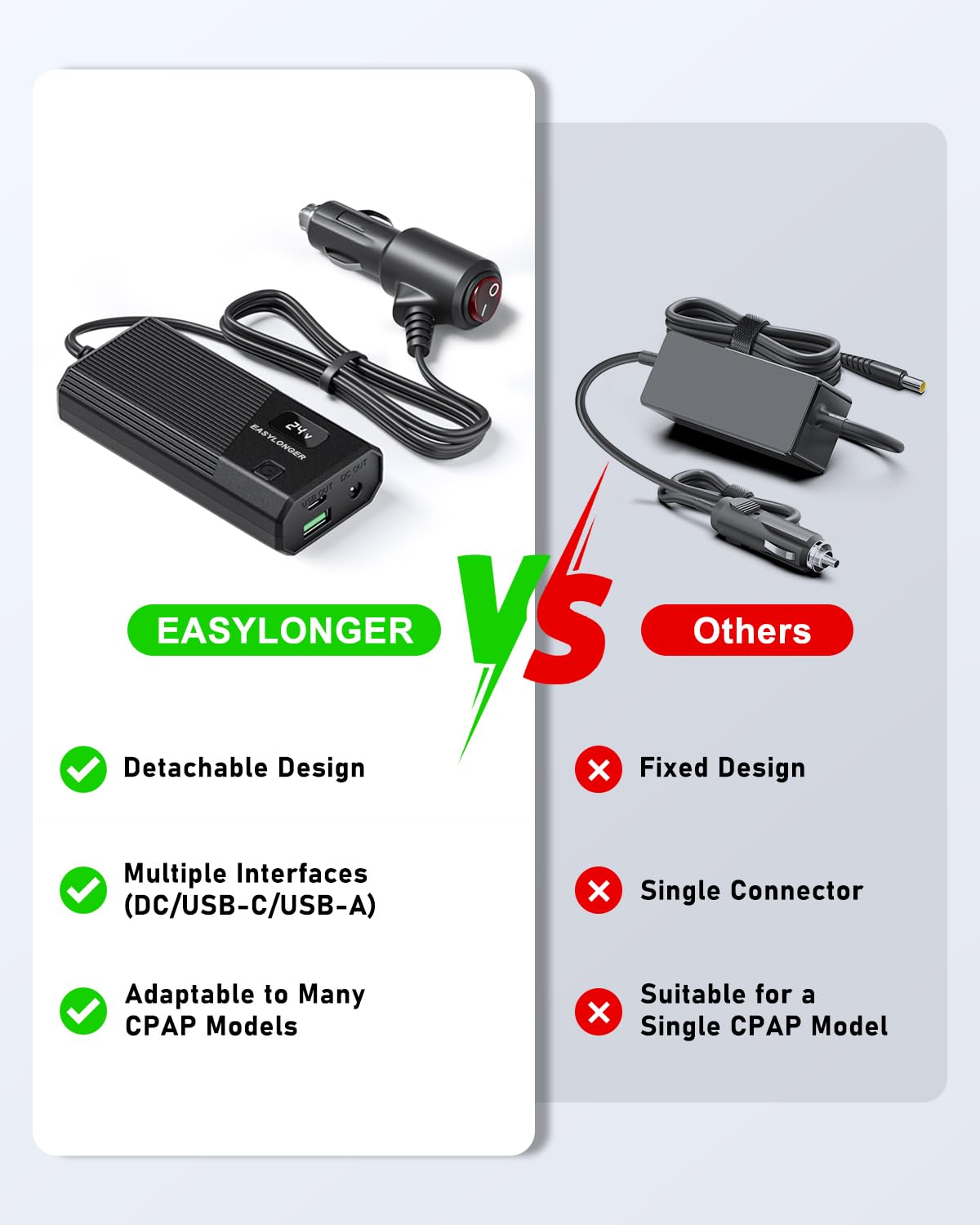
This image shows the USB-C (30W) and USB-A (18W) output ports on the converter, demonstrating its capability to charge multiple devices simultaneously.

This diagram illustrates the DC output capabilities (12V and 24V) and lists compatible devices such as soundboxes, routers, CPAP machines, and laptops, emphasizing the versatility of the converter.

The image highlights the safety feature of a switch button on the cigarette lighter plug, allowing users to turn off the power when not in use to save energy and protect the battery.

This detailed diagram labels the DC Output Voltage Display, DC Output ports (12V/5A, 24V/3.5A), USB-A Output (5V/3A, 9V/2A, 12V/1.5A), USB-C Output (5V/3A, 9V/3A, 12V/2.5A), and the button to adjust DC output voltage.
4. Maintenance
To ensure the longevity and optimal performance of your EASYLONGER Car Adapter, follow these maintenance guidelines:
- Cleaning: Use a soft, dry cloth to clean the exterior of the converter. Avoid using liquid cleaners or abrasive materials.
- Storage: When not in use, store the adapter and cables in a cool, dry place away from direct sunlight and extreme temperatures.
- Cable Care: Avoid bending or kinking the cables excessively, as this can damage the internal wires. Store cables neatly to prevent tangling.
- Connection Points: Periodically check all connection points (DC ports, USB ports, cigarette lighter plug) for any signs of wear, corrosion, or loose connections. Ensure they are clean and free of debris.
- Safety Switch: Always use the switch button on the cigarette lighter plug to turn off the power when the adapter is not actively in use to prevent unnecessary power drain and ensure safety.
5. Troubleshooting
If you encounter issues with your EASYLONGER Car Adapter, refer to the following common troubleshooting steps:
| Problem | Possible Cause | Solution |
|---|---|---|
| No power output from converter. |
|
|
| CPAP machine not receiving power or displaying error. |
|
|
| USB ports not charging devices. |
|
|
If the issue persists after trying these steps, please contact EASYLONGER customer support for further assistance.
6. Specifications
| Feature | Detail |
|---|---|
| Model Number | YN-056 |
| Input Voltage | DC 12V/24V |
| DC Output | 12V/5A, 24V/3.5A (Max 84W) |
| USB-C Output | 5V/3A, 9V/3A, 12V/2.5A (Max 30W) |
| USB-A Output | 5V/3A, 9V/2A, 12V/1.5A (Max 18W) |
| Dimensions | 5.75 x 5.63 x 2.6 inches |
| Weight | 12.7 ounces |
| Manufacturer | Dongguan Yihang Electronic Co., Ltd |
7. Warranty and Support
EASYLONGER products are designed for reliability and performance. This product comes with a standard manufacturer's warranty covering defects in materials and workmanship under normal use.
For warranty claims, technical support, or any inquiries regarding your EASYLONGER Car Adapter, please contact our customer support team through the official EASYLONGER website or your point of purchase. Please have your product model number (YN-056) and purchase details ready when contacting support.
For more information, visit the EASYLONGER Store on Amazon.
Ask a question about this manual
Ask about setup, troubleshooting, compatibility, parts, safety, or missing instructions. Manuals+ will review the question and use this page’s manual context to help answer it.