
Sorandy Sorandy9y5o6gd8eu-12
Sorandy 64GB Portable Digital Lossless MP3 Player
Model: Sorandy9y5o6gd8eu-12
Introduction
Thank you for choosing the Sorandy 64GB Portable Digital Lossless MP3 Player. This device is designed for high-quality audio playback, offering a compact and convenient solution for music on the go. It is suitable for various activities, including sports and daily use, providing a phone-free listening experience. This manual will guide you through the features and functions of your new MP3 player.
Package Contents
Please verify that all items are present in your package:
- Sorandy 64GB Portable Digital Lossless MP3 Player
- Earphones
- Lanyard

Image: The MP3 player shown alongside its included earphones and lanyard, demonstrating the complete package contents.
Setup
Charging the Device
The MP3 player has a built-in 180mAh battery. Before first use, fully charge the device. Connect the player to a USB power source (e.g., computer USB port or USB wall adapter) using the integrated USB connector. The device does not have a display to indicate charging status, but a full charge typically takes a few hours.

Image: A detailed view of the MP3 player's integrated USB-A connector, which is used for charging and data transfer.
Inserting a Micro SD Card
The player supports up to 64GB of external memory via a Micro SD card. Locate the SD card slot on the side of the device. Gently insert the Micro SD card into the slot until it clicks into place. Ensure the card is inserted correctly to avoid damage.
Loading Music Files
To load music files, connect the MP3 player to your computer via the integrated USB connector. The device will appear as a removable storage device. Drag and drop your desired audio files (e.g., MP3 format) into the player's storage or the inserted Micro SD card. Disconnect safely after transfer.
Connecting Earphones
Plug the included earphones into the 3.5mm audio jack located on the device. Ensure the plug is fully inserted for proper audio output.

Image: A close-up view of the 3.5mm audio jack on the MP3 player, where earphones are connected.
Operating Instructions
Power On/Off
Locate the power switch on the back of the device. Slide the switch to the 'On' position to power on the MP3 player. Slide it to the 'Off' position to power off the device.
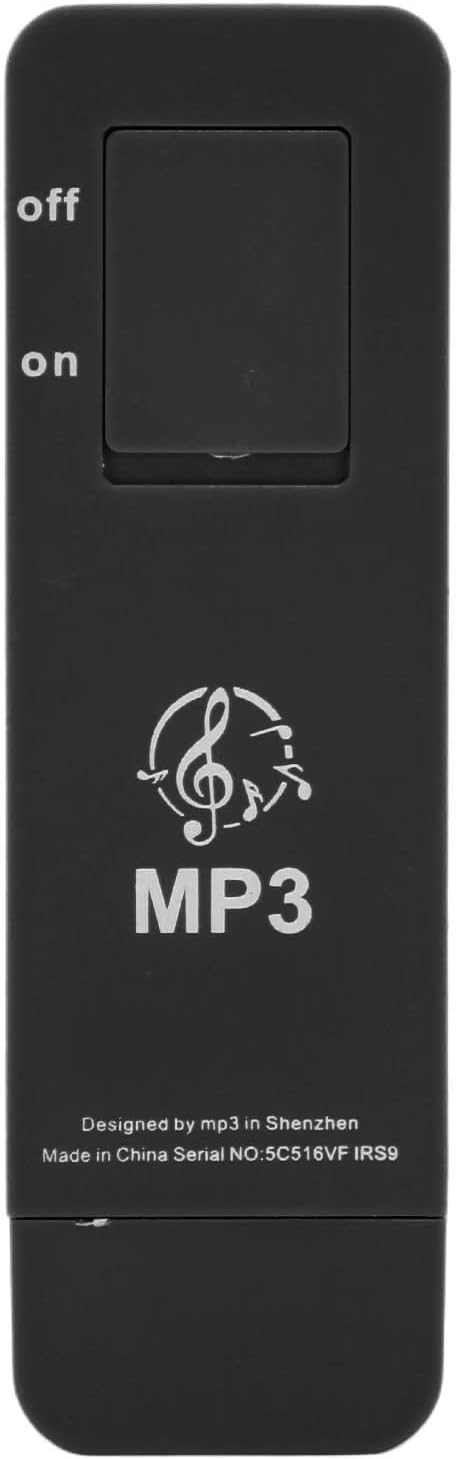
Image: The rear side of the MP3 player, highlighting the physical 'On' and 'Off' slide switch.
Basic Controls
The MP3 player features a simple control interface on its front:

Image: The front of the MP3 player, displaying the circular control pad with playback and volume buttons.
- Play/Pause (►▮▮): Press the center button to play or pause the current track.
- Next Track (►►): Press the right button to skip to the next track.
- Previous Track (◀◀): Press the left button to go back to the previous track.
- Volume Up (+): Press the top button to increase the volume.
- Volume Down (-): Press the bottom button to decrease the volume.
Playback
The player will automatically begin playing music files stored on the device or the inserted Micro SD card once powered on. Playback is sequential, and the device does not feature a display for track selection or directory browsing.

Image: This image illustrates the versatility of the MP3 player, showing individuals enjoying music during exercise, at a workplace, while cooking, and during meditation, highlighting its suitability for diverse daily activities.
Maintenance
Cleaning
Wipe the device with a soft, dry cloth. Do not use liquid cleaners or abrasive materials, as they may damage the surface or internal components.
Storage
Store the MP3 player in a cool, dry place away from direct sunlight and extreme temperatures. If storing for an extended period, ensure the battery is partially charged (around 50%) to prolong its lifespan.
Battery Care
To maintain battery health, avoid fully discharging the battery frequently. Charge the device regularly, even if not in constant use.
Troubleshooting
- Device does not power on: Ensure the battery is charged. Connect the player to a USB power source for at least 30 minutes. Verify the power switch is in the 'On' position.
- No sound: Check if the earphones are properly plugged into the 3.5mm jack. Increase the volume using the '+' button. Ensure music files are loaded onto the device or Micro SD card.
- Cannot transfer files: Ensure the MP3 player is properly connected to your computer's USB port. Try a different USB port. Ensure the device is powered on when connected.
- Player not recognized by computer: Try restarting your computer. Ensure the USB connection is secure.
- Music playback is choppy or distorted: Ensure the audio files are not corrupted. Try re-transferring the files. Check if the earphones are damaged.
Specifications
| Feature | Specification |
|---|---|
| Model Number | Sorandy9y5o6gd8eu-12 |
| Material | ABS |
| Battery Capacity | 180mAh |
| Memory Storage Capacity | 64 GB (internal, plus Micro SD card support) |
| Maximum Micro SD Card Support | 64GB |
| Connectivity Technology | Aux, USB |
| Display Technology | No display |
| Color | Black |
| Item Weight | 1.13 ounces |
| Package Dimensions | 5.31 x 2.99 x 0.71 inches |
| Included Components | Lanyard, Earphone |

Image: A visual representation of the MP3 player's key specifications, including material (ABS), battery capacity (180mAh), maximum memory support (64GB), and included accessories (earphone, lanyard).

Image: This image highlights the compact and portable design of the MP3 player, showing its approximate dimensions and close-ups of the integrated USB connector and headphone jack.
Warranty and Support
For warranty information and customer support, please refer to the seller's policy on the platform where the product was purchased. Keep your proof of purchase for any warranty claims.
Ask a question about this manual
Ask about setup, troubleshooting, compatibility, parts, safety, or missing instructions. Manuals+ will review the question and use this page’s manual context to help answer it.