
DigiPower 1160100
DigiPower 20,000mAh Portable Power Bank User Manual
Model: 1160100
Introduction
Thank you for choosing the DigiPower 20,000mAh Portable Power Bank. This device is designed to provide reliable and efficient power for your electronic devices on the go. With its high capacity, fast charging capabilities, and versatile port options, it ensures your smartphones, tablets, and other gadgets remain charged wherever you are. Please read this manual carefully to understand the features, operation, and maintenance of your new power bank.
Package Contents
- DigiPower 20,000mAh Portable Power Bank
- USB Charging Cable (USB-A to USB-C or Micro USB)
- User Manual
Product Overview
The DigiPower 20,000mAh Portable Power Bank features multiple ports for charging various devices and an LCD display for real-time battery status.

Figure 1: Top-down view of the DigiPower 20,000mAh Portable Power Bank, displaying its sleek design and the clear LCD screen indicating a full charge.

Figure 2: Detailed view of the power bank's input/output ports, including USB-C and USB-A, alongside the digital LCD display.
Key Features:
- 20,000mAh Capacity: Provides multiple charges for smartphones and tablets.
- Power Delivery (PD) USB-C Port: For fast charging compatible devices (up to 20W max).
- Quick Charge 3.0 (QC3.0) USB-A Ports: Two ports for rapid charging QC3.0 compatible devices (up to 22.5W max each).
- Micro USB Input Port: For recharging the power bank.
- LCD Digital Display: Shows precise battery percentage.
- Auto Shut-Off: Conserves power when not in use.
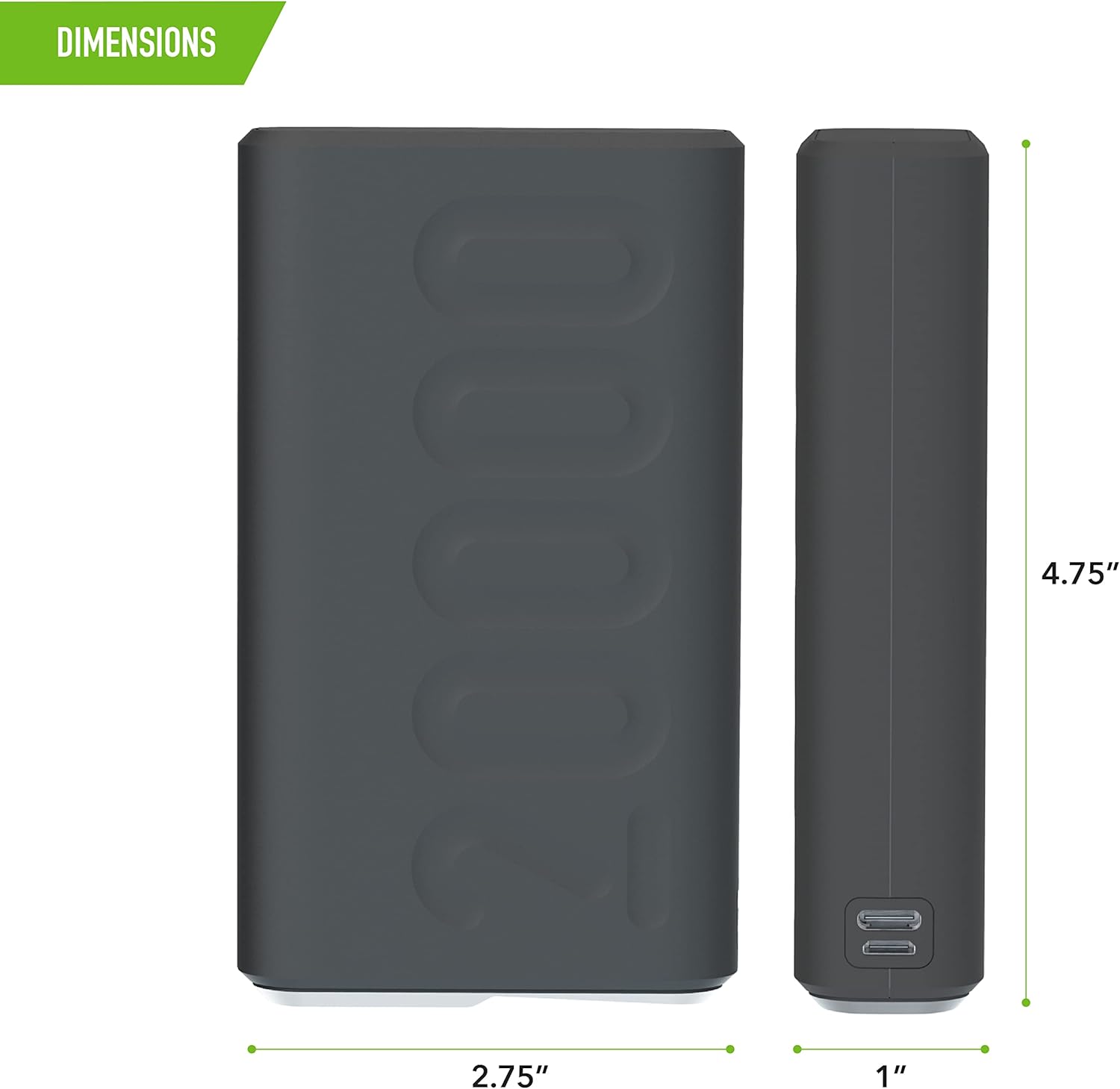
Figure 3: Diagram illustrating the compact dimensions of the power bank: approximately 6.5 inches in length, 4 inches in width, and 1.5 inches in thickness.
Setup and Initial Charge
- Unpack: Remove the power bank and all accessories from the packaging.
- Initial Charge: Before first use, fully charge the power bank. Connect the provided USB charging cable to the Micro USB input port or the USB-C input/output port on the power bank. Connect the other end to a USB wall adapter (not included) or a computer's USB port.
- Monitor Charge: The LCD display will show the charging progress. It is fully charged when the display reads "100%".
- Disconnect: Once fully charged, disconnect the power bank from the power source.
Operating Instructions
Charging Your Devices:
The power bank can charge up to three devices simultaneously using its USB-C and USB-A ports.
- Connect Device: Use your device's charging cable (USB-C to USB-C, USB-A to USB-C, USB-A to Lightning, etc.) and connect it to one of the output ports on the power bank (USB-C or USB-A).
- Start Charging: The power bank will automatically detect the connected device and begin charging. The LCD display will illuminate to show the remaining battery percentage.
- Fast Charging: For devices supporting Power Delivery (PD) or Quick Charge 3.0 (QC3.0), use the appropriate USB-C or USB-A QC3.0 ports and compatible cables to achieve faster charging speeds.
- Charging Multiple Devices: You can connect up to three devices to the available output ports simultaneously. The power bank will distribute power accordingly.
- Charging Completion: Disconnect your device once it is fully charged. The power bank will automatically shut off after a period of inactivity to conserve power.

Figure 4: The power bank connected via a USB-C cable to a smartphone, demonstrating active charging.

Figure 5: A user holding the compact power bank while their smartphone is connected and charging, highlighting its portability and ease of use.
Care and Maintenance
- Storage: Store the power bank in a cool, dry place away from direct sunlight and extreme temperatures.
- Cleaning: Use a soft, dry cloth to clean the surface of the power bank. Do not use liquid cleaners or aerosols.
- Avoid Drops: Do not drop or subject the power bank to strong impacts.
- Water Exposure: Keep the power bank away from water and high humidity.
- Regular Charging: If not used for extended periods, charge the power bank at least once every three months to maintain battery health.
Troubleshooting
| Problem | Possible Cause | Solution |
|---|---|---|
| Power bank not charging | Low battery; Faulty cable; Faulty adapter; Loose connection. | Ensure cable is securely connected. Try a different charging cable or wall adapter. |
| Device not charging from power bank | Power bank low on charge; Faulty cable; Incompatible device; Loose connection. | Recharge the power bank. Try a different charging cable. Ensure your device is compatible with USB charging. Check for secure connection. |
| Slow charging | Non-fast charging cable/adapter; Device not supporting fast charge; Multiple devices charging. | Use a fast-charging compatible cable and ensure your device supports PD/QC3.0. Disconnect other devices if faster charging is needed for one. |
| LCD display not working | Power bank is off; Malfunction. | Connect a device or charging cable to activate the display. If issue persists, contact customer support. |
Specifications
| Feature | Detail |
|---|---|
| Model Number | 1160100 |
| Battery Capacity | 20,000 mAh |
| Product Dimensions | 6.5 x 4 x 1.5 inches |
| Item Weight | 15.2 ounces |
| USB-C Input/Output | PD20W max |
| USB-A QC3.0 Output | 22.5W max (each port) |
| Micro USB Input | Standard charging |
| Voltage | 5 Volts |
| Special Features | Digital Display, Auto Shut-Off, Fast Charging |
Warranty and Support
DigiPower products are manufactured with high-quality standards. For warranty information or technical support, please refer to the warranty card included with your product or visit the official DigiPower website. Please retain your proof of purchase for warranty claims.
Manufacturer: Mizco
Date First Available: March 15, 2023
Ask a question about this manual
Ask about setup, troubleshooting, compatibility, parts, safety, or missing instructions. Manuals+ will review the question and use this page’s manual context to help answer it.