
Lapcare LPS222
LAPCARE Lapsonic LPS222 User Manual
Model: LPS222 - 30 Watt Trolley Karaoke Bluetooth Party Speaker
Introduction
Thank you for purchasing the LAPCARE Lapsonic LPS222 Trolley Karaoke Bluetooth Party Speaker. This manual provides essential information for the safe and efficient operation of your speaker. Please read it thoroughly before using the product and retain it for future reference.
The LPS222 is a versatile 30-watt portable speaker designed for party and entertainment use, featuring Bluetooth connectivity, USB and Micro SD card playback, FM radio, a wired microphone for karaoke, and dynamic RGB lights.
Safety Information
- Do not expose the speaker to water, moisture, or extreme temperatures.
- Avoid placing the speaker near heat sources such as radiators, heat registers, stoves, or other apparatus (including amplifiers) that produce heat.
- Use only attachments/accessories specified by the manufacturer.
- Unplug the speaker during lightning storms or when unused for long periods.
- Do not block any ventilation openings. Install in accordance with the manufacturer's instructions.
- Refer all servicing to qualified service personnel. Servicing is required when the apparatus has been damaged in any way.
Package Contents
Upon opening the package, please ensure all items listed below are present and in good condition:
- 1 x LAPCARE Lapsonic LPS222 Trolley Speaker
- 1 x Wired Microphone
- 1 x Remote Control
- 1 x Charging Cable (Power Adapter not included, use a standard 5V USB adapter)
- 1 x User Manual (this document)

Image: The LAPCARE Lapsonic LPS222 speaker, showing its front panel with RGB lights, the included wired microphone, and the remote control.
Product Overview
Familiarize yourself with the various parts and controls of your LPS222 speaker.

Image: The LAPCARE Lapsonic LPS222 speaker, illustrating its various connectivity ports and features such as USB, mSD Card slot, Aux Input, FM Radio, Microphone Input Jack, and Wireless Bluetooth.
Control Panel (Top/Rear Panel)
- Power Button: Turns the speaker ON/OFF.
- Mode Button: Switches between Bluetooth, USB, Micro SD, FM Radio, and AUX modes.
- Play/Pause Button: Plays or pauses audio playback. In FM mode, long press to auto-scan.
- Previous/Volume Down Button: Short press for previous track/station; long press to decrease volume.
- Next/Volume Up Button: Short press for next track/station; long press to increase volume.
- Microphone Input: 6.35mm jack for connecting the wired microphone.
- USB Port: For USB flash drive playback.
- Micro SD Card Slot: For Micro SD card playback.
- AUX Input: 3.5mm jack for connecting external audio devices.
- Charging Port: DC 5V input for charging the speaker.
- RGB Light Button: Controls the RGB lighting effects.
Setup
Initial Charging
Before first use, it is recommended to fully charge the speaker. Connect the charging cable to the speaker's charging port and the other end to a standard 5V USB power adapter (not included). The charging indicator will illuminate. Charging typically takes about 4 hours.
Powering On/Off
Press and hold the Power Button on the control panel to turn the speaker ON or OFF.
Operating Instructions
Bluetooth Mode
- Turn on the speaker. It will automatically enter Bluetooth pairing mode, indicated by a voice prompt or flashing LED.
- Enable Bluetooth on your mobile device (smartphone, tablet, etc.).
- Search for "LPS222" in the list of available Bluetooth devices and select it to pair.
- Once successfully paired, you will hear a confirmation sound. You can now play audio from your device through the speaker.
USB/Micro SD Card Playback
- Insert a USB flash drive or Micro SD card (with MP3 audio files) into the respective port/slot.
- The speaker will automatically switch to USB or Micro SD mode and begin playing audio. If not, press the Mode Button to select the correct source.
- Use the Play/Pause, Previous, and Next buttons to control playback.
FM Radio Mode
- Press the Mode Button to switch to FM Radio mode.
- Long press the Play/Pause Button to initiate an automatic scan for available FM stations. The speaker will save all found stations.
- Use the Previous and Next buttons to navigate between saved stations.
AUX Input Mode
- Connect an external audio device (e.g., laptop, MP3 player) to the speaker's AUX Input using a 3.5mm audio cable (not included).
- Press the Mode Button to switch to AUX mode.
- Audio will now play from your connected device. Control playback from the external device.
Karaoke Function (Wired Microphone)

Image: The LAPCARE Lapsonic LPS222 speaker, showcasing its karaoke capabilities with the wired microphone, 2400mAh built-in rechargeable battery, and remote control.
- Connect the included wired microphone to the Microphone Input jack on the speaker.
- Ensure the microphone's switch is in the ON position.
- Adjust the microphone volume using the dedicated knob (if available) or the main volume controls.
- You can sing along to music playing from any source (Bluetooth, USB, AUX, FM).
RGB Lights
Press the RGB Light Button to cycle through different lighting modes or to turn the lights ON/OFF.
Charging and Battery
The LPS222 speaker is equipped with a built-in rechargeable Lithium Ion battery. For optimal battery life, follow these guidelines:
- Charging: Connect the speaker to a 5V USB power source using the provided cable. A full charge takes approximately 4 hours.
- Battery Life: A fully charged battery provides approximately 4 hours of playback time, depending on volume level and usage of RGB lights.
- Low Battery: When the battery is low, the speaker may indicate this with a voice prompt or LED. Charge the speaker promptly to avoid interruption.
- Storage: If storing the speaker for an extended period, charge it to at least 50% every 3 months to preserve battery health.

Image: The LAPCARE Lapsonic LPS222 speaker, emphasizing its 4 hours of playtime on a single charge, ensuring extended entertainment.
Maintenance
- Cleaning: Use a soft, dry cloth to clean the speaker's exterior. Do not use abrasive cleaners, waxes, or solvents.
- Storage: Store the speaker in a cool, dry place away from direct sunlight and extreme temperatures.
- Handling: Avoid dropping the speaker or subjecting it to strong impacts.
Troubleshooting
| Problem | Possible Cause | Solution |
|---|---|---|
| Speaker does not turn on. | Battery is depleted. | Charge the speaker for at least 30 minutes before attempting to turn it on. |
| No sound. | Volume is too low; incorrect mode selected; device not connected properly. | Increase volume on speaker and connected device. Press Mode button to select correct input. Reconnect Bluetooth/AUX cable. |
| Bluetooth pairing fails. | Speaker is not in pairing mode; device is too far; interference. | Ensure speaker is in Bluetooth mode. Move device closer to speaker. Turn off other Bluetooth devices. Forget "LPS222" on your device and try pairing again. |
| Microphone not working. | Microphone not connected; microphone switch is OFF. | Ensure microphone is fully plugged into the MIC input. Check if the microphone's ON/OFF switch is in the ON position. |
| FM radio reception is poor. | Weak signal; environmental interference. | Relocate the speaker to an area with better reception. Extend any external antenna if available. |
Specifications
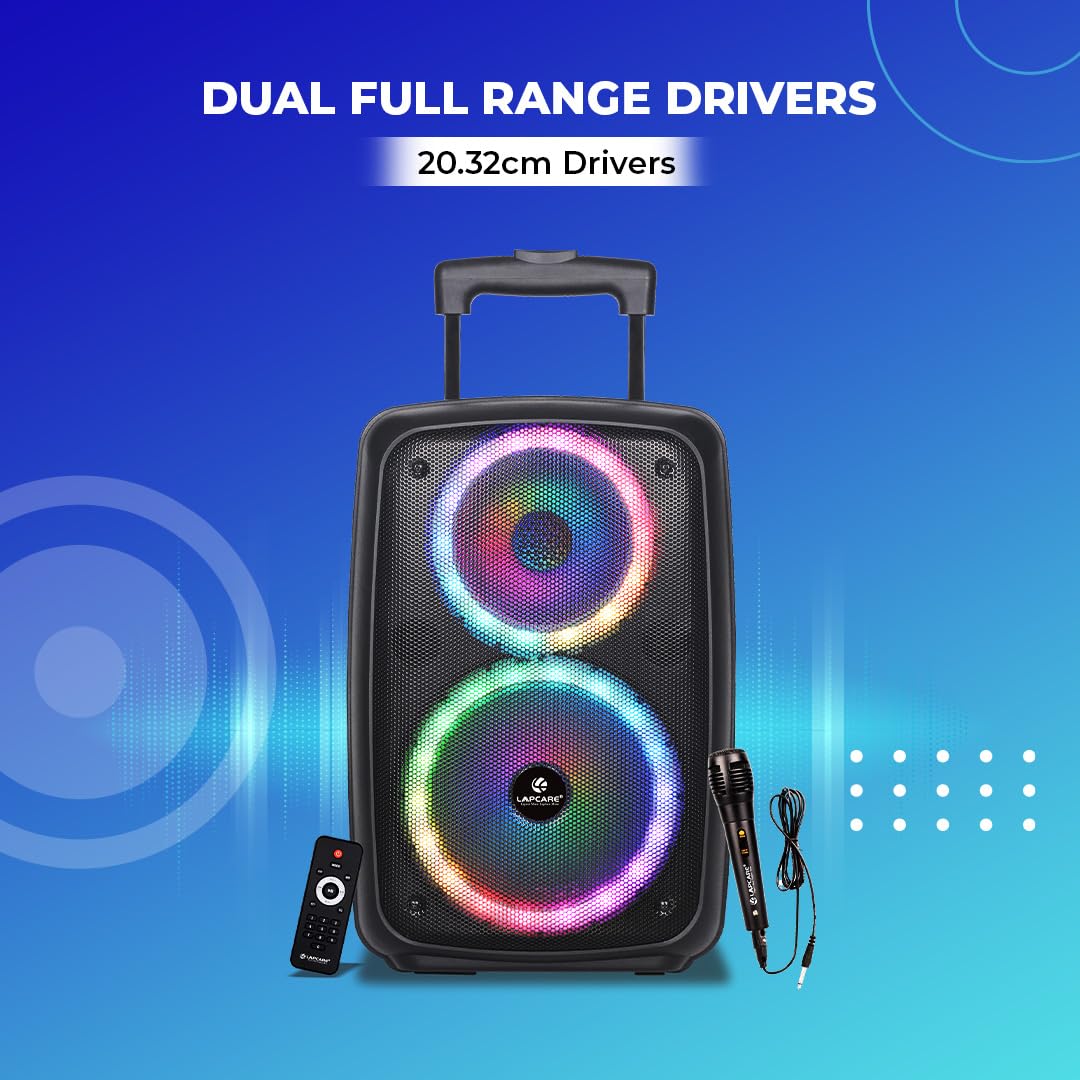
Image: The LAPCARE Lapsonic LPS222 speaker, illustrating its dual full-range 20.32cm (8-inch) drivers for powerful audio output.
| Feature | Detail |
|---|---|
| Model | LPS222 |
| Output Wattage | 30 Watts |
| Connectivity Technology | Bluetooth, USB, Micro SD, AUX, FM Radio |
| Power Source | Corded Electric (for charging), Battery Powered (for operation) |
| Battery Type | Lithium Ion |
| Battery Capacity | 2400 mAh |
| Battery Average Life | 4 Hours |
| Charging Time | 4 Hours |
| Frequency Response | 80 KHz |
| Impedance | 4 Ohm |
| Signal-to-noise ratio (dB) | 70 dB |
| Product Dimensions (LxWxH) | 44.6 x 22 x 26.5 cm |
| Item Weight | 2.9 kg |
| Material | Acrylonitrile Butadiene Styrene (ABS) |
| Special Features | Built-in Microphone (via wired mic), Hi Resolution Audio, Shockproof, USB Port, Wireless Mic with Remote (Note: Wired mic included, remote control for speaker functions) |
Warranty and Support
For warranty information and technical support, please contact Lapcare customer service. Details can typically be found on the product packaging or the official Lapcare website.
Manufacturer: Lapcare, Rx Infotech pvt ltd.
Address: Unit No -407, 4th Floor, Plot - 391, Diamond plaza, Dr. D.b. Marg, Girgaon Mumbai – 400004
Direct Contact: 022-66663335
Ask a question about this manual
Ask about setup, troubleshooting, compatibility, parts, safety, or missing instructions. Manuals+ will review the question and use this page’s manual context to help answer it.