
1. Introduction
The VTech Genius XL Interactive Video Telescope is designed for children aged 7 and above to explore the mysteries of the universe. This device features a 2.4-inch color LCD screen and offers a 110x zoom capability for observing celestial objects. It includes various modes for exploration, learning, and interactive play, incorporating educational content from NASA.
Safety Warning: Not suitable for children under 36 months due to small parts.
2. Package Contents
Ensure all the following items are present in your package:
- 1 x VTech Genius XL Interactive Video Telescope
- 1 x Tripod
- 20 x Double-sided Planet Cards
- 4 x LR6-AA Batteries (pre-installed or included)

Image 2.1: The VTech Genius XL Interactive Video Telescope assembled on its tripod.
3. Product Overview
Familiarize yourself with the main components of your telescope.

Image 3.1: Key components of the telescope, including the adjustable color screen, speaker, microSD card slot, adjustment knob, setting knob, and orientation handle.
- Adjustable Color Screen: 2.4-inch LCD for viewing observations and navigating menus.
- Speaker: For audio feedback and educational content.
- MicroSD Card Slot: (Card not included) For saving photos and videos.
- Adjustment Knob: For fine-tuning focus or zoom.
- Setting Knob: For general adjustments.
- Orientation Handle: For directing the telescope.
- Joystick and Buttons: For menu navigation and game control.
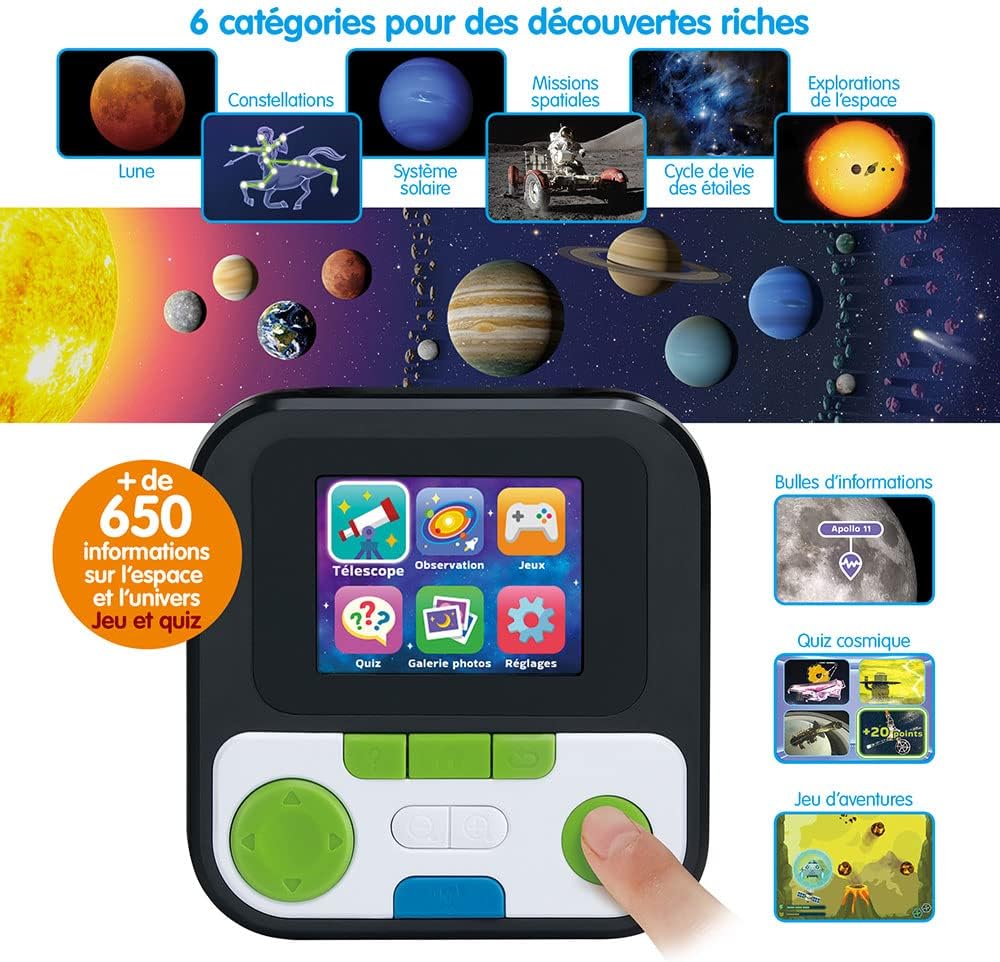
Image 3.2: The interactive screen displaying icons for Telescope mode, Observation, Games, Quiz, Photo Gallery, and Settings.
4. Setup
- Install Batteries: The telescope requires 4 LR6-AA batteries. These are typically included. Locate the battery compartment, open it, insert the batteries according to the polarity markings, and close the compartment securely.
- Attach Tripod: Extend the tripod legs and secure them. Attach the telescope unit to the tripod mount. Ensure it is stable on a flat surface.
- Power On: Press the power button to turn on the telescope.
- Language Setting: The product content is in French. While this manual is in English, the device's interactive content will be in French.

Image 4.1: A child setting up and using the telescope, demonstrating its ergonomic design for young users.
5. Operating Instructions
The VTech Genius XL Interactive Video Telescope offers 5 main modes of operation:
- Telescope Mode: Use the telescope to observe distant objects. Adjust the focus using the adjustment knob. The 110x zoom allows for detailed viewing. This mode includes Day and Night settings for optimal viewing conditions.
- Exploration Mode: Discover 6 themes related to space, documented with over 200 images and videos, and more than 650 educational facts from NASA. Topics include the solar system, constellations, stars, and space exploration.
- Space Adventure Game: Engage in an interactive game designed to make learning about space enjoyable.
- Quiz Mode: Test knowledge acquired in Exploration Mode with various quizzes.
- Photo Gallery: Store and review all photos taken using the telescope's integrated camera function.

Image 5.1: The telescope highlights its 110x zoom capability and two modes for day and night observation.
Using Planet Cards
The 20 double-sided planet cards provide additional information about the main planets of our solar system. These can be used in conjunction with the Exploration Mode for an enhanced learning experience.

Image 5.2: A set of 20 collectible cards featuring information about planets and other celestial bodies.
6. Maintenance
- Cleaning: Wipe the telescope and screen with a soft, dry cloth. Do not use abrasive cleaners or solvents.
- Battery Replacement: When the device indicates low battery or performance degrades, replace all 4 LR6-AA batteries with new ones.
- Storage: Store the telescope in a cool, dry place away from direct sunlight when not in use.
- MicroSD Card: If using a microSD card, handle it carefully. Ensure it is inserted and removed correctly to prevent damage.
7. Troubleshooting
- Device Not Turning On: Check if the batteries are correctly installed and fully charged. Replace with new batteries if necessary.
- Screen Not Displaying: Ensure the device is powered on. If the screen remains blank, try turning it off and on again.
- Poor Image Quality: Ensure the lens is clean. Adjust the focus knob. Check for sufficient lighting if observing indoors.
- Sound Issues: Check the volume settings. Ensure the speaker is not obstructed.
- MicroSD Card Not Recognized: Ensure the card is inserted correctly. Try reinserting it or using a different compatible microSD card.
8. Specifications
| Model Number | 614565 |
| Brand | VTech |
| Dimensions (L x W x H) | 57.2 x 65.4 x 92.4 cm (22.5 x 25.7 x 36.4 inches) |
| Weight | 1.34 kg (2.95 lbs) |
| Screen | 2.4-inch Color LCD |
| Zoom | 110x |
| Power Source | 4 x LR6-AA Batteries |
| MicroSD Card Slot | Yes (card not included) |
| Spare Parts Availability | Unavailable |
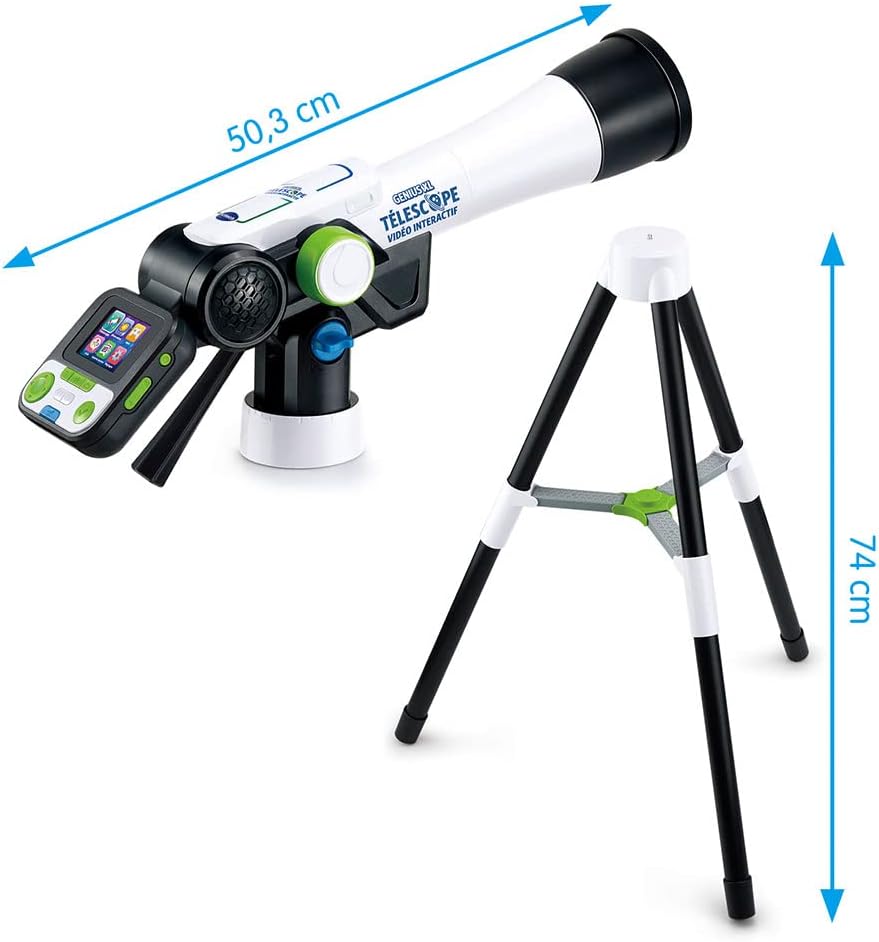
Image 8.1: Visual representation of the telescope's dimensions, including a length of 50.3 cm and a tripod height of 74 cm.
9. Warranty and Support
For product support, warranty information, or further assistance, please contact VTech customer service. Refer to the packaging or the official VTech website for contact details specific to your region.


