
1. Product Overview
The ZBAITU F20-VF is a high-performance 20W optical laser module designed for engraving and cutting applications. This module features a powerful diode laser with a fine 0.08mm laser spot, enabling precise and efficient work on various materials. It incorporates a dual-fan cooling system for stable operation and an integrated air assist nozzle to enhance cutting performance and protect the lens.
The F20-VF module is engineered for compatibility with most existing laser engraving and cutting machines on the market, allowing for direct installation and use. It is important to note that this module is not suitable for CNC router machines.
2. Safety Information
WARNING: Laser radiation can cause eye and skin damage. Always wear appropriate laser safety goggles when operating this device. Never look directly into the laser beam or its scattered reflection.
- Ensure the work area is well-ventilated to dissipate fumes and smoke generated during operation.
- Keep a fire extinguisher nearby. Laser cutting and engraving can ignite flammable materials.
- Do not leave the laser module unattended during operation.
- Keep children and pets away from the operating area.
- Ensure all electrical connections are secure and correctly wired to prevent electrical hazards.
- Operate the laser module only on a stable, non-flammable surface.
Refer to the warning label on the module for specific safety instructions.

An overview of the ZBAITU F20-VF laser module and its included accessories, showing the warning label on the module.
3. Package Contents
Verify that all components listed below are present in your package:

A visual representation of all items included in the ZBAITU F20-VF laser module kit.
- ZBAITU F20-VF Laser Module (x1)
- Sliding Slot (x1)
- Adapter Cables (x3)
- Fixed Focus Plate (x1)
- Transfer Line (x1)
- Transparent Hose (200cm) (x1)
- Power Supply (24V 5A) (x1)
- Various Screws (M3 x 10, M3 x 20, M4 x 8, M5 x 5, M3 x 8)
- Hose Clip (x1)
4. Setup and Installation
4.1. Module Installation
- Ensure your laser engraving machine is powered off and disconnected from the power source.
- Mount the ZBAITU F20-VF laser module onto your machine's gantry using the provided sliding slot and appropriate screws. Ensure it is securely fastened and aligned.
- Connect the necessary adapter cables from the laser module to your machine's control board. Refer to your machine's manual for specific port locations. The module requires DC 24V, GND, and a 0-5V PWM signal.

This image details the electrical connection points for the ZBAITU F20-VF laser module, including DC 24V, GND, and 0-5V PWM inputs, along with specified TTL voltage and PWM frequency ranges.
4.2. Power Connection
- Connect the provided 24V 5A power supply to the laser module.
- Important: Use only the original ZBAITU 24V 5A power supply or another compatible 24V 5A power supply. Using an under-spec power supply may prevent the laser module from reaching its full 20W output power.
4.3. Air Assist Setup
- Attach one end of the transparent hose to the air assist nozzle on the laser module.
- Secure the hose with the provided clip.
- Connect the other end of the hose to an external air assist pump (not included). An air assist pump is highly recommended for optimal cutting performance and to reduce smoke and debris buildup on the lens.

An exploded diagram illustrating the internal components of the ZBAITU F20-VF laser module, highlighting the dual fan cooling system, metal shell, air assist nozzle, and lens hood.
4.4. Focusing
- The ZBAITU F20-VF module features a fixed focus design with a focal length of 30mm.
- To set the focus, place the provided fixed focus plate on the material surface.
- Lower the laser module until its nozzle gently touches the fixed focus plate.
- Remove the fixed focus plate. The laser is now correctly focused for the material.
5. Operating Instructions
5.1. Material Compatibility
The ZBAITU F20-VF laser module is capable of engraving and cutting a wide range of materials:

A collage showcasing various materials that can be engraved or cut with the ZBAITU F20-VF laser module.
Engraving:
- Stainless steel, Coated metal
- MDF, Balsa, Plywood, Bamboo, Wood
- Foam Paper, Fabric, Plastic, Leather
- Glass, Colored acrylic, Paper, Sticker
- Ceramic, Slate
Cutting:
- MDF, Balsa, Wood, Fabric, Plywood, Bamboo
- Plastic, Leather, Foam, Paper
- Colored acrylic, Sticker

Demonstration of the ZBAITU F20-VF laser module's cutting power, showing examples of cutting 20mm wood and 15mm acrylic. An internal diagram illustrates the multi-diode laser structure.
5.2. Software and Parameter Settings
Use your laser engraving machine's control software (e.g., LightBurn, LaserGRBL) to prepare your designs and set parameters. Optimal settings for power, speed, and passes will vary depending on the material type, thickness, and desired effect. It is recommended to perform small test cuts or engravings on scrap material to determine the best settings before starting a project.
- Laser Power: Adjust the laser power according to the material. Higher power is generally needed for cutting thicker materials or for deeper engraving.
- Engraving Speed: Faster speeds are suitable for lighter engraving, while slower speeds allow for deeper marks.
- Cutting Speed: Slower speeds are required for cutting through materials. Multiple passes at lower power might be more effective than a single pass at very high power for some materials.
- Air Assist: Activate your air assist pump during cutting and engraving to improve cut quality, reduce charring, and keep the lens clean.
6. Maintenance
Regular maintenance ensures the longevity and optimal performance of your ZBAITU F20-VF laser module.
6.1. Lens Cleaning
- Over time, dust and debris can accumulate on the laser lens, affecting performance.
- Ensure the laser module is powered off and cooled down before cleaning.
- Gently clean the lens using a lint-free cloth and a small amount of isopropyl alcohol or a specialized optical lens cleaner. Avoid abrasive materials.
- The integrated air assist helps significantly reduce lens contamination, but periodic manual cleaning is still recommended.
6.2. Cooling System
- The module features a dual-fan cooling system to maintain stable laser power during extended operation.
- Periodically check the cooling fans for any obstructions (dust, debris) and clean them gently with compressed air if necessary.
- Ensure adequate airflow around the module during operation.

An illustration of the dual fan cooling system integrated into the ZBAITU F20-VF laser module, along with a graph comparing its optical power stability over time against other modules.
7. Troubleshooting
- Laser not firing or weak output:
- Check all power connections. Ensure the 24V 5A power supply is correctly connected and functioning.
- Verify that the adapter cables are securely connected to both the module and the control board.
- Confirm that the laser module is receiving the correct PWM signal from the control board.
- Ensure the lens is clean and free of obstructions. - Poor engraving/cutting quality:
- Re-check the focus. Ensure the fixed focus plate method was used correctly.
- Adjust laser power and speed settings in your software. Test on scrap material.
- Ensure air assist is active and providing sufficient airflow to clear debris.
- Check for any loose connections or vibrations in the machine. - Module overheating:
- Ensure the dual cooling fans are operating correctly and are not obstructed.
- Verify that the ambient temperature of the workspace is within acceptable limits.
- Reduce laser power or increase cooling time between operations if necessary. - Module not recognized by machine:
- Confirm that the adapter cables are compatible with your machine's control board.
- Check your machine's software settings for proper laser module selection or configuration.
8. Specifications
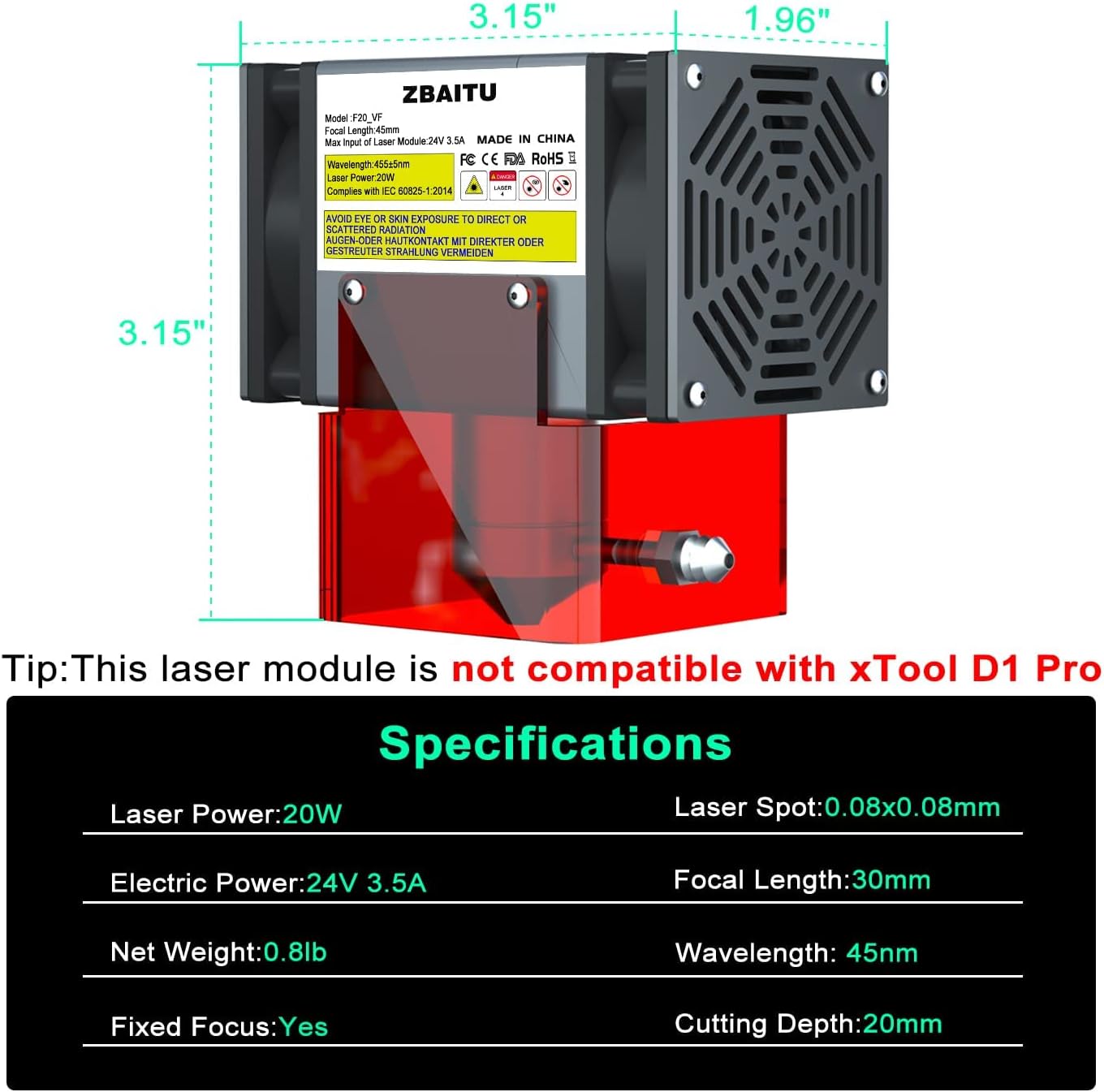
This image displays the physical dimensions and key specifications of the ZBAITU F20-VF laser module.
| Brand | ZBAITU |
| Model | F20-VF |
| Laser Output Power | 20W (20-22W) |
| Laser Spot Size | 0.08mm x 0.08mm |
| Wavelength | 455nm (Blue Laser) |
| Focal Length | 30mm (Fixed Focus) |
| Electrical Input | 24V 3.5A |
| PWM Frequency | 0-5KHz |
| TTL Range Voltage | 0-5V |
| Cooling System | Dual Fan Cooling |
| Air Assist | Integrated Nozzle |
| Dimensions | 8 x 5 x 8 cm (3.15 x 1.97 x 3.15 inches) |
| Weight | 364g (0.8 lbs) |
9. Warranty and Support
For information regarding warranty coverage, technical support, or service, please contact the manufacturer (ZBAITU) or your product retailer directly. Keep your purchase receipt as proof of purchase.
