1. Introduction
This manual provides essential information for the proper setup, operation, and maintenance of your ELEGOO MARS MATE Air Purifier. Please read these instructions carefully before using the device to ensure optimal performance and safety. The ELEGOO MARS MATE is designed to reduce Volatile Organic Compounds (TVOC) in environments where resin 3D printers are operated.

Image 1.1: The ELEGOO MARS MATE Air Purifier, a compact device designed for air purification.
2. Product Components
The ELEGOO MARS MATE Air Purifier consists of the main unit and a replaceable activated carbon filter.

Image 2.1: An internal diagram illustrating the air flow through the filter and fan components of the purifier.
3. Setup
- Unpack the Device: Carefully remove the air purifier from its packaging.
- Prepare the Filter: The activated carbon filter is located inside the main unit. Before first use, lift the upper part of the air purifier and remove the protective plastic bag from the filter. Reinstall the filter into its compartment.
- Reassemble: Place the upper part of the air purifier back onto the base, ensuring it is securely seated.
- Placement: Position the air purifier near your resin 3D printer. For optimal performance, connect the purifier to the extension port of your 3D printer via a connector hose (if applicable and provided with your 3D printer).
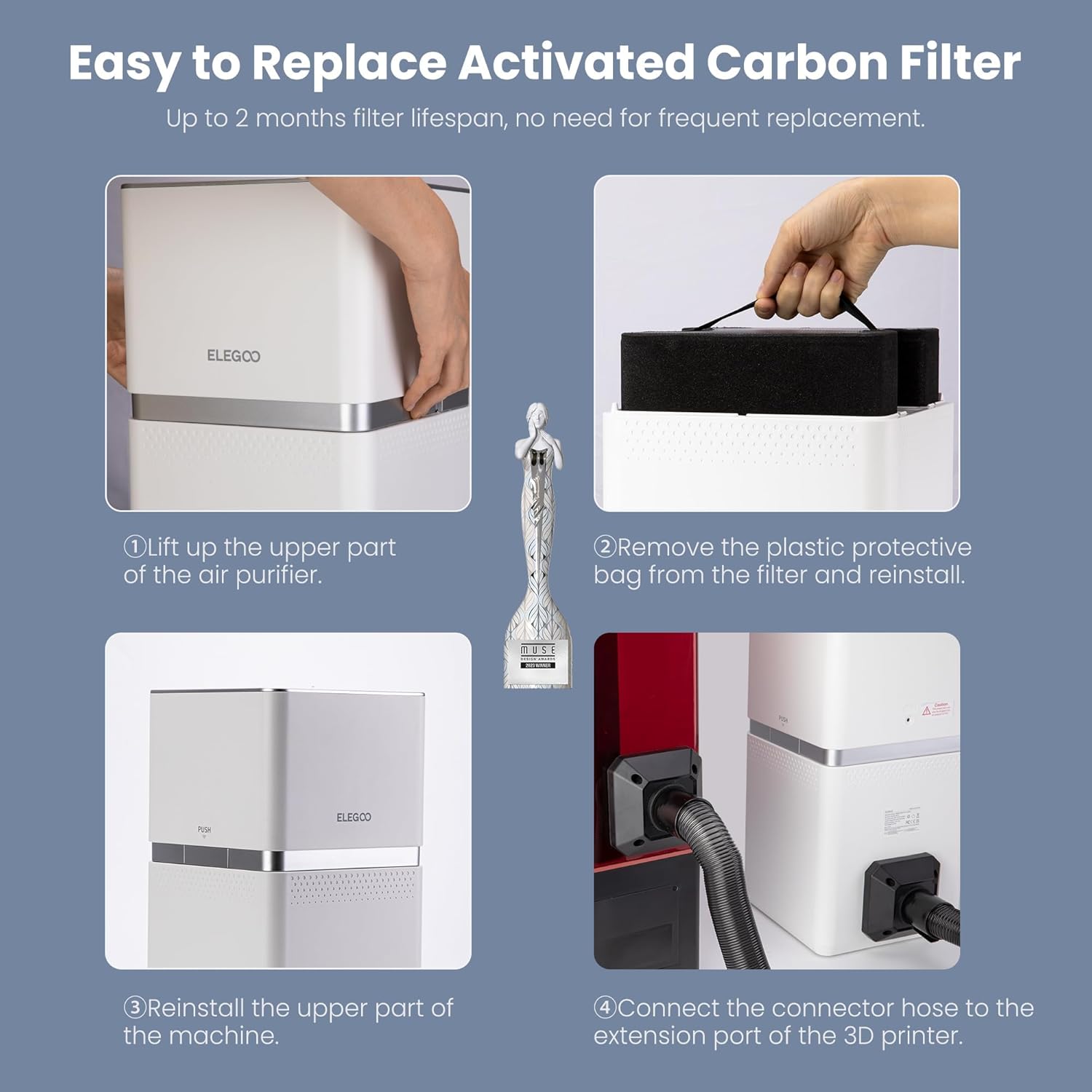
Image 3.1: Step-by-step guide for filter preparation and installation, including connecting to a 3D printer.
4. Operating Instructions
The ELEGOO MARS MATE Air Purifier features a simple button control interface.
- Power On/Off: Press the main power button to turn the device on or off.
- Automatic Fan Speed: The purifier automatically switches between low and high fan speed modes based on detected VOC levels.
- VOC Sensor and Air Quality Indicator: A built-in VOC sensor monitors air quality. The indicator light on the device will change color to reflect the current air quality:
- Green: Excellent air quality.
- Yellow: Moderate air quality.
- Red: Poor air quality, indicating a need for filter replacement or increased ventilation.
- Filter Reset Button: After replacing the filter, press the filter reset button to reset the filter lifespan timer.
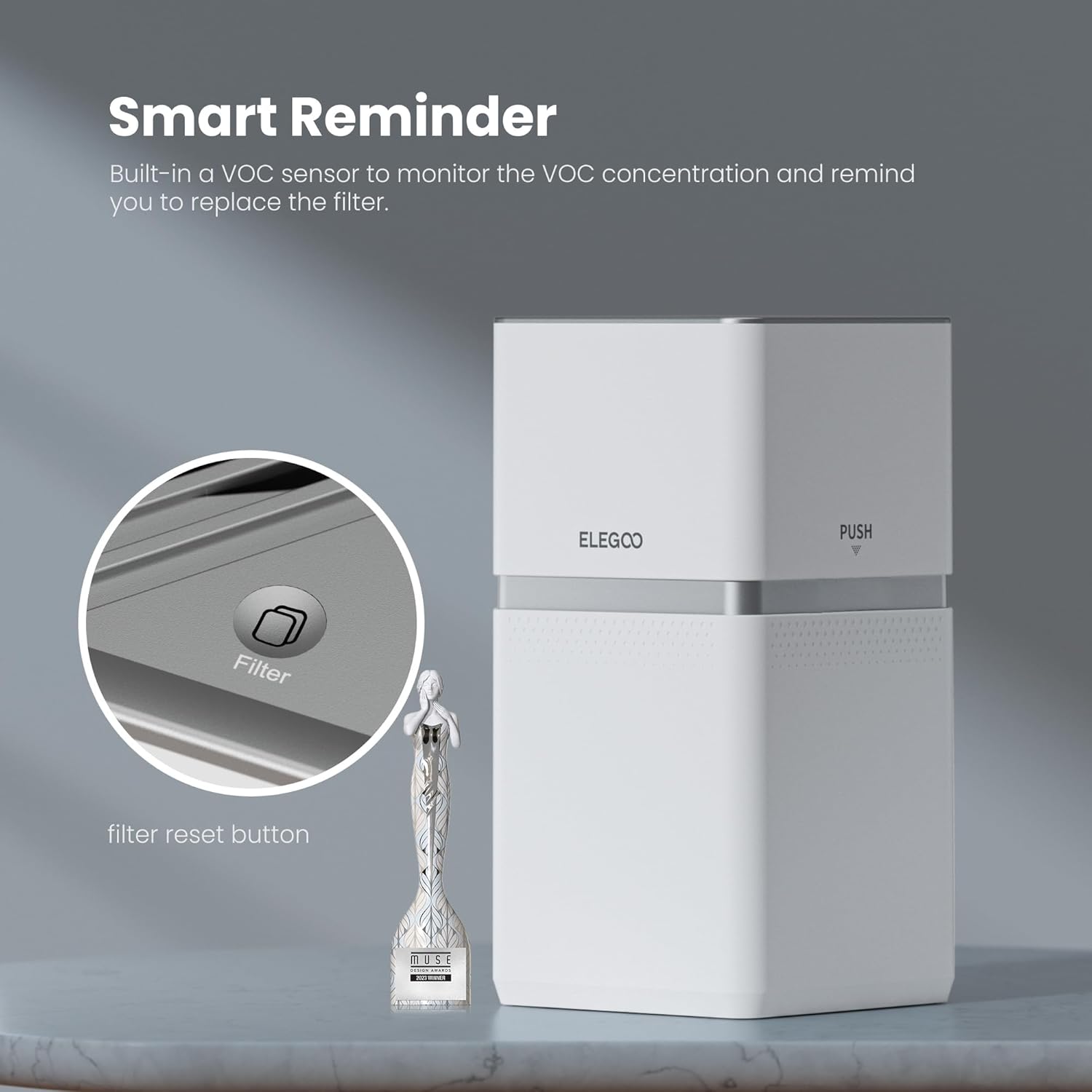
Image 4.1: Detail of the control panel, showing the filter reset button and power indicator.

Image 4.2: Visual representation of the air quality indicator lights and their meanings.
5. Maintenance
- Filter Lifespan: The activated carbon filter has a lifespan of up to 2 months under normal operating conditions. Replace the filter when the air quality indicator consistently shows 'Red' or after approximately 1440 hours of use.
- Filter Replacement Procedure:
- Ensure the air purifier is powered off and unplugged.
- Lift the upper part of the air purifier to access the filter compartment.
- Remove the used activated carbon filter.
- Insert a new activated carbon filter, ensuring any protective plastic is removed from the new filter.
- Place the upper part of the air purifier back onto the base.
- Plug in and power on the device, then press the filter reset button.
- Cleaning: Wipe the exterior of the air purifier with a soft, dry cloth. Do not use abrasive cleaners or immerse the device in water.

Image 5.1: Illustration of the replaceable activated carbon filter, emphasizing its importance for purification.
6. Compatibility
The ELEGOO MARS MATE Air Purifier is specifically designed for photocuring environments and is compatible with a range of ELEGOO resin 3D printers that feature an extension port. Compatible models include:
- ELEGOO Mars 4 DLP
- ELEGOO Mars 4 MAX
- ELEGOO Saturn 2
- ELEGOO Saturn 8K
- ELEGOO Jupiter
- ELEGOO Saturn 3
- ELEGOO Saturn 3 Ultra
- ELEGOO Saturn 4
- ELEGOO Saturn 4 Ultra
- ELEGOO Jupiter SE

Image 6.1: The air purifier displayed with several compatible ELEGOO 3D printer models.
7. Troubleshooting
If you encounter issues with your ELEGOO MARS MATE Air Purifier, consider the following:
- No Power: Ensure the power cable is securely connected and the power outlet is functional.
- Poor Purification/Strong Odor: Check if the activated carbon filter's protective plastic bag has been removed. Verify the filter is correctly installed. If the filter has been in use for over 2 months or the air quality indicator is consistently red, replace the filter.
- Unusual Noise: Ensure the device is placed on a stable, flat surface. Check for any obstructions around the fan intake or exhaust. If the noise persists, contact customer support.
- Filter Reminder Light Stays On After Replacement: Press the filter reset button firmly after installing a new filter.
8. Specifications
| Feature | Specification |
|---|---|
| Model Number | US-EL-3D-CP1 |
| Brand | ELEGOO |
| Product Dimensions (L x W x H) | 210 x 247 x 410 mm (8.26 x 9.72 x 16.14 inches) |
| Noise Level | 35 dB |
| Operating Power | 6W |
| TVOC Removal Efficiency | Up to 95% |
| Controller Type | Button Control |
| Filter Lifespan | Up to 2 months (approx. 1440 hours) |

Image 8.1: Diagram illustrating the physical dimensions of the air purifier.
9. Warranty and Support
For warranty information, technical support, or to purchase replacement filters, please refer to the official ELEGOO website or contact ELEGOO customer service directly. Keep your purchase receipt for warranty claims.


