
1. Introduction
Thank you for choosing the MEDca ZBD-108 Rechargeable Digital Behind-The-Ear (BTE) Hearing Amplifier. This device is designed to enhance sound clarity and reduce background noise, providing an improved listening experience for adults and seniors. It features a digital smart chip for effective noise reduction and is equipped with a long-lasting rechargeable battery for convenience.
2. Package Contents
Before use, please verify that all items listed below are included in your package:
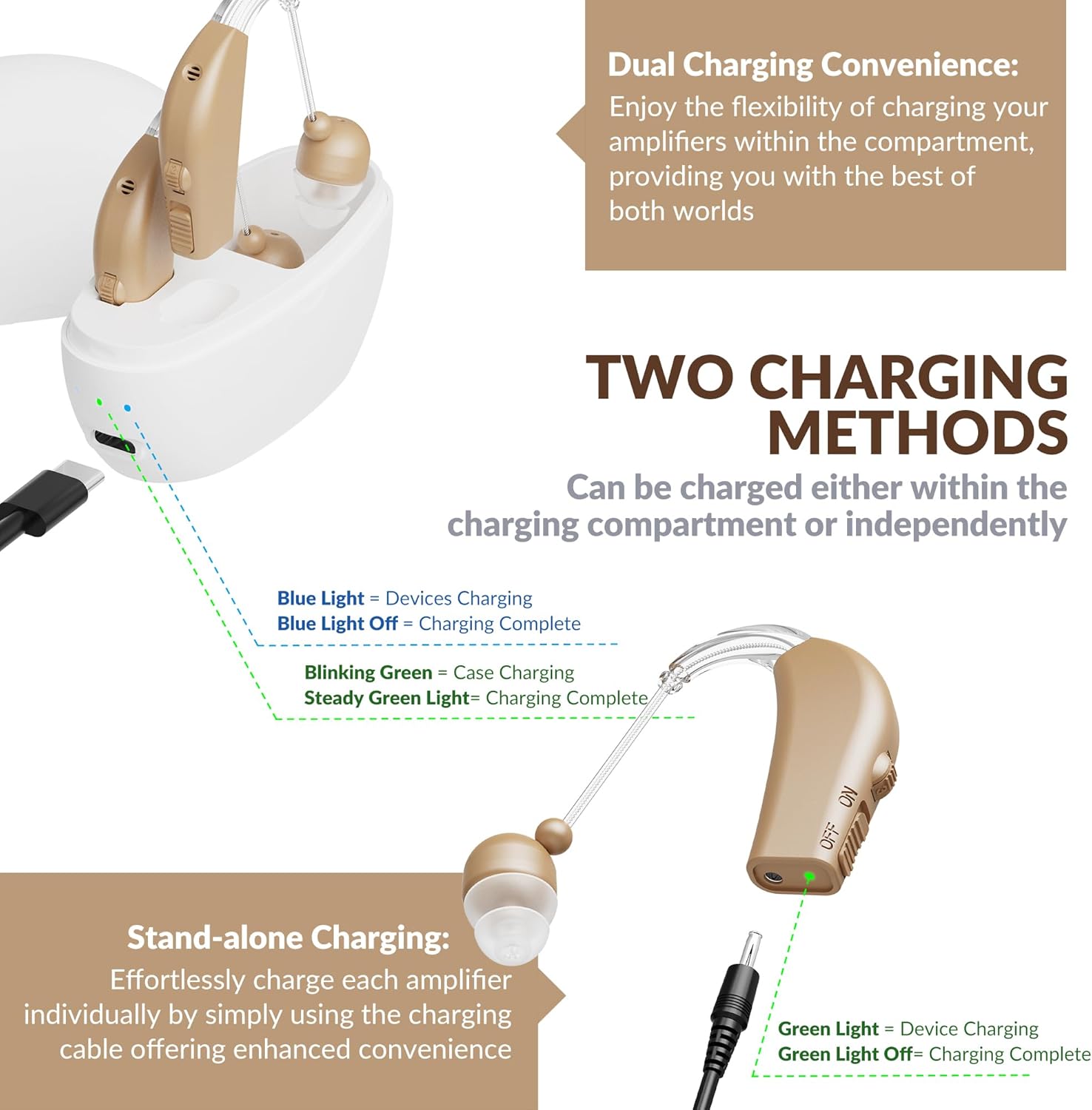
Image: Package contents of the MEDca ZBD-108 hearing amplifier.
- Hearing Device (x2)
- Charging Dock (x1)
- Charging Cable for Device (x1)
- Type-C Charging Cable for Dock (x1)
- Cleaning Brush (x2)
- Ear Domes (Multiple sizes) (x10)
- Instruction Manual (this document)
3. Product Overview
The MEDca ZBD-108 hearing amplifier is designed for comfort and ease of use. Familiarize yourself with its components and controls:

Image: Detailed view of the hearing amplifier components.
- Microphone: Captures external sounds.
- Power Button: Used to turn the device ON or OFF.
- Volume Adjustment: Scroll up to increase volume, scroll down to decrease volume.
- Double Layer Earplugs: Designed to suppress howling and provide a better fit.
4. Setup
4.1 Selecting Ear Domes
The package includes multiple sizes of soft silicone ear domes. Choose the size that provides a snug and comfortable fit in your ear canal. A proper fit is crucial for optimal sound quality and to prevent feedback (whistling).
4.2 Wearing the Device
The MEDca ZBD-108 is a Behind-The-Ear (BTE) device. Place the main body of the amplifier behind your ear, and gently insert the ear dome into your ear canal. Adjust the tubing for a comfortable and secure fit. The lightweight design ensures comfort during extended wear.
5. Charging Instructions
The MEDca ZBD-108 features a rechargeable battery, eliminating the need for frequent battery replacements.
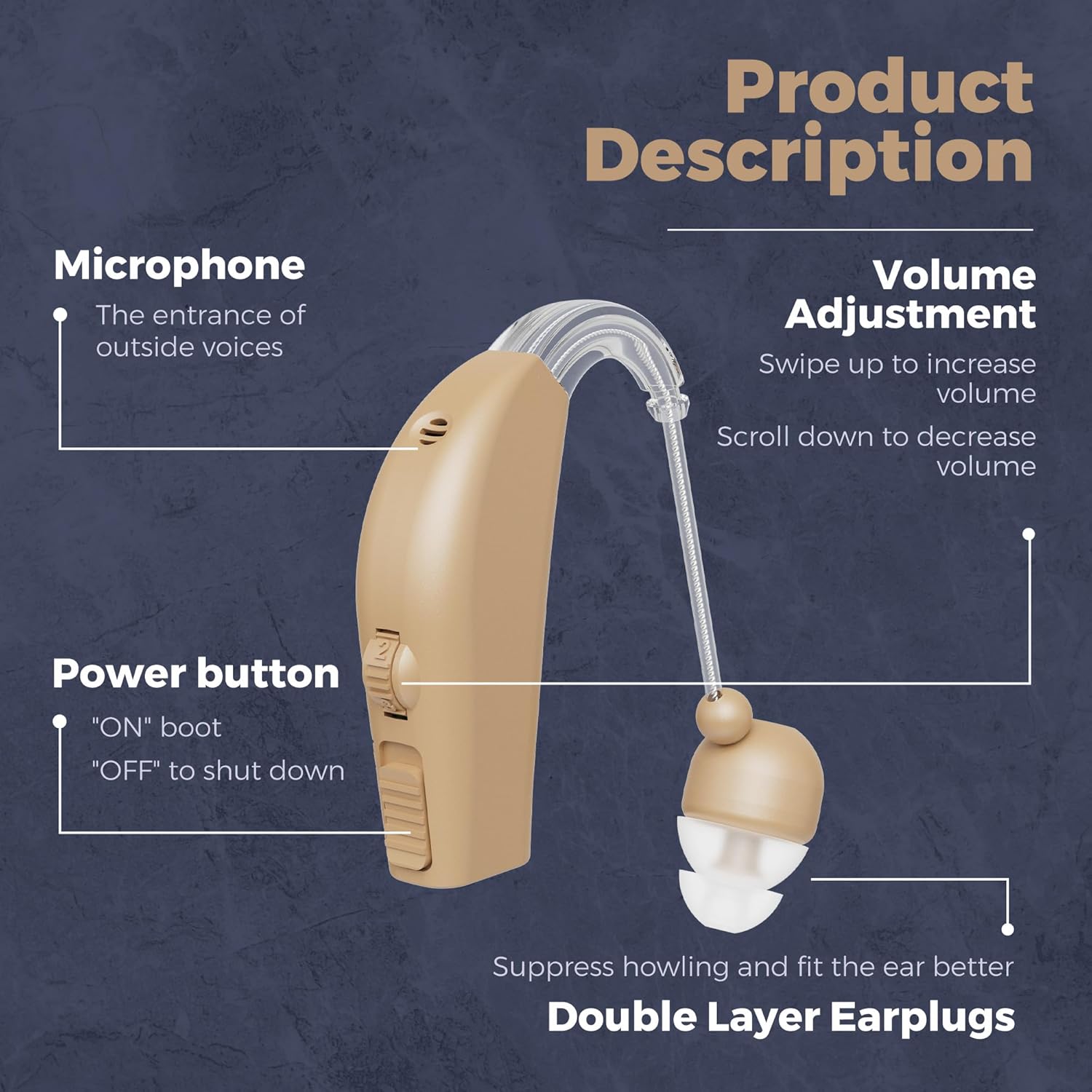
Image: Two methods for charging the hearing amplifier.
5.1 Charging Methods
- Dual Charging (Using Charging Dock): Place both hearing amplifiers into the charging dock. Connect the Type-C charging cable to the dock and a power source. A blinking green light on the dock indicates case charging, and a steady green light indicates charging is complete. Blue lights on the dock indicate device charging, and blue lights off indicate devices are fully charged.
- Stand-alone Charging: Connect the individual charging cable directly to each amplifier and a power source. A green light on the device indicates charging, and the light turning off indicates charging is complete.
5.2 Charging Time and Battery Life

Image: Battery life and charging duration details.
- Full Charging Time: Approximately 2-3 hours for the hearing amplifier.
- Single Use on Full Charge: Provides 30-45 hours of continuous use.
- Charging Case Power Supply: The charging case can provide an additional 4-5 full charges for the devices on-the-go.
6. Operating Instructions
6.1 Power On/Off
To turn the device ON, slide the power button to the 'ON' position. To turn it OFF, slide the button to the 'OFF' position.
6.2 Volume Adjustment
Use the volume adjustment scroll wheel on the device to set your preferred listening level. Scroll up to increase the volume and scroll down to decrease it. Start with a lower volume and gradually increase it to a comfortable level.
6.3 Noise Reduction
The integrated digital chip supports noise reduction and speaking amplification. This technology helps to minimize background noise while clarifying human speech, making conversations smoother and clearer.
7. Maintenance and Care
Proper maintenance ensures the longevity and optimal performance of your hearing amplifier.
- Cleaning: Use the provided cleaning brush to regularly remove earwax and debris from the ear domes and the device's sound outlet. Ensure the device is turned off before cleaning.
- Storage: When not in use, store the hearing amplifier in its charging dock or a dry, cool place away from direct sunlight and extreme temperatures.
- Moisture: Protect the device from moisture. Remove it before showering, swimming, or using hairspray.
- Handling: Handle the device with care. Avoid dropping it or exposing it to strong impacts.
8. Troubleshooting
If you encounter any issues with your MEDca ZBD-108 hearing amplifier, refer to the following common problems and solutions:
| Problem | Possible Cause | Solution |
|---|---|---|
| No sound or weak sound | Low battery; Volume too low; Ear dome blocked with earwax; Device turned off. | Charge the device; Increase volume; Clean the ear dome and sound outlet; Turn the device ON. |
| Whistling or feedback sound | Improperly fitted ear dome; Ear dome too small; Device not inserted correctly. | Ensure ear dome is securely in ear canal; Try a larger ear dome size; Re-insert the device properly. |
| Background noise is too loud | Volume set too high; Inherent amplification of all sounds. | Reduce the volume; Allow time to adjust to amplified sounds. The device is an amplifier, not a medical hearing aid. |
| Device not charging | Charging cable or dock not properly connected; Faulty cable/adapter. | Ensure all connections are secure; Try a different USB port or power adapter; Contact customer support if issue persists. |
9. Specifications
Key technical specifications for the MEDca ZBD-108 hearing amplifier:

Image: Technical specifications of the hearing amplifier.
| Specification | Value |
|---|---|
| Maximum saturation pressure level OSPL90 | ≤112±3 db |
| Full gear gain (mean HF) | 35±5 db |
| Full-scale sound gain | 38±5dB |
| Frequency response range | 250Hz - 5000Hz |
| Total harmonic distortion | ≤3%±3% |
| Equivalent input noise level | ≤26dB |
| Product Dimensions | 0.39 x 0.39 x 0.39 inches |
| Item Weight | 6.35 ounces |
| Model Name | ZBD-108 |
| Material | Silicone |
10. Important Safety Information
Please read and adhere to the following safety guidelines:
- This device is a sound amplifier and is not intended to diagnose, treat, cure, or prevent any disease or health condition. It is not a substitute for professional medical advice or treatment for hearing loss.
- Consult a medical professional if you experience sudden or rapid hearing loss, ear pain, or discharge from the ear.
- Do not expose the device to excessive heat, moisture, or direct sunlight.
- Keep out of reach of children and pets to prevent accidental ingestion of small parts.
- Do not attempt to modify or repair the device yourself. Refer to qualified personnel for service.
11. Limited Warranty and Support
MEDca provides a limited warranty for this product against defects in materials and workmanship under normal use. Please refer to the product packaging or the official MEDca website for specific warranty terms and conditions.
For technical support, troubleshooting assistance, or warranty claims, please contact MEDca customer service through the retailer where the product was purchased or visit the official MEDca support channels.