
1. Introduction
This manual provides detailed instructions for the installation, operation, and maintenance of your Gravity Audio 1200W 12" Premium Car Subwoofer Kit. This comprehensive package includes a Gravity 12-inch subwoofer, an Audiobank 3000W Class D amplifier, an Audiotek single 12-inch vented subwoofer enclosure, and a complete amplifier installation kit. Please read this manual thoroughly before attempting installation or operation to ensure proper use and maximum performance.

Figure 1.1: Overview of the Gravity Audio 1200W 12" Premium Car Subwoofer Kit components.
2. Safety Information
Always observe the following safety precautions during installation and operation:
- Professional Installation Recommended: If you are unsure about any aspect of installation, consult a qualified car audio technician.
- Disconnect Battery: Always disconnect the vehicle's negative battery terminal before starting any electrical work to prevent short circuits and electrical shock.
- Proper Wiring: Use appropriate gauge wiring as specified in this manual and ensure all connections are secure and insulated to prevent shorts.
- Ventilation: Ensure the amplifier is mounted in a location with adequate airflow to prevent overheating.
- Avoid Obstruction: Do not mount components in locations that obstruct airbags, driver visibility, or vehicle controls.
- Hearing Protection: Prolonged exposure to high volume levels can cause permanent hearing damage. Use caution when adjusting volume.
3. Package Contents
Verify that all items are present in your package:
- Gravity 12" 1200W Peak Power Subwoofer (GR-12PW)
- Audiobank 3000W Class D Monoblock Amplifier (P3001)
- Audiotek Single 12 Inch Vented Subwoofer Enclosure (CA-12SP)
- Complete Amplifier Installation Kit (Power Cable, Ground Cable, Remote Turn-On Wire, RCA Interconnects, Speaker Wire, Fuse Holder, Fuse, Terminals, Zip Ties)
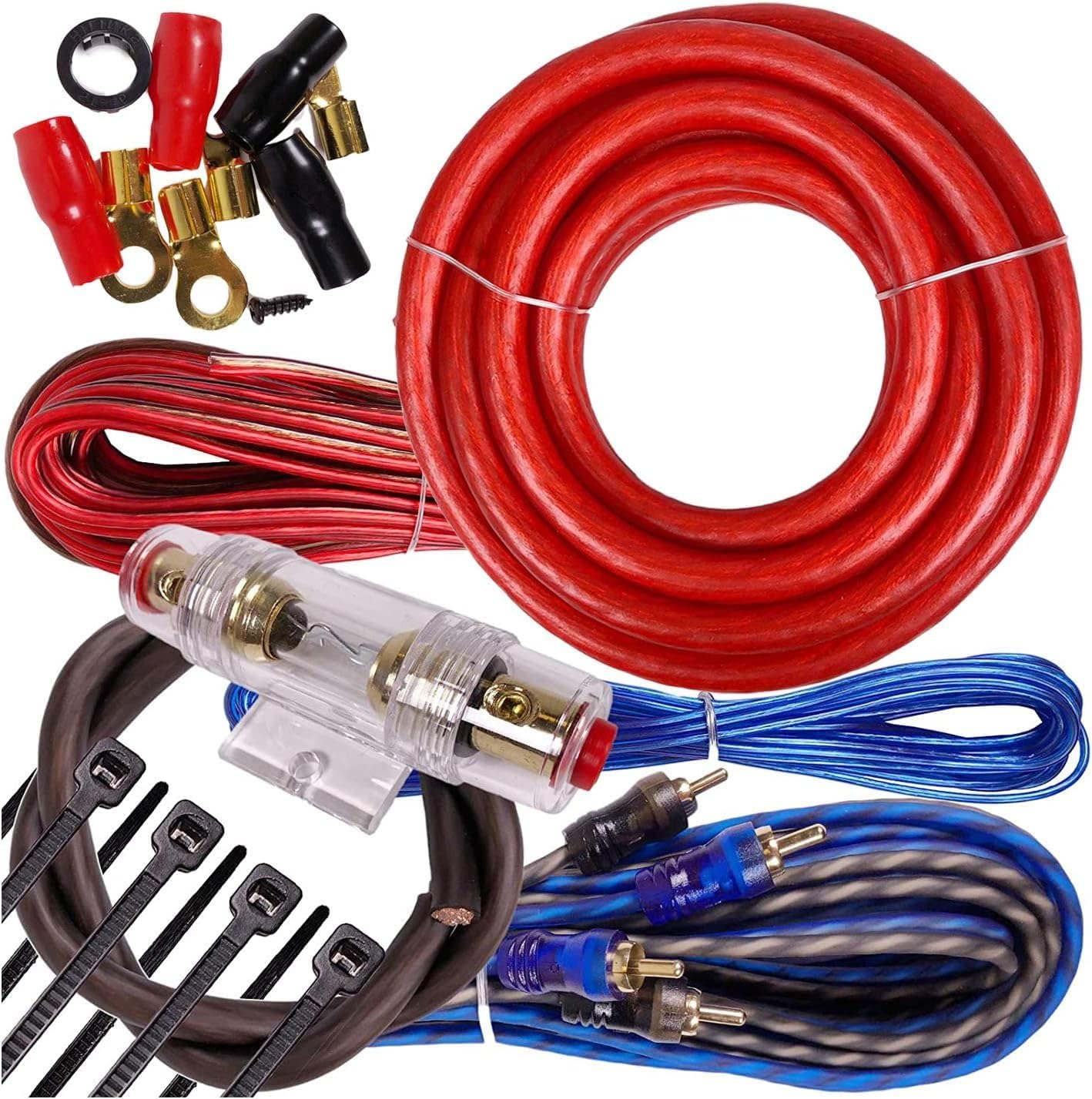
Figure 3.1: Contents of the amplifier installation kit, including various cables, fuse, and terminals.
4. Setup and Installation
Follow these steps for proper installation of your car audio system. Ensure the vehicle's battery is disconnected before proceeding.
4.1 Subwoofer Installation into Enclosure
- Carefully place the Gravity 12" subwoofer into the opening of the Audiotek vented enclosure. Ensure the mounting holes align.
- Secure the subwoofer using appropriate screws (not included, typically self-tapping wood screws) through the mounting holes into the enclosure. Do not overtighten.
- Connect speaker wire from the subwoofer's terminals to the enclosure's internal terminals. Observe polarity: positive (+) to positive, negative (-) to negative.

Figure 4.1: Front view of the Gravity 12-inch subwoofer, showing the cone and surround.

Figure 4.2: Front view of the Audiotek single 12-inch vented subwoofer enclosure.
4.2 Amplifier Mounting
Choose a secure, well-ventilated location for the Audiobank amplifier, such as the trunk or under a seat. Ensure it is away from moisture and direct sunlight.
- Mark the mounting holes on the chosen surface.
- Drill pilot holes if necessary, taking care not to damage any vehicle components.
- Secure the amplifier using appropriate screws.

Figure 4.3: Top view of the Audiobank 3000W Class D Monoblock Amplifier.
4.3 Wiring Connections
Refer to the amplifier's rear panel for terminal locations. Use the provided amplifier installation kit.
- Power Cable (+12V): Run the thick red power cable from the vehicle's positive battery terminal to the amplifier's +12V terminal. Install the fuse holder within 18 inches of the battery and insert the fuse.
- Ground Cable (GND): Connect the thick black ground cable from the amplifier's GND terminal to a clean, unpainted metal surface on the vehicle's chassis. Ensure a solid, low-resistance connection.
- Remote Turn-On Wire (REM): Connect the blue remote wire from your head unit's remote output to the amplifier's REM terminal. This turns the amplifier on/off with your head unit.
- RCA Interconnects: Connect the RCA cables from your head unit's subwoofer or full-range pre-outs to the amplifier's RCA input jacks.
- Speaker Output: Connect the speaker wire from the enclosure's external terminals to the amplifier's speaker output terminals. Ensure correct polarity.

Figure 4.4: Rear panel of the Audiobank amplifier showing power, ground, remote, and speaker output terminals.

Figure 4.5: Speaker terminal on the Audiotek subwoofer enclosure for connecting to the amplifier.
5. Operating Instructions
Once all connections are made and verified, reconnect the vehicle's negative battery terminal.
5.1 Initial Power-Up and Basic Settings
- Turn on your vehicle's ignition and head unit. The amplifier's power indicator should illuminate.
- Start with the amplifier's GAIN control set to minimum (fully counter-clockwise).
- Set the head unit's volume to about 75% of its maximum.
- Slowly increase the amplifier's GAIN control until you hear distortion, then back it off slightly. This sets the maximum clean output.
5.2 Amplifier Controls
The Audiobank P3001 amplifier features several controls for fine-tuning your subwoofer's performance:
- GAIN: Adjusts the input sensitivity to match the output of your head unit. (See 5.1)
- LPF (Low Pass Filter): This control sets the upper frequency limit for the subwoofer. Typically set between 80Hz and 120Hz. Frequencies above this setting will be filtered out.
- BASS BOOST: Provides an increase in bass output at a specific frequency. Use sparingly to avoid distortion and potential damage.
- PHASE: Allows you to adjust the phase of the subwoofer output (0 or 180 degrees) to ensure it blends seamlessly with your main speakers. Experiment with both settings to find the best sound.
6. Maintenance
Your Gravity Audio Subwoofer Kit requires minimal maintenance to ensure long-term performance.
- Cleaning: Periodically wipe down the amplifier and subwoofer enclosure with a soft, dry cloth. Avoid using harsh chemicals or abrasive cleaners.
- Connection Checks: Annually, inspect all wiring connections for tightness and corrosion. Re-tighten any loose connections.
- Ventilation: Ensure the amplifier's cooling fins remain free of dust and debris to maintain proper heat dissipation.
7. Troubleshooting
If you experience issues with your subwoofer kit, consult the following table before seeking professional assistance:
| Problem | Possible Cause | Solution |
|---|---|---|
| No Sound from Subwoofer |
|
|
| Distorted Sound |
|
|
| Amplifier Overheating |
|
|
8. Specifications
Gravity 12" Subwoofer (GR-12PW)
- Speaker Type: Subwoofer
- Subwoofer Diameter: 12 Inches
- Voice Coil Configuration: Dual 4 Ohm
- Peak Power: 1200 Watts each
- RMS Power: 600 Watts each
- Frequency Response: 30 - 2.5kHz
- Sensitivity: 90 dB
- Cone Material: Competition Grade Pressed Paper Cone
- Surround: High Roll Foam Surround
- Cooling System: Advanced Air Flow Cooling System
Audiobank 3000W Class D Amplifier (P3001)
- Type: Class D Monoblock Amplifier
- Peak Power: 3000 Watts (Total Package)
- Controls: Gain, LPF, Bass Boost, Phase
Audiotek Single 12 Inch Vented Enclosure (CA-12SP)
- Design: Vented (Ported)
- Material: High Quality Gray Carpet
- Dimensions: Approximately 18"W x 16"D x 14"H (External)
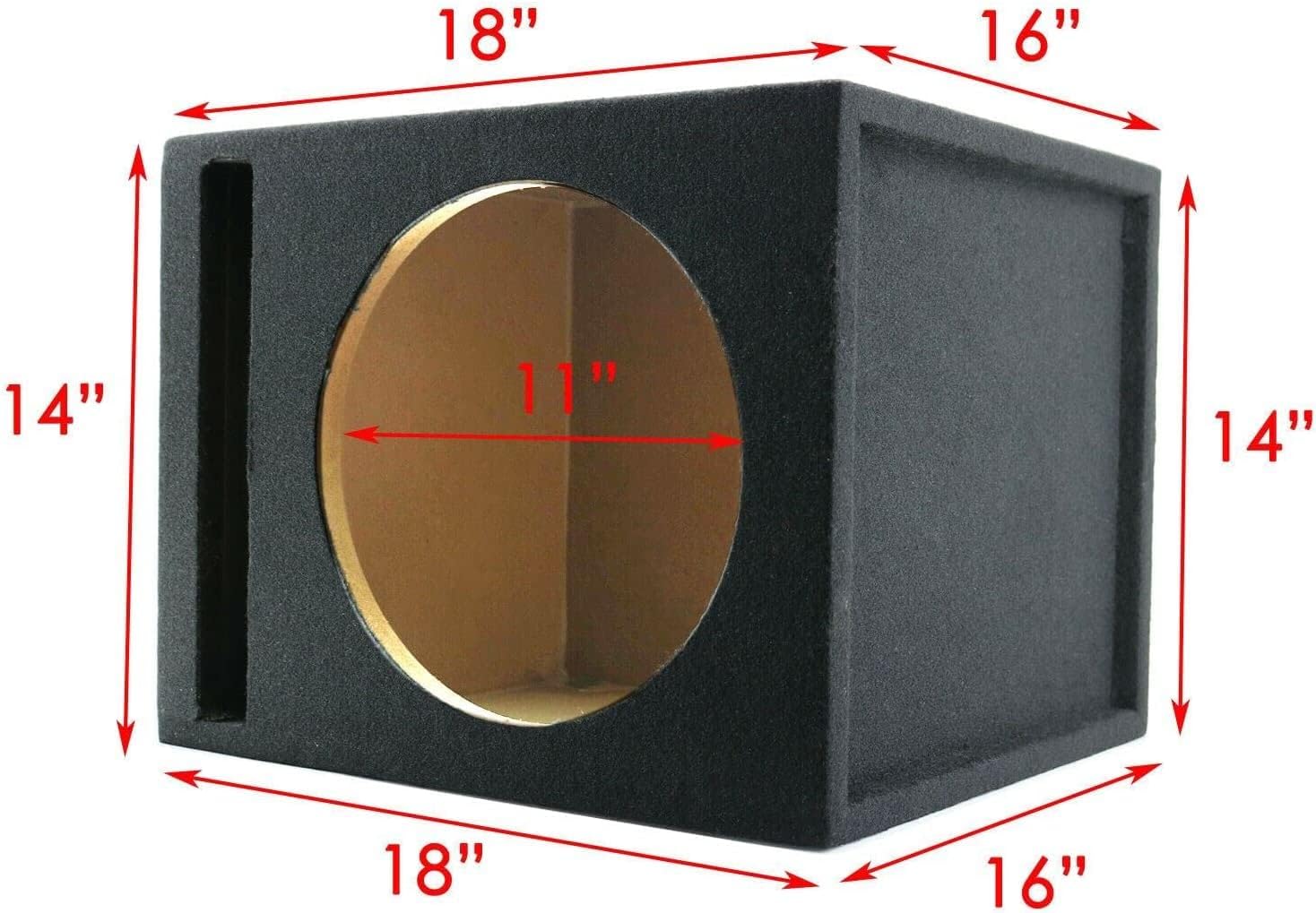
Figure 8.1: Dimensions of the Audiotek single 12-inch vented subwoofer enclosure.
9. Warranty & Support
This product comes with a Limited Warranty. For specific details regarding warranty coverage, duration, and terms, please refer to the warranty card included with your purchase or contact Gravity Audio customer support directly.
Customer Support
For technical assistance, troubleshooting not covered in this manual, or warranty claims, please contact your retailer or Gravity Audio customer service. Have your product model number (GR-12PW + P3001 + CA-12SP + Kit) and purchase date available when contacting support.
