
SnapPower SPSG-101-PXWH
SnapPower Single SafeLight (Duplex Outlets)
Instruction Manual
Model: SPSG-101-PXWH
Product Overview
The SnapPower SafeLight is an innovative cover plate designed for standard duplex electrical outlets, integrating a self-closing safety mechanism and an LED night light. This product enhances home safety by preventing access to electrical contacts, making it ideal for child-proofing, while also providing convenient, energy-efficient illumination in low-light conditions.
Key features include:
- Child-Proofing: Self-closing sliding outlet covers help prevent electrical shock and hazards.
- Integrated Night Light: An adjustable LED light bar with a light sensor automatically activates in the dark.
- Easy Installation: No wires, batteries, or special tools required; simply snaps onto existing duplex outlets.
- Energy Efficient: Operates at a very low cost, consuming less than 10 cents per year in electricity.
- Space-Saving Design: Eliminates the need for bulky plug-in night lights, keeping outlets fully accessible.

Image: The SnapPower SafeLight cover plate, designed for duplex outlets, features a subtle LED night light at its base. This white cover seamlessly integrates with standard home decor.
Installation Guide
Installation of the SnapPower SafeLight is designed to be quick and straightforward, requiring no electrical wiring knowledge or special tools. Ensure power to the outlet is off before beginning installation.
- Identify Duplex Outlet: Confirm that your outlet is a standard duplex type, characterized by two vertically stacked receptacles and a single center screw hole for the cover plate. This product is not compatible with decorator (rectangular) or GFCI outlets.
- Turn Off Power: For safety, locate the circuit breaker controlling the outlet and switch it to the "OFF" position. Verify that the power is off by attempting to plug in and operate a device.
- Remove Existing Cover Plate: Unscrew and carefully remove the existing cover plate from the duplex outlet.
- Align SafeLight: Position the SnapPower SafeLight over the outlet, ensuring the prongs on the back of the SafeLight align with the screw terminals of the outlet. The LED light bar should be at the bottom.
- Secure SafeLight: Gently push the SafeLight onto the outlet until it sits flush against the wall. Secure it in place using the provided screw, tightening it into the center screw hole of the outlet. Do not overtighten.
- Restore Power: Once the SafeLight is securely installed, return to your circuit breaker panel and switch the power back "ON".

Image: A visual guide highlighting the center screw hole characteristic of a duplex outlet, which is compatible with the SafeLight.
The SafeLight is now ready for use. The integrated light sensor will automatically activate the LED night light when the ambient light levels are low.
Operation
The SnapPower SafeLight operates automatically, providing illumination when needed and ensuring outlet safety.
Automatic Night Light
The SafeLight features a built-in light sensor that detects ambient light levels. The LED night light will automatically turn on when the room darkens and turn off when sufficient light is present. This ensures efficient energy usage and provides illumination only when necessary.
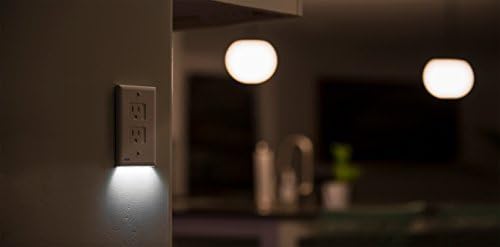
Image: The SafeLight provides subtle illumination in a kitchen setting, demonstrating its automatic activation in low light.
Self-Closing Safety Covers
Each receptacle on the SafeLight is equipped with self-closing sliding covers. When a plug is removed from the outlet, the internal mechanism automatically slides the cover back into place, blocking access to the electrical contacts. This feature is crucial for preventing children from inserting objects into the outlet and reducing the risk of electrical shock.

Image: A young child safely playing near an outlet equipped with the SnapPower SafeLight, highlighting its child-proofing design.
Maintenance
The SnapPower SafeLight requires minimal maintenance to ensure optimal performance and longevity.
- Cleaning: To clean the surface of the cover plate, gently wipe it with a soft, damp cloth. Avoid using abrasive cleaners, solvents, or harsh chemicals, as these can damage the finish or internal components.
- Inspection: Periodically inspect the cover plate for any signs of damage, such as cracks or loose components. Ensure the self-closing covers operate smoothly. If any damage is observed, discontinue use and consider replacement.
- No User-Serviceable Parts: The SafeLight contains no user-serviceable parts. Do not attempt to disassemble or repair the unit.
Troubleshooting
If you encounter issues with your SnapPower SafeLight, refer to the following common troubleshooting steps:
| Problem | Possible Cause | Solution |
|---|---|---|
| Night light does not turn on. |
|
|
| Cover plate is not flush with the wall. |
|
|
| Self-closing covers are stiff or not closing. |
|
|
| Product does not fit my outlet. |
|
|
Specifications
| Attribute | Detail |
|---|---|
| Model Number | SPSG-101-PXWH |
| Material | Plastic |
| Color | White |
| Finish Type | Polished |
| Configuration | Double (Duplex) |
| Installation Type | Screw-In |
| Item Weight | 0.08 Kilograms (approx. 2.89 ounces) |
| Product Dimensions | 5.16 x 3.15 x 1.4 inches |
| Type of Bulb | LED |
| Power Source | Electrical Outlet |
| Voltage | 120 Volts |
| Special Features | Energy Efficient |
| Usage | Indoor residential night lighting |
| Batteries Required | No |
Warranty and Support
For information regarding product warranty or to obtain technical support, please contact SnapPower directly. You can find more information and contact details on the official SnapPower website or through their brand store.
Related documentsSPSG-101-PXWH

Ask a question about this manual
Ask about setup, troubleshooting, compatibility, parts, safety, or missing instructions. Manuals+ will review the question and use this page’s manual context to help answer it.