
1. Introduction
This manual provides instructions for the proper use and maintenance of your Truper BASE-3 Digital Precision Scale. Please read this manual thoroughly before operating the device to ensure safe and efficient use. This scale is designed for precise weighing of various items up to 3 kg.
2. Product Features
- LCD Display with Green Backlight: Provides enhanced visibility of measurements in various lighting conditions.
- Removable Stainless Steel Plate: Durable and easy to clean, designed for hygiene and convenience.
- Tare Function: Allows you to subtract the weight of a container to obtain the net weight of its contents.
- Compact and Lightweight Design: Ensures portability and easy storage.
- High-Precision Sensor: Delivers accurate and reliable measurements.
- Piece Counting Function: Facilitates counting multiple small items of uniform weight.
- Dual Power Options: Operates for up to 31 hours with its rechargeable battery or 20 hours with standard batteries.

Image 1: Truper BASE-3 Digital Precision Scale highlighting its key components: the removable stainless steel plate, the LCD display with green backlight, and the durable ABS body.
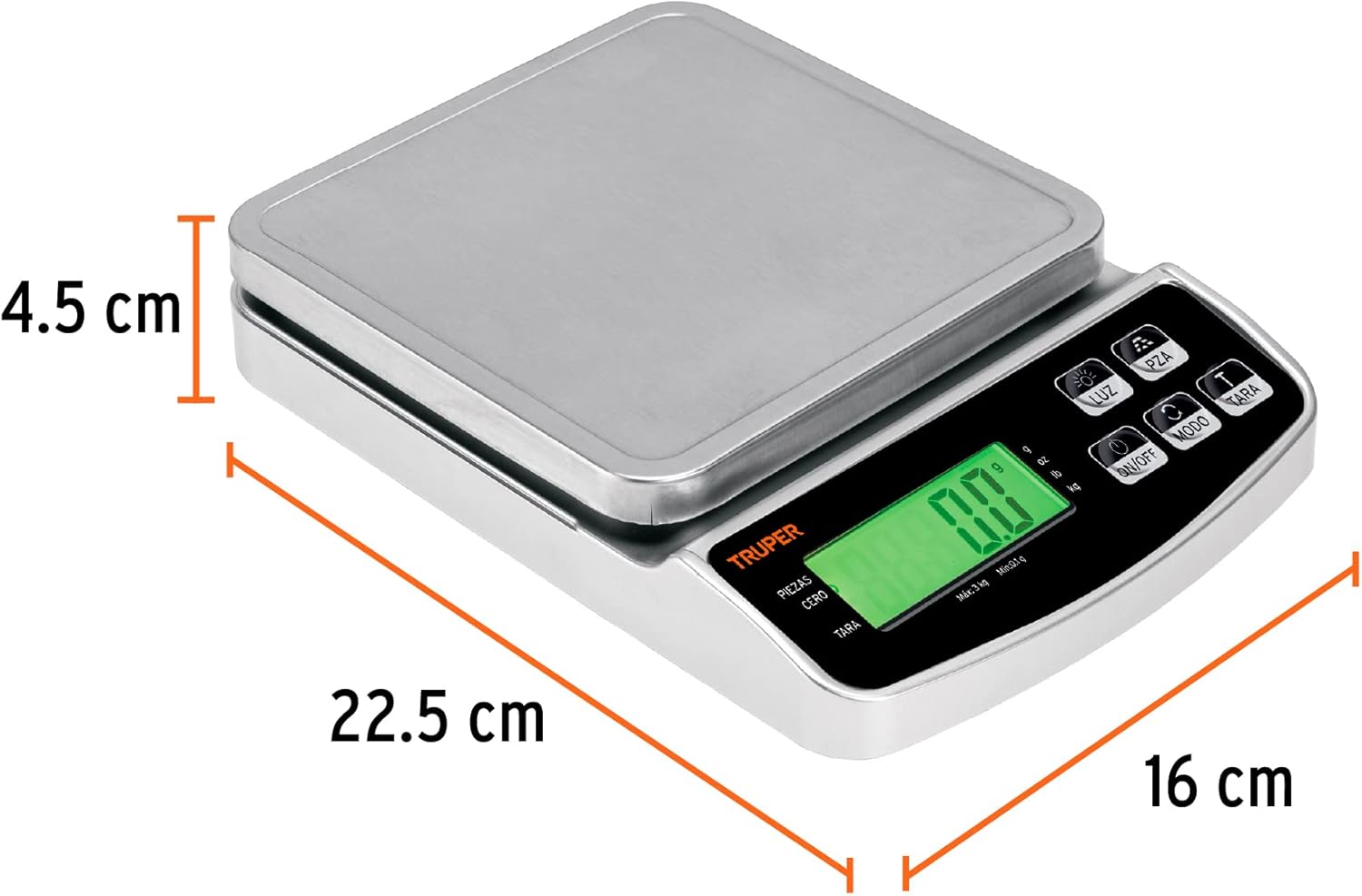
Image 2: The Truper BASE-3 Digital Precision Scale with its physical dimensions indicated for reference.
3. Setup
- Unpacking: Carefully remove the scale from its packaging. Retain packaging for future storage or transport.
- Power Source: The scale operates on a rechargeable battery and can also use standard batteries. Ensure the rechargeable battery is charged or insert fresh standard batteries if needed.
- Placement: Place the scale on a firm, flat, and stable surface to ensure accurate readings. Avoid placing it on soft or uneven surfaces.
- Initial Power On: Press the 'ON/OFF' button to turn on the scale. The display should light up and show '0.00'.
4. Operation
4.1. Power On/Off
- To turn on the scale, press the ON/OFF button.
- To turn off the scale, press and hold the ON/OFF button for a few seconds until the display turns off. The scale also features an auto-off function to conserve battery power.
4.2. Unit Conversion
The scale supports multiple units of measurement. To change the unit:
- With the scale on, press the UNIT button (often labeled 'g/oz' or 'MODE').
- Each press will cycle through available units such as grams (g), kilograms (kg), pounds (lb), and ounces (oz).
- Select your desired unit before weighing.
4.3. Tare Function
The Tare function allows you to weigh items in a container without including the container's weight.
- Place an empty container on the scale's stainless steel plate.
- Wait for the display to stabilize and show the container's weight.
- Press the TARE button. The display will reset to '0.00'.
- Add the items you wish to weigh into the container. The display will now show only the net weight of the items.
- To clear the tare, remove all items and the container from the scale, then press the TARE button again if the display does not automatically return to '0.00'.
4.4. Piece Counting Function
This function is useful for counting a large number of small, uniform items.
- Turn on the scale and ensure the display shows '0.00'.
- Place a known quantity of items (e.g., 10, 20, 50, or 100 pieces) on the scale.
- Press and hold the PCS (Piece Counting) button until a number (e.g., '25', '50', '100') appears on the display.
- Use the UNIT button to select the sample size that matches the number of items you placed on the scale.
- Press the PCS button again to confirm. The display will now show the count of the sample.
- Remove the sample items. The display should return to '0.00'.
- You can now place any quantity of the same items on the scale, and it will display the count.
Video 1: A close-up demonstration of a digital scale's basic functions, including power on, tare, and weighing items. This video illustrates general operation principles applicable to the Truper BASE-3 scale.
5. Maintenance
- Cleaning: Wipe the scale with a soft, damp cloth. Do not use abrasive cleaners or immerse the scale in water. The stainless steel plate can be removed for separate cleaning.
- Storage: Store the scale in a cool, dry place. Avoid extreme temperatures and humidity.
- Battery Care: If using standard batteries, remove them if the scale will not be used for an extended period to prevent leakage. For the rechargeable battery, ensure it is charged periodically to maintain its lifespan.
- Handling: Handle the scale with care. Avoid dropping it or subjecting it to strong impacts, as this can affect its precision.
6. Troubleshooting
If you encounter issues with your Truper BASE-3 scale, consider the following:
- Inaccurate Readings: Ensure the scale is on a flat, stable surface. Check if the battery is low and replace or recharge if necessary. Avoid placing the scale near strong electromagnetic fields.
- Display Not Turning On: Verify that the batteries are correctly installed and have sufficient charge. If using the rechargeable battery, ensure it is charged.
- Scale Not Responding: Try turning the scale off and on again. If the issue persists, remove and reinsert the batteries (if applicable) or fully charge the rechargeable battery.
For persistent problems, please contact Truper customer support.
7. Specifications
| Feature | Specification |
|---|---|
| Manufacturer | Truper SA de CV |
| Model Number | 102317 |
| Color | Silver |
| Material | Stainless Steel |
| Power Source | AC/DC (Rechargeable battery and standard batteries) |
| Maximum Weight Capacity | 3 Kilograms |
| Display Style | LCD with Green Backlight |
| Special Features | Tare Function, Piece Counting Function |
| Included Components | Steel Plate |
| Package Dimensions | 23.9 x 17.5 x 5.2 cm |
| Package Weight | 660 g |
8. Warranty and Support
The Truper BASE-3 Digital Precision Scale comes with a 1-year warranty from the date of purchase. For warranty claims, technical support, or any inquiries, please refer to the contact information provided on the product packaging or visit the official Truper website.
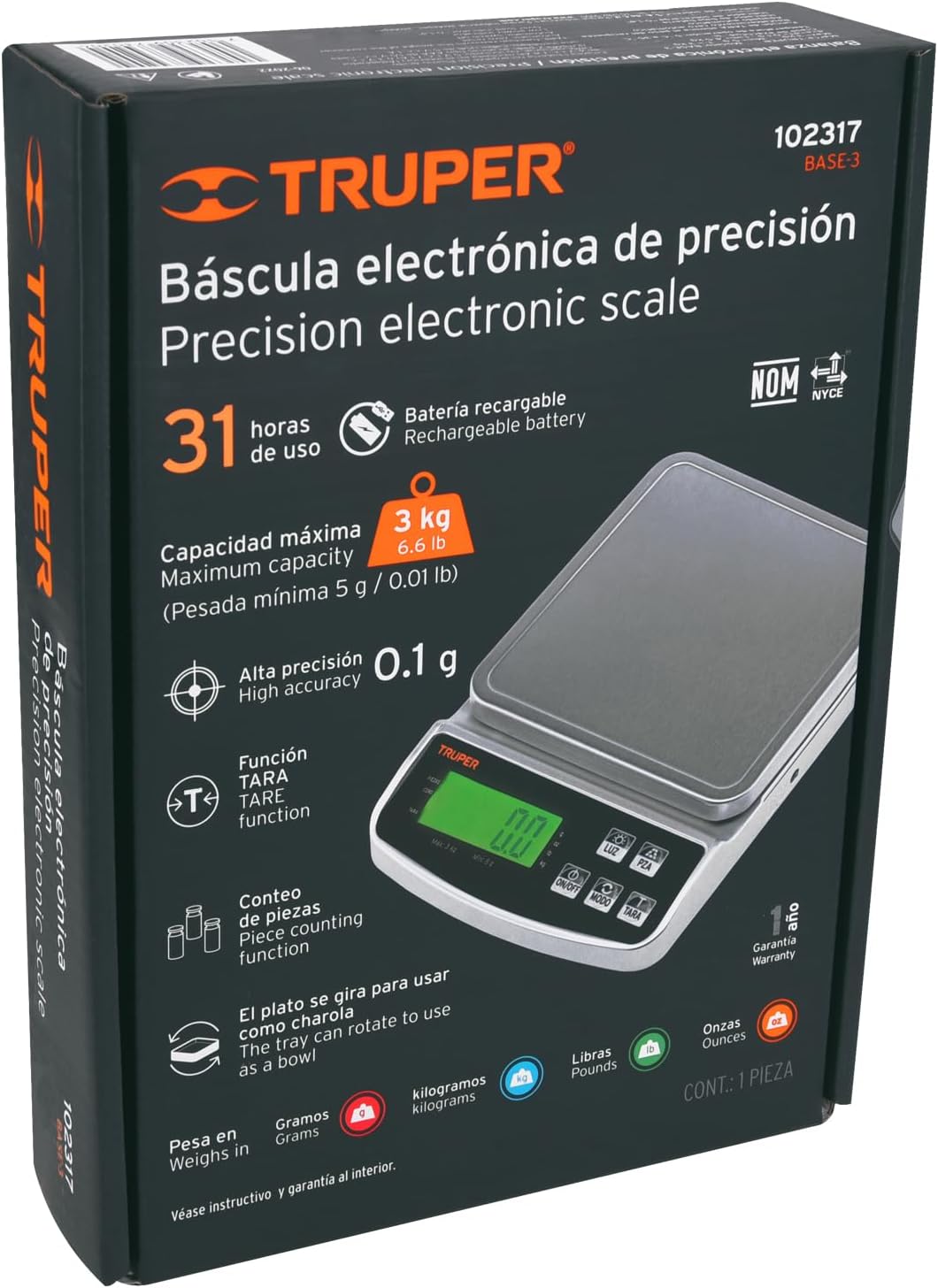
Image 3: Product packaging for the Truper BASE-3 scale, which typically contains detailed warranty and support information.


