1. Introduction
Thank you for choosing the Zeppelin LZ129 Hindenburg Solar Chronograph Watch. This manual provides detailed instructions for the proper setup, operation, and maintenance of your timepiece. Please read it carefully to ensure optimal performance and longevity of your watch.

Figure 1.1: Front view of the Zeppelin LZ129 Hindenburg Solar Chronograph Watch. This image displays the watch's dark blue dial, silver-colored indices and hands, three sub-dials for chronograph functions and 24-hour display, and the date window at the 4 o'clock position. The polished stainless steel case and blue BioVeg strap are also visible.
2. Overview of Features
- Precise Solar Quartz Movement: Powered by light, eliminating the need for regular battery changes.
- Chronograph Function: Measures elapsed time up to 30 minutes in seconds.
- Date Display: Located at the 4 o'clock position.
- 24-Hour Display: Auxiliary sub-dial for tracking time in a 24-hour format.
- K1 Mineral Glass: Scratch-resistant for enhanced durability.
- BioVeg Strap: Sustainable vegan leather alternative, synthesized from 45% vegetable oils.
- Water Resistance: Up to 5 bar (50 meters), suitable for everyday use and light splashes.
3. Setup
3.1 Initial Charging
Your Zeppelin solar watch is powered by light. Before initial use, or if the watch has stopped, expose the dial to a bright light source (natural sunlight is ideal) for several hours. The watch will begin operating once sufficient charge is accumulated. Avoid placing the watch in direct sunlight for extended periods in extremely hot environments to prevent damage.
3.2 Setting Time and Date
- Pull the crown out to the second click position. The second hand will stop.
- Rotate the crown to set the hour and minute hands to the correct time. Ensure the 24-hour sub-dial also reflects the correct AM/PM setting.
- Push the crown back in to the first click position.
- Rotate the crown to set the date. Advance the date until the correct date is displayed.
- Push the crown fully back into the normal position. The second hand will resume movement.
Note: To avoid damaging the movement, do not set the date between 9:00 PM and 3:00 AM, as the date change mechanism is active during this period.
4. Operating the Watch
4.1 Timekeeping
The main hands display the current hour, minute, and second. The sub-dial at the 9 o'clock position indicates the chronograph minutes, the sub-dial at 3 o'clock indicates the 24-hour time, and the sub-dial at 6 o'clock indicates the chronograph seconds/solar charge level.

Figure 4.1: Close-up view of the watch dial, highlighting the chronograph sub-dials and date window. The sub-dial at 9 o'clock shows chronograph minutes (up to 30), the sub-dial at 3 o'clock shows 24-hour time, and the sub-dial at 6 o'clock shows chronograph seconds and a 'SOLAR' indicator for charge level.
4.2 Chronograph Function
The chronograph allows for precise measurement of elapsed time.
- Start: Press the upper pusher (A) to start the chronograph. The chronograph second hand (sub-dial at 6 o'clock) will begin to move.
- Stop: Press the upper pusher (A) again to stop the chronograph. The elapsed time will be indicated by the chronograph second hand and the chronograph minute hand (sub-dial at 9 o'clock).
- Reset: With the chronograph stopped, press the lower pusher (B) to reset both chronograph hands to their zero positions.
4.3 Date Display
The date is displayed in the window at the 4 o'clock position. To adjust the date, pull the crown out to the first click position and rotate it. Refer to section 3.2 for detailed instructions.
4.4 24-Hour Display
The sub-dial at the 3 o'clock position indicates the current time in a 24-hour format, synchronized with the main hour hand. This sub-dial cannot be set independently.
5. Maintenance
5.1 Cleaning
- Case and Glass: Wipe regularly with a soft, dry cloth. For stubborn dirt, a slightly damp cloth can be used, followed by drying.
- BioVeg Strap: Clean with a soft, damp cloth. Avoid harsh chemicals or excessive moisture, as this can affect the material's integrity. Allow to air dry completely.
5.2 Water Resistance (5 Bar / 50 Meters)
Your watch is water-resistant up to 5 bar (50 meters). This means it is suitable for everyday use, splashes, rain, and short periods of recreational swimming. It is not suitable for diving, snorkeling, or prolonged water immersion. Always ensure the crown is fully pushed in before any contact with water. Avoid exposing the watch to hot water or steam, as this can compromise the seals.
5.3 Solar Power and Battery
The watch utilizes a solar cell under the dial to convert light into electrical energy, which is stored in a rechargeable battery. Regular exposure to light is essential for maintaining the charge. If the watch is stored in darkness for an extended period, it may stop. Simply expose it to light to reactivate it.

Figure 5.1: Detail of the BioVeg strap, showcasing its texture and stitching. This sustainable material requires gentle cleaning to maintain its appearance and durability.
6. Troubleshooting
- Watch has stopped: Ensure the watch has received sufficient light exposure. Place it under a bright light source for several hours.
- Time or Date is incorrect: Refer to Section 3.2 for instructions on how to reset the time and date.
- Chronograph hands do not reset to zero: If the chronograph hands are misaligned, perform a chronograph reset as described in Section 4.2. If the issue persists, consult the support information.
7. Specifications
| Feature | Detail |
|---|---|
| Model Number | 8086-3_N |
| Movement | Solar Quartz |
| Case Material | Polished Stainless Steel |
| Dial Color | Dark Blue |
| Watch Glass | Scratch-resistant K1 Mineral Glass |
| Strap Material | BioVeg (vegan leather alternative) |
| Clasp Type | Pin Buckle |
| Water Resistance | 5 bar (50 meters) |
| Case Diameter (without crown) | 41 mm |
| Case Height | 10 mm |
| Product Dimensions | 15 x 2 x 1.1 cm |
| Weight | 45 g |
| Batteries | 1 LR44 (included, rechargeable) |

Figure 7.1: Side profile of the watch, illustrating its 10mm case height and the design of the crown and pushers.
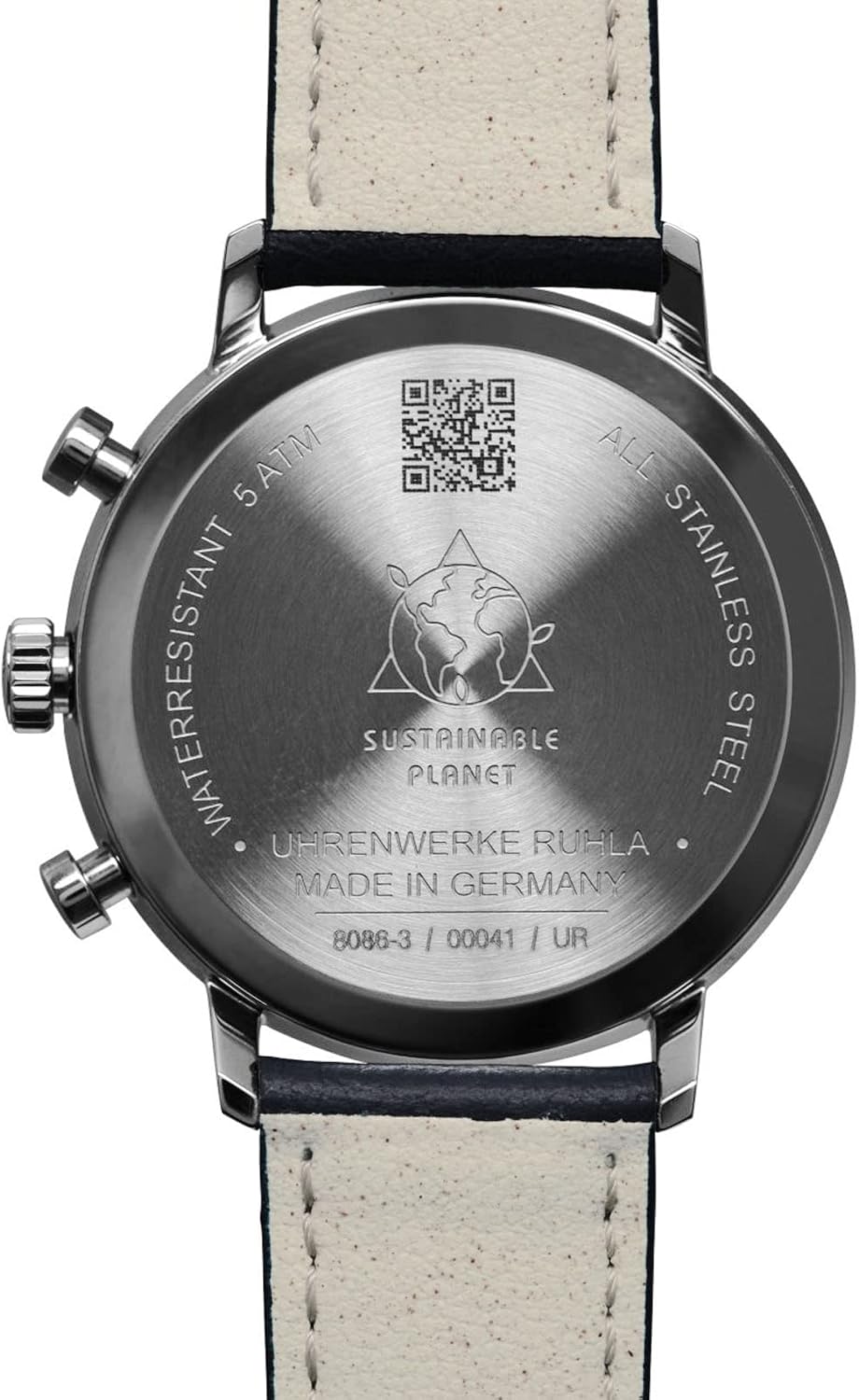
Figure 7.2: An angled view of the watch, providing a comprehensive look at the dial, case, and strap attachment points.
8. Warranty and Support
Your Zeppelin watch comes with a 2-year guarantee from the date of purchase, covering manufacturing defects. Please retain your proof of purchase for warranty claims.

Figure 8.1: Example of the International Guarantee card, indicating a 2-year warranty period. This document should be kept with your watch for service and support.
For further information, support, or to register your product, please visit the official website:
www.pointtec.de/zeppelin/8086-3/41/UR

Figure 8.2: Rear view of the watch case, showing engravings such as "WATERRESISTANT 5 ATM", "ALL STAINLESS STEEL", "MADE IN GERMANY", and the model number. A QR code is also visible, which may link to product information or support.


