
SYNCWIRE SW-EVA805
Syncwire J1772 to Tesla Adapter User Manual
Model: SW-EVA805
1. Introduction
The Syncwire J1772 to Tesla Adapter is an essential accessory designed to enable Tesla vehicle owners to charge their cars at Level 1 and Level 2 J1772 charging stations. This adapter provides broad compatibility, robust durability, and efficient charging capabilities, ensuring a seamless charging experience.
This manual provides detailed instructions on how to properly use and maintain your Syncwire J1772 to Tesla Adapter.

Figure 1: Syncwire J1772 to Tesla Adapter and included accessories.
Key Features:
- Wide Compatibility: Compatible with all Tesla Model 3, Model Y, Model S, and Model X vehicles equipped with a Tesla inlet (NACS/TPC inlet). Provides access to over 43,000 Level 1 and Level 2 J1772 charging stations across the US.
- Ultimate Durability and Safety: Features an IP65 waterproof rating and high flame resistance. Designed to withstand various weather conditions, fire, and extreme durability, tested for over 10,000 plug-ins and 4,400 lbs load pressure resistance.
- Fast Charging: Supports a maximum power output of 14.4kW (60A/240V AC) for efficient charging. Expect 3-4 miles per hour on Level 1 stations and up to 20-40 miles per hour on Level 2 stations.
- Easy Installation: Plug-and-play design ensures effortless connection. Includes a protective shield to securely fasten the J1772 charger to the adapter, preventing accidental disconnection.
- Compact and Portable: Measuring 1.9in x 1.9in x 3.4in, the adapter is highly portable and comes with a convenient drawstring storage pouch.
2. Package Contents
Upon opening your Syncwire J1772 to Tesla Adapter package, please ensure all the following items are present:
- 1 x Syncwire J1772 to Tesla Adapter
- 1 x Protective Shield
- 1 x Portable Storage Pouch
- 1 x User Manual

Figure 2: All items included in the Syncwire J1772 to Tesla Adapter package.
3. Setup and Installation
The Syncwire J1772 to Tesla Adapter is designed for simple plug-and-play use. Follow these steps to connect the adapter and begin charging your Tesla:
- Connect the J1772 Charger: Take the J1772 charging cable from the charging station and firmly connect its plug into the female end of the Syncwire J1772 to Tesla Adapter. Ensure a secure connection.
- Slide the Protective Shield: Once the J1772 charger is connected to the adapter, slide the included protective shield onto the charging adapter. This shield helps to securely fasten the J1772 charger to the adapter, preventing accidental disconnection during charging.
- Plug into Tesla: Firmly plug the male end of the adapter (now connected to the J1772 charger) into your Tesla vehicle's charging port. The adapter's NACS connector is designed to fit perfectly with Tesla's inlet.

Figure 3: Step-by-step guide for connecting the adapter to your Tesla.
Your Tesla should now recognize the charger and begin the charging process. Monitor your vehicle's display to confirm charging has initiated.
4. Operating the Adapter
Once connected, the Syncwire J1772 to Tesla Adapter facilitates charging from compatible J1772 Level 1 and Level 2 stations. The adapter supports up to 60 Amps and 240 Volts AC, allowing for efficient power transfer to your Tesla.
Charging Performance:
- Level 1 Charging: Expect to gain approximately 3-4 miles of range per hour.
- Level 2 Charging: Expect to gain approximately 20-40 miles of range per hour, depending on the station's output and your vehicle's acceptance rate.

Figure 4: Fast charging display in a Tesla vehicle.
The adapter is designed for reliable and safe operation. Always ensure the connection is firm before leaving your vehicle to charge.

Figure 5: Secure connection of the adapter during charging.
5. Maintenance
The Syncwire J1772 to Tesla Adapter is built with high-quality materials for long-lasting performance and requires minimal maintenance. Follow these guidelines to ensure its longevity:
- Cleaning: Wipe the adapter with a clean, dry cloth to remove any dust or debris. For stubborn dirt, a slightly damp cloth can be used, ensuring the adapter is completely dry before storage or next use.
- Storage: When not in use, store the adapter in its provided portable storage pouch to protect it from dust, moisture, and physical damage. Store in a cool, dry place.
- Inspection: Periodically inspect the adapter for any signs of wear, damage, or corrosion on the connectors or casing. Do not use the adapter if any damage is observed.
Durability Features:
The adapter is constructed from PA66+25%GF material, offering superior temperature and load pressure resistance compared to standard PC/ABS materials.
- Temperature Resistance: Withstands temperatures up to 482°F (250°C).
- Load Pressure Resistance: Can withstand up to 4,400 lbs of pressure.
- Plug-in/Pull-out Lifetime: Designed for over 10,000 plug-in and pull-out cycles.

Figure 6: Material comparison highlighting the superior durability of Syncwire's adapter.
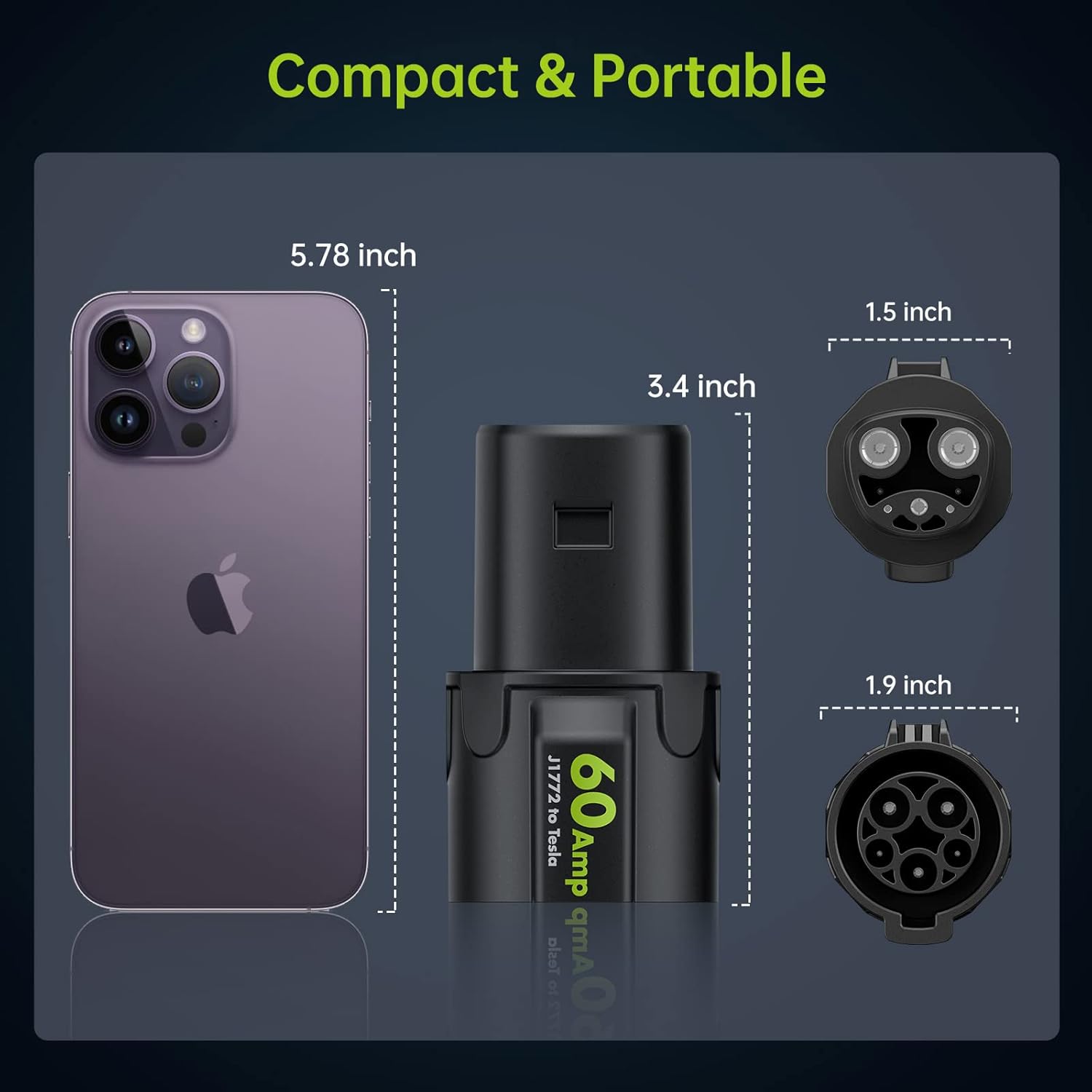
Figure 7: Demonstrating the adapter's high durability and impact resistance.
6. Troubleshooting
If you encounter issues while using your Syncwire J1772 to Tesla Adapter, consider the following common troubleshooting steps:
- Charging Not Initiating:
- Ensure both the J1772 charger and the adapter are firmly and correctly plugged into each other, and the adapter is securely inserted into your Tesla's charging port.
- Check the charging station's display or indicators to ensure it is active and providing power.
- Verify that your Tesla's charging settings (e.g., scheduled charging) are not preventing immediate charging.
- Intermittent Connection:
- Ensure the protective shield is correctly used to secure the J1772 charger to the adapter.
- Inspect the connectors for any debris, dirt, or damage. Clean if necessary.
- Avoid placing excessive strain on the cable or adapter during charging.
- Slow Charging:
- Confirm the type of J1772 station you are using (Level 1 vs. Level 2). Level 1 stations provide significantly slower charging speeds.
- Check the charging station's maximum output. The adapter will only draw as much power as the station can provide.
- Ensure your Tesla's charging current settings are not limited.
If problems persist after following these steps, please refer to the Warranty and Support section for contact information.
7. Specifications
| Feature | Specification |
|---|---|
| Model Number | SW-EVA805 |
| Product Dimensions | 1.93 x 2.44 x 3.46 inches |
| Item Weight | 9.6 ounces |
| Brand | SYNCWIRE |
| Connectivity Technology | SAE J1772 Port (Female) to Tesla Connector (Male) |
| Connector Type | Tesla Connector (NACS/TPC) |
| Compatible Devices | J1772 Connector (Level 1 & Level 2 Stations), Tesla Model 3, Tesla Model Y, Tesla Model S, Tesla Model X |
| Input Voltage | 240 Volts AC |
| Amperage | 60 Amps |
| Mounting Type | Plug and Play |
| Color | Black |
| Special Features | Highly Durable & Impact Resistant, Portable & Compact, Wide Compatibility, User Friendly, Fast Charging, IP65 Waterproof |
8. Warranty and Support
Warranty Policy:
SYNCWIRE provides a limited warranty for physical goods purchased from SYNCWIRE and SYNCWIRE authorized dealers. The warranty period for the Syncwire J1772 to Tesla Adapter is 3 years from the date of purchase.
The limited warranty covers defects in material or workmanship during the warranty period. It does NOT cover:
- Damage resulting from improper use.
- Damage resulting from modification or alteration.
- Damage resulting from defects in installation or workmanship by unauthorized parties.
- Damage resulting from negligence.
- Artificial damage, etc.
Customer Support:
For technical support or warranty claims, please contact Syncwire customer service. Syncwire is committed to customer satisfaction and offers lifetime technical support for its products.
You can also refer to the official User Manual (PDF) for additional information.
Related documentsSW-EVA805


Ask a question about this manual
Ask about setup, troubleshooting, compatibility, parts, safety, or missing instructions. Manuals+ will review the question and use this page’s manual context to help answer it.