
Introduction
Thank you for choosing the YLL Mini Karaoke Machine. This portable Bluetooth speaker with two wireless microphones is designed to provide an enjoyable audio experience for various occasions. This manual provides essential information for the proper setup, operation, and maintenance of your device.
Package Contents
Please verify that all items are present in the package:
- 1 x YLL Mini Karaoke Machine (Speaker)
- 2 x Wireless Microphones
- 1 x USB Charging Cable (Type-C)
- 1 x User Manual
Product Overview
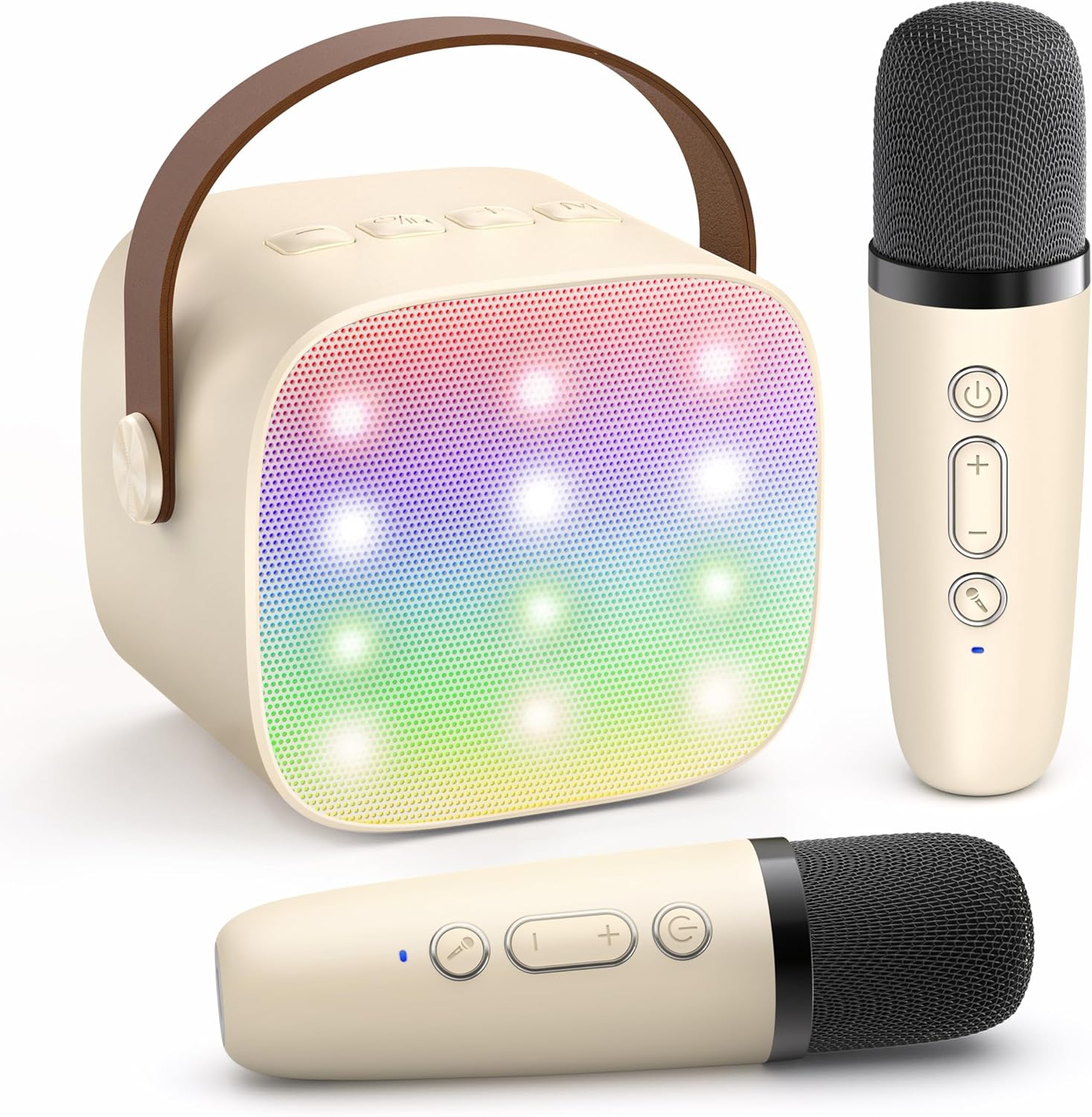
Image: The YLL Mini Karaoke Machine speaker and two wireless microphones, showcasing the beige color and LED lights on the speaker grille.
Key Features:
- Super Sound Quality: Equipped with a high-performance audio driver and advanced digital signal processor for clear sound.
- Wireless Microphones: Includes two rechargeable wireless microphones with individual controls.
- Multiple Playback Options: Supports Bluetooth 5.0 connectivity, TF card playback, and headphone output.
- Magic Voice Effects: Features 4 kinds of voice effects for entertainment.
- Dynamic LED Lights: Integrated LED lights that synchronize with music rhythm.
- Portable Design: Compact and lightweight for easy transport.

Image: An exploded view diagram illustrating the internal components of the speaker, highlighting the DSP chip, HiFi sound quality, and 3D surround sound capabilities.

Image: Two wireless microphones displayed, with text indicating features such as 2 wireless dynamic mics, separate adjustment for mic/echo/music volume, magic voice effects, original vocals/accompaniment function, and rechargeable mics.

Image: A collage demonstrating five vocal effects: Original/Accompaniment, Male Voice, Baby Voice, Female Voice, and Monster Voice, with children and adults using the microphone.

Image: The karaoke machine and a microphone shown next to a smartphone, illustrating their compact size with dimensions: speaker 3.26 inches wide, 2.87 inches high; microphone 5.3 inches long, 0.98 inches wide.
Setup Guide
1. Charging the Device
Before first use, fully charge the karaoke machine speaker and both wireless microphones. Use the provided USB Type-C charging cable. The charging port for the speaker is typically located on the back or side. The microphones have their own charging ports, usually at the bottom.
- Connect the USB charging cable to a 5V/1A USB power adapter (not included) or a computer USB port.
- Plug the Type-C end into the charging port of the speaker and microphones.
- An indicator light will show charging status (e.g., red for charging, off or blue for fully charged).
2. Powering On/Off
- Speaker: Press and hold the power button on the speaker for a few seconds until you hear a power-on prompt or see indicator lights illuminate.
- Microphones: Press and hold the power button on each microphone for a few seconds. A blue indicator light will typically confirm they are powered on and ready for pairing.
- To power off, repeat the process by pressing and holding the power button until the device shuts down.
3. Microphone Pairing
The wireless microphones should automatically pair with the speaker when both are powered on and in close proximity. If pairing does not occur automatically:
- Ensure both the speaker and microphones are fully charged and powered on.
- Move the microphones closer to the speaker.
- If issues persist, refer to the troubleshooting section.
Operating Instructions
1. Bluetooth Connection
To play music from your smartphone or tablet:
- Power on the karaoke machine speaker. It will enter Bluetooth pairing mode automatically.
- On your device, enable Bluetooth and search for available devices.
- Select 'YLL Karaoke' (or similar name) from the list to connect.
- A confirmation sound will indicate a successful connection.

Image: A graphic illustrating the 'Connect+Play' functionality, showing compatibility with Bluetooth 5.0, TF card, and headphones, along with icons for various music apps like Smule, TikTok, YouTube, and operating systems like Android and Apple.
2. TF Card Playback
To play music directly from a TF (Micro SD) card:
- Insert a TF card (not included) with pre-loaded music files into the designated TF card slot on the speaker.
- The speaker will automatically switch to TF card mode and begin playing music.
- Use the speaker's controls to navigate tracks or adjust volume.
3. Headphone Usage
For private listening or singing practice:
- Plug standard 3.5mm headphones into the headphone output port on the back of the speaker.
- Sound will be routed through the headphones, allowing you to hear your singing and music privately.
4. Volume Control
- Speaker Volume: Use the volume buttons on the speaker to adjust the overall music playback volume.
- Microphone Volume: Use the '+' and '-' buttons on each wireless microphone to adjust its individual volume level.
- Echo Effect: The microphones also feature a button to adjust the echo effect level.
5. Magic Voice Effects
The microphones include buttons to cycle through various magic voice effects (e.g., Male, Female, Baby, Monster). Press the designated button on the microphone to change your vocal effect.
6. Vocal Reduction/Restoration
A 'one key' function on the speaker allows you to reduce or restore vocals from Bluetooth music, enabling you to sing along with instrumental tracks.
7. LED Lights
The speaker features integrated LED lights that beat with the rhythm of the music. These lights are typically controlled automatically or via a dedicated button on the speaker to cycle through modes or turn them off.

Image: The YLL Mini Karaoke Machine speaker displaying its multi-colored LED lights, which are designed to dance with the music.
Care and Maintenance
- Cleaning: Wipe the device surfaces with a soft, dry cloth. Do not use abrasive cleaners, solvents, or harsh chemicals.
- Storage: Store the karaoke machine and microphones in a cool, dry place away from direct sunlight and extreme temperatures when not in use.
- Battery Care: To prolong battery life, avoid fully discharging the device frequently. Charge regularly, even if not in constant use. Do not attempt to replace the internal battery.
- Water Exposure: This device is not waterproof. Avoid exposure to water or excessive moisture.
Troubleshooting
| Problem | Possible Cause | Solution |
|---|---|---|
| No sound from speaker | Speaker is off; Volume is too low; Not connected via Bluetooth/TF card. | Ensure speaker is powered on; Increase speaker volume; Reconnect Bluetooth or check TF card. |
| Microphone not working | Microphone is off; Battery low; Not paired with speaker; Microphone volume too low. | Power on microphone; Charge microphone; Ensure microphone is paired; Increase microphone volume. |
| Bluetooth connection unstable | Device too far from speaker; Interference. | Move device closer to speaker (within 10 meters); Avoid obstacles; Turn off other Bluetooth devices. |
| Echo effect not working | Echo level set to minimum. | Press the echo button on the microphone to increase the effect level. |
Product Specifications
| Feature | Detail |
|---|---|
| Model Number | K1-L |
| Item Weight | 10.6 ounces |
| Product Dimensions | 4.72 x 3.93 x 5.9 inches |
| Batteries | 1 Nonstandard Battery required (internal, rechargeable) |
| Color | Beige 2 Mic |
| Compatible Devices | Headphone |
| Connector Type | 3.5mm headphone, Type-C Charging, TF |
| Material Type | Aluminum, Plastic |
| Speaker Count | 1 |
| Hardware Platform | Karaoke Machine |
| Special Feature | Portable, Rechargeable, Wireless |
Warranty and Support
YLL is committed to providing quality products and customer satisfaction. This product comes with:
- 365+ Days Quality Guarantee: Ensuring your product meets high standards.
- Lifetime Technical Support: Assistance with any technical issues you may encounter.
- Reliable-Free Replacement: For eligible product defects.
For support, please contact YLL Direct, the seller, through your purchase platform or refer to the contact information provided in your product packaging.