
Product Overview
The WallarGe Night Light Wall Clock, Model W-CL506, is a 12-inch silent wall clock designed for clear readability day and night. It features a smart light sensor that automatically illuminates the clock face in low light conditions, offering adjustable brightness levels. Its quartz movement ensures accurate timekeeping without a ticking sound.

Front view of the WallarGe Night Light Wall Clock, showcasing its clear white dial and bold black numbers.
Setup Instructions
1. Battery Installation
The WallarGe Night Light Wall Clock requires a total of four (4) AA batteries (not included) for full functionality. One AA battery powers the clock movement, and three AA batteries power the smart light sensor.
- Locate the battery compartments on the back of the clock.
- Insert one (1) AA battery into the compartment designated for clock movement, ensuring correct polarity (+/-).
- Insert three (3) AA batteries into the compartment designated for the smart light sensor, ensuring correct polarity (+/-).

Rear view of the clock, illustrating the separate battery compartments for clock movement and smart light.
2. Setting the Time
After installing the batteries, locate the time-setting knob on the back of the clock, usually near the clock movement battery compartment. Rotate this knob to set the correct time.
3. Mounting the Clock
The clock is designed for wall mounting. Use a suitable wall hook or screw (not included) to securely hang the clock in your desired location. Ensure the mounting point can support the weight of the clock (approximately 2.43 pounds).
Operating Instructions
1. Smart Night Light Function
The clock features a smart light sensor that detects ambient light levels. When the surrounding environment becomes dark, the clock face will automatically illuminate. Conversely, the light will turn off when sufficient ambient light is detected.
- Brightness Levels: The night light offers two adjustable brightness levels: Low and High.
- Turning Off the Light: The night light function can be completely turned off using the switch located on the back of the clock.
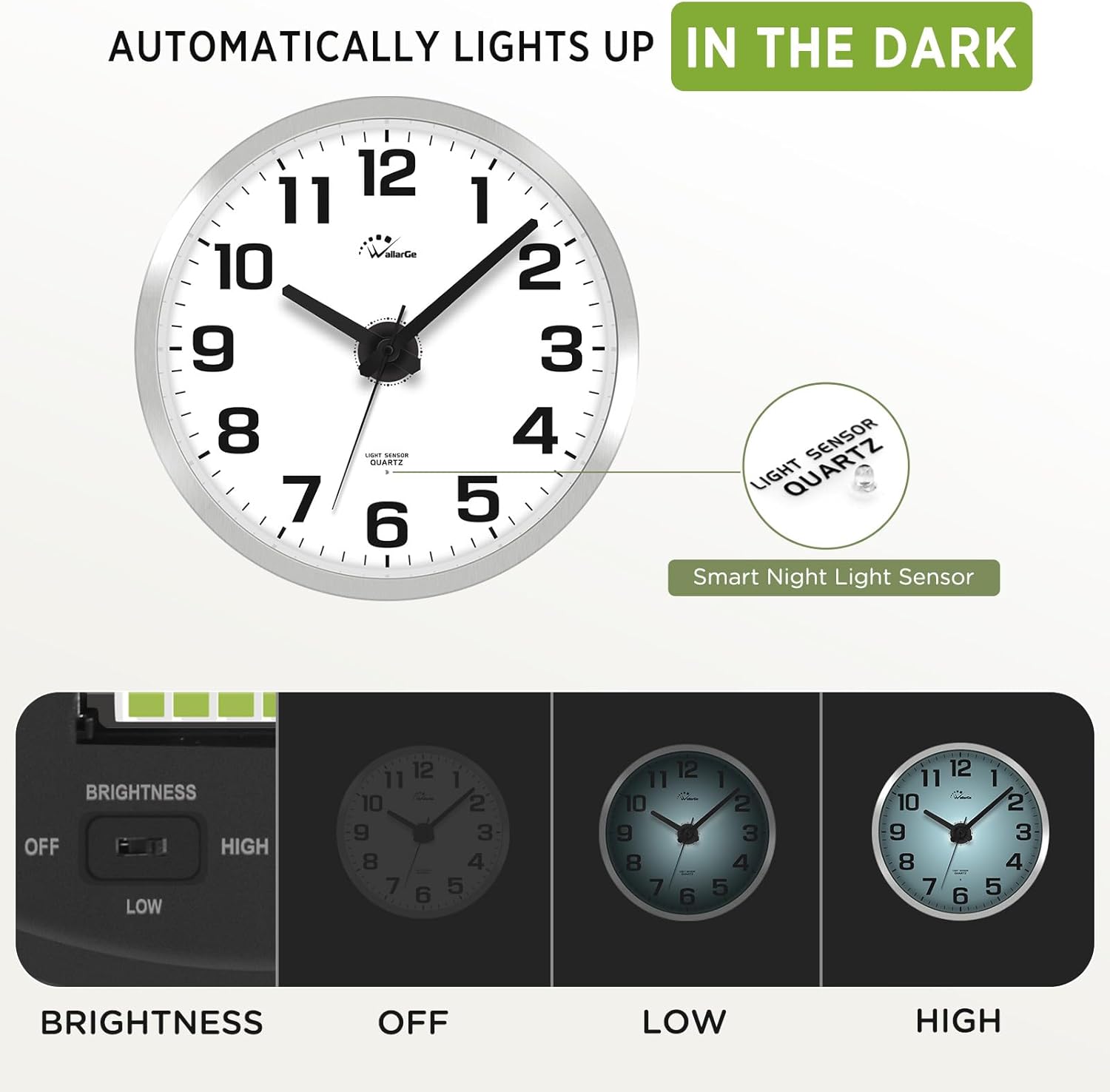
Illustration of the smart light sensor and adjustable brightness settings (Off, Low, High) for the clock's night light feature.

Comparison showing the clock's appearance in daylight and with the night light activated in darkness.
2. Silent Operation
The clock is equipped with a precise quartz movement that ensures silent, non-ticking operation. This feature makes it suitable for bedrooms, offices, and other environments where quiet is preferred.

The WallarGe clock displayed in a bedroom, highlighting its silent operation for an undisturbed environment.
Maintenance
- Cleaning: Wipe the clock face and frame with a soft, dry cloth. Avoid using abrasive cleaners or solvents.
- Battery Replacement: Replace all batteries (1xAA for movement, 3xAA for light) when the clock stops or the night light dims significantly. Always replace all batteries at the same time for optimal performance.
- Environment: Keep the clock away from extreme temperatures, direct sunlight, and high humidity to ensure longevity and accurate timekeeping.
Troubleshooting
- Clock not running:
- Check if the AA battery for the clock movement is installed correctly with proper polarity.
- Replace the clock movement battery with a fresh one.
- Night light not working or dim:
- Ensure the three AA batteries for the smart light are installed correctly with proper polarity.
- Replace the smart light batteries with fresh ones.
- Verify that the light sensor switch on the back of the clock is set to "Low" or "High", not "Off".
- Confirm that the ambient light is sufficiently dark for the sensor to activate.
- Inaccurate time:
- Replace the clock movement battery. A weak battery can affect accuracy.
- Ensure the clock is not exposed to strong magnetic fields.
Specifications
| Brand | WallarGe |
| Model Number | W-CL506 |
| Color | Silver |
| Display Type | Analog |
| Movement Type | Quartz |
| Special Features | Silent Clock, Smart Night Light (Adjustable Brightness) |
| Product Dimensions | 12"W x 12"H |
| Item Weight | 2.43 Pounds |
| Power Source | Battery Powered (1xAA for clock, 3xAA for light) |
| Material Type | Acrylonitrile Butadiene Styrene (ABS) |
| Mounting Type | Wall Mount |

Diagram illustrating the 12-inch dimensions of the WallarGe Night Light Wall Clock.
Official Product Video
Official WallarGe video demonstrating the features of the Smart Night Light Wall Clock, including its automatic illumination and silent operation.