
1. Introduction
Thank you for choosing the NWOUIIAY 3.5-inch 720P Video Baby Monitor ABM101. This device is designed to provide reliable monitoring of your baby, offering peace of mind with its advanced features. Please read this manual carefully before use to ensure proper operation and to maintain the product's longevity.
2. Product Overview
The NWOUIIAY ABM101 Video Baby Monitor consists of a camera unit and a parent unit (monitor). It features a 3.5-inch 720P LCD screen, a 2000mAh rechargeable battery for the parent unit, night vision, VOX mode, two-way communication, 10x zoom, and built-in lullabies.
Key Features:
- 3.5-inch 720P LCD Screen: Provides a clear, high-definition view of your baby.
- 2000mAh Rechargeable Battery: Ensures extended use for the parent unit. The camera unit requires continuous power.
- VOX Mode: Energy-saving mode that activates the screen upon detecting baby sounds, with 3 sensitivity levels (low, medium, high).
- Infrared Night Vision: Allows clear monitoring of your baby even in complete darkness.
- Two-Way Communication: Speak to your baby through the monitor to soothe them.
- 10x Digital Zoom: For detailed observation of your baby.
- 8 Built-in Lullabies: To help calm and comfort your baby.
- Temperature Monitoring: Displays the room temperature.
- Feeding Reminder: Alarm setting to remind you of feeding times.
Components:
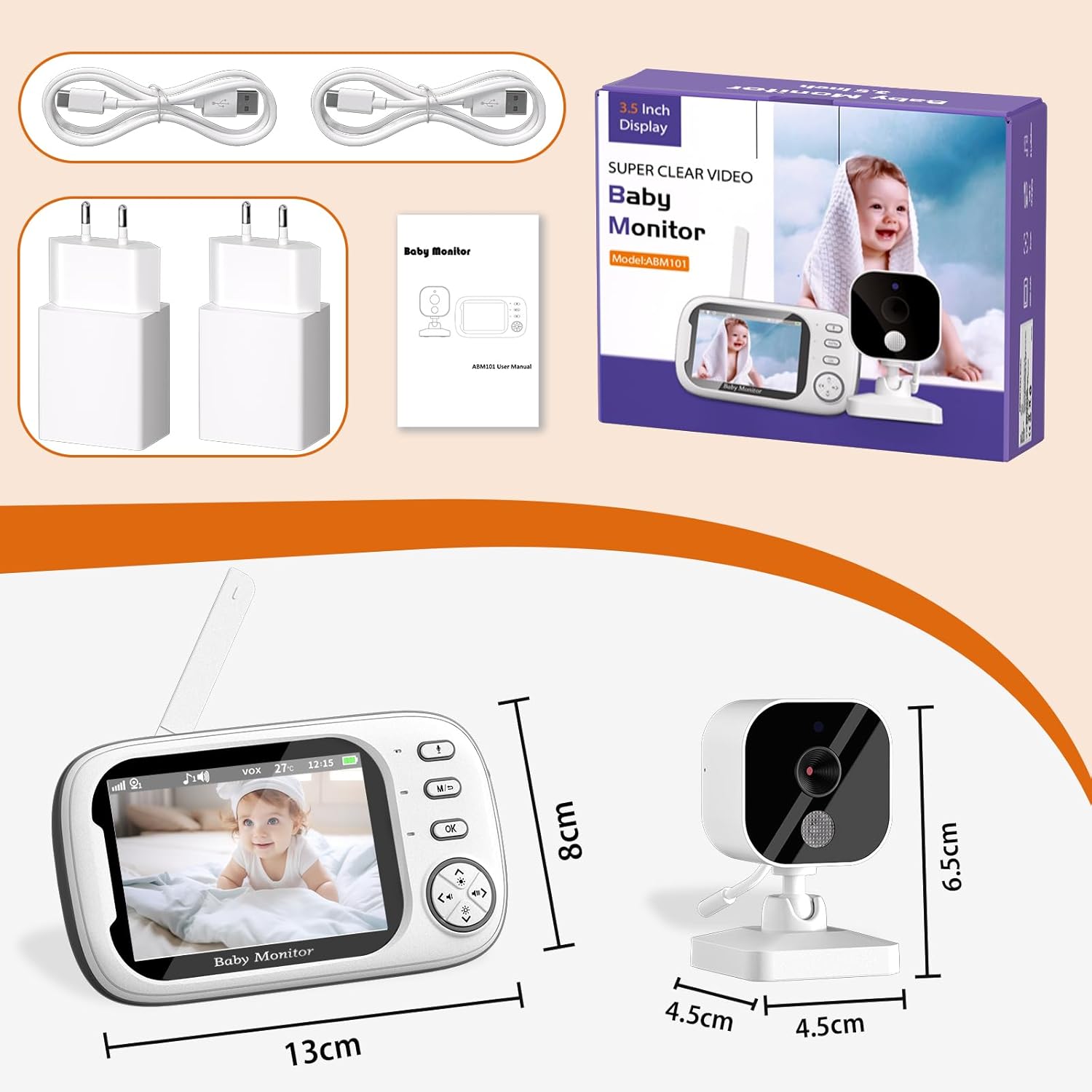
Image: Package contents of the NWOUIIAY ABM101 Baby Monitor, showing the camera unit, parent unit (monitor), two USB cables, two power adapters, and the user manual.

Image: An overview of the NWOUIIAY ABM101 Baby Monitor's main features, including the 3.5-inch LCD screen, sound monitoring, feeding reminder, night vision, lullabies, zoom, temperature monitoring, two-way intercom, time setting, and multi-camera support.
3. Setup Instructions
Follow these steps to set up your NWOUIIAY ABM101 Video Baby Monitor:
- Powering the Camera Unit: The camera unit must be connected to a power source at all times during operation. Use the provided USB cable and power adapter to plug the camera into an electrical outlet. Ensure the cable is placed out of reach of the baby to prevent entanglement.
- Charging the Parent Unit: Before first use, fully charge the parent unit (monitor) using the provided USB cable and power adapter. The 2000mAh battery allows for portable use once charged.
- Camera Placement: Place the camera unit in a location that provides a clear view of your baby. Ensure it is at least 1.5 meters (5 feet) away from the baby. The connection range is up to 300 meters (984 feet) in an open, unobstructed space. Actual range may vary due to walls, doors, and other electronic equipment.
- Optional SD Card Installation: The camera supports an SD memory card for recording (not included). To install, locate the SD card slot on the camera unit and insert the card. Recordings can be viewed on a computer or mobile phone after removal.
- Power On: Turn on both the camera unit and the parent unit. They should automatically pair. If not, refer to the troubleshooting section for pairing instructions.

Image: Examples of suitable placements for the baby monitor camera and parent unit in different rooms, highlighting its versatility for monitoring babies or elderly individuals.
4. Operating Instructions
This section details the various functions of your NWOUIIAY ABM101 Video Baby Monitor.
4.1 Real-time Monitoring
Once both units are powered on and paired, the parent unit will display a live video feed from the camera. You can adjust the volume on the parent unit to hear your baby clearly.
Video: This video demonstrates the real-time monitoring capabilities of a 3.5-inch baby monitor, showing a baby in a crib, a parent monitoring while preparing food, and adjusting the volume. It also highlights the VOX mode, two-way communication, and various usage scenarios.
4.2 VOX Mode (Voice Operated Exchange)
VOX mode conserves battery by turning off the screen when no sound is detected. The screen automatically activates and lights up when your baby makes a sound. You can adjust the sensitivity of the VOX mode to low, medium, or high, depending on your environment and preference.

Image: Illustration of the VOX sound activation feature, where the monitor screen automatically turns on when the baby cries, saving power.
4.3 Night Vision Mode
The camera is equipped with infrared night vision, allowing you to see your baby clearly even in a dark room. This mode activates automatically in low-light conditions.

Image: Demonstrates the clear night vision mode, capturing the baby's movements even in low light conditions.
4.4 Two-Way Communication
Press and hold the microphone button on the parent unit to speak to your baby. Your voice will be transmitted through the camera's speaker, allowing you to comfort your baby remotely.

Image: A woman using the baby monitor for two-way communication, illustrating how she can talk to her baby from anywhere in the home.
4.5 10x Digital Zoom
Use the zoom function on the parent unit to get a closer look at your baby. The monitor supports up to 10 times digital zoom for detailed observation.

Image: Comparison of 1x and 10x zoom on the baby monitor screen, demonstrating the ability to see the baby up close.
4.6 Lullabies
The monitor includes 8 pre-programmed lullabies. You can play these melodies through the camera's speaker to soothe your baby to sleep.

Image: A baby sleeping peacefully, with musical notes floating around, illustrating the feature of playing lullabies to soothe the baby.
4.7 Temperature Monitoring
The parent unit displays the current temperature of the baby's room, helping you ensure a comfortable environment.

Image: The baby monitor screen showing the detected room temperature, indicating the temperature monitoring feature.
4.8 Feeding Reminder / Time Setting
Set alarms on the parent unit to remind you of feeding times or other important schedules for your baby.

Image: The baby monitor screen displaying set alarm times, indicating the feeding reminder feature.
5. Maintenance
Proper maintenance ensures the longevity and optimal performance of your baby monitor.
- Cleaning: Use a soft, dry cloth to clean the camera and parent unit. Do not use liquid cleaners or aerosols.
- Battery Care: For the parent unit, avoid fully discharging the battery frequently. Charge it regularly to maintain battery health. If storing for a long period, charge the battery to about 50% and store in a cool, dry place.
- Storage: Store the device in a dry place, away from extreme temperatures and direct sunlight.
- Cable Management: Always ensure power cables are securely placed and out of reach of children.
6. Troubleshooting
If you encounter any issues with your baby monitor, please refer to the following common solutions:
- No Picture/Sound on Parent Unit:
- Ensure both the camera and parent unit are powered on and charged.
- Check if the units are within range. Move them closer if necessary.
- Verify that the camera is properly connected to its power source.
- Try re-pairing the units. Consult the full manual for specific pairing instructions if needed.
- Poor Picture Quality:
- Ensure the camera lens is clean.
- Check for obstructions between the camera and the parent unit.
- Adjust the camera's position for better lighting.
- Interference/Static Sound:
- Move the units away from other electronic devices (Wi-Fi routers, microwaves, cordless phones) that may cause interference.
- Ensure the units are not too close to each other.
- Parent Unit Battery Drains Quickly:
- Reduce screen brightness.
- Utilize VOX mode to turn off the screen when quiet.
- Ensure the battery is fully charged before use. Battery life naturally degrades over time.
- Camera Red Light Always On (Night Vision Indicator):
- The red light indicates the infrared night vision is active. This is normal behavior in low-light conditions. It cannot be manually turned off if the camera detects insufficient light.
7. Specifications
| Feature | Specification |
|---|---|
| Model | ABM101 |
| Screen Size | 3.5 inches |
| Video Resolution | 720P HD |
| Parent Unit Battery | 2000mAh rechargeable |
| Connectivity Technology | Wireless (Filaire - though product description implies wireless connection between units, power is wired) |
| Special Features | HD Resolution, Night Vision, VOX Mode, Two-Way Talk, 10x Zoom, Lullabies, Temperature Monitoring |
| Material | Plastic |
| Power | 5 Watts |
| Dimensions (Parent Unit) | Approx. 13 cm x 8 cm |
| Dimensions (Camera Unit) | Approx. 4.5 cm x 4.5 cm x 6.5 cm |
| Wireless Range | Up to 300m (open space) |
8. Warranty and Support
Your NWOUIIAY ABM101 Video Baby Monitor comes with a standard manufacturer's warranty. Please refer to the product packaging or the official NWOUIIAY website for specific warranty terms and conditions.
For technical support, troubleshooting assistance, or any questions regarding your product, please contact NWOUIIAY customer service through the retailer where you purchased the product or visit the official brand website for contact information.