
1. Product Overview
The SIXWIN SXW9300 is a portable car stereo receiver designed to enhance your in-car entertainment and navigation experience. It features a 9.3-inch display with wireless Apple CarPlay and Android Auto compatibility, an integrated DVR, Bluetooth connectivity, FM transmission, and voice control capabilities.
2. Package Contents
The following items are included in your package:
- 9.3-Inch Smart Screen Player
- Universal Mount
- Camera Power Cable (if included with specific variant)
- Power Cord
- Monitor Base
- TF Card (64GB, if included)
- Bracket Fixing Sticker
- 3m AUX Cable

Image: An illustration showing the SIXWIN SXW9300 portable car stereo receiver along with its included accessories: power cord, monitor base, TF card, bracket fixing stickers, user manual, and 3m AUX cable.
3. Specifications
- Screen: HD 1024 x 600 resolution, 9.3 Inches LCD
- Language Support: English, Russian, Spanish, French, German, Japanese, Korean, Italian, Portuguese
- Voltage: 7-32V
- System: PAL/NTSC
- Installation Method: Vertical stand / Suction cup stand
- Camera Compatibility: Supports 720P/1080P HD camera
- Working Current: 400mA
- Power: 6W
- Operating Temperature: -30°C to +80°C
- Video: Two-way video split display with recording function
- Intelligent Interconnection: Supports iOS CarPlay, Android Auto, Bluetooth music, FM transmission
- Voice Control: Supported
- Cooling Method: Passive cooling
- Audio Output: Stereo, Built-in Speakers
- Connectivity: Bluetooth, HDMI, USB
- Model Number: SXW9300
4. Setup and Installation
This device is designed for plug-and-play installation. Ensure your vehicle's power supply is compatible with the 7-32V voltage requirement.
4.1 Mounting the Device
Choose a suitable location on your dashboard or windshield that does not obstruct your view or interfere with vehicle controls. Use the provided universal mount or suction cup stand to securely attach the 9.3-inch smart screen player.

Image: The SIXWIN SXW9300 portable car stereo receiver showing its 9.3-inch display with various app icons, a 64GB TF card, and a rear view of the unit with a camera lens.
4.2 Power Connection
Connect the provided power cord to the device and then to your vehicle's power outlet (e.g., cigarette lighter socket). Ensure a secure connection.
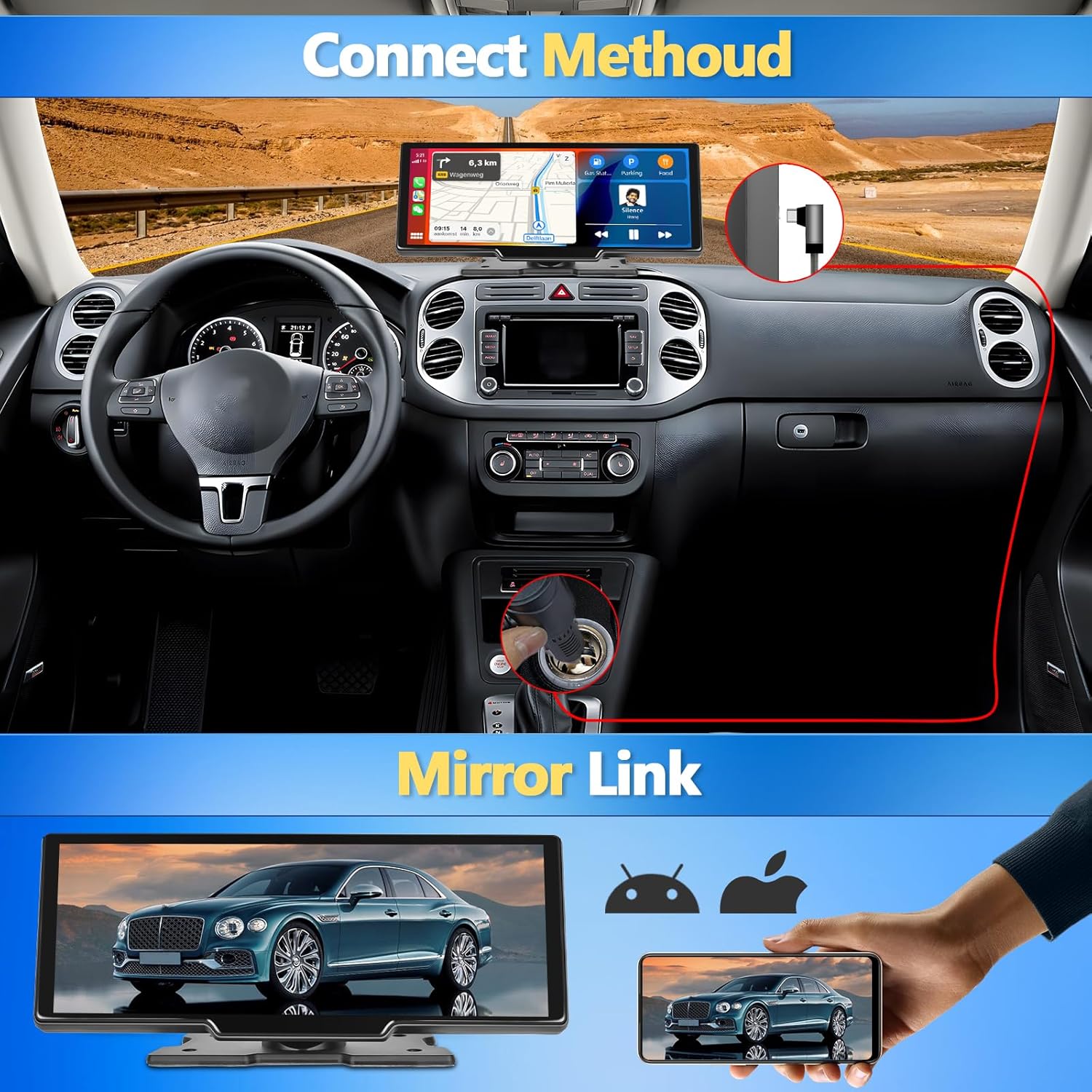
Image: Diagram illustrating the power connection method for the SIXWIN SXW9300, showing the device mounted on a dashboard and connected to a car's power outlet.
5. Operating Instructions
5.1 Wireless Apple CarPlay / Android Auto Connection
The device supports wireless Apple CarPlay and Android Auto for seamless smartphone integration.
For Apple CarPlay:
- Open settings on your iPhone.
- Turn on Bluetooth.
- Find the monitor's Bluetooth name and connect.
- Connection successful.
For Android Auto:
- Open settings on your Android phone.
- Turn on Bluetooth.
- Allow contacts to make calls, then select pairing.
- Connection successful.

Image: Visual guide detailing the steps for connecting to Apple CarPlay and Android Auto wirelessly via Bluetooth on the SIXWIN SXW9300 display.
5.2 Bluetooth Functionality
The built-in Bluetooth module allows for hands-free calls, music streaming, and automatic phonebook loading.
- Hands-free Calls: Make and receive calls directly from the device.
- Bluetooth Music Player: Stream audio from your smartphone.
- Phonebook Sync: Automatically loads your phone's contacts.
5.3 FM Transmitter
Utilize the FM transmitter to output audio from the device to your car's existing stereo system.
- Turn on the FM Transmitter function on the Smart Screen Player.
- Tune your car's FM radio to the same frequency displayed on the Smart Screen Player.
- Audio from the device will now play through your car's speakers.

Image: Display showing the Bluetooth music interface and the FM transmitter settings on the SIXWIN SXW9300, with an example frequency of 106.0 MHz.
5.4 Front Camera & DVR
The device includes a built-in front camera with DVR functionality to record your driving. The lens can be adjusted 360 degrees.
- Recording: Automatically records driving footage.
- Adjustable Lens: Fine-tune the camera angle for optimal view.
- Loop Recording: Supports seamless loop recording, overwriting older files when the storage card is full.
- WiFi Video: View recorded videos and driving tracks on your phone via a dedicated app (downloadable via WiFi).

Image: Illustration of the front camera and DVR feature of the SIXWIN SXW9300, including examples of recorded footage during day and night conditions.
5.5 GPS Navigation & Voice Control
When connected to Apple CarPlay or Android Auto, the device provides real-time GPS navigation and supports voice commands.
- Voice Navigation: Use voice commands for directions.
- Voice Control: Access phone functions like calls, messages, and music playback hands-free.
- Real-Time GPS: Utilize your smartphone's navigation apps on the larger display.

Image: Screenshot of the SIXWIN SXW9300 display showing GPS navigation with map data, points of interest, and voice control icons.
5.6 Split Screen Function
The split-screen feature allows you to view two applications simultaneously, such as navigation and music playback.
Image: The SIXWIN SXW9300 display demonstrating split-screen mode, showing navigation on one side and media playback controls on the other.
5.7 Mirror Link / AirPlay / Android Cast
The device supports Mirror Link, AirPlay (for iOS), and Android Cast, allowing you to mirror your smartphone's screen onto the 9.3-inch display.
- Mirror Link: Display your phone's content directly on the car stereo screen.
- AirPlay (iOS): Wirelessly stream content from Apple devices.
- Android Cast: Wirelessly stream content from Android devices.
Image: Visual representation of the Mirror Link function, showing a smartphone screen mirrored onto the SIXWIN SXW9300 display.
6. Maintenance
- Cleaning: Use a soft, dry cloth to clean the screen and exterior. Avoid abrasive cleaners or solvents.
- Temperature: Operate the device within the specified temperature range (-30°C to +80°C) to ensure optimal performance and longevity.
- Storage: If storing the device for an extended period, disconnect it from power and store it in a cool, dry place.
- Firmware Updates: Check the manufacturer's website periodically for any available firmware updates to ensure the device has the latest features and bug fixes.
7. Troubleshooting
- Device Not Powering On:
- Ensure the power cord is securely connected to both the device and the vehicle's power outlet.
- Verify that the vehicle's power outlet is functioning correctly.
- No Audio Output:
- Check the volume settings on both the device and your car stereo.
- If using FM transmission, ensure the device and car stereo are tuned to the same frequency.
- If using Bluetooth, ensure your phone is connected and media audio is enabled.
- CarPlay/Android Auto Not Connecting:
- Ensure Bluetooth is enabled on both the device and your smartphone.
- Verify that your phone's operating system is up to date.
- Try restarting both the device and your smartphone.
- Screen Unresponsive:
- Restart the device.
- Ensure the screen is clean and free from debris.
- DVR Recording Issues:
- Check if the TF card is properly inserted and has sufficient storage space.
- Ensure the loop recording function is configured as desired.
8. Warranty and Support
SIXWIN provides lifetime technical support for this product. If you encounter any issues or have questions regarding the operation, installation, or features of your SXW9300 Portable Car Stereo Receiver, please contact our support team.
Refer to your purchase documentation for specific warranty terms and contact information.