
Roidmi XCQ06RM
Roidmi X20S XCQ06RM Cordless 2-in-1 Vacuum and Mop User Manual
Model: XCQ06RM
1. Introduction
Thank you for choosing the Roidmi X20S XCQ06RM Cordless 2-in-1 Vacuum and Mop. This appliance is designed to provide efficient and convenient cleaning for various floor types in your home. This manual contains important information regarding the safe use, operation, and maintenance of your device. Please read it thoroughly before first use and keep it for future reference.
2. Safety Instructions
To reduce the risk of fire, electric shock, or injury, please observe the following safety precautions:
- Read all instructions before using the appliance.
- Do not use outdoors or on wet surfaces.
- Do not allow to be used as a toy. Close attention is necessary when used by or near children.
- Use only as described in this manual. Use only manufacturer's recommended attachments.
- Do not use with damaged cord or plug. If appliance is not working as it should, has been dropped, damaged, left outdoors, or dropped into water, return it to a service center.
- Do not pull or carry by cord, use cord as a handle, close a door on cord, or pull cord around sharp edges or corners. Do not run appliance over cord. Keep cord away from heated surfaces.
- Do not unplug by pulling on cord. To unplug, grasp the plug, not the cord.
- Do not handle plug or appliance with wet hands.
- Do not put any object into openings. Do not use with any opening blocked; keep free of dust, lint, hair, and anything that may reduce airflow.
- Keep hair, loose clothing, fingers, and all parts of body away from openings and moving parts.
- Turn off all controls before unplugging.
- Use extra care when cleaning on stairs.
- Do not use to pick up flammable or combustible liquids, such as gasoline, or use in areas where they may be present.
- Do not pick up anything that is burning or smoking, such as cigarettes, matches, or hot ashes.
- Do not use without dust cup and/or filters in place.
- Prevent unintentional starting. Ensure the switch is in the off-position before connecting to battery pack, picking up or carrying the appliance.
- Recharge only with the charger specified by the manufacturer.
3. Package Contents
Please check the package contents upon unpacking to ensure all items are present:
- Vacuum cleaner main unit
- Multi-function brush
- Mite removal brush
- Washing brush (mop attachment)
- Electric mattress brush
- Wireless charger
- Filter
- Crevice tool
- Cleaning station
- Vacuum tube
- Mop heads x2
4. Product Overview
The Roidmi X20S XCQ06RM is a powerful and versatile cleaning solution, combining vacuuming and mopping capabilities. Its lightweight design and advanced features make home cleaning efficient.

Figure 1: The Roidmi X20S XCQ06RM cordless vacuum cleaner in its upright configuration.
Key Features:
- 2-in-1 Vacuum and Mop: Easily switch between vacuuming and mopping functions by attaching the appropriate head. The mop brush rotates at approximately 200 RPM for deep cleaning.
- Powerful Suction: Features a new generation Engine-x brushless digital motor (up to 120,000 rpm) delivering 138 watts of suction power and 25,000 Pa air intake pressure. Air-x technology ensures consistent suction by separating dust from air.
- 6-Level Filtration System: A multi-level system effectively separates dust, filtering impurities as small as 0.3 µm with a 99% purification rate. The device includes a safety mechanism that prevents operation if filters are not correctly installed.
- Mobile Application Connectivity: Connects via Bluetooth to your smartphone. The app allows monitoring of remaining operating time, cleaning time, and provides notifications for dustbin full or filter replacement.
- Extended Battery Life: Optimized by the BMS-X system, the 8 LG/Samsung lithium batteries provide approximately 65 minutes of runtime. The app displays battery status and alerts.
- Magnetic Wireless Charging: Convenient and cable-free charging.
- User-Friendly Design: Operates at a reduced noise level of approximately 72 dB (A). The electric brush includes an LED light for improved visibility in dark areas. Weighing 1.5 kg, it is lightweight for easy handling.

Figure 2: The Roidmi X20S main unit shown with both the vacuum brush head and the mop attachment.

Figure 3: A user operating the Roidmi X20S to vacuum a rug in a living room setting.

Figure 4: The mop attachment of the Roidmi X20S cleaning a wet spill on a tiled kitchen floor.
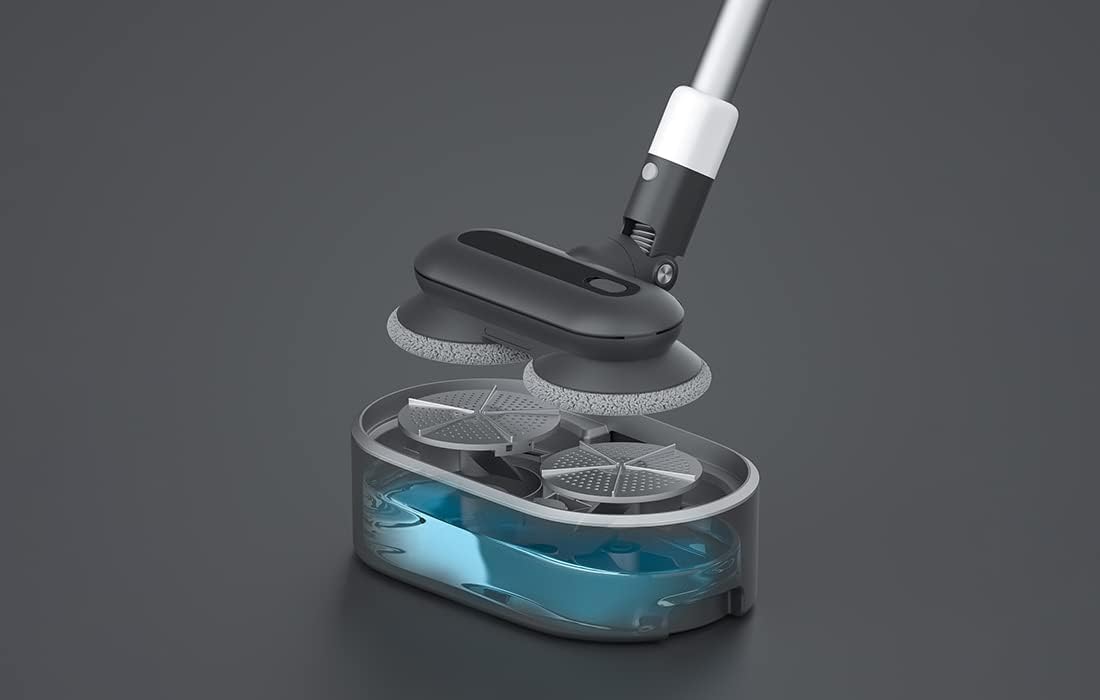
Figure 5: An exploded view showing the internal components of the Roidmi X20S mop attachment, including the water tank.
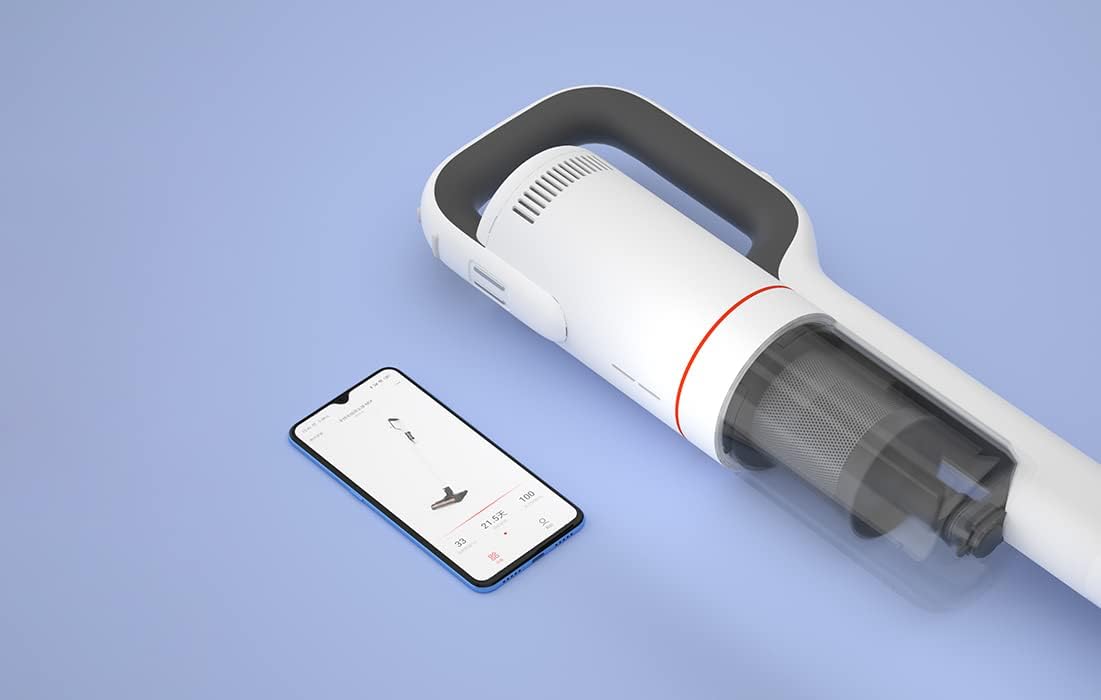
Figure 6: The Roidmi X20S main unit positioned next to a smartphone, illustrating its connectivity with the Roidmi mobile application.

Figure 7: A user demonstrating the Roidmi X20S in handheld mode, cleaning a sofa with an attachment.
5. Setup
5.1 Assembly
- Connect the Vacuum Tube: Insert the vacuum tube into the main unit until it clicks into place.
- Attach Cleaning Head: Select the desired cleaning head (multi-function brush for vacuuming, or washing brush for mopping) and attach it to the end of the vacuum tube until it clicks.
- Install Mop Pads (for mopping): If using the washing brush, attach the mop pads to the bottom of the mop attachment.
5.2 Charging
Before first use, fully charge the appliance. The Roidmi X20S uses magnetic wireless charging.
- Mount the cleaning station to a wall in a convenient location, ensuring it is near a power outlet.
- Connect the wireless charger to the cleaning station and plug it into a power outlet (220 Volts).
- Place the Roidmi X20S onto the cleaning station. The magnetic connection will secure it, and charging will begin automatically.
- Monitor the battery status via the indicator lights on the device or through the Roidmi mobile application.
6. Operating Instructions
6.1 Vacuuming
- Ensure the multi-function brush or appropriate vacuum attachment is securely installed.
- Press the power button to turn on the vacuum.
- Select the desired suction mode (if applicable) using the mode selection button.
- Begin vacuuming the desired surface. The LED light on the brush head will illuminate dark areas.
- After use, press the power button to turn off the vacuum.
6.2 Mopping
- Detach the vacuum brush head and attach the washing brush (mop attachment) with mop pads installed.
- Fill the water tank on the mop attachment with clean water. Do not use corrosive liquids or hot water.
- Press the power button to turn on the device. The mop pads will begin to rotate.
- Gently guide the mop attachment over the floor surface to clean.
- After use, press the power button to turn off the device. Empty any remaining water from the tank and clean the mop pads.
6.3 Mobile Application Usage
- Download the Roidmi app from your smartphone's app store (compatible with Android and iOS).
- Enable Bluetooth on your smartphone and open the Roidmi app.
- Follow the in-app instructions to pair your Roidmi X20S with your smartphone.
- Once connected, you can view battery status, remaining operating time, cleaning history, and receive notifications for dustbin full or filter replacement.
7. Maintenance
Regular maintenance ensures optimal performance and extends the lifespan of your Roidmi X20S.
7.1 Emptying the Dustbin
- When the dustbin full notification appears on the app or when visibly full, detach the dustbin from the main unit.
- Open the dustbin and empty its contents into a waste bin.
- Close the dustbin and reattach it to the main unit.
7.2 Cleaning/Replacing Filters
- The Roidmi X20S features a washable filter. When the app notifies you to clean or replace the filter, remove the filter from the dustbin.
- Rinse the filter under running water until clean. Ensure it is completely dry before reinserting.
- Replace the filter if it is damaged or excessively worn.
7.3 Cleaning Brushes and Mop Pads
- Regularly remove hair and debris from the multi-function brush and electric mattress brush. Use the crevice tool or scissors if necessary.
- After mopping, detach the mop pads from the washing brush and rinse them thoroughly. Allow them to air dry completely before storing or reusing.
8. Troubleshooting
If you encounter issues with your Roidmi X20S, refer to the following common problems and solutions:
| Problem | Possible Cause | Solution |
|---|---|---|
| No power/Does not turn on | Battery is depleted Device not properly assembled | Charge the battery fully Ensure all parts are clicked into place |
| Low suction power | Dustbin is full Filter is clogged Brush head is blocked | Empty the dustbin Clean or replace the filter Remove any obstructions from the brush head |
| Mop function not effective | Water tank is empty Mop pads are dirty or worn | Refill the water tank Clean or replace mop pads |
| Device stops unexpectedly | Battery is low Filtration system parts not installed correctly | Recharge the battery Check all filter components are securely in place |
| App connectivity issues | Bluetooth is off Device not paired | Ensure Bluetooth is enabled on your phone Follow app instructions to re-pair the device |
If the problem persists after attempting these solutions, please contact Roidmi customer support.
9. Specifications
| Feature | Specification |
|---|---|
| Brand | ROIDMI |
| Model Number | XCQ06RM |
| Color | White |
| Power | 34.2 Watts |
| Voltage | 220 Volts |
| Noise Level | 72 Decibels (A) |
| Battery Life | Approx. 65 minutes |
| Item Weight | 3.95 Kilograms |
| Filter Type | Cartridge (Washable, HEPA) |
| Power Source | Battery Powered (1 Lithium-ion battery included) |
| Compatibility | Android, iOS (via Roidmi App) |
| Special Features | Compact, Lightweight, Portable, Bagless, Wet/Dry (mop function) |
| Manufacturer | Wuxi Roidmi Information Technology Co., Ltd. |
10. Warranty and Support
For warranty information, please refer to the warranty card included with your product or contact Roidmi customer service directly. Information regarding the availability of spare parts is not provided in the product details.
For technical support or service inquiries, please visit the official Roidmi website or contact their customer support channels.
Related documentsXCQ06RM


Ask a question about this manual
Ask about setup, troubleshooting, compatibility, parts, safety, or missing instructions. Manuals+ will review the question and use this page’s manual context to help answer it.