
1. Introduction
This manual provides essential information for the installation and proper use of the Anchilly Microwave Push Button Replacement. This component is designed to replace a broken or worn door release button in compatible Kitchen-aid microwave ovens, restoring full functionality to your appliance. It is a durable, 3D-printed part engineered for longevity.
2. Compatibility and Verification
The Anchilly Microwave Push Button Replacement is compatible with a wide range of Kitchen-aid microwave models, including Convection Microwave Ovens, Grill Microwave Ovens, Microwave/Oven Combinations, and Solo Microwave Ovens. Due to variations across models, it is crucial to verify the dimensions of your original button against the specifications provided below to ensure a correct fit.
2.1 Key Dimensions
- Width: Approximately 56.8 mm (side to side)
- Height: Approximately 23.8 mm (top to bottom, rectangular face)
- Clip Height: Approximately 27 mm (from base when laying face down)
- Distance Between Pressure Clips: Approximately 53 mm
Please compare these measurements with your existing button before proceeding with installation. Images demonstrating these measurements are provided below for reference.
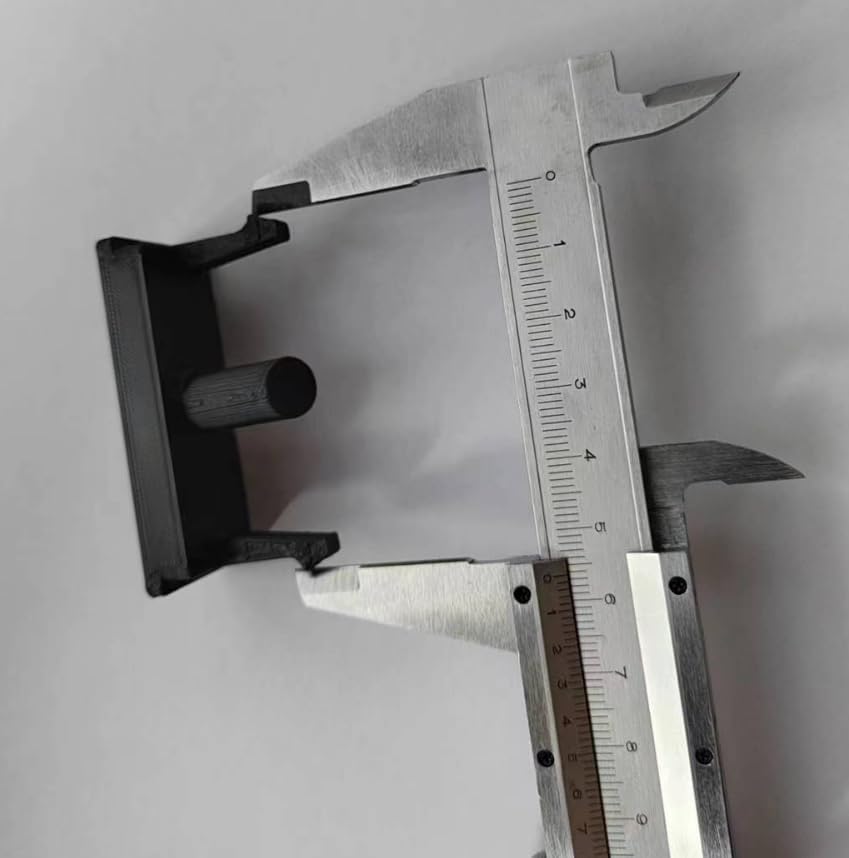
Image: Side view of the replacement button being measured with a caliper. This helps verify the button's dimensions against your original part.

Image: Top view of the replacement button being measured with a caliper. This illustrates the width and clip spacing.

Image: Front view of the replacement button being measured with a caliper. This shows the height of the button's face.
3. Installation Instructions
This replacement button is designed for straightforward installation. Please follow these steps carefully:
- Safety First: Before beginning any work, ensure the microwave oven is unplugged from the power outlet to prevent electrical hazards.
- Remove Old Button: Carefully remove the broken or old microwave door release button. This may involve gently prying it out.
- Retain the Spring: Crucially, do not discard the original spring that was located behind the old button. This spring is essential for the proper function of the new button.
- Position the Spring: Place the original spring onto the center peg of the new Anchilly replacement button. Ensure it is seated correctly.
- Install New Button: Align the new button with the opening in the microwave's control panel. Gently push the button into position until it clicks securely into place. Ensure the button is oriented correctly (there may be an "up" side).
- Test Functionality: Once installed, plug the microwave back into the power outlet. Press the new button to confirm that the microwave door opens smoothly and consistently.

Image: An illustration of the replacement button's structure and its typical location on a Kitchen-aid microwave. Note the highlighted area indicating where the button is installed.

Image: Front view of the Anchilly Microwave Push Button Replacement. This shows the textured surface and overall appearance of the installed button.
4. Operation
Once correctly installed, the Anchilly Microwave Push Button Replacement functions identically to the original part. Press the button firmly to release the microwave oven door. Ensure the door latches securely when closed to allow the microwave to operate.
5. Maintenance
The replacement button requires minimal maintenance. To clean, wipe the surface with a soft, damp cloth. Avoid using abrasive cleaners or harsh chemicals, as these can damage the material. Ensure no liquids seep into the microwave's internal components during cleaning.
6. Troubleshooting
- Button Does Not Fit: Re-verify the dimensions of your original button against the specifications in Section 2. If the dimensions do not match, this replacement part may not be compatible with your specific microwave model.
- Door Does Not Open/Close Properly:
- Ensure the original spring was correctly placed on the center peg of the new button during installation.
- Check that the button is fully seated and clicked into its position within the control panel.
- Verify that the button is not obstructed by any debris or misaligned components.
- Button Feels Loose: Confirm that the button's clips are securely engaged with the microwave's housing. If the issue persists, re-installation may be necessary.
7. Specifications
| Product Name | Anchilly Microwave Push Button Replacement |
| Brand | Anchilly |
| Material | Durable 3D-printed material |
| Dimensions (Approximate) | 56.8 mm (width) x 23.8 mm (height) x 27 mm (clip height) |
| Weight | 0.317 ounces (approx. 9 grams) |
| Compatibility | Kitchen-aid Microwave Ovens (various models) |
8. Warranty and Support
As this is a replacement part, specific warranty information may vary. Please refer to the retailer or original purchase documentation for details regarding returns or defects. For installation assistance or further inquiries, please contact the seller directly through the platform where the purchase was made.