
Introduction
This manual provides essential information for the proper setup, operation, and maintenance of your Locksworth Digital Electronic Security Safe, Model AZ4304. Please read these instructions carefully before using the safe to ensure optimal security and functionality.
The Locksworth safe is designed to provide secure storage for valuables such as cash, jewelry, documents, and passports. It features a digital keypad for access, an alarm system, and a removable shelf for organized storage.

Image: The Locksworth Digital Electronic Security Safe with its door open, showcasing the interior storage capacity and digital keypad.
Safety Information
- Always keep emergency keys in a secure location away from the safe and out of reach of unauthorized individuals.
- Do not store emergency keys inside the safe.
- Ensure the safe is placed on a stable, level surface or securely mounted to prevent tipping.
- Avoid exposing the safe to extreme temperatures or humidity.
- Replace batteries promptly when the low battery indicator appears to avoid being locked out.
Package Contents
Verify that all items are present in your package:
- 1 x Locksworth Digital Electronic Security Safe
- 2 x Emergency Keys
- 2 x Sets of Expansion Bolts (for mounting)
- 1 x Instruction Manual
- 4 x AA Batteries
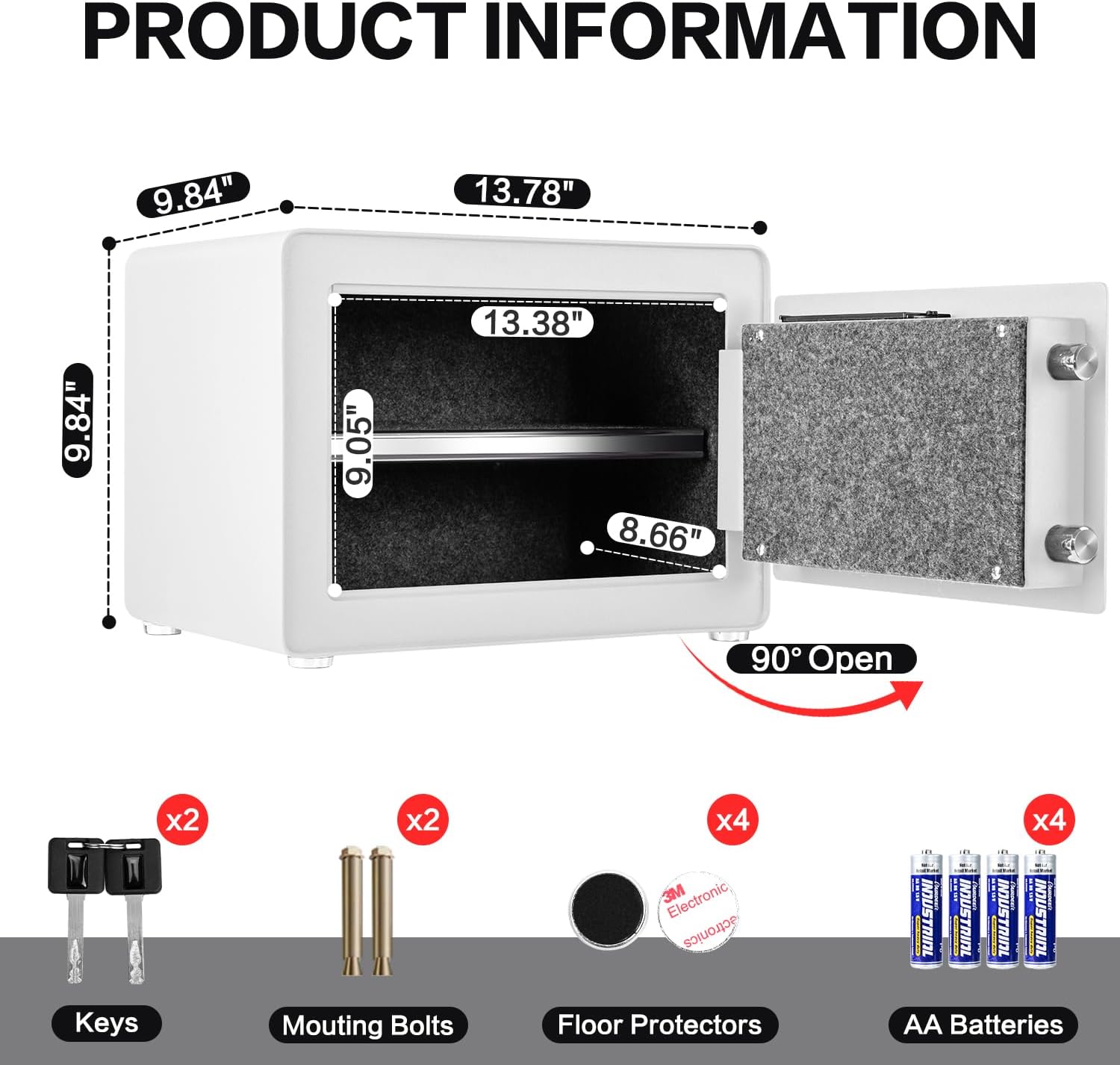
Image: A visual representation of the safe's dimensions and the accessories included in the package, such as keys, mounting bolts, and batteries.
Setup
1. Battery Installation
- Open the safe door using the emergency key (see 'First-Time Opening' below).
- Locate the battery compartment on the inside of the door.
- Remove the battery cover.
- Insert 4 AA batteries, ensuring correct polarity.
- Replace the battery cover.
Video: Demonstrates how to install batteries into the safe's internal compartment.
2. First-Time Opening
Upon receiving your safe, it will be locked. Use the emergency key to open it for the first time and install batteries.
- Locate the emergency keyhole, usually hidden behind a small cover on the right side of the electronic keypad.
- Remove the cover.
- Insert the emergency key and turn it counter-clockwise.
- While the key is turned, rotate the knob clockwise to open the door.
Video: Illustrates the process of opening the safe for the first time using the emergency key.
3. Programming Your Passcode
After installing batteries, you can program your personal passcode.
- With the safe door open, locate the red reset button on the inside of the door, near the hinge.
- Press the reset button. The safe will emit two beeps.
- On the keypad, enter your new passcode (1 to 8 digits).
- Press the "#" button to confirm. The safe will emit two beeps, and the yellow indicator light will turn off.
- Test your new passcode with the door open before closing it.
Video: Shows the steps to program a new digital passcode for the safe.
4. Mounting the Safe
For enhanced security, the safe can be mounted to a wall or floor.
- Identify a suitable location for mounting.
- Use the pre-drilled holes on the back or bottom of the safe as a template to mark drilling points on the wall or floor.
- Drill pilot holes.
- Secure the safe using the provided expansion bolts.
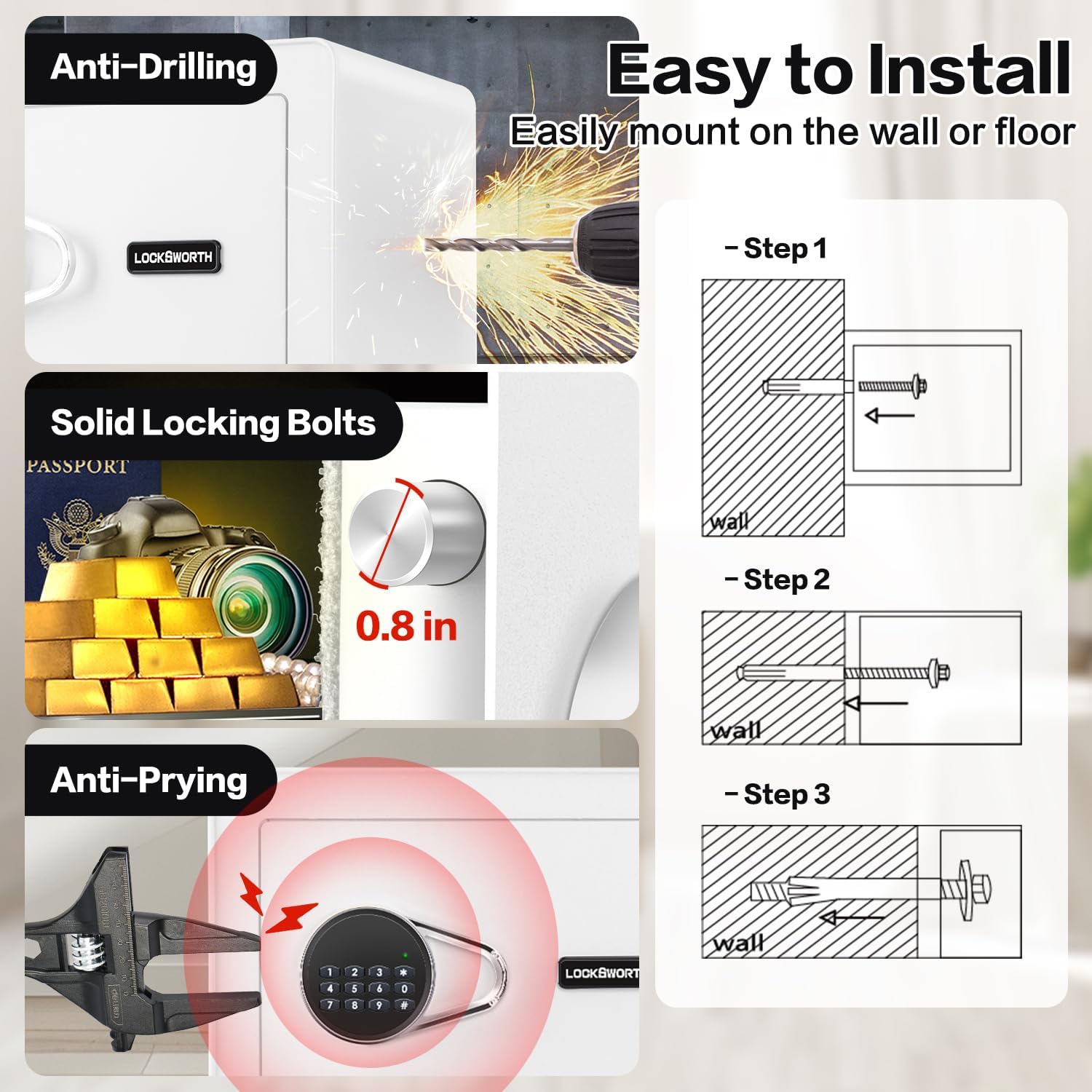
Image: Step-by-step guide on how to install the safe using the pre-drilled holes and expansion bolts.
Operating Instructions
1. Opening with Passcode
- Enter your programmed passcode on the digital keypad.
- Press the "#" button to confirm. The green indicator light will illuminate.
- Within 5 seconds, rotate the knob clockwise to open the door.
Video: Demonstrates how to open the safe using the digital passcode.
2. Opening with Emergency Key
In case of forgotten passcode or dead batteries, use the emergency key:
- Remove the cover over the emergency keyhole.
- Insert the emergency key and turn it counter-clockwise.
- While the key is turned, rotate the knob clockwise to open the door.

Image: Visual guide to the two methods of opening the safe: digital keypad and emergency keys.
3. Closing and Locking the Safe
- Close the safe door firmly.
- Rotate the knob counter-clockwise to engage the locking bolts.
4. Alarm System
The safe is equipped with a dual alarm system for enhanced security:
- Incorrect Passcode Alarm: If an incorrect passcode is entered three consecutive times, the alarm will activate.
- Vibration/Tamper Alarm: If the safe detects violent vibration or tampering attempts, the alarm will sound.

Image: Explanation of the safe's dual alarm system, triggered by incorrect passcodes or physical tampering.
Maintenance
1. Battery Replacement
When the low battery indicator light appears, replace the batteries promptly to ensure continuous operation. Follow the steps outlined in the 'Battery Installation' section.
2. General Care
- Clean the exterior of the safe with a soft, damp cloth. Avoid abrasive cleaners or solvents.
- Regularly check the locking mechanism for any obstructions.
- Ensure the emergency keys are stored securely and their location is known only to authorized users.
Troubleshooting
| Problem | Possible Cause | Solution |
|---|---|---|
| Safe does not open with passcode. | Incorrect passcode entered; batteries are low or dead. | Re-enter the correct passcode. Replace batteries if low. Use emergency key to open. |
| Alarm sounds unexpectedly. | Incorrect passcode entered multiple times; safe detected vibration/tampering. | Enter the correct passcode to disarm. Ensure safe is stable and not being disturbed. |
| Keypad is unresponsive. | Dead batteries. | Replace batteries. Use emergency key to open. |
Specifications
| Feature | Detail |
|---|---|
| Brand | Locksworth |
| Model Number | AZ4304 |
| Product Dimensions | 9.84"D x 13.78"W x 9.84"H |
| Lock Type | Electronic Combination Lock, Key |
| Color | White |
| Capacity | 0.9 Cubic Feet |
| Material | Alloy Steel |
| Special Features | Alarm System, Anti-Theft, Combination Lock, Removable Shelf, Sensor Light |
| Mounting Type | Under Counter Mount, Wall Mount, Floor Mount |
| Item Weight | 18.7 pounds (8.5 Kilograms) |
| Water Resistance Level | Water Resistant |
| Batteries Required | Yes (4 x AA Alkaline) |
Warranty and Support
For warranty information and customer support, please refer to the documentation included with your product or visit the official Locksworth website. Keep your purchase receipt for warranty claims.
