
1. Introduction
Thank you for choosing the Habotest HT121 Non-Contact Voltage and Diode Tester. This device is designed for safe and accurate electrical measurements, featuring Non-Contact Voltage (NCV) detection, diode testing, and True RMS capabilities. Please read this manual thoroughly before use to ensure proper operation and safety.
2. Safety Information
WARNING: Electrical shock hazard. Failure to follow these safety instructions can result in serious injury or death.
- Always exercise extreme caution when working with electrical circuits.
- Do not use the device if it appears damaged or if the battery cover is not properly closed.
- Do not apply voltage or current that exceeds the maximum specified limits.
- Ensure your hands are dry and wear appropriate personal protective equipment (PPE) when performing measurements.
- Never attempt to repair or modify the device. Refer servicing to qualified personnel.
- Keep the device away from children.
3. Product Features
- Non-Contact Voltage (NCV) Detection: Safely detect AC voltage without direct contact.
- Diode Test: Check the functionality of diodes.
- True RMS Measurement: Provides accurate readings for non-sinusoidal waveforms.
- Compact and portable design.
4. Setup
4.1 Battery Installation
The Habotest HT121 requires batteries for operation. To install or replace batteries:
- Locate the battery compartment cover on the back of the device.
- Use a screwdriver to open the battery compartment.
- Insert the required batteries, observing the correct polarity (+ and -).
- Replace the battery compartment cover and secure it with the screw.
4.2 Power On/Off
Press the power button to turn the device on. Press and hold the power button to turn it off.
5. Operating Instructions
5.1 Non-Contact Voltage (NCV) Detection
The NCV function allows for safe detection of AC voltage without direct contact with live wires.
- Turn on the device.
- Select the NCV mode (refer to the device's button layout for the specific NCV button or rotary switch position).
- Bring the tip of the tester close to the conductor or outlet you wish to test.
- If AC voltage is detected, the device will typically emit an audible beep and/or illuminate an LED indicator, with the frequency of beeps/flashes increasing with voltage strength.
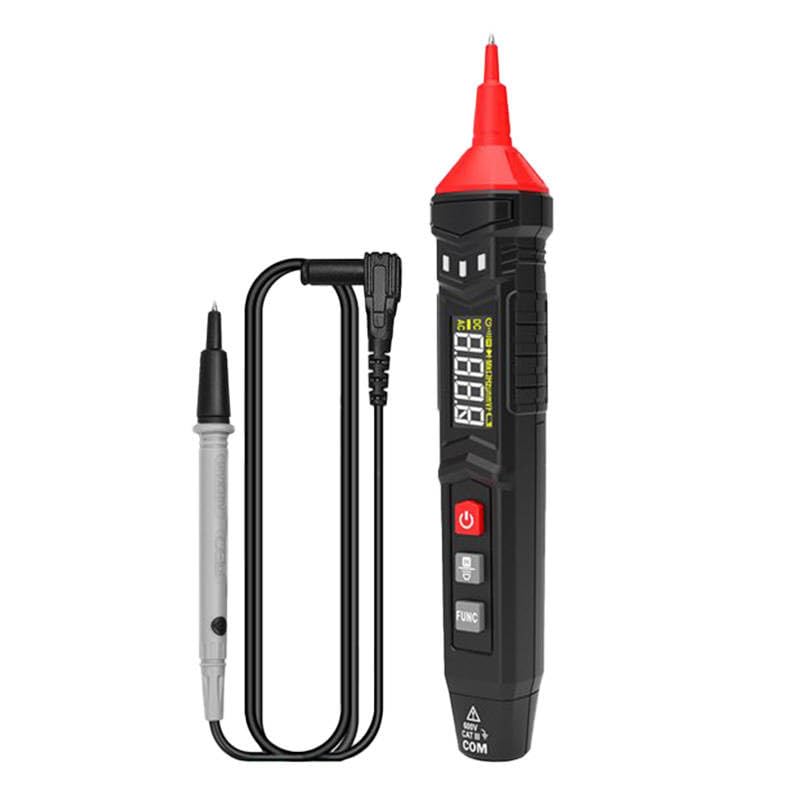
Figure 1: Habotest HT121 Non-Contact Voltage and Diode Tester. This image shows the compact design of the device, highlighting its display and function buttons.
5.2 Diode Test
The diode test function is used to check the forward voltage drop of a diode and its integrity.
- Turn on the device.
- Select the Diode Test mode.
- Connect the test leads to the diode, observing polarity (red to anode, black to cathode).
- The display will show the forward voltage drop in millivolts (mV). An open circuit (OL) indicates a faulty diode or incorrect connection.
5.3 True RMS
True RMS (Root Mean Square) measurement provides accurate readings for both sinusoidal and non-sinusoidal AC waveforms. Unlike average-responding meters, True RMS meters correctly measure distorted waveforms, which are common in modern electronic systems. This ensures higher accuracy for voltage and current measurements in various applications.
6. Maintenance
6.1 Cleaning
Wipe the device with a damp cloth and mild detergent. Do not use abrasive cleaners or solvents. Ensure the device is completely dry before storage or use.
6.2 Battery Replacement
When the low battery indicator appears on the display, replace the batteries as described in Section 4.1. Always use the specified battery type.
7. Troubleshooting
| Problem | Possible Cause | Solution |
|---|---|---|
| Device does not power on. | Dead or incorrectly installed batteries. | Check battery polarity; replace batteries. |
| Inaccurate readings. | Low battery; incorrect mode selection; environmental interference. | Replace batteries; ensure correct mode is selected; move away from strong electromagnetic fields. |
| NCV not detecting voltage. | Voltage too low; device too far from source; faulty device. | Ensure voltage is present and sufficient; bring device closer; contact support if issue persists. |
8. Specifications
| Parameter | Value |
|---|---|
| Model Number | HT121 (4050) |
| Brand | HABOTEST |
| Features | Non-Contact Voltage (NCV), Diode Test, True RMS |
| Power Source | (Not specified, typically AAA or button cell batteries) |
| Origin | China |
9. Warranty and Support
HABOTEST products are manufactured to high-quality standards. For warranty information, technical support, or service inquiries, please contact your local distributor or visit the official HABOTEST website. Please retain your purchase receipt as proof of purchase.


