
1. Introduction
The Habotest HT651D is a versatile digital instrument designed for non-contact temperature measurement using infrared technology and contact-based moisture content measurement. This device provides quick and accurate readings, making it suitable for various applications in industrial, HVAC, and home inspection fields. Please read this manual thoroughly before operating the device to ensure safe and correct usage.
2. Safety Information
WARNING: Laser Radiation
- Do not stare into the laser beam. Direct eye exposure to the laser can cause permanent eye damage.
- Avoid pointing the laser at people or animals.
- Do not aim the laser at reflective surfaces, as the reflected beam can also cause eye injury.
- Use caution when operating the device around others to prevent accidental exposure.
General Safety Precautions:
- Do not attempt to disassemble or modify the device. This may cause damage and void the warranty.
- Keep the device away from water, dust, and extreme temperatures.
- Remove batteries if the device will not be used for an extended period to prevent leakage.
- Dispose of batteries and the device according to local regulations.
3. Product Overview
The Habotest HT651D features an ergonomic design for comfortable handling and a clear LCD display for easy reading of measurements.

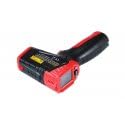
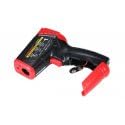
Key Components:
- Infrared Sensor: For non-contact temperature measurement.
- Laser Pointer: Assists in targeting the measurement area.
- Moisture Pins: (If applicable) For contact-based moisture measurement.
- LCD Display: Shows temperature, moisture, mode, and battery status.
- Measurement Trigger: Activates measurement.
- Mode Button: Cycles through measurement modes and settings.
- Battery Compartment: Houses the power source.
4. Setup
4.1 Battery Installation
- Locate the battery compartment cover on the handle of the device.
- Slide or unclip the cover to open the compartment.
- Insert the required batteries (e.g., 2 x AAA or 9V, refer to the compartment label) ensuring correct polarity (+/-).
- Close the battery compartment cover securely.
4.2 Power On/Off
- To power on the device, press the Measurement Trigger. The LCD display will illuminate.
- The device will automatically power off after a period of inactivity (typically 10-15 seconds) to conserve battery life.
5. Operating Instructions
5.1 Non-Contact Temperature Measurement
- Point the infrared sensor towards the target surface.
- Press and hold the Measurement Trigger. The laser pointer will activate to help aim.
- The temperature reading will be displayed on the LCD. Release the trigger to hold the reading.
- Ensure the distance-to-spot ratio (D:S) is appropriate for accurate measurement. For example, a 12:1 D:S means that at 12 inches from the target, the measurement spot diameter is 1 inch.
5.2 Moisture Measurement
The HT651D can measure moisture content in various materials.
- Contact Moisture Measurement (if applicable): Carefully press the moisture pins into the material to be tested. The moisture percentage will be displayed on the LCD.
- Non-Contact Moisture Measurement (if applicable): If the device features a non-contact moisture sensor, place the sensor near the surface. The relative moisture level will be displayed.
5.3 Mode Selection and Settings
Use the MODE button to cycle through different functions and settings:
- Temperature Unit (°C/°F): Press the MODE button to switch between Celsius and Fahrenheit.
- Emissivity Adjustment: In temperature mode, press the MODE button multiple times until the emissivity setting appears. Use the up/down buttons (if available) to adjust the emissivity value (typically 0.10 to 1.00) to match the target material for accurate readings.
- MAX/MIN/AVG: Some modes allow viewing maximum, minimum, or average temperature readings during a measurement session.
- Data Hold: Readings are typically held automatically after releasing the trigger.
6. Maintenance
6.1 Cleaning
- Wipe the device casing with a soft, damp cloth. Do not use abrasive cleaners or solvents.
- For the infrared lens, use a clean, soft cloth or cotton swab with a small amount of isopropyl alcohol. Gently wipe the lens to avoid scratching.
- Keep the moisture pins (if applicable) clean and free of debris.
6.2 Storage
- Store the device in a cool, dry place, away from direct sunlight and extreme temperatures.
- If storing for an extended period, remove the batteries to prevent leakage.
7. Troubleshooting
- Device does not power on: Check battery installation and ensure batteries are not depleted. Replace if necessary.
- Inaccurate temperature readings: Ensure the infrared lens is clean. Verify the emissivity setting matches the target material. Ensure the target is within the device's measurement range.
- Inaccurate moisture readings: Ensure moisture pins (if applicable) are making good contact with the material and are clean.
- Laser not working: Check if the laser function is enabled in the settings.
8. Specifications
| Parameter | Value |
|---|---|
| Model Number | HT651D |
| Manufacturer | Habotest |
| Item Weight | 2.2 pounds |
| Temperature Range | Typical: -50°C to 550°C (-58°F to 1022°F) (Specific range may vary, refer to product packaging) |
| Moisture Range | Typical: 0% to 100% RH (Specific range may vary, refer to product packaging) |
| Distance Spot Ratio (D:S) | Typical: 12:1 (Specific ratio may vary, refer to product packaging) |
| Emissivity | Adjustable: 0.10 to 1.00 |
9. Warranty and Support
Habotest products are designed for reliability and performance. This device typically comes with a limited warranty against defects in materials and workmanship. For specific warranty terms, duration, and support inquiries, please refer to the warranty card included with your product or contact Habotest customer service directly through their official website or authorized distributors.


