
1. Introduction
Thank you for choosing the vamav Mercury DSP1501 Professional Amplified Speaker. This manual provides essential information for the safe and efficient operation of your new audio system. Please read it thoroughly before use and retain it for future reference.
The Mercury DSP1501 is a high-performance amplified speaker designed for professional audio applications. It features a 15-inch speaker, a 350W RMS Class D amplifier, and integrated Digital Signal Processing (DSP). Connectivity options include Bluetooth, USB, SD card, and an intuitive DSP application for advanced control.
2. Safety Instructions
To ensure safe operation and prevent damage, please observe the following precautions:
- Power Source: Connect the speaker only to a grounded AC power outlet with the correct voltage as specified on the unit.
- Moisture: Do not expose the speaker to rain, moisture, or excessive humidity. Avoid placing liquid-filled objects on or near the unit.
- Ventilation: Ensure adequate ventilation around the speaker. Do not block ventilation openings.
- Heat: Keep the speaker away from heat sources such as radiators, heat registers, stoves, or other heat-producing appliances.
- Cleaning: Disconnect the power cord before cleaning. Use a dry cloth only.
- Servicing: Do not attempt to service this product yourself. Refer all servicing to qualified service personnel.
- Placement: Place the speaker on a stable, level surface to prevent it from falling.
- Hearing Protection: Prolonged exposure to high volume levels can cause permanent hearing damage. Use caution when adjusting volume.
3. Package Contents
Verify that your package contains the following items:
- vamav Mercury DSP1501 Professional Amplified Speaker
- Power Cable
- User Manual (this document)
4. Product Overview
Familiarize yourself with the various parts of your vamav Mercury DSP1501 speaker.
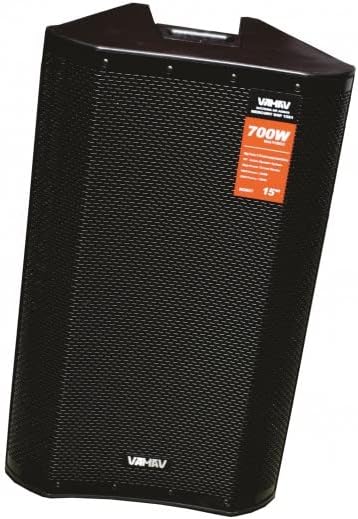
Figure 4.1: Front View. This image displays the front of the vamav Mercury DSP1501 speaker, featuring the protective metal grille covering the 15-inch speaker and the vamav branding. A label indicating "700W" and "15"" is visible on the grille.

Figure 4.2: Side View. This image shows the side profile of the vamav Mercury DSP1501 speaker, highlighting its trapezoidal cabinet design and the durable textured MDF material. Integrated handles are visible for transport.

Figure 4.3: Rear Panel. This image details the rear control panel of the vamav Mercury DSP1501. It includes various inputs (XLR, RCA), output (XLR), USB and SD card slots, a display screen, control knobs, and the power input. The DSP section is clearly labeled.
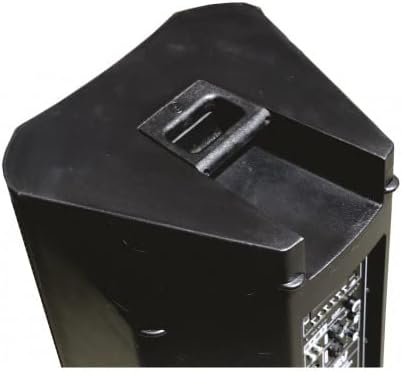
Figure 4.4: Top Handle. This image provides a close-up view of the integrated handle located on the top of the vamav Mercury DSP1501 speaker, designed for easy portability.
5. Setup
5.1. Placement
Position the speaker on a stable, flat surface or a compatible speaker stand. Ensure there is sufficient space around the unit for proper ventilation. Avoid placing it in direct sunlight or near heat sources.
5.2. Power Connection
- Ensure the speaker's power switch is in the "OFF" position.
- Connect the supplied power cable to the power input on the rear panel of the speaker.
- Plug the other end of the power cable into a grounded AC power outlet.
5.3. Connecting Audio Sources
The Mercury DSP1501 offers multiple input options:
- XLR/RCA Inputs: Use appropriate cables to connect external audio devices such as mixers, microphones, or other audio players to the XLR or RCA inputs on the rear panel.
- USB/SD Card: Insert a USB drive or SD card containing MP3 audio files into the respective slots on the rear panel.
- Bluetooth: For wireless audio streaming, refer to the "Bluetooth Pairing" section in Operating instructions.
6. Operating Instructions
6.1. Powering On/Off
To power on the speaker, flip the power switch on the rear panel to the "ON" position. To power off, flip the switch to "OFF".
6.2. Volume Control
Adjust the master volume using the main volume knob on the rear panel. Individual input levels may also be adjusted if available.
6.3. Bluetooth Pairing
- Ensure Bluetooth is enabled on your audio device (smartphone, tablet, etc.).
- Select the Bluetooth input mode on the speaker (refer to the display and control buttons on the rear panel).
- On your device, search for available Bluetooth devices and select "VAMAV DSP1501" (or similar name).
- Once paired, you can stream audio wirelessly to the speaker.
6.4. USB/SD Playback
When a USB drive or SD card with MP3 files is inserted, the speaker will typically switch to USB/SD mode automatically. Use the control buttons on the rear panel to navigate tracks, play, pause, and adjust playback settings.
6.5. DSP Application Control
The Mercury DSP1501 features advanced Digital Signal Processing (DSP) controllable via a dedicated application. Download the official vamav DSP app to your smartphone or tablet. Connect to the speaker via Bluetooth to access and adjust various audio parameters, equalization, and effects for optimized sound performance.
7. Maintenance
7.1. Cleaning
Before cleaning, ensure the speaker is powered off and disconnected from the power outlet. Use a soft, dry cloth to wipe the exterior surfaces. Do not use abrasive cleaners, waxes, or solvents, as these can damage the finish.
7.2. Storage
If storing the speaker for an extended period, ensure it is clean and dry. Store it in a cool, dry place, away from direct sunlight and extreme temperatures. It is recommended to use the original packaging for protection during storage.
8. Troubleshooting
If you encounter issues with your vamav Mercury DSP1501, refer to the following common problems and solutions:
| Problem | Possible Cause | Solution |
|---|---|---|
| No power | Power cable not connected; Power outlet not active; Power switch off | Check power cable connection; Test power outlet; Ensure power switch is ON |
| No sound output | Volume too low; Incorrect input selected; Audio source issue; Cable connection issue | Increase master volume; Select correct input mode; Check audio source device; Verify all audio cables are securely connected |
| Bluetooth not pairing | Speaker not in pairing mode; Device too far; Bluetooth disabled on device | Ensure speaker is in Bluetooth mode; Move device closer; Enable Bluetooth on your device and retry pairing |
| Distorted sound | Volume too high (clipping); Poor audio source quality; Damaged cable | Reduce volume; Use a higher quality audio source; Replace audio cables if damaged |
If the problem persists after trying these solutions, please contact customer support.
9. Specifications
| Feature | Detail |
|---|---|
| Model | CHMERCURY DSP1501 |
| Brand | vamav |
| Speaker Size | 15 Inches |
| RMS Power | 350W |
| Amplifier Type | Class D with DSP |
| Cabinet Material | MDF textured |
| Impedance | 8 ohms |
| Sensitivity | 97 dB |
| Driver | 1.75" Titanium |
| Connectivity | Bluetooth, USB, SD, MP3 Player |
| Control Method | Application (DSP App) |
| Power Source | Cable electric (AC) |
| Dimensions (D x W x H) | 43cm x 43cm x 80cm |
| Components Included | Power cable |
| Recommended Uses | For smartphones, tablets, computers, and music players |
10. Warranty and Support
10.1. Limited Warranty
The vamav Mercury DSP1501 speaker comes with a limited warranty. Please refer to the warranty card included with your product or contact vamav customer service for detailed terms and conditions.
10.2. Customer Support
For technical assistance, troubleshooting beyond this manual, or warranty inquiries, please contact vamav customer support. Contact information can typically be found on the official vamav website or on your product packaging.