
1. Introduction
This manual provides detailed instructions for the installation, operation, and maintenance of the Anchilly FZ31-9E Rotary Function Switch. This switch is also compatible with models FZ31-9 and FZ31-10, as these three models are functionally identical. It is designed for use in various appliances, including specific air fryers and ovens. Please read this manual thoroughly before installation and use to ensure proper function and safety.
2. Product Overview
The Anchilly FZ31-9E is an 11-pin, 7-position rotary function switch. It features a double-layer design and is rated for 20A at 125VAC (T125). The switch allows for selection between 7 distinct functions by twisting the knob, with a total of 6 twists from the starting point. It does not support 360-degree continuous rotation.

Figure 1: Front view of the Anchilly FZ31-9E Rotary Function Switch, showing the shaft and pin configuration.

Figure 2: Angled view of the Anchilly FZ31-9E Rotary Function Switch, highlighting the 11 pins and double-layer construction.
3. Specifications
| Feature | Detail |
|---|---|
| Model Numbers | FZ31-9E, FZ31-9, FZ31-10 (All identical) |
| Pin Configuration | 11 pins |
| Number of Positions | 7 positions (6 twists from start) |
| Rotation Type | Non-360 degree rotation |
| Layers | Double layer |
| Current Rating | 20 Amps |
| Operating Voltage | 125 VAC |
| Temperature Rating | T125 |
| Contact Type | Normally Open |
| Actuator Type | Rotary |
| Contact Material | Copper |
| Approximate Dimensions (L x W x H) | Refer to measurement images below for detailed dimensions. |
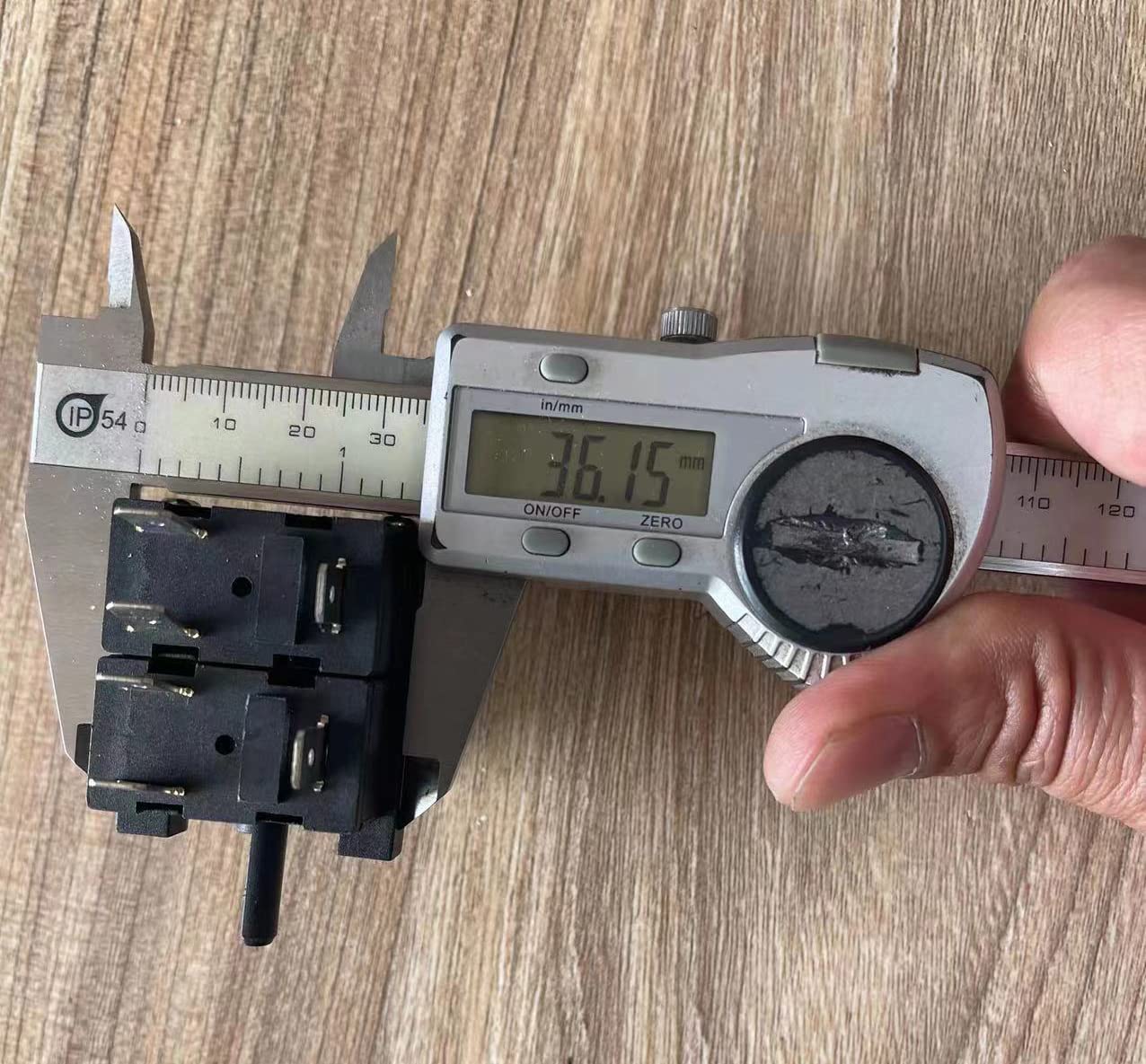
Figure 3: Measurement of the switch body width, approximately 36.15 mm.

Figure 4: Measurement of the switch body length, approximately 53.12 mm.

Figure 5: Measurement of the switch body height, approximately 54.66 mm.
4. Compatibility
This rotary function switch is designed as a replacement part for various kitchen appliances. It is known to be compatible with:
- Cuisinart TOA-60 air fryer function switch
- Geek Chef FM9001E air oven
- Beelicious oven
Always verify the specifications and physical dimensions of your original switch against the details provided in this manual before purchasing and installing to ensure proper fit and function.
5. Installation and Setup
Warning: Installation of this component involves working with electrical wiring and internal appliance parts. It should only be performed by individuals with appropriate technical knowledge and experience. Always disconnect the appliance from the power source before beginning any installation or repair work to prevent electric shock.
General Installation Steps:
- Disconnect Power: Unplug the appliance from the wall outlet.
- Access the Switch: Carefully disassemble the appliance to gain access to the existing rotary function switch. This may involve removing screws, panels, and the control knob. Note the orientation and wiring of the original switch.
- Remove the Old Switch: Disconnect all wires from the old switch. It is recommended to take photos of the wiring configuration before disconnecting to aid in reassembly.
- Install the New Switch: Connect the wires to the new Anchilly FZ31-9E switch, ensuring they match the original configuration. The switch has 11 pins; ensure each connection is secure.
- Secure the Switch: Mount the new switch in its designated position within the appliance.
- Reassemble Appliance: Carefully reassemble the appliance, ensuring all components are correctly seated and secured.
- Test Functionality: Plug the appliance back into the power source and test all functions of the rotary switch to confirm proper operation.
For specific appliance models, it is highly recommended to consult the appliance's service manual or search for model-specific repair videos online (e.g., on YouTube) for detailed disassembly and reassembly instructions. Pay close attention to the knob removal, as some designs have specific clips or mechanisms.

Figure 6: The rotary switch with a control knob, illustrating the connection point for the knob.
6. Operation
The Anchilly FZ31-9E rotary switch provides 7 distinct functional positions. To select a function, rotate the control knob clockwise or counter-clockwise until it clicks into the desired position. The switch is designed for non-360 degree rotation, meaning it has definite start and end points.
Available Functions:
- Warm
- Broil
- Strong Wind Broil
- Toast
- Bake
- Strong Wind Bake
- Air Fry
Always ensure the knob is fully engaged in a position before operating the appliance. Avoid forcing the knob past its rotational limits.
7. Maintenance
The Anchilly FZ31-9E rotary function switch is designed for durability and typically requires minimal maintenance. However, to ensure its longevity and reliable performance:
- Regular Cleaning: If accessible, ensure the area around the switch and its connections remains free of dust, grease, and debris. Always disconnect power before cleaning.
- Inspect Connections: Periodically check the electrical connections to the switch for any signs of looseness or corrosion. Loose connections can lead to overheating and premature failure.
- Gentle Operation: Operate the rotary knob with gentle, firm movements. Avoid excessive force or rapid turning, which can stress the internal mechanisms.
- Power Off Before Switching: For optimal longevity, it is recommended to turn off the appliance's power (if possible) before changing modes, especially for high-current functions, to minimize arcing within the switch contacts.
8. Troubleshooting
If you experience issues with your appliance after installing the Anchilly FZ31-9E rotary switch, consider the following troubleshooting steps:
- No Functionality:
- Ensure the appliance is properly plugged into a working power outlet.
- Verify all wire connections to the switch are secure and correctly matched according to your appliance's wiring diagram or previous photos.
- Check for any tripped circuit breakers or blown fuses in your home's electrical panel.
- Intermittent Functionality or Specific Modes Not Working:
- Re-check all wire connections for looseness or improper seating.
- Ensure the rotary knob is fully engaged in each position.
- Inspect the switch for any visible damage or signs of overheating (discoloration, melted plastic).
- Knob Difficult to Turn or Not Engaging:
- Ensure the knob is correctly aligned and seated on the switch shaft.
- Check for any obstructions around the knob or switch mechanism.
- Verify that the switch itself is securely mounted and not misaligned.
If troubleshooting steps do not resolve the issue, it is recommended to consult a qualified appliance repair technician.
9. Warranty and Support
For information regarding warranty coverage or technical support for your Anchilly FZ31-9E Rotary Function Switch, please refer to the documentation provided with your purchase or contact the retailer directly. Keep your proof of purchase for warranty claims.