
1. Introduction
Thank you for choosing the LUXBIRD LB-1SC Digital Heat Mat Thermostat and Seedling Heating Mat Combo Bundle. This product is designed to provide precise temperature control for various applications, including plant germination, reptile habitats, and pet fish tanks. The digital thermostat allows for accurate temperature management, while the seedling heating mat ensures even and stable warmth for optimal growth and comfort. Please read this manual thoroughly before use to ensure safe and efficient operation.
2. Safety Information
To prevent electric shock, fire, or injury, always follow these safety guidelines:
- This product is intended for household use only.
- Do not immerse the heating mat or thermostat in water.
- Do not place the heating mat on top of another heating mat or other heating elements.
- Do not use the product with a damaged cord or plug.
- Do not use outdoors. This product is for indoor use only.
- Avoid using sharp objects on the heating mat.
- Keep the product out of reach of children. Children aged 8 years and above should be supervised when using the appliance and understand the associated hazards.
- Ensure the heating mat is placed on a flat, dry surface, away from direct sunlight.
- Always unplug the device before cleaning or maintenance.
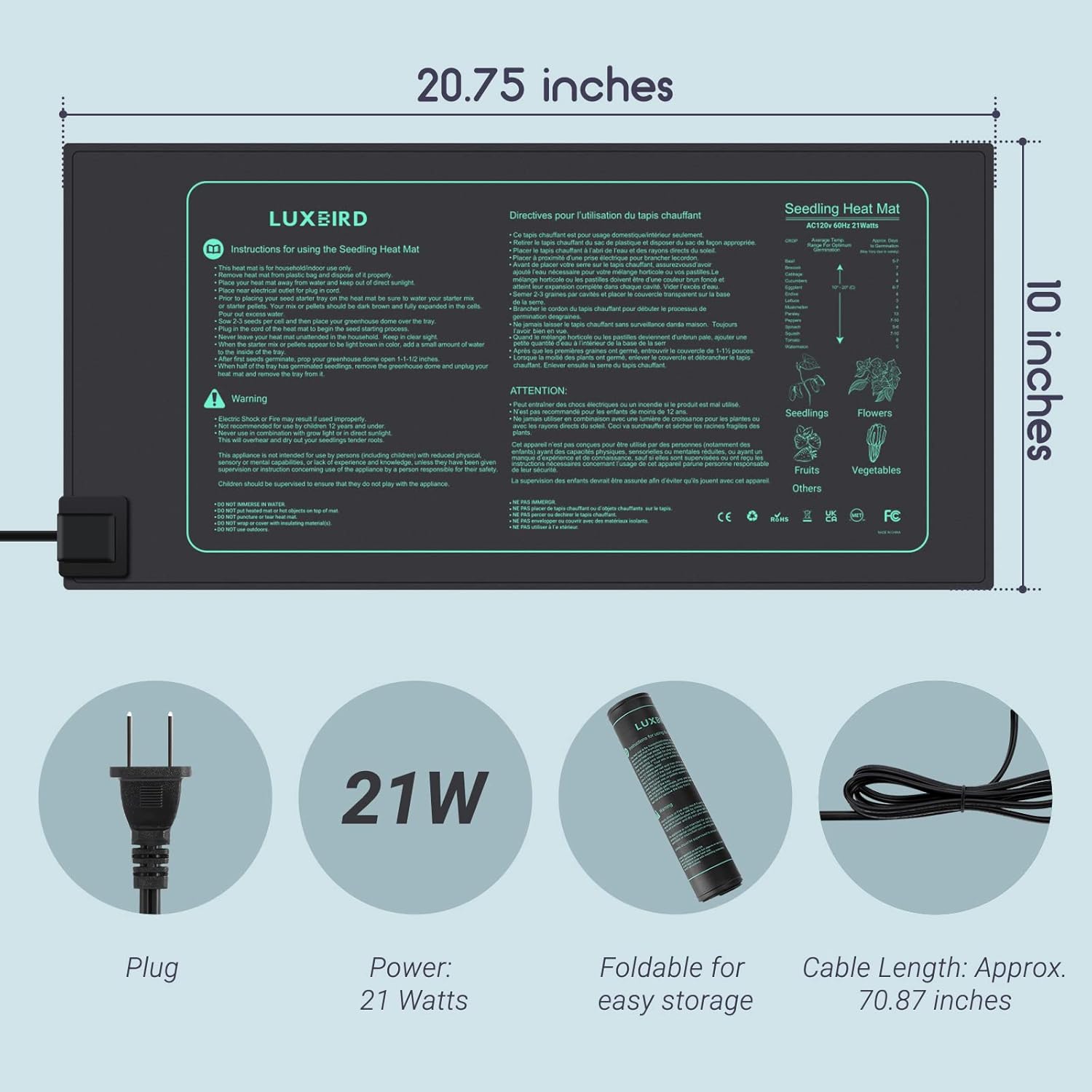
Image: Seedling Heat Mat with safety warnings and dimensions. This image displays the 10 x 20.75 inch heating mat, highlighting its 21W power consumption, foldable design, and approximate cable length of 70.87 inches. Important safety warnings are also visible on the mat's surface.
3. Package Contents
The LUXBIRD LB-1SC combo bundle includes:
- 1 x LUXBIRD LB-1SC Digital Heat Mat Thermostat
- 1 x Seedling Heating Mat (10" x 20.75")
- 1 x Temperature Probe (2m / 6.56ft length)
4. Product Features
The LUXBIRD LB-1SC system offers a range of features for precise environmental control:
- Heating/Cooling Dual Modes: Control temperature within a range of 32.0℉ to 113℉ (0℃ to 45℃).
- High Power Output: 1200W capacity, suitable for connecting to various heating or cooling devices.
- Temperature Probe: Accurate temperature sensing with a 2m (6.56ft) probe length.
- Power Cable: 1.5m (4.9ft) length for flexible placement.
- Cooling Compressor Delay: Protects cooling equipment from rapid cycling.
- Probe Abnormal Alarm: Alerts users to potential sensor issues.
- Indicating Lights: Visual cues for operational status.
- Temperature Calibration: Allows for fine-tuning of temperature readings.
- °C/°F Selection: Easily switch between Celsius and Fahrenheit units.
- High/Low Temperature Alarms: Provides timely alerts if temperatures exceed or fall below set thresholds.
- Seedling Heating Mat: 10" x 20.75" size, 21W power consumption, designed to raise root temperatures 50℉-68℉ (10℃-20℃) above ambient.
- Energy Efficient: The heating mat operates at a low 21 watts.
- Strong Waterproof Rating: IP67 rated for splash-proof and dust-proof protection, making it easy to clean.
- Foldable Design: The heating mat can be folded for convenient storage.
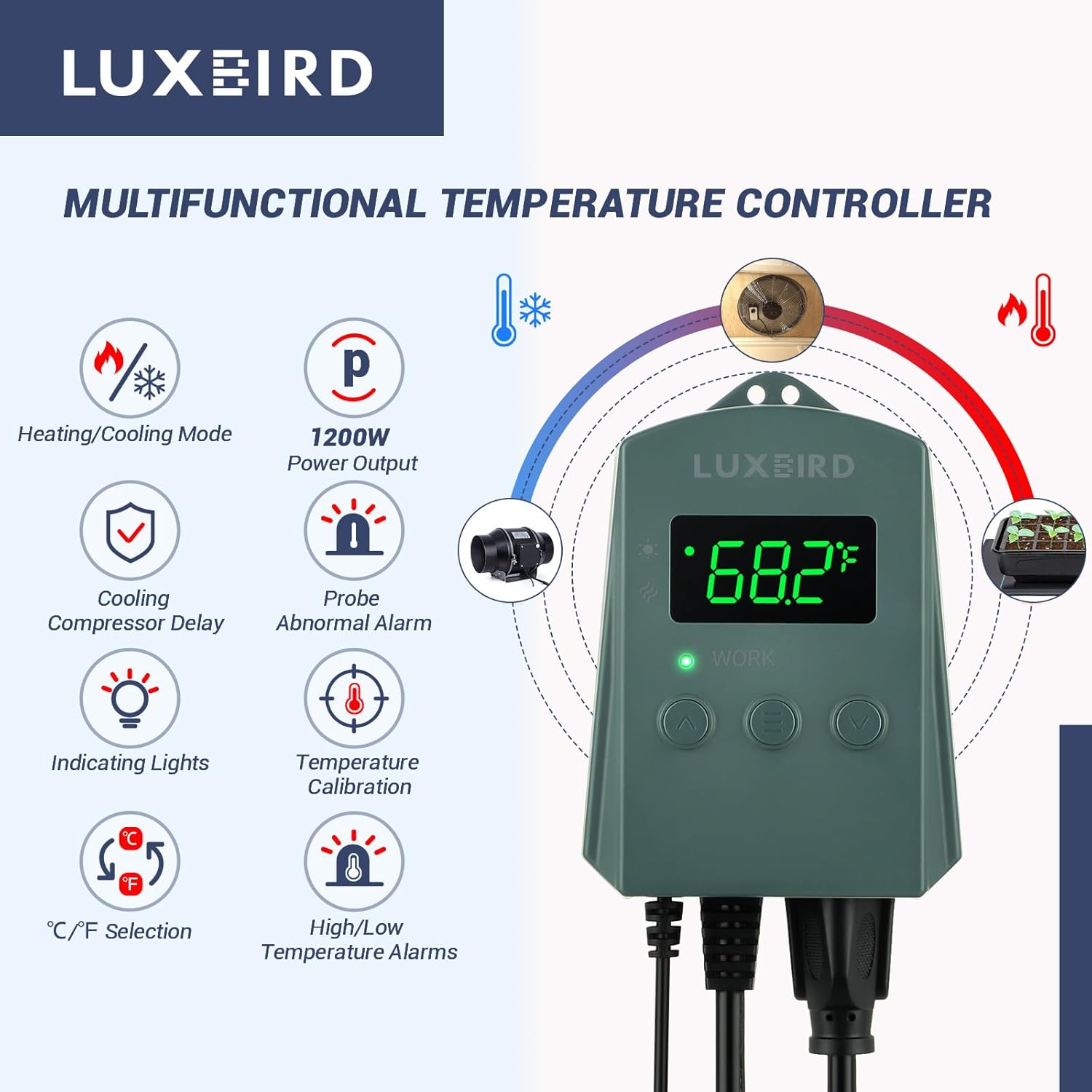
Image: LUXBIRD Multifunctional Temperature Controller features. This image illustrates the various functions of the thermostat, including heating/cooling mode, 1200W power output, cooling compressor delay, probe abnormal alarm, indicating lights, temperature calibration, °C/°F selection, and high/low temperature alarms.

Image: Heating and Cooling Two Modes. This image visually demonstrates the thermostat's ability to operate in both heating and cooling modes, showing a seedling tray for heating and a fan for cooling applications.

Image: High/Low Temperature Alarm feature. This image highlights the high/low temperature alarm function of the thermostat, indicating that timely beeping reminds users to take protective measures to avoid plant discomfort or vitality loss.

Image: Premium Seedling Heating Mat features. This image showcases the key attributes of the seedling heating mat: plug and play functionality, energy efficiency, strong waterproof design, and MET certification.

Image: IP67 Waterproof Rating. This image emphasizes the IP67 waterproof rating of the heating mat, indicating it is splash-proof, dust-proof, and easy to clean.
5. Setup Instructions
Follow these steps to set up your LUXBIRD LB-1SC system:
- Place the Heating Mat: Lay the seedling heating mat flat on a stable, dry surface. Ensure there are no wrinkles or folds. Keep it away from direct sunlight.
- Position the Temperature Probe: Insert the temperature probe into the growing medium (for plants) or habitat (for reptiles/fish) where you want to monitor and control the temperature. Ensure the probe tip is fully covered and in the desired temperature zone.
- Connect the Heating Mat: Plug the heating mat's power cord into the thermostat's designated output socket.
- Connect Other Devices (Optional): If using a cooling device (e.g., a fan) or another heating device, plug its power cord into the thermostat's other output socket.
- Power On: Plug the thermostat's main power cord into a standard electrical outlet. The display will illuminate, showing the current temperature.

Image: Accelerate Plant Growth Process with heating mat. This image shows several potted plants on the heating mat, illustrating how the mat raises root temperature to accelerate plant rooting and germination by providing even and stable warmth.

Image: Optimal heat source for various applications. This image displays the versatility of the heating mat, showing its use for indoor planting, home brewing, fish tanks, and terrariums, providing an optimal heat source for diverse needs.
6. Operating Instructions
The thermostat features an intuitive interface for setting and monitoring temperatures.
6.1 Setting the Desired Temperature
- Press the 'SET' button (usually represented by a gear icon or 'M'). The display will flash the current set temperature.
- Use the 'UP' and 'DOWN' arrow buttons to adjust the temperature to your desired value.
- Press 'SET' again to confirm and save the setting, or wait a few seconds for it to automatically save.
6.2 Switching Between Heating/Cooling Modes
The thermostat automatically switches between heating and cooling based on your set temperature and the current ambient temperature. Refer to the specific model's manual for detailed instructions on configuring heating/cooling differentials if available.
6.3 Setting High/Low Temperature Alarms
The thermostat can alert you if the temperature goes outside a safe range:
- Access the alarm settings menu (refer to the thermostat's specific button combination, often a long press of 'SET' or a dedicated 'ALARM' button).
- Set the desired high temperature limit using the 'UP' and 'DOWN' arrows.
- Set the desired low temperature limit using the 'UP' and 'DOWN' arrows.
- Confirm settings. An audible alarm will sound if the temperature exceeds these limits.
6.4 Temperature Calibration
If you suspect the temperature reading is inaccurate, you can calibrate it:
- Access the calibration menu (consult the thermostat's manual for the specific key sequence).
- Adjust the temperature offset using the 'UP' and 'DOWN' arrows to match a known accurate thermometer.
- Save the calibration setting.
6.5 °C/°F Selection
To switch between Celsius and Fahrenheit, locate the °C/°F button or setting in the menu and toggle as desired.
7. Maintenance
7.1 Cleaning
- Always unplug the thermostat and heating mat from the power outlet before cleaning.
- Wipe the thermostat and heating mat with a damp cloth. Do not use abrasive cleaners or immerse them in water.
- Ensure all components are completely dry before plugging them back in.
7.2 Storage
When not in use, store the heating mat and thermostat in a cool, dry place. The heating mat can be folded for compact storage.
8. Troubleshooting
If you encounter issues, refer to the following common problems and solutions:
| Problem | Possible Cause | Solution |
|---|---|---|
| Thermostat display is off | No power supply | Check if the thermostat is properly plugged into a working outlet. |
| Heating mat not heating | Incorrect temperature setting; Mat not plugged into thermostat; Thermostat in cooling mode | Verify the set temperature is above the current temperature. Ensure the mat is securely plugged into the thermostat. Check thermostat mode. |
| Temperature reading is inaccurate | Probe improperly placed; Calibration needed | Ensure the probe is correctly positioned. Perform temperature calibration as per section 6.4. |
| Probe Abnormal Alarm | Temperature probe disconnected or faulty | Check the probe connection to the thermostat. If the alarm persists, the probe may need replacement. |
| High/Low Temperature Alarm sounds | Temperature outside set limits | Adjust the set temperature or the alarm limits. Check for external factors affecting temperature. |
If the problem persists after trying these solutions, please contact customer support.
9. Specifications
| Feature | Specification |
|---|---|
| Brand | Luxbird |
| Model | LB-1SC |
| Material | Plastic |
| Display Type | LCD or LED |
| Temperature Control Range | 32.0℉~113℉ (0℃~45℃) |
| Thermostat Power Output | 1200W |
| Temperature Probe Length | 2m (6.56ft) |
| Thermostat Power Cable Length | 1.5m (4.9ft) |
| Heating Mat Dimensions | 10" x 20.75" |
| Heating Mat Power | 21W |
| Heating Mat Cable Length | Approx. 70.87 inches (1.8m) |
| Waterproof Rating | IP67 (Heating Mat) |
10. Warranty and Support
LUXBIRD products are manufactured to high-quality standards. For warranty information or technical support, please refer to the product packaging or contact your retailer. Keep your purchase receipt as proof of purchase.
