
1. Introduction
Thank you for purchasing the YXYKODM Mini Portable Bluetooth Speaker. This compact and versatile speaker is designed to deliver high-quality audio on the go, featuring Bluetooth connectivity, hands-free calling, and a selfie button function. Please read this manual carefully to ensure proper use and maintenance of your device.

Image: The YXYKODM Mini Portable Bluetooth Speaker, showcasing its compact size as it is held between two fingers.
Safety Information
- Do not expose the speaker to extreme temperatures, direct sunlight, or high humidity.
- Keep the speaker away from water and liquids. It is not waterproof.
- Do not attempt to disassemble, repair, or modify the speaker yourself. This will void the warranty.
- Use only the provided charging cable or a certified equivalent.
- Avoid dropping or subjecting the speaker to strong impacts.
2. Package Contents
Upon opening the package, you should find the following items:
- 1 x YXYKODM Mini Portable Bluetooth Speaker
- 1 x USB Charging Cable
- 1 x Anti-lost Lanyard
- 1 x User Manual (this document)
Video: Unboxing and contents of the YXYKODM Mini Portable Bluetooth Speaker. This video demonstrates the items included in the package, such as the speaker, charging cable, and lanyard.
3. Product Overview
Familiarize yourself with the components of your speaker:

Image: A detailed diagram highlighting the various parts of the speaker, including the power on/off button, LED indicator light, hanging rope hole, built-in microphone, speaker grille, and charging port.
- Power On/Off Button: Used for power, play/pause, answer/hang up calls, and remote selfie control.
- LED Indicator Light: Shows power and connection status.
- Hanging Rope Hole: For attaching the anti-lost lanyard.
- Built-in Microphone: Supports hands-free calling.
- Speaker: Audio output.
- Charging Port: For connecting the USB charging cable.
4. Setup
4.1 Charging the Speaker
Before first use, fully charge the speaker. Connect the small end of the USB charging cable to the speaker's charging port and the larger end to a USB power source (e.g., computer USB port, wall adapter). The LED indicator will show charging status (specific color/behavior not detailed in product info, typically red while charging, off or blue when full).
Note: A full charge provides approximately 2-3 hours of playback time.
4.2 Powering On/Off
- To Power On: Press and hold the Power On/Off button until the LED indicator lights up and you hear an audible prompt.
- To Power Off: Press and hold the Power On/Off button until the LED indicator turns off and you hear an audible prompt.
4.3 Bluetooth Pairing
To connect your speaker to a Bluetooth-enabled device (smartphone, tablet, PC):
- Ensure the speaker is powered on and in pairing mode (LED indicator will typically flash, indicating it's discoverable).
- On your device, go to Bluetooth settings and enable Bluetooth.
- Search for available devices. The speaker will appear as "BS-101" or a similar name.
- Select the speaker from the list to connect. Once connected, the LED indicator will typically stop flashing and remain solid, and you will hear a confirmation sound.

Image: The mini speaker wirelessly connected to both a smartphone and a tablet, illustrating its compatibility with various devices.
5. Operating Instructions
5.1 Music Playback
- Once connected via Bluetooth, open your music application on your device and start playback.
- Play/Pause: Press the Power On/Off button once to play or pause music.
- Volume control is managed directly from your connected device.

Image: The mini speaker placed on a car dashboard, playing music from a smartphone, demonstrating its use in a vehicle.
5.2 Hands-Free Calling
When connected to your smartphone:
- Answer Call: Press the Power On/Off button once when an incoming call rings.
- End Call: Press the Power On/Off button once during a call to hang up.
- Reject Call: Press and hold the Power On/Off button for 2 seconds to reject an incoming call.
5.3 Remote Selfie Function
To use the speaker as a remote shutter for your phone's camera:
- Ensure the speaker is connected to your phone via Bluetooth.
- Open your phone's camera application.
- Take Photo: Quickly double-click the Power On/Off button to capture a photo.
Image: A person holding the mini speaker and a smartphone, demonstrating how to use the speaker's button to remotely trigger the phone's camera for a selfie.
5.4 True Wireless Stereo (TWS) Pairing (Optional)
If you have two YXYKODM Mini Portable Bluetooth Speakers, you can pair them together for a stereo sound experience:
- Ensure both speakers are powered off.
- Power on both speakers simultaneously. Do not connect either speaker to your phone yet.
- On one of the speakers, quickly press the Power On/Off button twice. The speakers will attempt to connect to each other.
- Once successfully paired, one speaker will act as the master and the other as the slave. The master speaker's LED will flash, indicating it's ready to pair with your phone, while the slave's LED will be solid.
- Now, connect your phone to the master speaker via Bluetooth as described in section 4.3. Both speakers will now play audio in stereo.
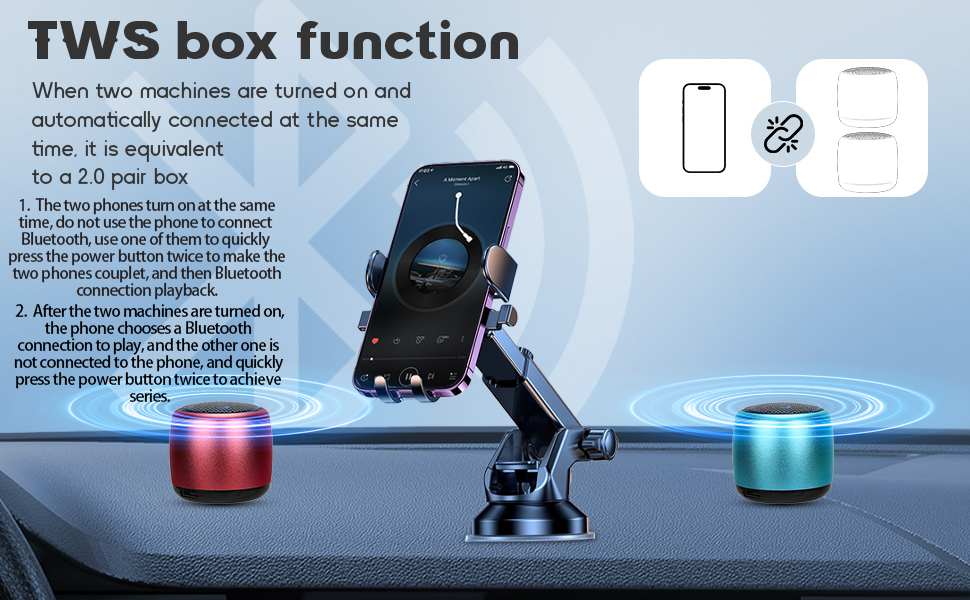
Image: Two mini Bluetooth speakers, one red and one blue, placed on a car dashboard, illustrating the True Wireless Stereo (TWS) pairing function for enhanced sound.
6. Maintenance
- Cleaning: Use a soft, dry cloth to clean the speaker. Do not use abrasive cleaners or solvents.
- Storage: Store the speaker in a cool, dry place away from direct sunlight and extreme temperatures.
- Battery Care: To prolong battery life, avoid fully discharging the speaker frequently. Charge it regularly, even if not in use for extended periods.
7. Troubleshooting
| Problem | Possible Cause | Solution |
|---|---|---|
| Speaker does not power on. | Battery is drained. | Charge the speaker fully using the provided USB cable. |
| Cannot pair with device. | Bluetooth is off on device; speaker is too far; speaker is already connected to another device; speaker is not in pairing mode. | Ensure Bluetooth is enabled on your device. Move speaker closer to device (within 36 feet/12 meters). Disconnect from other devices. Power off and on the speaker to re-enter pairing mode. |
| No sound or low volume. | Volume on device is too low; speaker is not connected; audio source issue. | Increase volume on your connected device. Ensure speaker is properly paired. Check audio source on your device. |
| Speaker beeps frequently. | Low battery warning. | Recharge the speaker immediately. |
| Charging cable difficult to insert. | Misalignment or slight manufacturing tolerance. | Ensure the cable is oriented correctly. Apply gentle, steady pressure. Do not force it excessively to avoid damage. |
8. Specifications
| Feature | Detail |
|---|---|
| Model Name | BS-101 |
| Brand | YXYKODM |
| Connectivity Technology | Bluetooth |
| Wireless Communication Technology | Bluetooth |
| Bluetooth Range | Up to 10 meters (36 feet) |
| Speaker Type | Portable Bluetooth Speaker |
| Speaker Size | 1.2 Inches |
| Product Dimensions | 1"D x 1"W x 1"H |
| Item Weight | 1.76 ounces (50 Grams) |
| Power Source | Battery Powered |
| Battery Life | 2-3 Hours (approx.) |
| Speaker Maximum Output Power | 3 Watts |
| Water Resistance Level | Not Water Resistant |
| Compatible Devices | Smartphone, Tablet, Laptop |
| Control Method | Button |
9. Warranty and Support
For warranty information and customer support, please refer to the contact details provided with your purchase or visit the official YXYKODM website. Keep your purchase receipt as proof of purchase for warranty claims.