
1. Introduction
Thank you for choosing the Easymaxx LED Rechargeable Work Light. This versatile and portable lighting solution is designed to provide powerful illumination for a wide range of tasks, from car repairs and job site lighting to outdoor activities and home repairs. Featuring a robust clamp, strong magnetic base, and multiple light modes, this work light offers flexibility and convenience wherever you need it.

Figure 1.1: Easymaxx LED Rechargeable Work Light (2-Pack) demonstrating key features.
2. Key Features
- 2100 Lumens & 3 Light Modes: Provides powerful illumination with COB high mode, COB low mode, and COB strobe mode. Easily cycle through modes with the ON/OFF button.
- Flood Light with Handle & Clip: Designed with a carrying handle and a strong clip for versatile positioning, allowing hands-free operation.
- 270° Rotating Magnetic Base: The light head swivels 270° left and right, and the base rotates 180° up and down, offering wide-angle illumination. Powerful magnets securely attach to metal surfaces.
- Rechargeable & Portable Charger: Equipped with a rechargeable battery and a USB output port to charge mobile phones and other devices.
- Battery Indicator: Features a power indicator (25%, 50%, 75%, 100%) to show remaining battery life.

Figure 2.1: Versatile clamping and strong magnetic attachment for hands-free use.

Figure 2.2: Three distinct light modes for various illumination needs.
3. Product Components

Figure 3.1: Detailed diagram of the work light's features and components.
- COB LED Chips
- ON/OFF Button
- Type-C Charging Port (Input)
- USB Output Port (Power Bank)
- Battery Indicator Lights
- Adjustable Clamp
- Strong Magnetic Base
- Rotating Head (270° Left/Right)
- Rotating Base (180° Up/Down)
4. Initial Setup & Charging
Before first use, fully charge your Easymaxx Work Light. Use the provided USB-C charging cable to connect the light to a compatible USB power adapter (not included) or a computer's USB port.
- Locate the Type-C charging port on the back of the light, protected by a silicone cover.
- Plug the USB-C cable into the light and the other end into a power source.
- The battery indicator lights will illuminate to show charging progress. All four lights will be solid when fully charged.
- Charging typically takes 3-3.5 hours for a full charge.

Figure 4.1: Charging the work light and using its power bank function.
5. Operating Instructions
5.1 Light Modes
Press the ON/OFF button to cycle through the different light modes:
- COB High Mode: Maximum brightness (2100 lumens).
- COB Low Mode: Reduced brightness for extended battery life.
- COB Strobe Mode: Flashing light for signaling or emergency situations.
- Pressing again will turn the light off.
5.2 Positioning the Work Light
- Using the Clamp: The integrated clamp allows you to attach the light to various surfaces like tables, shelves, or car hoods. Ensure the clamp is securely fastened.
- Using the Magnetic Base: The powerful magnets on the base allow the light to be attached to any ferrous metal surface, providing stable, hands-free illumination.
- Adjusting Angle: The light head can be rotated 270° horizontally and the base can be rotated 180° vertically to direct light precisely where needed.
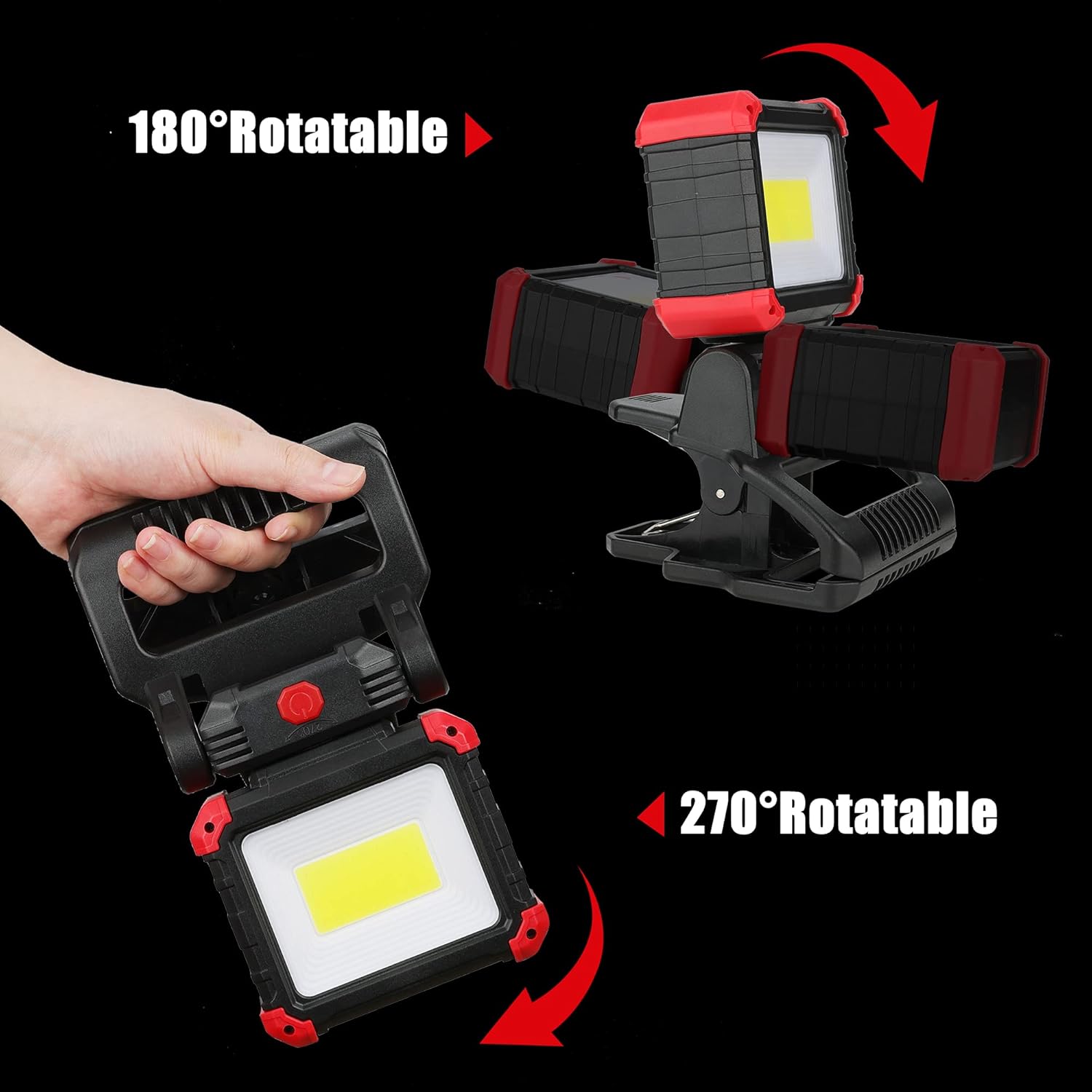
Figure 5.1: Flexible rotation for multi-directional lighting.

Figure 5.2: Examples of diverse applications for the work light.
Video 5.1: Demonstration of the Easymaxx Rechargeable Clamp Work Light in various settings.
Video 5.2: Highlighting the strong magnetic base of the Easymaxx Clamp Work Light.
6. Charging & Power Bank Function
The work light is equipped with a built-in rechargeable battery. To charge the light, use the provided USB-C cable and connect it to a suitable power adapter.
- The battery indicator lights will show the current charge level.
- When the charging indicator strobes, it's time to recharge the light.
- The USB output port allows you to use the work light as a portable power bank to charge your mobile devices. Simply connect your device's charging cable to the USB output port.
7. Maintenance & Care
- Keep the work light clean by wiping it with a soft, damp cloth. Do not use abrasive cleaners or solvents.
- Store the light in a cool, dry place when not in use.
- Avoid exposing the light to extreme temperatures or direct sunlight for prolonged periods.
- Ensure the silicone cover for the charging ports is securely closed to maintain water resistance.
8. Troubleshooting
| Problem | Possible Cause | Solution |
|---|---|---|
| Light does not turn on. | Battery is depleted. | Charge the work light fully. |
| Light is dim. | Low battery or in low mode. | Recharge the battery or switch to COB High mode. |
| Device not charging from USB output. | Work light battery is low or cable issue. | Ensure work light is charged. Try a different USB cable. |
9. Specifications
| Attribute | Value |
|---|---|
| Brand | Easymaxx |
| Model Number | 6662 |
| Brightness | 2100 Lumens |
| Light Source Type | Light Emitting Diode (COB) |
| Color Temperature | 6000 Kelvin |
| Power Source | Battery Powered (1 Lithium Ion battery included) |
| Material | Acrylonitrile Butadiene Styrene (ABS) |
| Product Dimensions | 4.9"L x 4.9"W x 7.48"H |
| Item Weight | 1.08 Pounds |
| Mounting Type | Clip Mount, Tabletop Mount, Magnetic Mount |
| Included Components | USB-C Charging Cables, Clamp Work Lights, Instruction Manual |
10. Warranty & Support
Easymaxx products are designed for durability and performance. For warranty information or technical support, please refer to the contact details provided on the product packaging or visit the official Easymaxx website. Please retain your proof of purchase for any warranty claims.
