
Bell+Howell 7896
Bell+Howell Spin Power Outlet Extender
User Manual
Important Safety Instructions
Please read and understand all safety instructions before using the Bell+Howell Spin Power Outlet Extender. Failure to follow these instructions may result in electric shock, fire, or serious injury.
- Indoor Use Only: This product is designed for indoor use in dry locations. Do not use outdoors or in wet environments.
- Electrical Rating: Ensure the total current draw of connected devices does not exceed the extender's maximum rating (125V~, 60Hz, 15A, 1875W max).
- Surge Protection: The unit provides surge protection. If the surge protection indicator light is off, the surge protection feature may be compromised and should be replaced.
- Avoid Overloading: Do not plug in appliances that exceed the unit's capacity.
- Proper Grounding: Ensure the wall outlet is properly grounded.
- Children and Pets: Keep out of reach of children and pets.
- Do Not Disassemble: Do not attempt to open, modify, or repair the unit. Refer all servicing to qualified service personnel.
- Unplug When Not In Use: Unplug the unit from the wall outlet when not in use for extended periods.
Product Overview
The Bell+Howell Spin Power Outlet Extender is a versatile power solution designed to expand your available outlets and charging options. It features a unique 360-degree rotating design for easy access to all ports, a hide-away extension cord, and comprehensive surge protection.
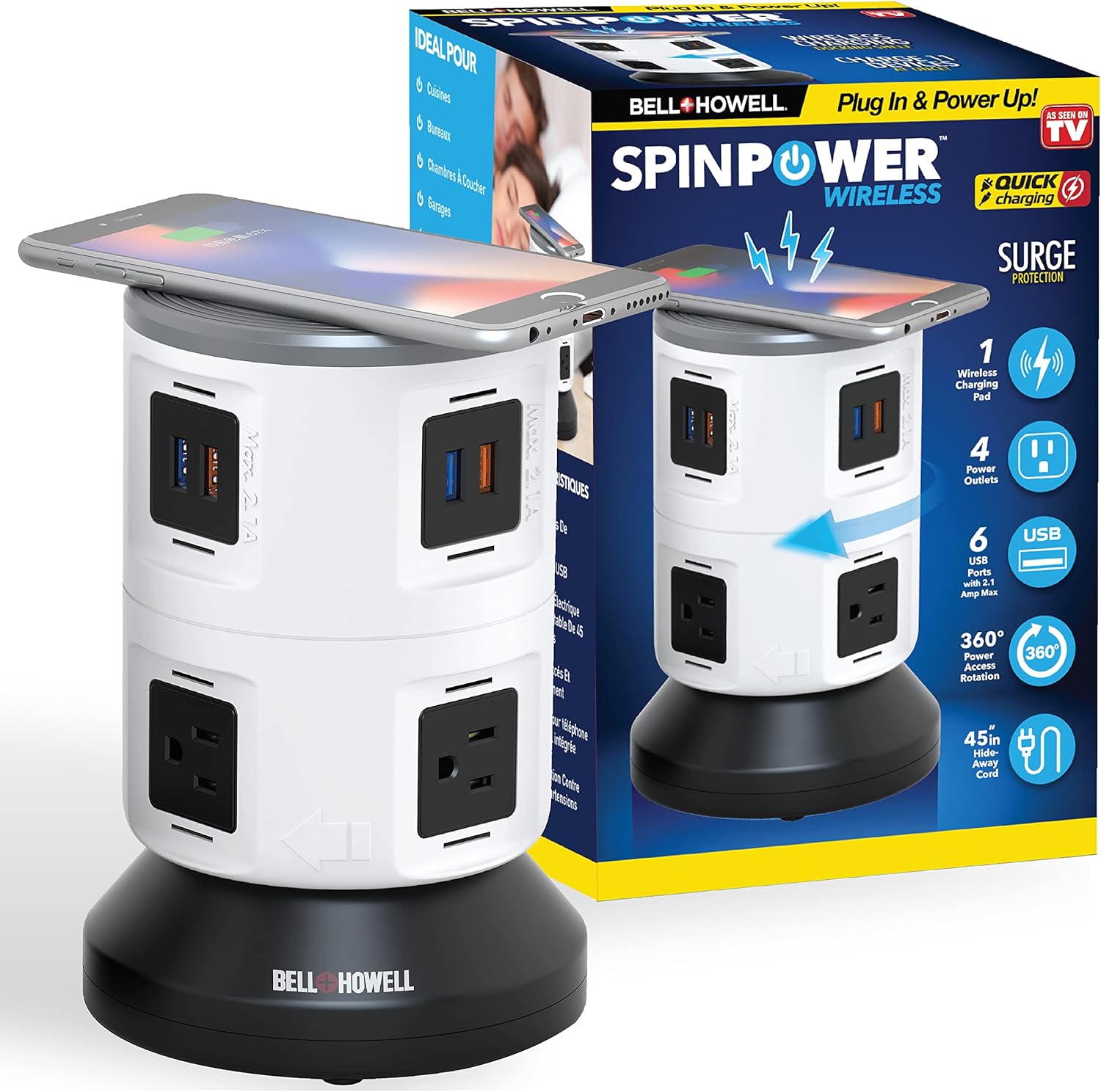
Figure 1: Bell+Howell Spin Power Outlet Extender with its retail packaging, showcasing its features.
Key Features:
- 4 AC Power Outlets: Widely spaced to accommodate larger plugs without blocking adjacent outlets.
- 6 USB Ports: For charging a variety of USB-powered devices.
- Wireless Charging Pad: Located on top for convenient wireless charging of compatible devices.
- Surge Protection: Protects connected electronics from power surges.
- 360-Degree Rotation: Allows for easy access to all outlets and ports from any angle.
- 45-Inch Hide-Away Extension Cord: Provides flexibility in placement while maintaining a tidy appearance.

Figure 2: The Bell+Howell Spin Power Charger highlighting its wireless charging, multiple outlets, USB ports, 360-degree rotation, and hide-away cord.
Setup Instructions
- Unpack the Unit: Carefully remove the Bell+Howell Spin Power Outlet Extender from its packaging.
- Choose a Location: Select a dry, indoor location near a standard wall outlet. The 45-inch hide-away extension cord allows for flexible placement, such as behind furniture or on a desk.
- Plug In: Extend the integrated 45-inch power cord from the base of the unit and plug it firmly into a grounded 125V AC wall outlet.
- Power On: Locate the On/Off power switch on the side of the unit and press it to the 'On' position. The surge protection indicator light should illuminate, confirming the unit is powered and protected.

Figure 3: Detailed view of the Spin Power unit, indicating the wireless charging dock, USB outlets, On/Off power switch, and AC power outlets.
Operating Instructions
Once the unit is set up and powered on, you can begin charging and powering your devices.
Using AC Power Outlets:
- Plug your devices directly into any of the 4 widely spaced AC outlets.
- Rotate the top section of the unit 360 degrees to easily access any outlet without obstruction.
Using USB Ports:
- Connect your USB charging cables to any of the 6 USB ports.
- The USB ports are designed for fast charging, providing efficient power delivery to your devices.
Using the Wireless Charging Pad:
- Place your Qi-compatible smartphone or other device directly onto the wireless charging pad located on the top surface of the unit.
- Ensure the device is centered on the pad for optimal charging. The device's screen should indicate that it is charging wirelessly.

Figure 4: The Spin Power Extender offers universal compatibility, capable of charging cell phones, iPads, laptops, smartwatches, gaming devices, and cameras.
The Bell+Howell Spin Power Outlet Extender allows you to charge up to 11 devices simultaneously (4 AC, 6 USB, 1 Wireless).
Maintenance
To ensure the longevity and proper functioning of your Bell+Howell Spin Power Outlet Extender, follow these simple maintenance guidelines:
- Cleaning: Disconnect the unit from the power outlet before cleaning. Use a soft, dry cloth to wipe the exterior surfaces. Do not use liquid cleaners, aerosols, or abrasive materials, as they may damage the unit.
- Storage: When not in use, store the unit in a cool, dry place away from direct sunlight and extreme temperatures. The hide-away extension cord can be neatly stored within the base.
- Inspection: Periodically inspect the power cord and the unit for any signs of damage, such as frayed wires or cracks. If damage is found, discontinue use immediately and contact customer support.
Troubleshooting
If you encounter issues with your Bell+Howell Spin Power Outlet Extender, please refer to the following common problems and solutions:
| Problem | Possible Cause | Solution |
|---|---|---|
| No power to outlets/USB ports. | Unit is not plugged in, power switch is off, or wall outlet has no power. | Ensure the unit is firmly plugged into a live wall outlet. Check that the On/Off power switch is in the 'On' position. Test the wall outlet with another device. |
| Surge protection indicator light is off. | The surge protection circuit has been compromised due to a power surge. | The unit may no longer provide surge protection. While it may still function as an outlet extender, it is recommended to replace the unit for continued surge protection. |
| USB ports are not charging devices. | Device incompatibility, faulty USB cable, or device requires more power than available. | Ensure your device is compatible with USB charging. Try a different USB cable. Some devices (e.g., certain laptops) may require higher power delivery than standard USB ports can provide; try using an AC adapter in one of the AC outlets instead. |
| Wireless charging is not working. | Device is not Qi-compatible, not properly aligned, or has a thick case. | Verify your device supports Qi wireless charging. Reposition the device on the charging pad to ensure proper alignment. Remove thick phone cases that may interfere with charging. |
If the problem persists after trying these solutions, please contact Bell+Howell customer support for further assistance.
Specifications
Detailed technical specifications for the Bell+Howell Spin Power Outlet Extender (Model 7896):
| Feature | Detail |
|---|---|
| Brand | Bell+Howell |
| Model Name | Spin Power Wireless |
| Model Number | 7896 |
| AC Outlets | 4 |
| USB Ports | 6 (Total USB Ports) |
| Wireless Charging | 1 Pad (10W max) |
| Electrical Rating | 125V~, 60Hz, 15A, 1875W max |
| USB Output | 5VDC, 4.2A max |
| Surge Protection | Yes (3SPD, VPR800V (L-N)) |
| Extension Cord Length | 45 inches (hide-away design) |
| Material | ABS Plastic (Heat Resistant) |
| Product Dimensions | 13 x 13 x 19.15 cm (5.1 x 5.1 x 7.8 inches) |
| Item Weight | 939 g |
| Color | White |

Figure 5: Internal components and safety certifications (ETL, DOE, FCC, CA65) of the Bell+Howell Spin Power Outlet Extender, emphasizing its design for safety.
Warranty and Support
For warranty information and customer support, please refer to the documentation included with your purchase or visit the official Bell+Howell website. Keep your purchase receipt as proof of purchase for any warranty claims.
If you require technical assistance or have questions not covered in this manual, please contact Bell+Howell customer service. Contact details are typically available on the product packaging or the manufacturer's official website.
Ask a question about this manual
Ask about setup, troubleshooting, compatibility, parts, safety, or missing instructions. Manuals+ will review the question and use this page’s manual context to help answer it.