
ANYSECU UV K5
Quansheng UV-K5 Dual Band Radio User Manual
Model: UV K5 | Brand: ANYSECU
1. Introduction
This manual provides comprehensive instructions for the operation, maintenance, and troubleshooting of your Quansheng UV-K5 Dual Band Radio. Please read this manual thoroughly before using the device to ensure proper function and safety.
2. Included Components
Your Quansheng UV-K5 package should contain the following items:
- Radio Unit
- Antenna
- Battery
- Charger (Charging Base)
- User Manual
- Belt Clip
3. Product Overview
Familiarize yourself with the various parts of your UV-K5 radio:

Figure 3.1: Labeled diagram of the Quansheng UV-K5 radio, indicating key components such as the antenna, torch, power/volume knob, Push-to-Talk (PTT) button, menu and navigation keys, and the Type-C charging port.

Figure 3.2: Multiple views of the Quansheng UV-K5 radio, showcasing its design from various angles.
4. Setup
4.1 Battery Installation
- Ensure the radio is powered off.
- Align the battery pack with the grooves on the back of the radio.
- Slide the battery pack upwards until it clicks securely into place.
4.2 Antenna Attachment
- Locate the antenna connector on the top of the radio.
- Screw the antenna clockwise onto the connector until it is finger-tight. Do not overtighten.
4.3 Charging the Battery
Before initial use, fully charge the battery. The UV-K5 supports multiple charging methods:
- Charging Base: Place the radio into the provided charging base. Ensure the charging contacts align.
- Type-C Charging: Connect a Type-C USB cable to the charging port on the side of the radio. This allows charging via a Type-C charger, car charger, or power bank.

Figure 4.1: The Quansheng UV-K5 radio connected to a power bank using its Type-C charging port, demonstrating its versatile charging capabilities.

Figure 4.2: Detailed views highlighting the radio's top section with the antenna connection and integrated flashlight, the removable battery pack, and the side panel featuring the Type-C charging port and accessory jacks.
5. Operating Instructions
5.1 Power On/Off and Volume Control
Rotate the top knob clockwise to power on the radio and increase the volume. Rotate counter-clockwise to decrease volume and power off.
5.2 Frequency and Channel Selection
The UV-K5 supports a wide range of frequencies for both transmission (TX) and reception (RX), including:
- 50.0000-76.0000MHz (RX only)
- 108.0000-135.9750MHz (RX only)
- 136.0000-173.9750MHz (TX and RX both)
- 174.0000-349.9975MHz (RX only)
- 350.0000-399.9750MHz (RX only)
- 400.0000-469.9750MHz (TX and RX both)
- 470.0000-600.0000MHz (RX only)
- FM Radio: 76.000-108.000MHz
- 10 USA NOAA Weather Forecast Channels
Use the Up/Down keys to navigate through frequencies or channels. The Menu/Confirm button allows access to various settings and functions.
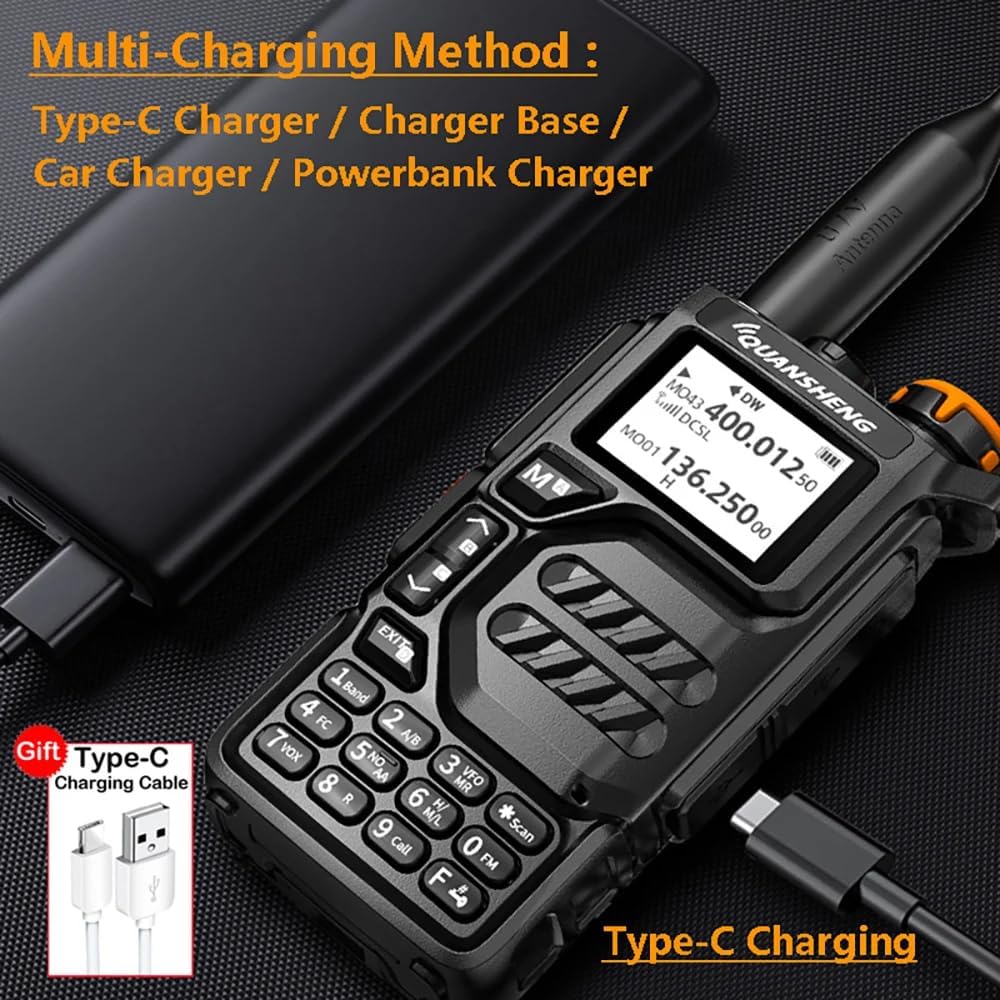
Figure 5.1: The radio's display showing active frequencies and a comprehensive list of supported frequency bands for amateur radio use.
5.3 Push-to-Talk (PTT) Operation
To transmit, press and hold the PTT button located on the side of the radio. Speak clearly into the microphone. Release the PTT button to receive.
5.4 NOAA Weather Alert
The radio features NOAA Weather Alert functionality. Refer to the specific menu settings to activate and configure weather alerts for your region. This feature provides timely warnings for severe weather conditions.
5.5 Fast Copy One Channel
This feature allows for quick copying of a channel's frequency and settings. Consult the radio's menu for detailed instructions on utilizing the 'Fast Copy' function.
5.6 Flashlight Function
The radio includes a built-in flashlight. Activate it using the designated side key or menu option. This can be useful in low-light conditions.

Figure 5.2: The Quansheng UV-K5 radio demonstrating its integrated flashlight feature, providing illumination in dark environments.
5.7 Programming the Radio
The UV-K5 can be programmed via PC software. The programming cable is the same as for Baofeng UV-5R (2-pin cable). Software downloads and programming guides can be found on the manufacturer's website. For the PDF manual, please refer to the official website.
6. Maintenance
6.1 Cleaning
Wipe the radio with a soft, damp cloth. Do not use harsh chemicals or abrasive cleaners. Ensure all ports are dry before use, especially after exposure to moisture.
6.2 Battery Care
To prolong battery life, avoid overcharging or completely draining the battery. Store the radio and battery in a cool, dry place when not in use for extended periods.
6.3 Water Resistance
The UV-K5 radio has an International Protection Rating of IP68, indicating it is waterproof. While designed to withstand water immersion, avoid unnecessary exposure to water and ensure all port covers are securely closed when in wet environments.
6.4 Storage
Store the radio in a clean, dry environment away from direct sunlight, extreme temperatures, and corrosive materials.
7. Troubleshooting
| Problem | Possible Cause | Solution |
|---|---|---|
| Radio does not power on | Battery is low or not installed correctly. | Charge the battery or re-install it securely. |
| Cannot transmit or receive | Incorrect frequency/channel, antenna not attached, or out of range. | Verify frequency/channel, ensure antenna is attached, move closer to other radios. |
| Poor audio quality | Low battery, incorrect squelch setting, or interference. | Charge battery, adjust squelch level, move away from sources of interference. |
| NOAA Weather Alert not working | Feature not activated or incorrect regional settings. | Check menu settings to ensure NOAA alert is enabled and configured for your area. |
8. Specifications
| Feature | Specification |
|---|---|
| Model Number | UV K5 |
| Item Weight | 15.5 ounces |
| Frequency Range (TX/RX) | 136-174MHz, 400-480MHz |
| Frequency Range (RX only) | 50-76MHz, 108-135.975MHz, 174-349.9975MHz, 350-399.975MHz, 470-600MHz |
| FM Radio | 76-108MHz |
| Special Feature | NOAA Weather Alert |
| Talking Range Maximum | 5 Kilometer |
| Water Resistance Level | Waterproof (IP68) |
| Batteries | 1 A battery required (included) |
| Color | [PO] Black |
9. Warranty & Support
9.1 Warranty Information
The Quansheng UV-K5 radio body is covered by a 1-year warranty from the date of purchase. Please retain your proof of purchase for warranty claims.
9.2 Customer Support
For further assistance, technical support, or warranty inquiries, please contact the manufacturer or your authorized dealer. Additional resources, including software downloads and updated manuals, may be available on the official ANYSECU website.
Related documentsUV K5


Ask a question about this manual
Ask about setup, troubleshooting, compatibility, parts, safety, or missing instructions. Manuals+ will review the question and use this page’s manual context to help answer it.