
Introduction
This manual provides detailed instructions for the installation, operation, and maintenance of your LOAAO 40"x30" RGB LED Bathroom Mirror. This mirror features RGB backlit and front lighting, anti-fog functionality, dimmable light modes, and a memory function for personalized settings. Please read this manual thoroughly before installation and use.
Safety Information
- Handle the mirror with care to avoid injury from potential glass breakage.
- Ensure proper electrical installation to prevent hazards. All electrical work should be performed by a qualified electrician.
- Do not attempt to disassemble or modify the mirror.
- Keep the mirror away from direct water spray to prevent electrical damage, despite its waterproof features.
Package Contents
Verify that all components are present before beginning installation:
- LOAAO 40"x30" RGB LED Bathroom Mirror
- Z-bar mounting brackets (2)
- Installation hardware (screws, wall anchors)
- Power cord (for plug-in option)
- Instruction Manual
Installation
The LOAAO LED Bathroom Mirror can be installed either by plugging it into an outlet or by hardwiring it directly to your electrical system. It can be hung vertically or horizontally using the provided Z-bar brackets.
Mounting the Mirror
- Determine the desired mounting location and orientation (vertical or horizontal).
- Mark the positions for the two Z-bar brackets on the wall, ensuring they are level and spaced correctly for your mirror's dimensions.
- Drill pilot holes and secure the Z-bar brackets to the wall using appropriate screws and wall anchors. Ensure the brackets are firmly attached to support the mirror's weight.
- Carefully lift the mirror and hook it onto the installed Z-bar brackets. Ensure it is securely seated.
Electrical Connection
Option 1: Plug-in Installation
- Connect the mirror's power cord to a standard electrical outlet.
- Ensure the outlet is easily accessible and meets local electrical codes.
Option 2: Hardwired Installation
- Turn off the main power supply at the circuit breaker before beginning any hardwiring.
- Connect the mirror's wiring directly to your home's electrical system. This should be done by a qualified electrician to ensure safety and compliance with local codes.
- Once wired, restore power at the circuit breaker.
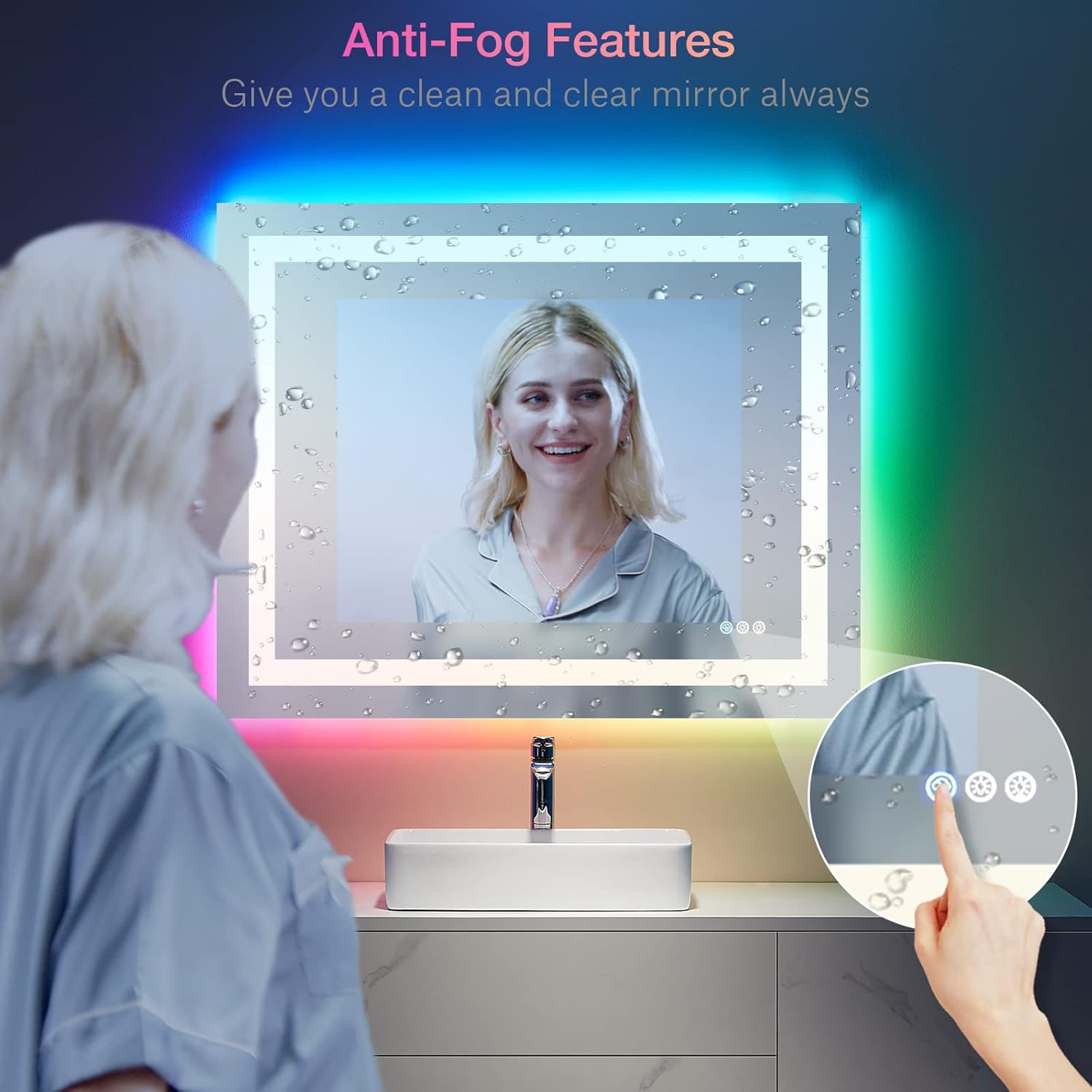
Image: Mirror touch controls and dimming functionality.

Image: Installation options (plug-in or hardwired).
Operating Instructions
The mirror features intuitive touch controls located on the mirror surface.
Touch Controls Overview
- Anti-Fog Button: Activates the defogging function.
- Front Light Button: Controls the front LED lighting.
- RGB Backlight Button: Controls the RGB LED backlighting.
Front Light Operation
- Tap the Front Light Button to turn the front light ON/OFF.
- Press and hold the Front Light Button to adjust brightness (dimmable).
- Tap repeatedly to cycle through the three available light modes (Cold light 6000K, White light 4000K, Warm light 3000K).

Image: Multiple light modes for front and back lighting.
RGB Backlight Operation
- Tap the RGB Backlight Button to turn the backlight ON/OFF.
- Press and hold the RGB Backlight Button to adjust brightness (dimmable).
- Tap repeatedly to cycle through the eight available RGB light modes (Colorful, Cold light, White light, Warm light, Pink, Red, Green, Blue). The backlight can also be set to just white light.

Image: RGB backlight color options.
Anti-Fog Function
- Tap the Anti-Fog Button to activate the defogging function.
- The anti-fog feature starts quickly and automatically turns off after one hour to save energy.
- Note: The anti-fog feature works from the center to the edge. The heating pad is located in the center, so defogging is most effective in the central area and decreases towards the edges.

Image: Anti-fog feature clearing the mirror surface.
Memory Function
- The mirror remembers the last light settings (brightness and mode) you used, so there is no need to reset them each time you turn it on.
Maintenance
- To clean the mirror surface, use a soft, damp cloth and a mild glass cleaner. Avoid abrasive cleaners or materials that could scratch the glass.
- Ensure no liquid enters the electrical components.
Troubleshooting
| Problem | Possible Cause | Solution |
|---|---|---|
| Lights not turning on | No power supply; loose connection; faulty switch | Check power connection/outlet; ensure wall switch is ON (if hardwired); contact a qualified electrician if issues persist. |
| Anti-fog not working effectively | Anti-fog function not activated; limited heating area | Ensure anti-fog button is pressed; note that the heating pad is central and effectiveness decreases towards edges. |
| Lights flickering or dimming unexpectedly | Unstable power supply; loose wiring | Check electrical connections; consult an electrician. |
Specifications
- Brand: LOAAO
- Model: L-L001AC10075RGB
- Product Dimensions: 40"L x 30"W
- Material: 5mm Tempered Glass
- Lighting: RGB Backlit + Front Light
- Front Light Modes: 3 (Cold, White, Warm)
- RGB Backlight Modes: 8 (Colorful, Cold, White, Warm, Pink, Red, Green, Blue)
- Special Features: Anti-Fog, Dimmable, Memory Function, Shatter-Proof, Explosion-Proof, Waterproof
- Mounting Type: Wall Mount (Vertical or Horizontal)
- Power: Plug-in or Hardwired
- Item Weight: 26 Pounds

Image: Tempered glass construction for safety and durability.
Warranty and Support
For warranty information or technical support, please refer to the product packaging or contact LOAAO customer service directly. Keep your purchase receipt for warranty claims.
Official Product Videos
LOAAO LED Mirror Features Overview
Video: A detailed review of the LOAAO LED mirror's features, including light modes and anti-fog function.
Installation and Functionality Demonstration
Video: A user demonstrates the installation process and various lighting features of the LOAAO LED mirror.


