
AC Infinity AC-CFT7
AC Infinity CLOUDFORGE T7 Plant Humidifier Instruction Manual
Model: AC-CFT7 | Brand: AC Infinity
1. Introduction
The AC Infinity CLOUDFORGE T7 is a plant humidifier designed to maintain optimal humidity levels for plant growth in controlled environments such as grow tents and greenhouses. It features advanced controls, a precision vaporizer, and a robust design to ensure efficient and reliable operation.

Image: The CLOUDFORGE T7 humidifier unit shown with its extendable hose, targeting pipe, and sensor probe.
Key Features:
- Smart controls and precision vaporization for optimal humidity.
- Next-generation EC ultrasonic vaporizer with 10 levels of humidity control.
- Water-resistant seal to prevent leakage and extend operational lifespan.
- VPD and humidity triggers, timers, hidable backlit display, and auto-start with backup memory.
- Connectivity with UIS controllers for dynamic climate triggers, grow cycles, scheduling, alerts, and app control.

Image: The CLOUDFORGE T7 humidifier positioned outside a grow tent, demonstrating its application in plant cultivation environments.
2. Setup
2.1 Unpacking and Inspection
- Carefully remove all components from the packaging.
- Verify that all included components are present: Humidifier unit, interchangeable nozzles (extendable hose, targeting pipe), and sensor probe.
- Inspect the unit for any signs of damage during transit. Do not operate if damaged.
2.2 Component Identification
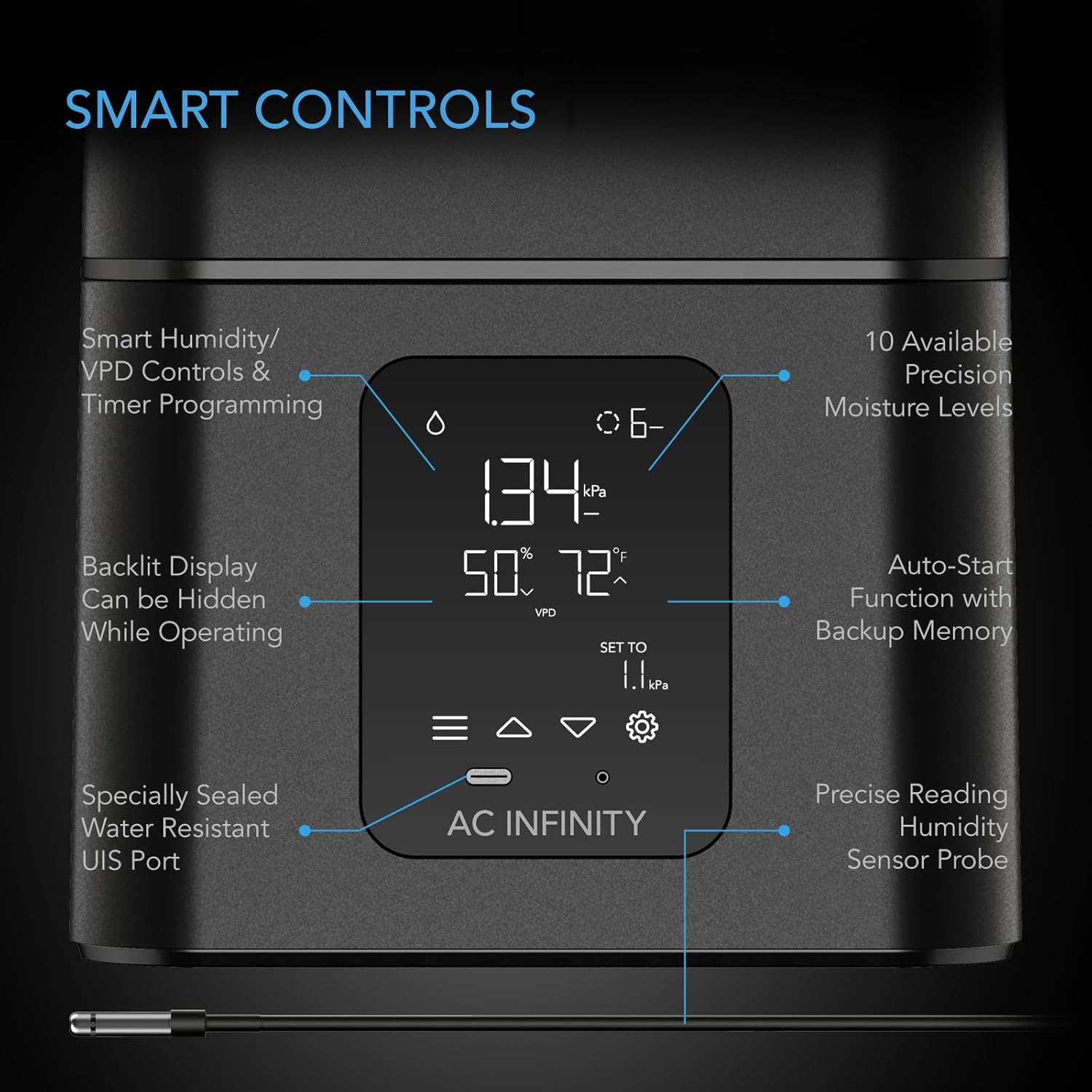
Image: Detailed view of the CLOUDFORGE T7's smart control panel, highlighting the backlit display, precision moisture levels, auto-start function, water-resistant seal, and sensor probe connection.
- Control Panel: Features smart humidity/VPD controls, timer programming, and a hidable backlit display.
- Sensor Probe: Provides precise humidity and temperature readings.
- Water Tank: The reservoir for water.
- Vaporizer: The internal component responsible for mist generation.
- Output Nozzles: Includes an extendable hose and a targeting pipe for directing mist.
- UIS Port: For connecting to AC Infinity UIS controllers.

Image: A detailed view of the thermal-alloy sensor probe, designed to detect changes in temperature, humidity, and VPD.
2.3 Initial Placement and Filling
- Place the humidifier on a stable, level surface within your grow environment. Ensure it is not directly exposed to water splashes.
- Remove the top cover of the humidifier.
- Fill the water tank with clean, distilled water. Using distilled water is recommended to prevent mineral buildup and extend the unit's lifespan. Do not exceed the maximum fill line.
- Replace the top cover securely.
- Connect the desired output nozzle (extendable hose or targeting pipe) to the mist outlet.
- Insert the sensor probe into its designated port. Position the probe in the area where you want to monitor humidity and temperature.
3. Operating Instructions
3.1 Powering On and Basic Operation
- Plug the power cord into a suitable electrical outlet (240 Volts).
- The display will illuminate, showing current humidity, temperature, and VPD readings.
- Use the control panel buttons to navigate settings.

Image: The illuminated digital display of the CLOUDFORGE T7, providing real-time environmental data including humidity percentage, temperature, and Vapor Pressure Deficit (VPD).
3.2 Humidity and VPD Control
- The unit allows for precise humidity control with 10 available moisture levels.
- Set target humidity levels using the control panel. The humidifier will automatically activate or deactivate to maintain the desired range.
- VPD (Vapor Pressure Deficit) triggers can also be set to optimize plant transpiration.
- The auto-start function with backup memory ensures the unit resumes previous settings after a power interruption.

Image: The CLOUDFORGE T7 humidifier actively releasing mist through its five-way nozzle in a grow room, illustrating its effective humidity distribution.

Image: The CLOUDFORGE T7 humidifier operating within a grow tent, with an overlay highlighting its internal EC ultrasonic vaporizer and sealed components for precise and leak-free operation.
3.3 Timer Programming
- The integrated timer allows for scheduled operation.
- Program the humidifier to turn on or off at specific times or for set durations.

Image: A graphical representation of the humidifier's timer functions, showing options for countdown to off and cyclical on/off programming.
3.4 Connectivity with UIS Controllers and App Control
The CLOUDFORGE T7 can be integrated into the AC Infinity UIS platform for enhanced control and monitoring.
- Connect the humidifier to a compatible UIS controller via the UIS port.
- Utilize the AC Infinity app to manage settings, view data, set dynamic climate triggers, schedule grow cycles, and receive alerts.

Image: An illustration depicting various AC Infinity grow devices, including the CLOUDFORGE T7, interconnected through the UIS platform for unified environmental control.

Image: A smartphone screen displaying the AC Infinity app's automation interface, allowing users to program grow cycles and environmental triggers.
4. Maintenance
4.1 Regular Cleaning
- Daily: Refill the water tank as needed. The unit will flash the screen when water runs out.
- Weekly: Empty any remaining water from the tank. Wipe down the interior of the tank and the base with a soft cloth to prevent mineral buildup.
- Monthly (or as needed): For hard water areas, descale the vaporizer and tank using a mild descaling solution (e.g., white vinegar diluted with water). Rinse thoroughly with clean water before refilling.
- Ensure the water-resistant seal is clean and free of debris to maintain its integrity and prevent leaks.
4.2 Water Quality
Using distilled or demineralized water is highly recommended. This minimizes mineral deposits (white dust) and extends the lifespan of the ultrasonic vaporizer and other internal components.
5. Troubleshooting
| Problem | Possible Cause | Solution |
|---|---|---|
| No mist output. | Water tank is empty or low. Unit is not powered on. Vaporizer is clogged with mineral deposits. | Refill the water tank. Ensure the power cord is securely plugged in and the unit is turned on. Clean the vaporizer and tank as per maintenance instructions. |
| Unit not maintaining desired humidity. | Incorrect humidity/VPD settings. Sensor probe is dirty or improperly placed. Room size exceeds unit capacity. | Adjust target humidity/VPD settings. Clean the sensor probe and ensure it is positioned correctly away from direct mist. Verify the unit's capacity (15L for CLOUDFORGE T7) is suitable for your grow space. |
| Water leakage. | Top cover not securely placed. Seal is damaged or dirty. Overfilling the water tank. | Ensure the top cover is properly seated and sealed. Inspect and clean the water-resistant seal. If damaged, contact support. Do not fill water above the maximum fill line. |
| Unusual noise during operation. | Mineral buildup on internal components. Unit not level. | Perform a thorough cleaning of the unit, especially the vaporizer. Ensure the unit is placed on a flat, stable surface. |
6. Specifications

Image: A comprehensive diagram detailing the physical dimensions, sensor probe length, power cord length, and nozzle lengths of the CLOUDFORGE T7 humidifier, along with its capacity and output rate.
| Feature | Detail |
|---|---|
| Model Name | CLOUDFORGE T7 (AC-CFT7) |
| Brand | AC Infinity |
| Capacity | 15.0 L (3.96 gal) |
| Operation Mode | Ultrasonic |
| Output Rate | 1300 ml/h |
| Max Runtime | 30 hours |
| Wattage | 100 Watts |
| Voltage | 240 Volts |
| Product Dimensions (D x W x H) | 9.52"D x 10.23"W x 20.51"H (24.2 cm D x 26.0 cm W x 52.1 cm H) |
| Item Weight | 12.42 pounds |
| Sensor Probe Length | 144" (366.0 cm) |
| Power Cord Length | 71.25" (181.0 cm) |
| Flexible Hose Length | 32.0" (81.3 cm) to 88.5" (224.8 cm) |
| Fixed Pipe Length | 18.30" (46.5 cm) |
| Included Components | Interchangeable Nozzles, Sensor Probe |
| Control Method | App, Manual Controls |
| Room Type | Greenhouse/Grow Tent |
| UPC | 819137023628 |
7. Warranty and Support
For warranty information, technical support, or service inquiries, please contact AC Infinity directly. Refer to the official AC Infinity website or product packaging for the most current contact details and warranty terms.
AC Infinity Official Store: Visit AC Infinity Store on Amazon
Related documentsAC-CFT7


Ask a question about this manual
Ask about setup, troubleshooting, compatibility, parts, safety, or missing instructions. Manuals+ will review the question and use this page’s manual context to help answer it.