
RYOBI RAR800K-120
RYOBI RAR800K-120 Multi-Purpose Accessory Set User Manual
Model: RAR800K-120 | Brand: RYOBI
Introduction
The RYOBI RAR800K-120 Multi-Purpose Accessory Set is a comprehensive collection of 120 rotary tool accessories designed for a wide range of applications. This set provides the necessary tools for tasks such as cutting, cleaning, polishing, grinding, sharpening, sanding, engraving, and carving on various materials including wood, metal, plastic, glass, brick, and stone.
This manual provides essential information on the contents of the set, proper usage, maintenance, and safety guidelines to ensure optimal performance and longevity of the accessories.
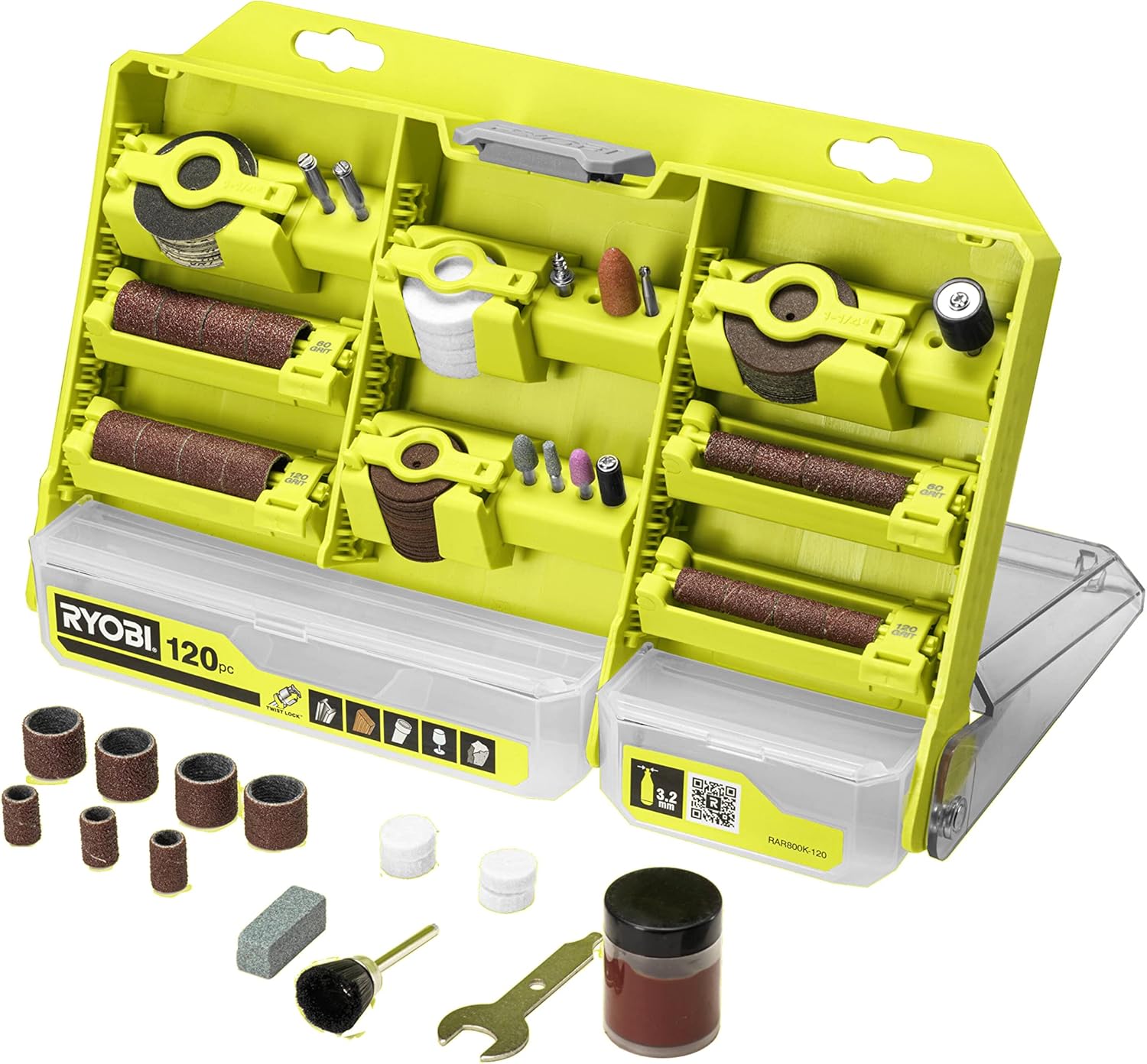
Figure 1: RYOBI RAR800K-120 Multi-Purpose Accessory Set, opened to show the organized compartments and included accessories.
Safety Information
Always adhere to the safety instructions provided with your rotary tool. The following are general safety guidelines for using these accessories:
- Wear Personal Protective Equipment (PPE): Always wear safety glasses or goggles to protect your eyes from flying debris. Consider gloves and a dust mask depending on the material being worked on.
- Secure Workpiece: Ensure the material you are working on is securely clamped or held to prevent movement during operation.
- Check Accessory Condition: Before each use, inspect accessories for damage, cracks, or wear. Do not use damaged accessories.
- Correct RPM: Operate your rotary tool within the recommended maximum rotational speed for each accessory. For this set, the maximum recommended speed is 35,000 RPM. Exceeding this can lead to accessory failure and injury.
- Proper Insertion: Ensure accessories are fully inserted into the rotary tool's chuck and securely tightened before operation.
- Ventilation: Work in a well-ventilated area, especially when generating dust or fumes.
- Keep Clear: Keep hands, hair, and loose clothing away from rotating parts.
Package Contents
The RYOBI RAR800K-120 set includes 120 multi-purpose accessories, organized for easy access. The complete list of components is as follows:
| Quantity | Item Description |
|---|---|
| 24 | 24mm Cutting Discs |
| 12 | 32.5mm Reinforced Cutting Discs |
| 1 | 32.5mm Cutting Disc |
| 1 | Nylon Brush |
| 4 | 13mm Polishing Discs |
| 1 | Polishing Paste |
| 4 | 25mm Polishing Discs |
| 1 | 44mm Grinding Wheel |
| 1 | 40mm Grinding Wheel |
| 1 | 13mm Sanding Mandrel |
| 6 | 13mm Sanding Bands (60 grit) |
| 6 | 13mm Sanding Bands (120 grit) |
| 1 | 39mm Sanding Mandrel |
| 6 | 13mm Sanding Bands (60 grit) |
| 5 | 13mm Sanding Bands (120 grit) |
| 13 | 32mm Sanding Discs (120 grit) |
| 13 | 32mm Sanding Discs (240 grit) |
| 12 | 32mm Sanding Discs (240 grit) |
| 1 | 2.8mm High Speed Cutter |
| 1 | 38.5mm Mandrel |
| 1 | Standard 38.5mm Mandrel |
| 1 | Sharpening Stone |
| 1 | Wrench |

Figure 2: The RYOBI RAR800K-120 accessory set in its compact storage case.
Setup
This accessory set is designed for use with rotary tools that feature a 3.2mm chuck. Ensure your rotary tool is compatible before attempting to attach any accessories.
- Power Off: Always ensure your rotary tool is unplugged or has its battery removed before changing accessories.
- Open Chuck: Use the provided wrench or the tool's integrated mechanism to loosen the chuck collet.
- Insert Accessory: Insert the shank of the desired accessory fully into the chuck. For mandrels, attach the corresponding disc or band first, then insert the mandrel into the chuck.
- Tighten Chuck: Securely tighten the chuck collet using the wrench or by hand, ensuring the accessory is firmly held and centered. Do not overtighten.
- Verify: Gently pull on the accessory to confirm it is securely fastened and will not slip during operation.

Figure 3: The accessory set displayed alongside compatible RYOBI rotary tools, illustrating typical usage environment.
Operating Instructions
The RAR800K-120 set offers versatility for various applications. Always select the appropriate accessory for the material and task.
General Usage Tips:
- Speed Control: Adjust your rotary tool's speed according to the material and accessory. Softer materials or polishing may require lower speeds, while cutting or grinding harder materials may require higher speeds, up to the recommended 35,000 RPM.
- Light Pressure: Allow the accessory to do the work. Apply light, consistent pressure. Excessive pressure can cause the accessory to wear prematurely, break, or overheat the material.
- Cooling: For prolonged use or on heat-sensitive materials, allow the accessory and workpiece to cool periodically.
Specific Accessory Applications:
- Cutting Discs (24mm, 32.5mm, Reinforced):
- Ideal for cutting metal, plastic, and thin wood. Use reinforced discs for more demanding cuts. Always cut at a 90-degree angle to the workpiece and avoid side pressure.
- Sanding Bands & Discs (60, 120, 240 grit):
- Used for shaping, smoothing, and removing material from wood, plastic, and soft metals. Start with lower grit (60) for aggressive material removal and progress to higher grits (120, 240) for finer finishes.
- Polishing Discs & Paste:
- Apply polishing paste to the polishing discs. Use at a lower speed to buff and shine various surfaces, including metals and plastics. Clean discs after use.
- Grinding Wheels (40mm, 44mm):
- Suitable for grinding, sharpening, and deburring harder materials like metal and stone. Maintain a consistent angle for sharpening.
- High Speed Cutter (2.8mm):
- Used for carving, engraving, and routing in wood, plastic, and soft metals. Apply light pressure and allow the cutter to remove material gradually.
- Nylon Brush:
- Effective for light cleaning and polishing of delicate surfaces, removing rust, or preparing surfaces for painting.

Figure 4: Visual representation of recommended material applications for the accessory set, including wood, metal, plastic, glass, and stone.
Maintenance
Proper maintenance extends the life of your accessories and ensures consistent performance.
- Cleaning: After each use, clean accessories to remove debris and residue. A soft brush or cloth can be used. For polishing discs, remove excess polishing paste.
- Storage: Store all accessories in their original case or a similar protective container to prevent damage and loss. Keep them in a dry environment to prevent rust.
- Inspection: Regularly inspect accessories for signs of wear, dullness, or damage. Replace worn or damaged accessories immediately to prevent injury or poor performance. The sharpening stone can be used to maintain the edge of certain bits.
Troubleshooting
Most issues related to accessory performance can be resolved by checking the following:
- Accessory Slipping: Ensure the accessory is fully inserted into the chuck and the chuck is tightened securely. The chuck may need cleaning if debris is preventing a tight grip.
- Poor Performance (e.g., slow cutting, ineffective sanding):
- Check if the accessory is worn out and needs replacement.
- Verify that the rotary tool's speed is appropriate for the task and material.
- Ensure you are not applying excessive pressure, which can bog down the tool.
- Excessive Vibration: This can indicate an improperly seated accessory, a bent shank, or a damaged accessory. Stop operation immediately, inspect the accessory, and replace if necessary.
- Overheating of Accessory/Workpiece: Reduce the speed of the rotary tool or apply lighter pressure. Allow for cooling periods.
Specifications
| Feature | Detail |
|---|---|
| Model Number | RAR800K-120 |
| Brand | RYOBI |
| Accessory Count | 120 pieces |
| Chuck Compatibility | 3.2mm (Universal) |
| Maximum Rotational Speed | 35,000 RPM |
| Recommended Uses | Cutting, Cleaning, Polishing, Grinding, Sharpening, Sanding, Engraving, Carving |
| Item Weight | 2.2 pounds (approx. 1 Kilogram) |
| Package Dimensions | 10.43 x 6.89 x 1.73 inches |
Warranty and Support
For specific warranty information and customer support regarding your RYOBI RAR800K-120 Multi-Purpose Accessory Set, please refer to the documentation included with your purchase or visit the official RYOBI website. You may also find additional resources and FAQs by scanning the QR code found on the product packaging or by visiting the following link:
Related documentsRAR800K-120

Ask a question about this manual
Ask about setup, troubleshooting, compatibility, parts, safety, or missing instructions. Manuals+ will review the question and use this page’s manual context to help answer it.