
Colorcool M8
Colorcool M8 MP3 Player User Manual
Model: M8
1. Introduction
Thank you for choosing the Colorcool M8 MP3 Player. This portable music player is designed for ease of use and high-quality audio, featuring Bluetooth connectivity, a built-in speaker, and a full-touch screen. It is ideal for music enthusiasts on the go, offering a compact design and versatile functions.

Image 1.1: Front and back view of the Colorcool M8 MP3 Player, showcasing its compact design and touch screen interface.
Key features include:
- 16GB internal memory, expandable up to 128GB with a Micro SD card.
- Bluetooth 5.0 for wireless audio streaming to speakers or earphones.
- Built-in HD speaker for direct audio playback.
- Multi-functional support: FM Radio, Voice Recording, E-book (TXT), Video (AVI/AMV), Alarm Clock, Calendar, Stopwatch.
- HiFi sound quality with intelligent digital noise reduction chip.
- Lightweight and portable design (32g, 65x40x15mm).
2. Getting Started: Setup
2.1 Package Contents
Before you begin, please ensure all items are present in the package:
- 1 x Colorcool M8 MP3 Player
- 1 x USB Type-C Cable
- 1 x Wire Headset
- 1 x User's Manual (this document)
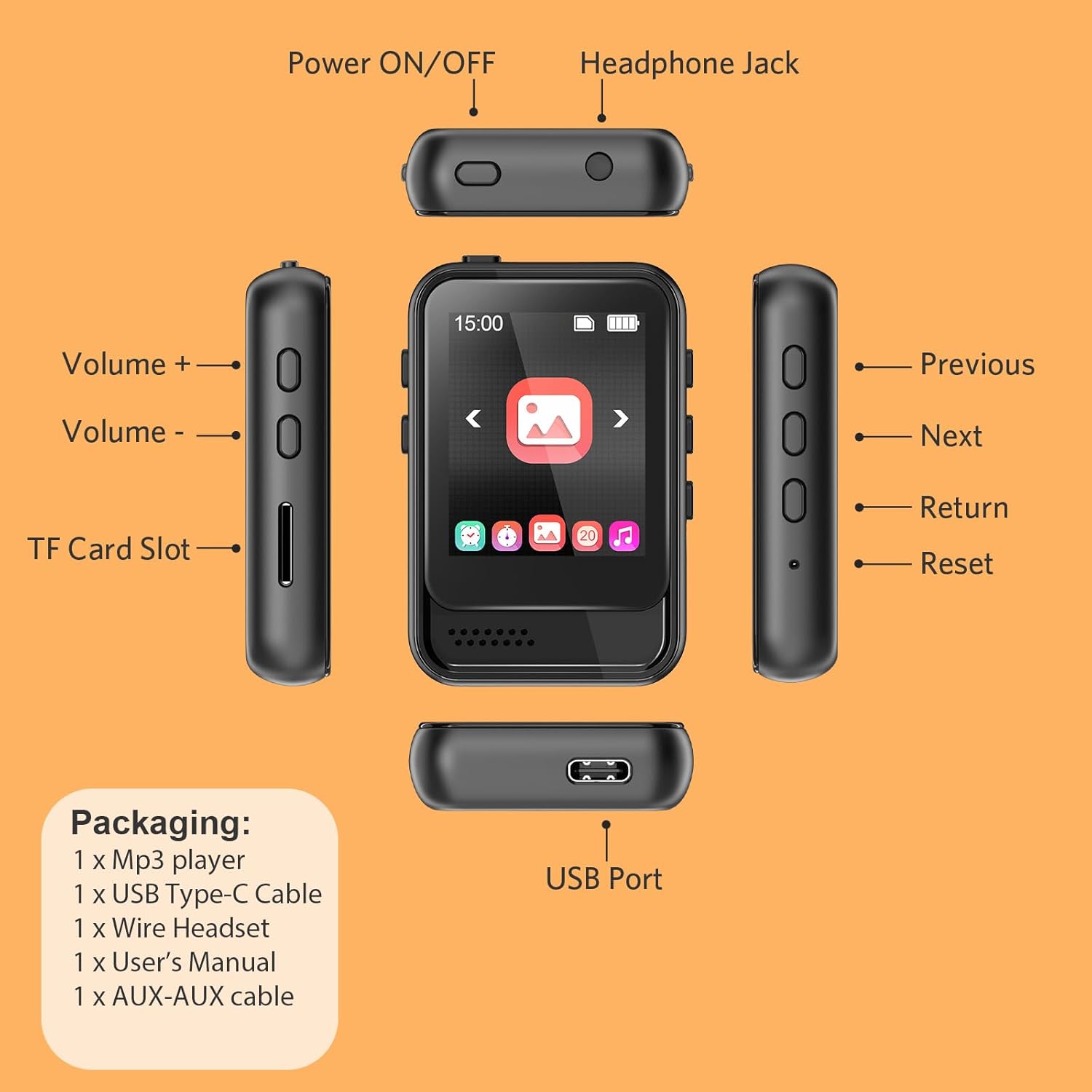
Image 2.1: Diagram illustrating the various ports of the MP3 player (Power ON/OFF, Headphone Jack, Volume buttons, TF Card Slot, USB Port, Previous, Next, Return, Reset) and a list of included accessories.
2.2 Charging the Device
The MP3 player comes with a built-in 300 mAh Lithium Polymer battery. For optimal performance, fully charge the device before first use.
- Connect the provided USB Type-C cable to the player's USB port.
- Connect the other end of the USB cable to a 5V/500mA charger (not included) or a computer's USB port.
- The charging indicator will show the charging status. A full charge typically takes 2-3 hours.

Image 2.2: Visual representation of the MP3 player's built-in 16GB memory and support for external expansion via a TF (Micro SD) card, along with Type-C port charging.
2.3 Inserting a Micro SD Card
The player has 16GB of internal storage. You can expand the memory up to 128GB using a Micro SD card (not included).
- Locate the TF Card Slot on the side of the MP3 player.
- Gently insert the Micro SD card into the slot until it clicks into place. Ensure the card is oriented correctly.
- To remove, gently push the card inward until it clicks, then release, and it will eject.
2.4 Powering On/Off
- To power on: Press and hold the Power ON/OFF button located on the top of the device until the screen lights up.
- To power off: Press and hold the Power ON/OFF button until the power-off prompt appears, then confirm.
3. Operating Instructions
3.1 Basic Navigation
The Colorcool M8 features a 1.8-inch full touch screen for intuitive navigation.
- Swipe: Swipe left or right on the screen to navigate between main menu icons.
- Tap: Tap an icon to select an application or option.
- Return: Use the 'Return' button on the side or the back arrow icon on the screen to go back to the previous menu.

Image 3.1: The multi-function MP3 player interface displaying icons for Music, Bluetooth, FM Radio, Voice Record, E-book, Calendar, Stopwatch, Alarm, and Picture functions.
3.2 Music Playback
The player supports MP3, WMA, APE, FLAC, WAV, DRM, and ACELP audio formats.
- From the main menu, tap the "Music" icon.
- Browse your music by Artist, Album, Songs, Playlists, etc.
- Tap a song to begin playback.
- Use the on-screen controls (play/pause, next/previous, shuffle, repeat) or the physical volume buttons on the side.
3.3 Bluetooth Connectivity
The player features Bluetooth 5.0 for connecting to Bluetooth speakers or earphones. Note: This device cannot pair with smartphones.
- From the main menu, tap the "Bluetooth" icon.
- Ensure your Bluetooth speaker or earphones are in pairing mode.
- The player will scan for available devices. Select your device from the list to connect.
- Once connected, audio will stream wirelessly to your paired device.

Image 3.2: Illustration of the MP3 player's Bluetooth 5.3 technology, demonstrating simple connection, stable signal, and low power consumption when paired with TWS earbuds and a Bluetooth speaker.
3.4 FM Radio
Listen to your favorite FM radio stations.
- Connect the wired earphones (included) as they act as the antenna.
- From the main menu, tap the "FM Radio" icon.
- Use the auto-scan function to find and save available stations.
- You can manually tune or select from saved presets.

Image 3.3: A user enjoying the FM Radio function of the MP3 player, with details on common, Japan, and European frequency bands displayed on the screen.
3.5 Voice Recording
The built-in dual capacitor microphone allows for clear voice recordings.
- From the main menu, tap the "Voice Recording" icon.
- Tap the record button to start recording.
- Tap again to pause/resume, and tap the stop button to save the recording.
3.6 E-book Reader
The player supports TXT format e-books.
- Transfer TXT files to the "E-book" folder on your player.
- From the main menu, tap the "E-book" icon.
- Select the desired TXT file to open and read.
3.7 Video Playback
The player supports AMV and AVI video formats.
- Transfer compatible video files to the "Video" folder on your player.
- From the main menu, tap the "Video" icon.
- Select a video file to play.
3.8 Using the Built-in Speaker
The MP3 player includes a built-in speaker for audio playback without earphones.
- The speaker can be turned on or off in the device settings.
- Navigate to "Settings" and find the "Speaker" option to toggle its status.
3.9 Adjusting Settings
Access the "Settings" menu to customize your player.
- Volume Adjustment: Level 31 digital volume control. Use the physical volume buttons or the on-screen slider.
- Screen Brightness: Adjust from 00 to 11. Higher numbers indicate greater brightness.
- Languages: Supports English, French, Italian, Dutch, Portuguese, Chinese, Japanese, Turkish, and more.
- Variable Playback: Adjust playback speed from -7 to +7.
4. Maintenance
Proper care will extend the life of your Colorcool M8 MP3 Player.
- Cleaning: Use a soft, dry, lint-free cloth to clean the screen and body. Avoid abrasive cleaners or solvents.
- Storage: Store the device in a cool, dry place away from direct sunlight, extreme temperatures, and humidity.
- Battery Care: To maintain battery health, avoid fully discharging the battery frequently. If storing for a long period, charge the battery to about 50% every few months.
- Avoid Impacts: The device is lightweight but sensitive. Avoid dropping or subjecting it to strong impacts.
5. Troubleshooting
If you encounter issues with your MP3 player, please refer to the following common problems and solutions:
| Problem | Possible Cause | Solution |
|---|---|---|
| Device does not power on. | Low battery; device frozen. | Charge the device for at least 30 minutes. If still unresponsive, press the 'Reset' button (if available, refer to Image 2.1) or hold the power button for 10-15 seconds to force a restart. |
| Cannot connect to Bluetooth device. | Bluetooth device not in pairing mode; player already connected to another device; player cannot connect to smartphone. | Ensure your Bluetooth speaker/earphones are in pairing mode. Disconnect from any other devices. Remember, the player cannot pair with smartphones. Restart both devices and try again. |
| No sound from earphones/speaker. | Volume too low; earphones not fully plugged in; speaker disabled. | Increase volume. Ensure earphones are fully inserted into the headphone jack. Check settings to ensure the built-in speaker is enabled if you are using it. |
| Micro SD card not recognized. | Card not inserted correctly; incompatible card format; faulty card. | Re-insert the Micro SD card, ensuring it clicks into place. Ensure the card is formatted to FAT32. Try a different Micro SD card to rule out a faulty card. |
| Screen is unresponsive or frozen. | Software glitch. | Press the 'Reset' button (if available) or hold the power button for 10-15 seconds to force a restart. |
6. Specifications
| Feature | Detail |
|---|---|
| Model No. | M8 |
| Dimensions | 65 × 40 × 15 mm (2.56 × 1.57 × 0.59 inches) |
| Weight | 32g (1.13 oz) |
| Brand | Colorcool |
| Internal Memory | 16GB |
| Expandable Memory | Up to 128GB (Micro SD Card) |
| Screen Size | 1.8 inch full touch screen |
| USB Port | USB Type-C |
| Bluetooth Version | 5.0 |
| Microphone | Built-in dual capacitor microphone |
| Battery Capacity | 300 mAh 3.7V Lithium Polymer |
| Charging Time | 2-3 hours (using 5V/500mA charger) |
| Audio Formats | MP3, WMA, APE, FLAC, WAV, DRM, ACELP |
| Video Formats | AMV, AVI |
| E-book Format | TXT |
| Picture Formats | BMP, JPG |
| Supported OS | Windows 98/XP/VISTA/7/8/10 |
| Headphone Output | 10mW@32Ω; 20mW@16Ω (Supports 16Ω or 32Ω headphones) |
7. Warranty and Support
For warranty information and customer support, please refer to the documentation included with your product packaging or contact the seller directly. Keep your purchase receipt as proof of purchase.
For further assistance, you may also visit the official Colorcool website or contact their customer service department.
Related documentsM8


Ask a question about this manual
Ask about setup, troubleshooting, compatibility, parts, safety, or missing instructions. Manuals+ will review the question and use this page’s manual context to help answer it.