
1. Introduction
This manual provides essential instructions for the safe and efficient operation of your DATOUBOSS 2000W Pure Sine Wave Inverter. This device converts 36V DC power from batteries into 230V AC power, suitable for various household and vehicle applications. Please read this manual thoroughly before installation and use, and retain it for future reference.
2. Important Safety Instructions
Failure to follow these instructions may result in electric shock, fire, or serious injury. Save these instructions.
- Read all instructions: Before using the inverter, read all instructions and cautionary markings on the inverter, the batteries, and all appropriate sections of this manual.
- Do not expose to rain or snow: This inverter is designed for indoor use or protected outdoor environments.
- Keep away from children: This device is not a toy.
- Proper ventilation: Ensure adequate ventilation around the inverter. Do not block ventilation openings.
- Avoid flammable materials: Do not install the inverter in compartments containing flammable materials or in locations that may accumulate flammable gases.
- Correct voltage: Connect the inverter only to a 36V DC power source. Connecting to other voltages may damage the inverter and connected devices.
- Grounding: Ensure the inverter is properly grounded according to local electrical codes.
- Disconnect power: Always disconnect the DC power source before performing any maintenance or cleaning.
- Professional installation: If you are unsure about any aspect of installation or operation, consult a qualified electrician.
3. Product Overview
3.1 Key Features
- Stable 2000W Pure Sine Wave Output: Converts 36V DC to 230V AC, suitable for sensitive electronics.
- Advanced Cooling System: Equipped with two temperature and load-dependent fans for efficient heat dissipation.
- Robust Construction: Full aluminum alloy housing for durability and fire resistance.
- Multiple Output Ports: Includes 3 USB ports (one QC3.0, one Type-C) and 2 EU sockets.
- Comprehensive Protection: Features overload, short circuit, over-temperature, under/over-voltage, and reverse connection protection.
- Remote Control: For convenient operation from a distance.
3.2 Components and Controls
Familiarize yourself with the various parts of your DATOUBOSS inverter.

Figure 1: Front view of the DATOUBOSS 2000W Pure Sine Wave Inverter with its remote control. The inverter features a digital display, USB ports, and Type-C port on the front panel, along with cooling fans on the sides.
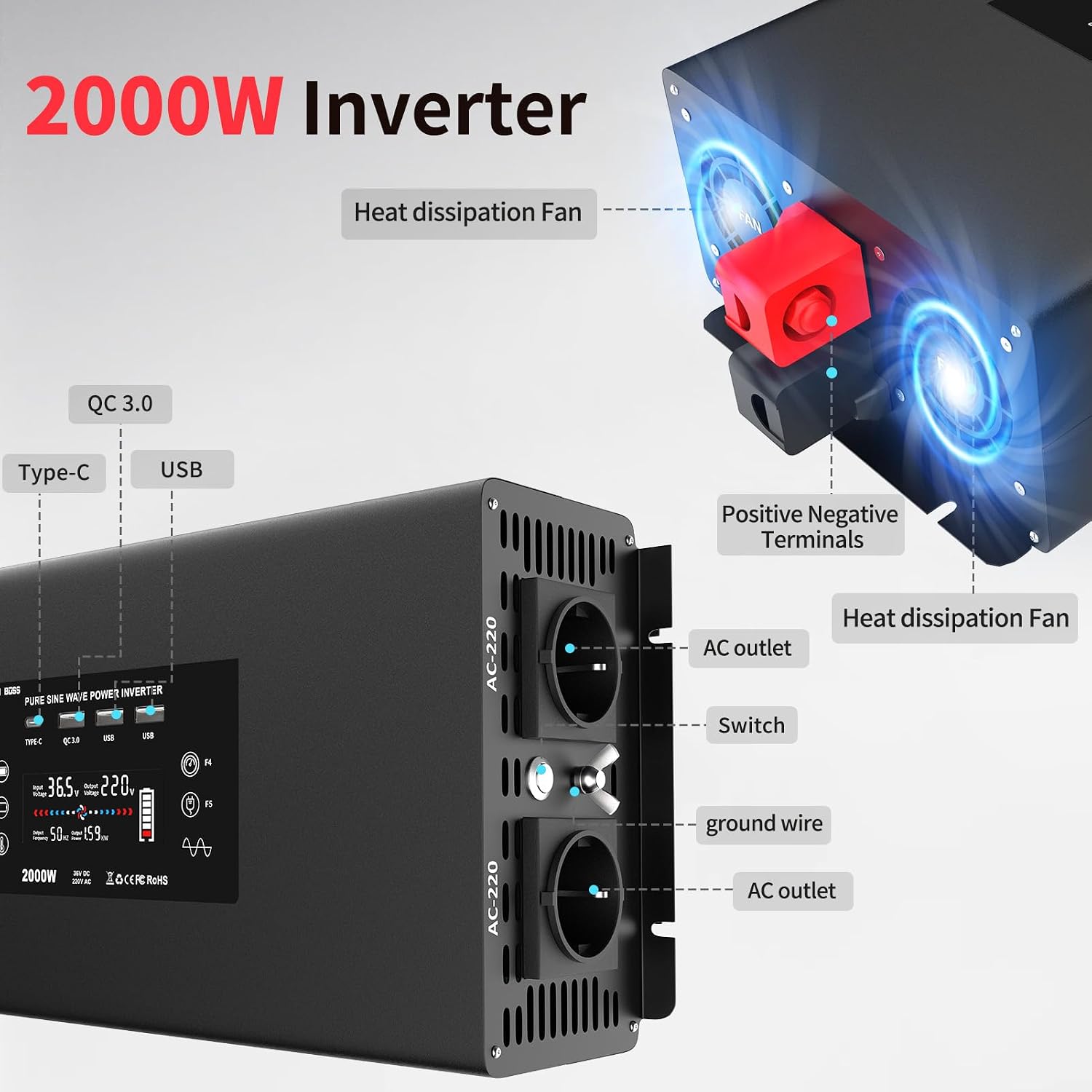
Figure 2: Detailed view highlighting the inverter's components. This image shows the heat dissipation fans, positive and negative terminals, AC outlets, switch, and ground wire connection points. The front panel includes Type-C, QC 3.0, and standard USB ports.
- Digital Display: Shows input voltage, output voltage, output frequency, and power usage.
- USB Ports: Includes Type-C, QC 3.0, and standard USB ports for charging mobile devices.
- AC Outlets (2x EU Sockets): For connecting 230V AC appliances.
- Power Switch: To turn the inverter on or off.
- Positive (+) and Negative (-) Terminals: For connecting to the 36V DC battery source.
- Ground Wire Terminal: For safety grounding.
- Heat Dissipation Fans: Two fans for active cooling.
- Remote Control: Wireless control for power on/off.
4. Setup and Installation
Proper installation is crucial for the safe and efficient operation of your inverter.
4.1 Choosing a Location
- Install the inverter in a dry, well-ventilated area, away from direct sunlight, heat sources, and moisture.
- Ensure there is sufficient space around the inverter for proper airflow to the cooling fans.
- Avoid locations where flammable liquids or gases are stored.
4.2 Connecting to a DC Power Source
- Ensure the inverter's power switch is in the "OFF" position.
- Connect the supplied red connecting cable to the positive (+) terminal of the inverter and the positive (+) terminal of your 36V DC battery. Ensure a secure connection.
- Connect the supplied black connecting cable to the negative (-) terminal of the inverter and the negative (-) terminal of your 36V DC battery. Ensure a secure connection.
- Important: Use the provided fully insulated ring terminals for safer connections compared to crocodile clip cables.
- Verify all connections are tight and correct polarity is observed. Incorrect polarity will damage the inverter.
4.3 Grounding the Inverter
For safety, the inverter must be properly grounded.
- Connect a grounding wire (not supplied) from the inverter's ground terminal to a suitable earth ground point. This could be the chassis of a vehicle or a dedicated ground rod, depending on your application.
- Consult local electrical codes for proper grounding procedures.
5. Operating Instructions
5.1 Powering On the Inverter
- After ensuring all connections are secure and correct, switch the inverter's power button to the "ON" position.
- The digital display will illuminate, showing the input voltage, output voltage, frequency, and power usage.
- Alternatively, use the provided remote control to power the inverter on or off.
5.2 Connecting Appliances
- Before connecting any appliance, ensure its power consumption is within the inverter's continuous output capacity of 2000W.
- Plug your 230V AC appliances into the EU sockets on the inverter.
- Use the USB and Type-C ports for charging compatible mobile phones, laptops, and other digital devices.
- The inverter is suitable for a wide range of devices, including mobile phones, laptops, digital cameras, washing machines, microwave ovens, power tools, desk lamps, DVD players, GPS, musical instruments, and drills.

Figure 3: Examples of how the DATOUBOSS inverter can be used, including for domestic appliances, camping, RVs, and charging electronic devices like laptops and smartphones.
5.3 Powering Off the Inverter
- Disconnect all appliances from the inverter.
- Switch the inverter's power button to the "OFF" position.
- For long-term storage or maintenance, disconnect the DC input cables from the battery.
6. Maintenance
Regular maintenance ensures the longevity and optimal performance of your inverter.
- Cleaning: Periodically clean the exterior of the inverter with a dry, soft cloth. Do not use liquid cleaners or solvents.
- Ventilation: Ensure the cooling fans and ventilation openings are free from dust and obstructions. Blocked vents can lead to overheating.
- Connections: Regularly check all electrical connections (DC input, AC output, grounding) to ensure they are tight and free from corrosion.
- Storage: If storing the inverter for an extended period, disconnect it from the battery and store it in a cool, dry place.
7. Troubleshooting
The DATOUBOSS inverter is equipped with multiple protection functions. If the inverter beeps or stops functioning, it may be due to one of the following conditions:

Figure 4: Illustration of the six protection circuit functions integrated into the DATOUBOSS inverter, ensuring safety for both the equipment and the connected car or power source.
| Problem | Possible Cause | Solution |
|---|---|---|
| Inverter not turning on | No DC input power, loose connections, low battery voltage. | Check battery connections and voltage. Ensure the inverter switch is ON. |
| Inverter beeps and shuts down (Overload Protection) | Connected appliance exceeds 2000W continuous power. | Disconnect the appliance. Reduce the load to below 2000W. Restart the inverter. |
| Inverter beeps and shuts down (Over-temperature Protection) | Poor ventilation, blocked fans, high ambient temperature. | Ensure adequate ventilation. Clear any obstructions from fans. Allow the inverter to cool down. |
| Inverter beeps and shuts down (Under/Over-voltage Protection) | Battery voltage is too low or too high for 36V input. | Check battery voltage. Recharge or replace the battery if necessary. Ensure correct 36V input. |
| Inverter beeps and shuts down (Short Circuit Protection) | Short circuit in the output wiring or connected appliance. | Disconnect all appliances. Check wiring for shorts. Restart the inverter. |
| Inverter beeps and shuts down (Reverse Connection Protection) | DC input cables connected with incorrect polarity. | Immediately disconnect power. Correct the positive (+) and negative (-) connections. |
8. Specifications
Technical details of the DATOUBOSS 2000W Pure Sine Wave Inverter.
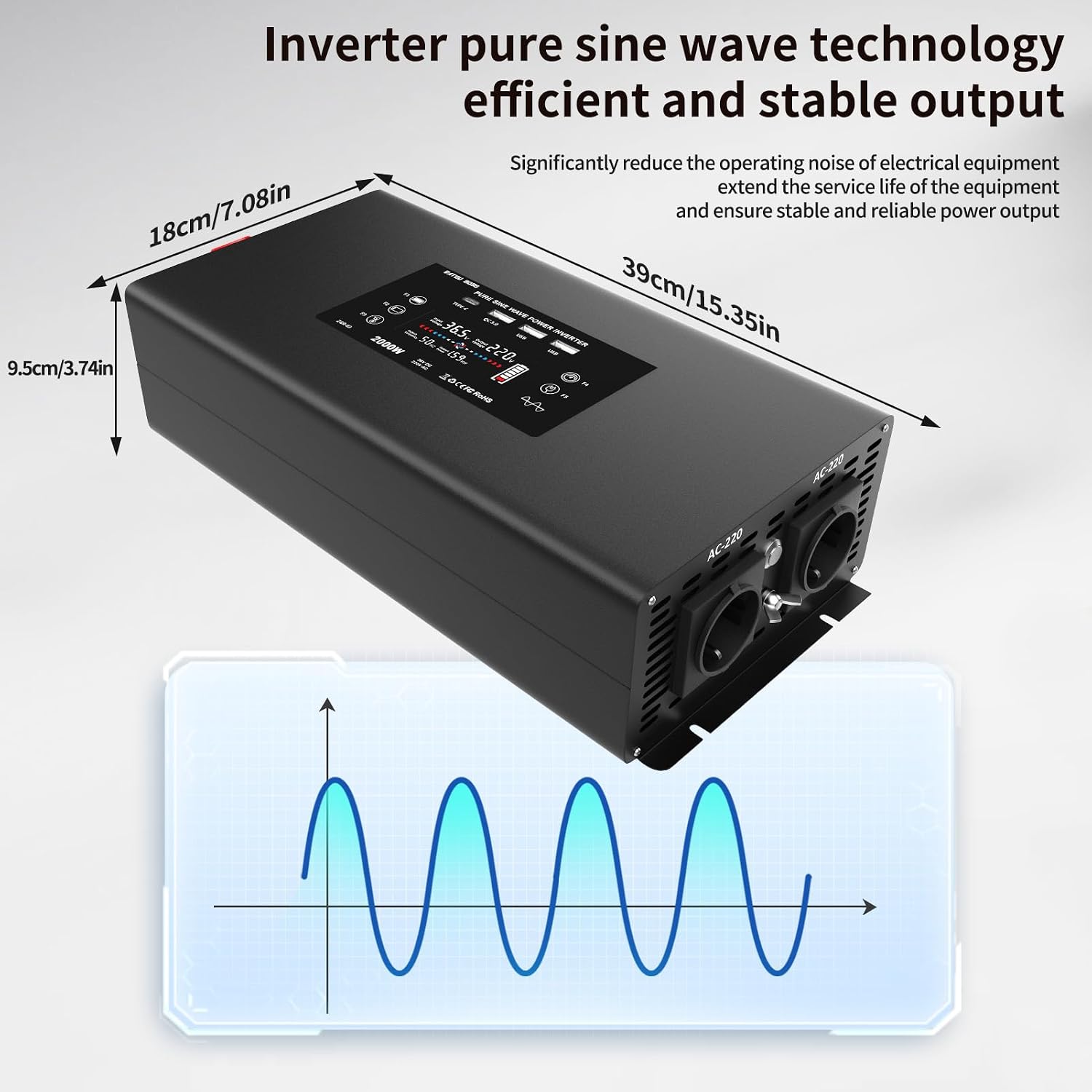
Figure 5: This image illustrates the physical dimensions of the DATOUBOSS inverter (39cm L x 18cm W x 9.5cm H) and visually represents its pure sine wave output technology, which ensures efficient and stable power.
| Feature | Detail |
|---|---|
| Brand | DATOUBOSS |
| Model Name | 36V2000W |
| Input Voltage | 36 Volts DC |
| Output Voltage | 230 Volts AC |
| Wattage (Continuous) | 2000 Watts |
| Waveform | Pure Sine Wave |
| Power Source | Battery Powered |
| Battery Capacity (Recommended) | 200 Amp Hours (minimum for sustained 2000W output) |
| Output Sockets | 2 x EU Sockets |
| USB Ports | 1 x Type-C, 1 x QC 3.0, 1 x Standard USB |
| Color | Black |
| Product Dimensions (L x W x H) | 39L x 18W x 9.5H centimeters |
| Included Components | 1 x 2000 W pure sine wave inverter, 1 x remote control, 2 x connecting cables, Instruction Manual |
| Recommended Uses | Home, Office, Vehicle (e.g., RV, Camping) |
9. Warranty and Support
This product comes with an instruction manual. For specific warranty information or technical support, please refer to the documentation included with your purchase or contact DATOUBOSS customer service through your retailer.


