
UNITOPSCI 9312W
UNITOPSCI Wireless Double Din Car Stereo User Manual
Model: 9312W
Brand: UNITOPSCI
1. Introduction
This manual provides detailed instructions for the installation, operation, and maintenance of your UNITOPSCI Wireless Double Din Apple CarPlay Car Stereo. Please read this manual thoroughly before using the product to ensure proper function and safety. Keep this manual for future reference.
2. Product Features
- Wireless CarPlay & Android Auto: Seamless integration with your smartphone for navigation, music, calls, and more, via wireless connection.
- 7-Inch HD Capacitive Touch Screen: High-resolution (1024*600) display for clear visuals and intuitive control.
- Built-in Bluetooth 5.1: Supports hands-free calling, A2DP audio streaming, and voice control with an included external microphone.
- Mirror Link Function: Projects your phone screen directly onto the car stereo display (supports iOS up to 13.4, Android up to 10.1).
- Multiple USB & Auxiliary Inputs: Features 6 USB slots (2 front, 4 rear) for playback and fast charging, plus an auxiliary audio input.
- Backup Camera Input: Automatic display of rear view image when reversing, with included AHD backup camera.
- FM/RDS Radio: Enjoy your favorite radio stations with 18 preset options.
- DSP EQ Settings: Customize your audio experience with various equalizer presets (Jazz, Classic, Rock, Pop, Flat) and user settings.
- Steering Wheel Control (SWC): Compatible with existing steering wheel controls for convenient operation.
- 7-Color Backlight: Customizable button illumination to match your vehicle's interior.
3. What's in the Box
Verify that all items are present in the package:
- 1 x Car MP5 Player (Main Unit)
- 1 x Backup Camera
- 1 x Microphone
- 1 x Power Cable (16-pin)
- 1 x USB Cable
- 1 x Antenna Head
- 1 x Remote Control
- 1 x User Manual
- 1 x Mounting Bracket
- 4 x Screws

Image: All components included in the UNITOPSCI car stereo package.
4. Setup & Installation
4.1. Pre-Installation Check
Before installation, ensure your car's dashboard opening size is compatible. The radio opening size is approximately Width 178mm/7 inch, Height 102mm/4 inch, Depth 54mm/2.1 inch. If your dash opening does not match these dimensions, a suitable dash kit may be required.

Image: Product dimensions and main wiring diagram for the car stereo.
4.2. Wiring Connections
Refer to the wiring diagram provided in the user manual and on the product itself for precise connections. Key connections include:
- Power Cable (16-Pin): Connect to your vehicle's power supply.
- Speaker Outputs: Connect to your car's front and rear speakers (Rear Right/Left, Front Right/Left).
- Subwoofer Output: For connecting an external subwoofer.
- USB Interfaces: Connect USB devices for playback or charging.
- Microphone Input: For the external microphone.
- Radio Antenna: Connect your car's radio antenna.
- Reversing Input (BACK-VIN): For the backup camera video signal.
- Trigger Wire (BACK): Connect this wire from the car radio harness to the positive power supply of your car's reverse light.
4.3. Backup Camera Wiring
The car radio includes a 12-LED wick reversing camera for enhanced night vision. Follow these steps for connection:
- Camera Power: Connect the red wire of the camera's power cable to the positive back battery supply and the black wire to the negative battery supply.
- Video Input: Connect the yellow RCA video cable from the camera to the 'CAM IN' port on the rear of the car radio.
- Trigger Wire: Locate the wire labeled "BACK" on the car radio's wire harness. Connect this wire to the positive power supply of your car's reverse light. This enables automatic switching to the reverse image when the car is in reverse gear.

Image: Detailed diagram for backup camera wiring and connection points.
5. Operating Instructions
5.1. Wireless CarPlay & Android Auto
Connect your iPhone or Android phone wirelessly to access navigation, music, messages, and other apps directly on the stereo's screen. Use voice commands for hands-free operation.

Image: Wireless CarPlay and Android Auto functionality displayed on the stereo screen.
5.2. Mirror Link
The Mirror Link function allows you to project your smartphone's screen onto the 7-inch display. This is useful for viewing maps, videos, or other content from your phone. Connect your phone via USB for this feature.
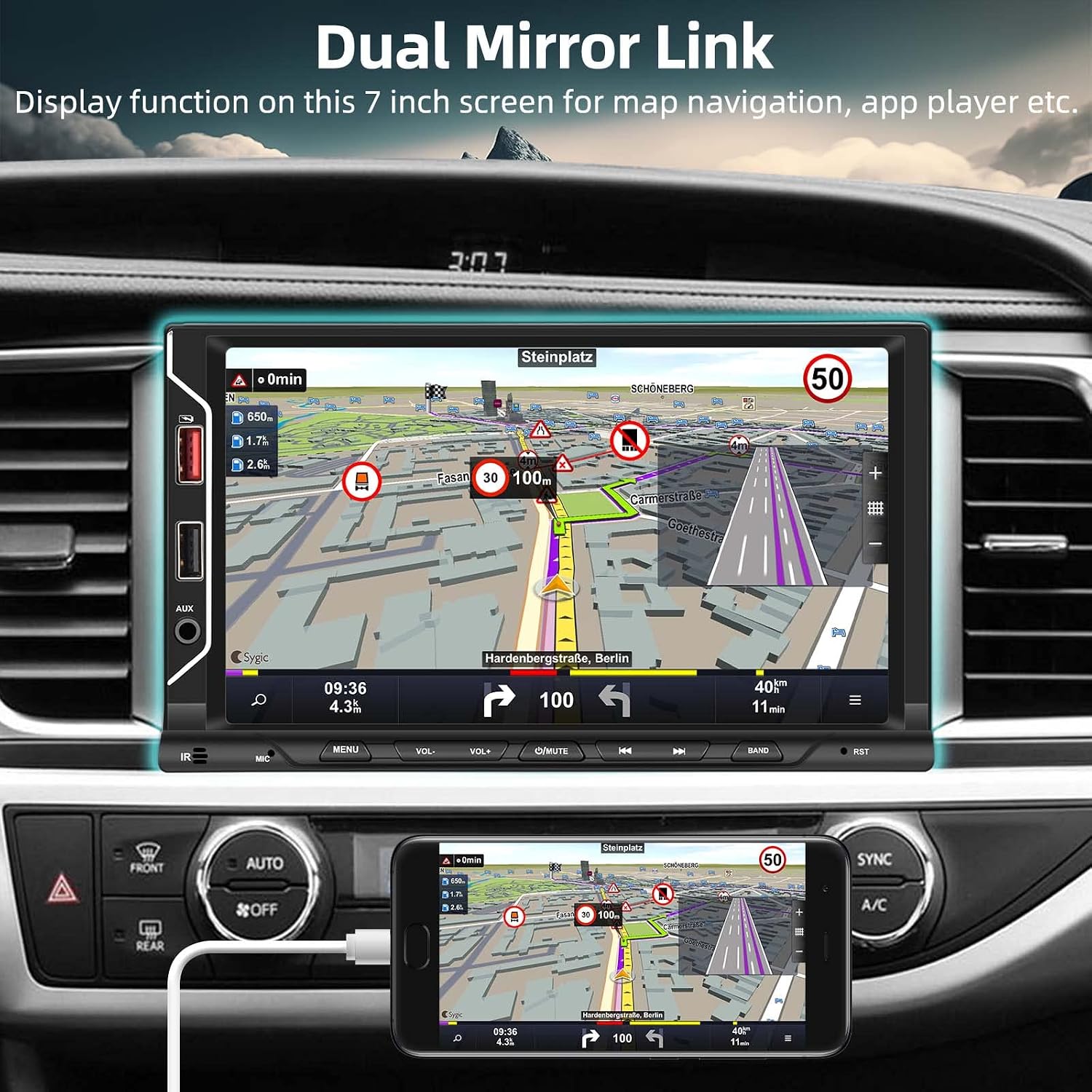
Image: Mirror Link feature showing a navigation app on the stereo screen.
5.3. Bluetooth Operation
Pair your Bluetooth-enabled device to the stereo for hands-free calling and wireless audio streaming. Access the Bluetooth menu to search for devices, pair, and manage connections.

Image: Bluetooth interface for hands-free calls and music streaming.
5.4. USB Playback & Charging
Utilize the multiple USB ports for playing media files (MP3/WMA/WAV/APE/FLAC audio, MKV/AVI/TS/TP/MP4/M4V video) from a USB drive or for fast charging your mobile devices.

Image: USB playback, fast charging, and auxiliary input capabilities.
5.5. Backup Camera Display
When the vehicle is shifted into reverse gear, the stereo will automatically display the rear view from the connected backup camera. This aids in safer parking and maneuvering.

Image: Automatic backup camera display and steering wheel control interface.
5.6. Steering Wheel Control (SWC)
If your vehicle supports steering wheel controls, connect them to the stereo to operate functions like volume, track skipping, and mode selection directly from your steering wheel for convenience and safety.
6. Maintenance
To ensure the longevity and optimal performance of your car stereo, follow these maintenance guidelines:
- Cleaning: Use a soft, dry cloth to clean the screen and exterior. For stubborn smudges, a slightly damp cloth with a mild, non-abrasive cleaner can be used, but avoid excessive moisture.
- Avoid Liquids: Do not spray liquids directly onto the unit.
- Temperature: Avoid exposing the unit to extreme temperatures, direct sunlight for prolonged periods, or high humidity.
- Software Updates: Periodically check the manufacturer's website for any available firmware updates to improve performance and add new features.
7. Troubleshooting
If you encounter issues with your car stereo, refer to the following common problems and solutions:
| Problem | Possible Cause | Solution |
|---|---|---|
| Unit does not power on. | Incorrect wiring; Blown fuse; Vehicle battery issue. | Check power cable connections (ACC, B+, GND). Inspect vehicle fuses. Ensure car battery is charged. |
| No sound or distorted sound. | Incorrect speaker wiring; Volume too low; EQ settings. | Verify speaker connections. Adjust volume. Check EQ settings and reset if necessary. |
| Backup camera not displaying. | Camera power issue; Incorrect video input; Trigger wire not connected. | Ensure camera is powered. Check video cable connection to 'CAM IN'. Verify the 'BACK' trigger wire is connected to the reverse light positive. |
| Wireless CarPlay/Android Auto not connecting. | Bluetooth/Wi-Fi off on phone; Incorrect pairing; Software glitch. | Ensure Bluetooth and Wi-Fi are enabled on your phone. Re-pair the device. Restart both phone and stereo. |
| Unit freezes or crashes. | Software issue; Overheating; Corrupted media file. | Perform a soft reset (locate the RST button, usually a small pinhole). Ensure adequate ventilation. Try different media files. If persistent, contact support. |
8. Specifications
| Feature | Specification |
|---|---|
| Model Number | 9312W |
| Product Dimensions | 2.1 x 7 x 4 inches |
| Item Weight | 2.2 pounds (1 Kilogram) |
| Screen Size | 7.0 inches |
| Screen Resolution | 1024*600 |
| Operating System | F133 |
| Voltage | 12V |
| Output Power | 4*45W |
| Bluetooth Version | 5.1 |
| USB Interface | Dual USB 2.0 (supports fast charging) |
| FM Radio Range | 87.5-108.0MHZ |
| Audio Formats | MP3/WMA/WAV/APE/FLAC |
| Video Formats | MKV/AVI/TS/TP/MP4/M4V (Max Bit Rate 50Mbps-80Mbps) |
| Working Temperature | -20℃ ~ 70℃ |
| Manufacturer | UNITOPSCI |
| Country of Origin | China |
9. Warranty & Support
UNITOPSCI is committed to providing high-quality products and satisfactory services. Your product comes with:
- Replacement Available: Within 24 months of purchase.
- Lifetime After-Sales Consult and Technical Support: Dedicated support for the lifespan of your product.
- 60-Days No Worry to Return: Hassle-free returns within 60 days.
For any inquiries, technical assistance, or warranty claims, please contact our support team:
Email: UNITOPSCI@126.com
Ask a question about this manual
Ask about setup, troubleshooting, compatibility, parts, safety, or missing instructions. Manuals+ will review the question and use this page’s manual context to help answer it.