
Introduction
Thank you for choosing the YEELIGHT Smart Ceiling Lamp C 2201C300. This manual provides essential information for the safe installation, operation, and maintenance of your new smart ceiling lamp. Please read this manual thoroughly before installation and retain it for future reference.
Safety Information
- Always disconnect power at the circuit breaker before installation, removal, or servicing.
- Installation must be performed by a qualified electrician in accordance with all local electrical codes.
- Do not install the lamp on unstable or uneven surfaces.
- Ensure the voltage supply matches the lamp's requirements (230 Volts).
- This product is designed for indoor use only.
- Do not attempt to disassemble or modify the lamp, as this will void the warranty and may cause electrical hazards.
- Keep the lamp away from direct water exposure, although it is water resistant, it is not waterproof.
Package Contents
Verify that all components are present and undamaged before proceeding with installation.
- YEELIGHT Smart Ceiling Lamp C 2201C300 (1 unit)
- Remote Control (1 unit)
- Mounting Hardware (screws, anchors)
- User Manual
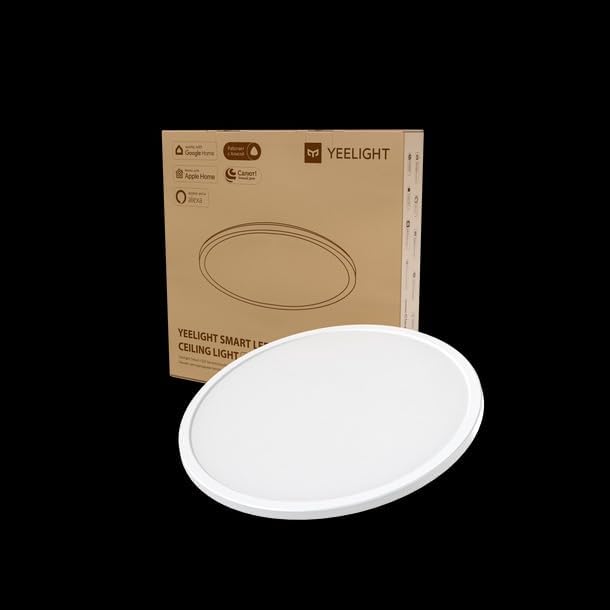
Image: The YEELIGHT Smart Ceiling Lamp C 2201C300 shown in its retail packaging, indicating the product and its box.
Setup
The YEELIGHT Smart Ceiling Lamp C 2201C300 is designed for surface mount installation and operates via corded electric power.
- Preparation: Turn off the main power supply at the circuit breaker before starting any electrical work.
- Mounting Bracket Installation: Secure the mounting bracket to the ceiling using the provided screws and anchors. Ensure the bracket is firmly attached to a joist or suitable ceiling support.
- Wiring: Connect the lamp's electrical wires to your household wiring. Typically, this involves connecting live, neutral, and ground wires. Follow local electrical codes and color conventions.
- Lamp Attachment: Carefully attach the lamp body to the mounting bracket, ensuring all wires are tucked safely inside the junction box. Secure the lamp in place according to the specific mechanism (e.g., twist-lock, screws).
- Power On: Restore power at the circuit breaker. The lamp should illuminate or be ready for pairing.

Image: The YEELIGHT Smart Ceiling Lamp C 2201C300 displaying its ambient light feature, showcasing its design and potential lighting effects.
Operating
The YEELIGHT Smart Ceiling Lamp C 2201C300 can be controlled via the included remote control or through the YEELIGHT app (if applicable).
- Remote Control: Use the provided remote to turn the light on/off, adjust brightness (up to 1600 Lumens), change color temperature, and select preset modes. Refer to the remote control's specific button functions for detailed operation.
- Smart App Control: Download the YEELIGHT app from your device's app store. Follow the in-app instructions to pair your lamp. This enables advanced features such as scheduling, scene customization, and integration with smart home platforms.
- Light Source: This lamp utilizes an integrated LED light source.
Maintenance
Regular maintenance ensures optimal performance and longevity of your YEELIGHT Smart Ceiling Lamp.
- Cleaning: Ensure the power is off before cleaning. Wipe the lamp's surface with a soft, dry, or slightly damp cloth. Do not use abrasive cleaners or solvents.
- Water Resistance: The lamp is water resistant, meaning it can withstand splashes but should not be submerged or exposed to direct water jets.
- LED Lifespan: The integrated LED light source is designed for long-term use and is not user-replaceable.
Troubleshooting
If you encounter issues with your YEELIGHT Smart Ceiling Lamp, refer to the following common solutions:
- Lamp not turning on: Check the power supply at the circuit breaker. Ensure all wiring connections are secure.
- Remote control not working: Replace the batteries in the remote control. Ensure there are no obstructions between the remote and the lamp.
- Difficulty pairing with app: Ensure your Wi-Fi network is active and the lamp is within range. Reset the lamp by cycling power (turn off for 10 seconds, then on) and attempt pairing again.
- Flickering light: Verify stable power supply. If the issue persists, contact customer support.
Specifications
| Feature | Specification |
|---|---|
| Brand | YEELIGHT |
| Model Name | Yeelight Comet 300C Ceiling Light with Ambient Light |
| Model Number | YLXDD-0033 |
| Product Dimensions | 14.17"L x 2.76"W x 14.57"H |
| Item Weight | 2.2 pounds (1 Kilogram) |
| Voltage | 230 Volts |
| Wattage | 21 watts |
| Brightness | 1600 Lumens |
| Control Method | Remote Control |
| Material | Metal |
| Color | Black |
| Indoor/Outdoor Usage | Indoor |
| Special Feature | Water Resistant |
| Installation Type | Surface Mount |
| Light Source Type | LED |
Warranty and Support
For warranty information or technical support, please refer to the warranty card included with your product or visit the official YEELIGHT website. Keep your purchase receipt as proof of purchase for warranty claims.
For further assistance, please contact YEELIGHT customer service.


