
Alpena 78234E
Alpena ToughPods LED Rock Lights User Manual
Model: 78234E
Product Overview
The Alpena ToughPods LED Rock Lights are designed to enhance the aesthetic and visibility of various vehicles, including trucks, cars, ATVs, and SUVs. This kit provides a multi-colored underglow lighting experience with durable, waterproof LED pods controlled wirelessly.

Image: A vehicle illuminated with green underglow lights, showcasing the vibrant effect of the ToughPods.
What's Included
Your Alpena ToughPods kit comes with all necessary components for installation and operation:
- 4 wired auxiliary lights, each with 6 LEDs
- 1 wireless remote control
- 4 rubber pads for secure mounting
- Cable zip ties
- Mounting hardware (spade and splice connectors, extension, heat shrink tubing)
- 1 user manual
- Cigarette plug switch

Image: All components of the ToughPods kit, including the LED pods, wiring harness, remote control, and various installation accessories.
Setup and Installation
Follow these steps for proper installation of your ToughPods LED Rock Lights:
- Plan Placement: Determine the desired locations for the four LED pods on your vehicle (e.g., undercarriage, wheel wells, frame). Ensure the wiring can reach the central control unit and power source.
- Prepare Mounting Surface: Clean the mounting surfaces thoroughly to ensure proper adhesion and secure fit.
- Mounting the Pods:
- For secure and paint-friendly installation, mount the RGB rock lights using the four included rubber pads.
- The pods feature wire channels to allow for flush mounting.
- For slim mounts, simply remove the rubber pads before installation.
- Wiring Connection: Connect the wired auxiliary lights to the main control unit. Utilize the provided spade and splice connectors, extension, and heat shrink tubing for secure and weather-resistant connections.
- Power Connection: Connect the main control unit to your vehicle's 12V power source using the included cigarette plug switch. Ensure all connections are tight and insulated.
- Secure Wiring: Use the provided cable zip ties to neatly secure all wiring, preventing it from dangling or interfering with moving parts.
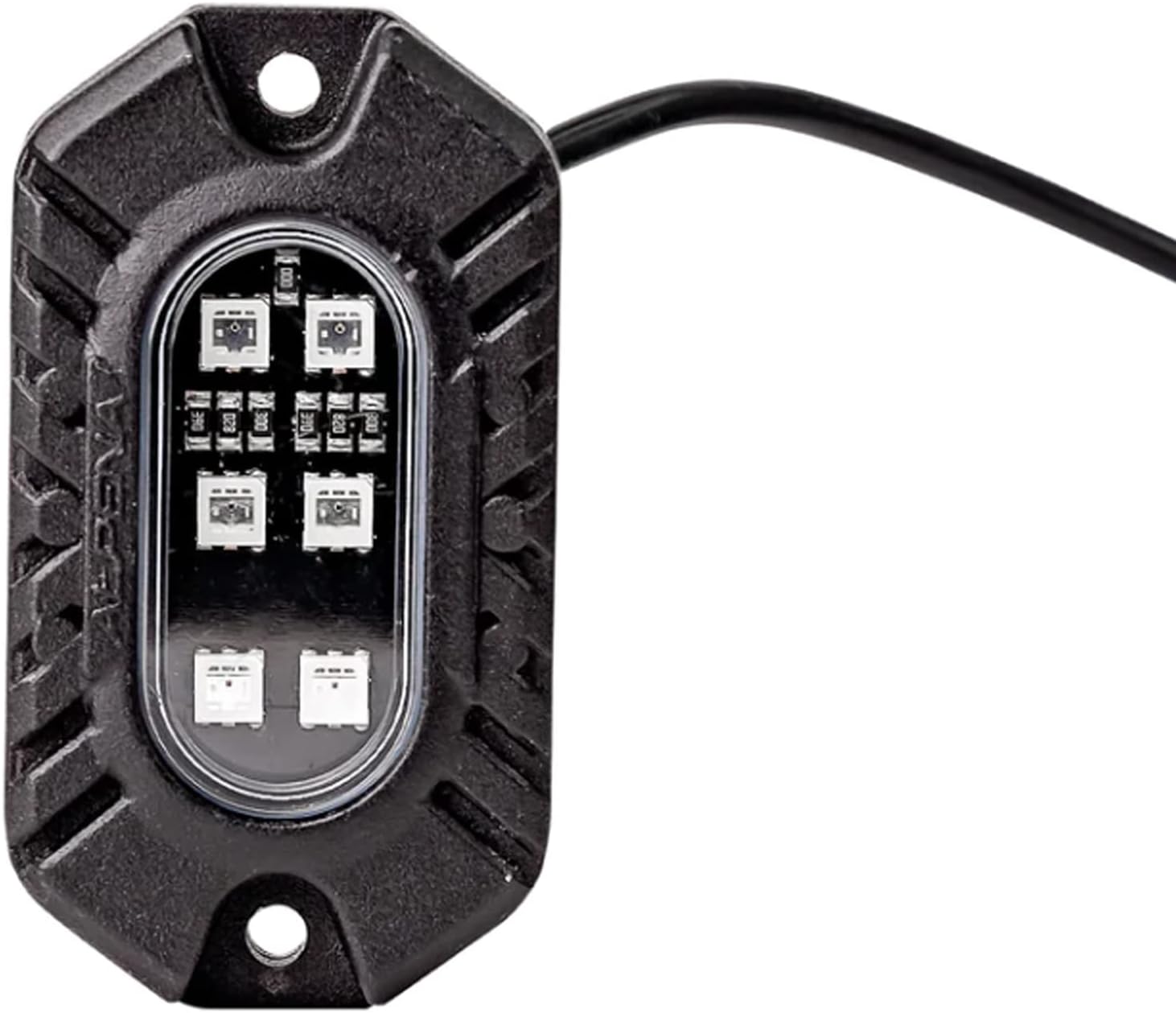
Image: A detailed view of one Alpena ToughPod, showing its robust casing and integrated LEDs.
Operating Instructions
The Alpena ToughPods are controlled via the included wireless remote. This remote allows for easy customization of your lighting experience.
- Power On/Off: Use the designated button on the remote to turn the lights on or off.
- Color Selection: The remote provides access to 9 different color varieties. Press the color buttons to cycle through or select your desired color.
- Light Mode Settings: Choose from 4 different light mode settings (e.g., solid, strobe, fade, flash) to create dynamic lighting effects. Refer to the remote's button layout for specific mode activation.
- Custom Presets: The system comes with custom presets, allowing for quick selection of popular color and pattern combinations.
Maintenance
To ensure the longevity and optimal performance of your Alpena ToughPods, follow these maintenance guidelines:
- Cleaning: Periodically clean the LED pods with a soft, damp cloth to remove dirt and debris. Avoid abrasive cleaners or high-pressure washes directly on the pods.
- Water Resistance: The ToughPods are designed with an IP65 rating, making them resilient against dust and low-pressure water jets. While waterproof, avoid submerging the pods or exposing them to prolonged high-pressure water.
- Wiring Inspection: Regularly inspect all wiring and connections for any signs of wear, fraying, or corrosion. Re-secure or repair any loose connections to maintain optimal performance and safety.
- Remote Control Battery: If the remote control's range or responsiveness decreases, replace its battery (type typically CR2025 or similar, check remote for specifics).

Image: An off-road vehicle with red underglow lights, demonstrating the product's robust design suitable for tough conditions.
Troubleshooting
If you encounter issues with your Alpena ToughPods, refer to the following common troubleshooting steps:
| Problem | Possible Cause | Solution |
|---|---|---|
| Lights do not turn on. | No power, loose connection, faulty remote battery. | Check power source (cigarette lighter), ensure all wiring connections are secure, replace remote battery. |
| Lights flicker or dim. | Insufficient power, loose wiring, damaged pod. | Verify stable 12V power supply, inspect all wiring for damage or loose connections, contact support if a pod is damaged. |
| Remote control not responding. | Dead battery, out of range, interference. | Replace remote battery, ensure you are within effective range of the control unit, minimize electronic interference. |
| Only some pods are working. | Loose connection to specific pod, damaged pod. | Check wiring connections for the non-working pods. If connections are secure, the pod may be faulty and require replacement. |
Specifications
| Feature | Detail |
|---|---|
| Brand | Alpena |
| Model Number | 78234E |
| Color | Multicolored |
| Form Factor | Pod |
| Recommended Uses | Vehicle Exterior (Trucks, Cars, ATVs, SUVs) |
| Connectivity Technology | USB (for power input to control unit) |
| Special Feature | Waterproof (IP65 rating) |
| Material | Plastic or Composite |
| Number of Pieces | 4 (auxiliary lights) |
| Remote Control | Included (Wireless) |
| Item Weight | 2.01 pounds |
| Package Dimensions | 8.96 x 5.12 x 2.6 inches |
| UPC | 084902782349 |
Warranty and Support
For warranty information, technical support, or further assistance with your Alpena ToughPods LED Rock Lights, please refer to the official Alpena website or contact their customer service directly. Keep your purchase receipt for warranty claims.
You can also visit the Alpena Store on Amazon for more product information and support resources.
Ask a question about this manual
Ask about setup, troubleshooting, compatibility, parts, safety, or missing instructions. Manuals+ will review the question and use this page’s manual context to help answer it.