
1. Introduction
This manual provides essential instructions for the proper installation, operation, and maintenance of the QWORK Wired Dual-Action Fire Alarm Call Point, Model QS30092. This device is designed to be an integral part of a wired fire alarm system and is not a standalone unit. It requires connection to a compatible control panel for full functionality. Please read these instructions thoroughly before installation and use.
2. Product Overview
The QWORK Dual-Action Fire Alarm Call Point is a manual fire alarm activation device. Its dual-action mechanism requires both pushing in and pulling down the handle to trigger an alarm signal. Upon activation, the device provides a clear visual indication that it has been triggered.
Key Features:
- Easy Operation: Push then pull down the handle to trigger the fire alarm signal.
- Control Panel Integration: Designed to work with wired fire alarm systems; not a standalone unit.
- Clear Indication: "ACTIVATED" appears when triggered for quick visual identification.
- Technical Specifications: Operates on DC 9–28V, with a 2A maximum current, featuring a normally open contact switch.
- Complete Installation Kit: Supplied with two keys, screws, and wall anchors for setup.
Package Contents:
- 1 x QWORK Wired Dual-Action Fire Alarm Call Point
- 2 x Reset Keys
- Mounting Screws and Wall Anchors
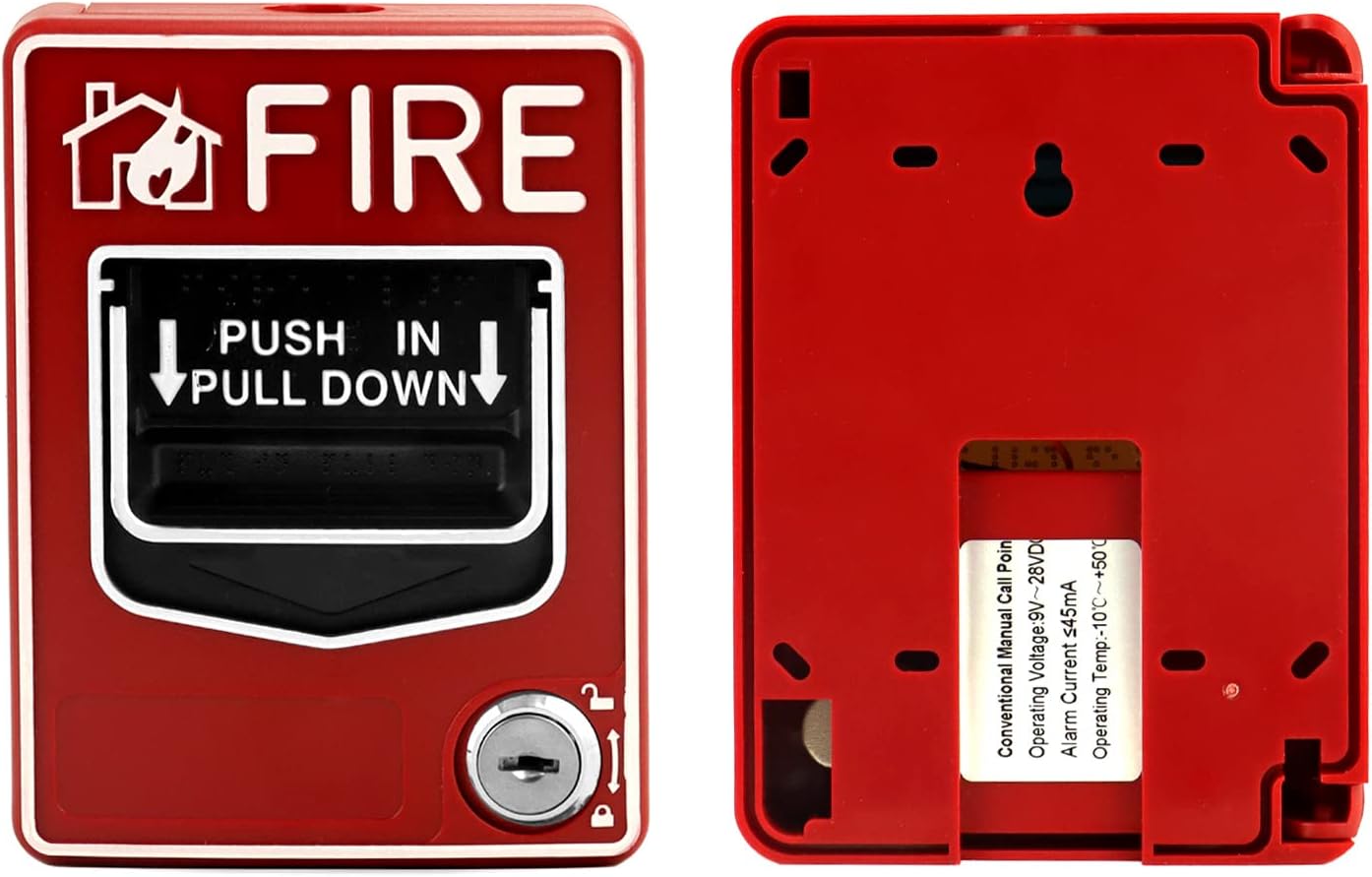
Figure 2.1: Front view of the QWORK Wired Dual-Action Fire Alarm Call Point.

Figure 2.2: Two QWORK fire alarm call points, one closed and one open, illustrating the internal structure.

Figure 2.3: The fire alarm call point shown with its two included keys, highlighting the keyhole for resetting.
3. Safety Information
This product is designed for use in fire alarm systems. While no specific warnings are applicable to the device itself beyond its intended function, it is crucial to adhere to all local and national electrical and fire safety codes during installation and operation. Always ensure the device is installed by qualified personnel and integrated into a compliant fire alarm control panel. Do not attempt to modify the device or use it for purposes other than its intended function.
4. Installation
The QWORK Fire Alarm Call Point is designed for wall mounting and wired DC power. Proper installation is critical for reliable operation.
Installation Steps:
- Select Location: Choose a visible and accessible location on a wall, in accordance with local fire safety regulations.
- Prepare Mounting Surface: Use the provided screws and wall anchors to securely mount the backplate of the call point to the wall.
- Wiring: Connect the call point to your wired fire alarm control panel. Ensure correct polarity and secure connections for the DC 9-28V power supply and the normally open contact switch. Refer to your fire alarm control panel's manual for specific wiring diagrams.
- Secure the Unit: Once wiring is complete, attach the front cover of the call point to the mounted backplate.
- Test System: After installation, perform a full system test to ensure the call point communicates correctly with the control panel and triggers the alarm as expected.

Figure 4.1: The fire alarm call point shown with its mounting hardware (screws and wall anchors).

Figure 4.2: Internal view of the call point, detailing the circuit board and wiring terminals for connection to a control panel.
5. Operation
The QWORK Dual-Action Fire Alarm Call Point is designed for straightforward activation in an emergency.
Activating the Alarm:
- To trigger the alarm, first push in the clear plastic panel on the front of the unit.
- Then, pull down the handle. This action will activate the internal switch, sending a signal to the connected fire alarm control panel.
- Upon activation, the word "ACTIVATED" will become visible in the display area, providing a clear visual confirmation that the device has been triggered.
Resetting the Alarm:
- Insert one of the provided keys into the keyhole located at the bottom of the unit.
- Turn the key to reset the pull-down handle to its original position.
- Remove the key. The "ACTIVATED" indicator will retract, and the unit will be ready for re-use.

Figure 5.1: The fire alarm call point with a key inserted into the reset mechanism.
6. Maintenance
Regular maintenance ensures the continued reliability of your fire alarm call point.
- Visual Inspection: Periodically inspect the unit for any signs of physical damage, tampering, or obstruction.
- Cleaning: Clean the exterior of the unit with a soft, dry cloth. Do not use abrasive cleaners or solvents.
- Functional Testing: Conduct routine functional tests as required by local fire safety codes and your fire alarm system's maintenance schedule. Always notify relevant personnel before initiating a test to avoid false alarms.
- Key Management: Keep the two provided reset keys in a secure, accessible location known to authorized personnel.
7. Troubleshooting
If you encounter issues with your QWORK Fire Alarm Call Point, consider the following:
- Unit Does Not Activate:
- Ensure the push-in and pull-down actions are performed correctly and fully.
- Check the wiring connections to the control panel for looseness or corrosion.
- Verify the control panel is powered and functioning correctly.
- "ACTIVATED" Indicator Not Visible:
- Confirm the unit has been fully activated (pushed in and pulled down).
- If the unit is activated but the indicator is not visible, the internal mechanism may be faulty. Contact support.
- Unit Cannot Be Reset:
- Ensure the key is fully inserted and turned in the correct direction.
- Check for any obstructions preventing the handle from returning to its original position.
For persistent issues, contact a qualified fire alarm technician or QWORK customer support.
8. Specifications
| Attribute | Value |
|---|---|
| Brand | QWORK |
| Model Number | QS30092 |
| Color | Yellow (Product is red, but listed as yellow in specifications. Please verify.) |
| Power Source | Wired DC Powered |
| Operating Voltage | DC 9–28V |
| Max Current | 2A |
| Control Method | Touch (Push-in, Pull-down) |
| Audible Noise | 85 dB (Note: This device is a call point, not an audible alarm. This specification might refer to a connected alarm.) |
| Mounting Type | Wall Mount |
| Sensor Technology | Heat Sensor (Note: This device is a manual call point, not a heat sensor. This specification might be incorrect or refer to a system component.) |
| Item Weight | 0.27 kg |
| Dimensions (Approx.) | 140mm (5-1/2") H x 105mm (4-1/8") W x 44mm (1-3/4") D |

Figure 8.1: Approximate dimensions of the QWORK Wired Dual-Action Fire Alarm Call Point.
9. Warranty and Support
For warranty information, please refer to the documentation provided at the time of purchase or visit the official QWORK website. For technical support, troubleshooting assistance, or to inquire about replacement parts, please contact QWORK customer service through their official channels.