
1. Introduction
The CECO USA F1200 is a high-performance, USB rechargeable bicycle headlight designed for optimal visibility and durability. Featuring 1200 lumens of output, IP67 waterproofing, and FL-1 impact resistance, this light is suitable for various cycling conditions, from daily commutes to challenging mountain trails. This manual provides essential information for the proper setup, operation, and maintenance of your F1200 headlight.
2. Package Contents
Please verify that all items are present in your package:
- CECO USA F1200 Bicycle Headlight
- Handlebar Mount (Flexible Mount Version)
- Micro USB Charging Cable
- User Manual
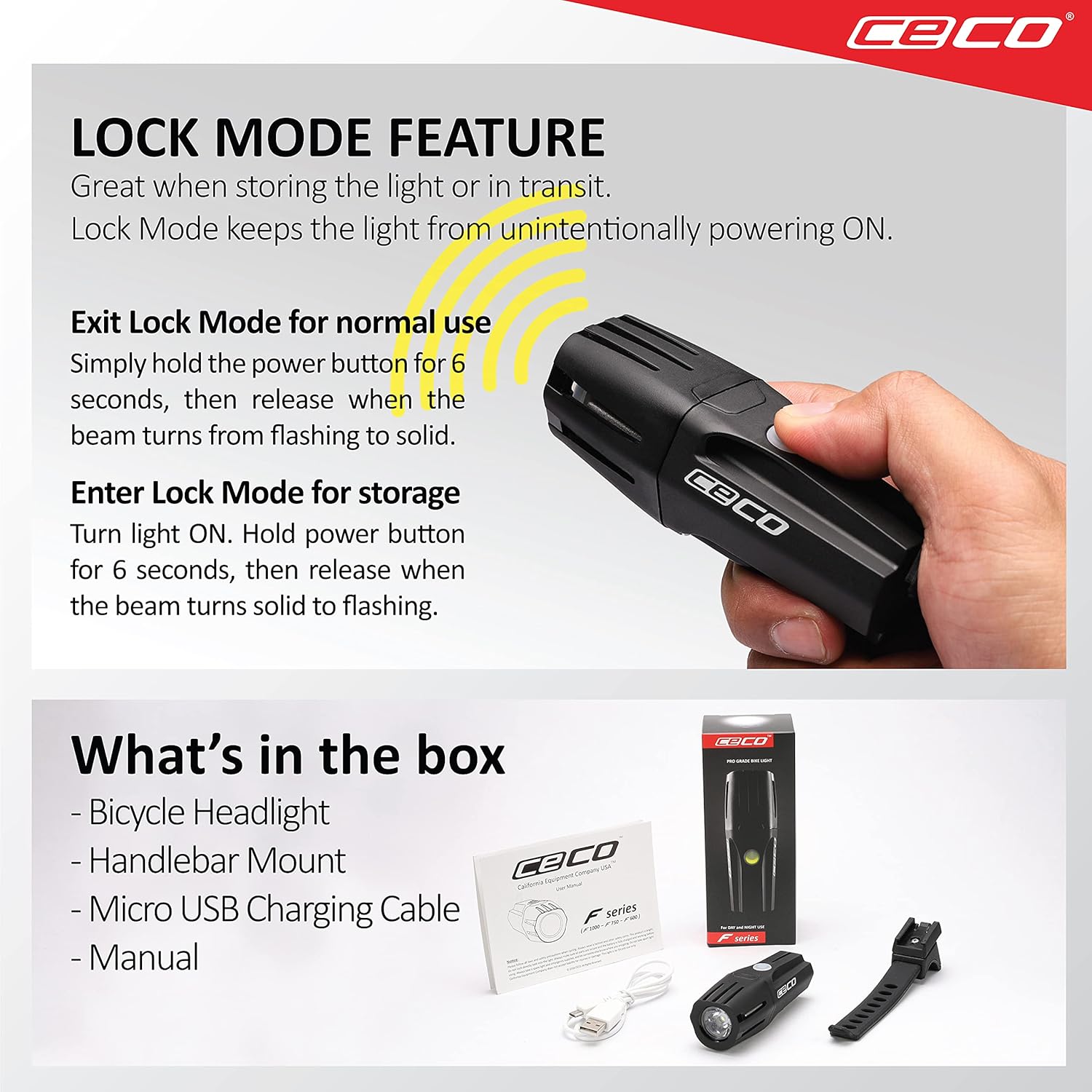
Image: Package contents of the CECO USA F1200 Bicycle Headlight.
3. Setup and Installation
3.1 Mounting the Headlight
The CECO USA F1200 comes with a heavy-duty flexible mount designed for easy and secure attachment to various handlebar types, including aerobars. The bracket tab is constructed from durable Zytel material for maximum strength.
- Position the flexible handlebar mount on your bicycle's handlebar.
- Wrap the flexible strap securely around the handlebar and hook it into place. Ensure the mount is tight and stable.
- Slide the F1200 headlight onto the mount until it clicks firmly into position. The quick-release function allows for easy removal when not in use or for flashlight purposes.
- Adjust the light's angle by swiveling it left or right to direct the beam as needed.

Image: The flexible handlebar mount securely attaching the F1200 headlight to different bicycle handlebars.
4. Operating Instructions
4.1 Initial Use and Lock Mode
The F1200 headlight is shipped in Lock Mode to prevent accidental activation during storage or transit and to preserve battery life. If the light flashes when the power button is pressed, it is in Lock Mode.
- To Unlock: Press and hold the power button for 6 seconds. Release the button when the light beam changes from flashing to solid. The light is now ready for normal operation.
- To Lock: With the light turned ON, press and hold the power button for 6 seconds. Release the button when the light beam changes from solid to flashing. The light is now in Lock Mode.

Image: Instructions for using the Lock Mode feature.
4.2 Power On/Off and Mode Selection
The F1200 features a single illuminated power button for all functions.
- To Turn On: Press the power button once. The light will activate in the last used mode (mode memory).
- To Cycle Modes: Briefly press the power button to cycle through the available modes.
- To Turn Off: Press and hold the power button for approximately 1 second.
4.3 Lighting Modes
The F1200 offers versatile lighting options for various conditions:
- Night Modes (5): Designed for different speeds and terrains, these modes provide constant brightness.
- Flashing Day Modes (3): Unique flash patterns enhance visibility in high-traffic areas and open roads during daylight.
- Walking Flashlight Mode (1): A convenient mode for off-bike use.
The regulated circuitry maintains constant brightness throughout the battery charge, unlike many lights that dim significantly over time.

Image: Overview of Night and Day Modes, Electronically Regulated Circuitry, and USB Rechargeable feature.
4.4 Low Battery Indicator
When the battery is low, the light will flash every 25 seconds, indicating approximately 10 to 20 minutes of remaining runtime. This allows you to safely conclude your ride or find a charging source.
5. Charging
The CECO USA F1200 is USB rechargeable for convenience.
- Locate the Micro USB port on the light.
- Connect the provided Micro USB charging cable to the light and to a USB power source (e.g., computer, wall adapter).
- The power button LED will indicate charging status (color may vary based on model/firmware).
- Once fully charged, disconnect the cable.
6. Maintenance
To ensure the longevity and optimal performance of your F1200 headlight, follow these maintenance guidelines:
- Cleaning: Wipe the light and mount with a soft, damp cloth. Avoid using harsh chemicals or abrasive materials.
- Storage: Store the light in a cool, dry place when not in use. If storing for extended periods, ensure the battery is partially charged (around 50%) and recharge every few months to prevent deep discharge.
- Water Resistance: The F1200 is IP67 waterproof. While it can withstand immersion up to 1 meter for 30 minutes, it is not designed for prolonged underwater use. Ensure the USB port cover is securely closed to maintain water resistance.
- Impact Resistance: The light is FL-1 impact resistant, designed to withstand drops from up to 1 meter. However, avoid unnecessary impacts to prevent damage.
7. Troubleshooting
| Problem | Possible Cause | Solution |
|---|---|---|
| Light does not turn on. | Light is in Lock Mode. | Unlock the light by pressing and holding the power button for 6 seconds until the beam turns solid. |
| Light does not turn on. | Battery is depleted. | Charge the light using the provided USB cable. |
| Light turns off unexpectedly. | Low battery. | Recharge the light. The low battery indicator (flashing every 25 seconds) provides a warning. |
| Light is dim or inconsistent. | Incorrect mode selected or low battery. | Cycle through modes to select a brighter setting or recharge the battery. |
8. Specifications
| Feature | Detail |
|---|---|
| Model Name | F1200 |
| Brightness | 1200 Lumens (FL-1 Certified) |
| Water Resistance | IP67 Waterproof |
| Impact Resistance | FL-1 Impact Resistant |
| Power Source | USB Rechargeable Battery |
| Material | Plastic (Zytel for bracket tab) |
| Item Weight | 145 Grams |
| Mounting Type | Flexible Handlebar Mount |
| Number of Settings | 14 (including Night, Day Flash, and Walking modes) |
| UPC | 850004626115 |
9. Warranty and Support
For warranty information, technical support, or any inquiries regarding your CECO USA F1200 headlight, please refer to the contact details provided on the product packaging or visit the official CECO USA website.
