
Introduction
Thank you for choosing the Mienta 18-inch Stand Fan with Timer, Model SF35938A. This fan is designed to provide efficient and comfortable airflow in your home or office. It features a powerful 5-blade design, three speed settings, a convenient timer function, oscillation for wide area coverage, and adjustable tilt for precise airflow direction. Please read this manual carefully before assembly, operation, or maintenance to ensure safe and optimal performance of your fan.
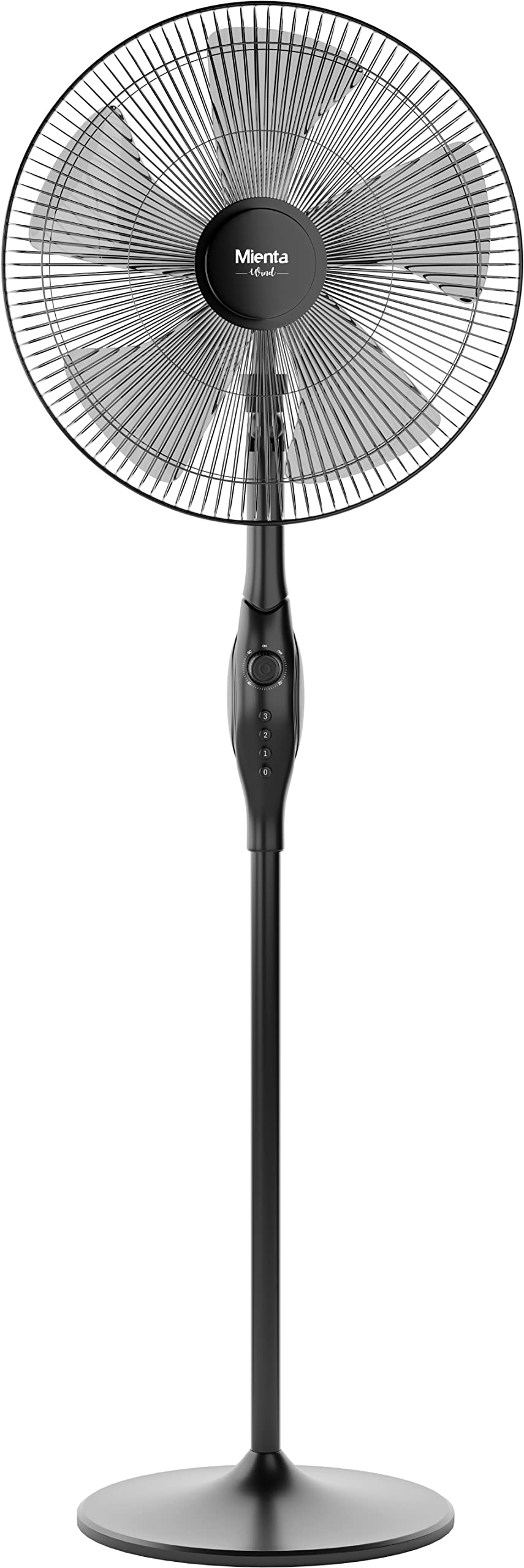
Figure 1: Mienta 18-inch Stand Fan (Model SF35938A) - Overall View
Important Safety Instructions
To reduce the risk of fire, electric shock, or injury, always follow these basic safety precautions:
- Read all instructions before using this fan.
- Ensure the power supply voltage matches the rating label on the fan.
- Always unplug the fan from the power outlet before cleaning, servicing, or moving it.
- Do not insert fingers or any objects through the grille when the fan is operating.
- Do not operate the fan with a damaged cord or plug. If the cord or plug is damaged, contact qualified service personnel.
- Keep the fan away from water or other liquids. Do not use it in wet areas like bathrooms.
- Place the fan on a stable, level surface to prevent it from tipping over.
- Do not cover the fan or restrict airflow during operation.
- This appliance is not intended for use by persons (including children) with reduced physical, sensory or mental capabilities, or lack of experience and knowledge, unless they have been given supervision or instruction concerning use of the appliance by a person responsible for their safety.
- Children should be supervised to ensure that they do not play with the appliance.
Product Components
Familiarize yourself with the parts of your Mienta Stand Fan:
- Front Grille
- Fan Blades (5 blades)
- Rear Grille
- Motor Unit
- Control Panel (Speed/Timer Knob, Oscillation Switch)
- Height Adjustable Stand Pole
- Base

Figure 2: Front View of the Fan, showing the grille and blades.

Figure 3: Rear View of the Fan, highlighting the motor unit and control panel.

Figure 4: Close-up of the Control Panel, showing the speed/timer knob and oscillation switch.
Setup Instructions
Follow these steps to assemble your Mienta Stand Fan:
- Assemble the Base: Attach the stand pole to the fan base, ensuring it is securely fastened.
- Attach the Motor Unit: Secure the motor unit to the top of the stand pole.
- Install the Rear Grille: Place the rear grille onto the motor unit, aligning it correctly.
- Mount the Fan Blades: Carefully attach the fan blades to the motor shaft. Ensure they are firmly in place.
- Secure the Front Grille: Attach the front grille to the rear grille, ensuring all clips or screws are tightened to prevent accidental contact with the blades.
- Adjust Height: Loosen the height adjustment knob on the stand pole, adjust to your desired height (up to 1.55 meters), and tighten the knob securely.
Operating Instructions
Once assembled, your fan is ready for use. Ensure it is plugged into a suitable power outlet.
- Power On/Off and Speed Control: Use the rotary knob on the control panel (refer to Figure 4). Turn the knob clockwise to select desired speed:
- Position 0: Off
- Position 1: Low Speed
- Position 2: Medium Speed
- Position 3: High Speed
- Timer Function: The same rotary knob also controls the timer. Continue turning the knob past the speed settings to set the desired operating time. The fan will automatically turn off after the set time.
- Oscillation Control: Locate the oscillation switch on the top of the motor unit (refer to Figure 4).
- Press down the switch to enable oscillation, allowing the fan head to sweep from side to side.
- Pull up the switch to stop oscillation, fixing the fan head in a stationary position.
- Tilt Adjustment: To adjust the vertical angle of the fan head, gently push the fan head up or down to your preferred position. The fan features an upward and downward tilt mechanism (refer to Figure 5).

Figure 5: Side View of the Fan, demonstrating the tilt adjustment capability.
Maintenance
Regular cleaning and proper storage will help prolong the life of your fan.
- Cleaning:
- Always unplug the fan before cleaning.
- Use a soft, damp cloth to wipe the exterior surfaces of the fan. Do not use abrasive cleaners or solvents.
- For stubborn dust on the grilles or blades, you may carefully remove the front grille (refer to assembly instructions) and wipe the blades. Ensure all parts are dry before reassembling and operating.
- Do not immerse the fan or its electrical components in water.
- Storage:
- When not in use for extended periods, unplug the fan and store it in a cool, dry place.
- Cover the fan to protect it from dust accumulation.
Troubleshooting
If you encounter any issues with your fan, refer to the following common problems and solutions:
| Problem | Possible Cause | Solution |
|---|---|---|
| Fan does not turn on. | Not plugged in; power outlet not working; speed/timer knob set to 'Off'. | Ensure the fan is securely plugged into a working outlet. Turn the speed/timer knob to a speed setting (1, 2, or 3). |
| Weak airflow. | Fan speed too low; grilles or blades are dirty. | Increase the fan speed. Clean the fan grilles and blades as per maintenance instructions. |
| Fan is noisy. | Loose parts; fan not on a level surface. | Check for any loose screws or components and tighten them. Ensure the fan is placed on a stable, level surface. |
| Oscillation not working. | Oscillation switch is in the 'Off' position. | Press down the oscillation switch to engage the oscillation function. |
If the problem persists after trying these solutions, please contact customer support.
Technical Specifications
| Model Number | SF35938A |
| Brand | Mienta |
| Type | Stand Fan (Pedestal Fan) |
| Size | 18 inches |
| Wattage | 8 Watts |
| Number of Speeds | 3 |
| Special Features | Timer, Oscillation, Tilt Adjustment |
| Material | Plastic |
| Power Source | Corded Electric |
| Color | Black |
| Item Weight | 3.7 kg |
| Dimensions (Package) | 61 x 51 x 31 cm |
| Total Height | 1.55 meters |
Warranty Information
This Mienta product is eligible for a two-year warranty provided by the manufacturer/brand from the date of purchase. This warranty covers manufacturing defects and ensures the product meets quality standards.
For more details regarding warranty terms, conditions, and claims, please contact the manufacturer, Mienta, or the seller from whom you purchased the product. Keep your proof of purchase for warranty validation.
Customer Support
If you have any questions, require technical assistance, or need to report an issue that is not covered in the troubleshooting section, please contact Mienta customer support or the retailer where you purchased this product.
Please have your model number (SF35938A) and proof of purchase ready when contacting support.